
下拉列表中选择项的QComboBox样式
我想在组合框的下拉列表中对选定的项目进行突出显示。
与其他问题的不同之处是,我不想样式“选定”的项目(悬停),但风格已经选择的项目。
默认的是某种类型的滴答,它是画在文本上的。我希望选择的项目有粗体文本,没有勾选。
或者,在最坏的情况下,只需将文本移到右边,以使滴答正确可见。
我所拥有的是:
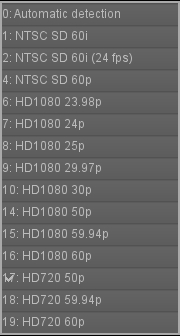
请注意第17项,它在数字17上有勾号。
这是我的样式表:
QComboBox
{
    subcontrol-origin: padding;
    subcontrol-position: top right;
    selection-background-color: #111;
    selection-color: yellow;
    color: white;
    background-color: QLinearGradient( x1: 0, y1: 0, x2: 0, y2: 1, stop: 0 #565656, stop: 0.1 #525252, stop: 0.5 #4e4e4e, stop: 0.9 #4a4a4a, stop: 1 #464646);
    border-style: solid;
    border: 1px solid #1e1e1e;
    border-radius: 5;
    padding: 1px 0px 1px 20px;
}


QComboBox:hover, QPushButton:hover
{
    border: 1px solid yellow;
    color: white;
}

QComboBox:editable {
    background: red;
    color: pink;
}

QComboBox:on
{
    padding-top: 0px;
    padding-left: 0px;
    color: white;
    background-color: QLinearGradient( x1: 0, y1: 0, x2: 0, y2: 1, stop: 0 #2d2d2d, stop: 0.1 #2b2b2b, stop: 0.5 #292929, stop: 0.9 #282828, stop: 1 #252525);
    selection-background-color: #ffaa00;
}

QComboBox:!on
{
    color: white;
    background-color: QLinearGradient( x1: 0, y1: 0, x2: 0, y2: 1, stop: 0 #666, stop: 0.1 #555, stop: 0.5 #555, stop: 0.9 #444, stop: 1 #333);
}

QComboBox QAbstractItemView
{
    border: 2px solid darkgray;
    color: black;
    selection-background-color: QLinearGradient( x1: 0, y1: 0, x2: 0, y2: 1, stop: 0 #111, stop: 1 #333);
}

QComboBox::drop-down
{
     subcontrol-origin: padding;
     subcontrol-position: top right;
     width: 15px;
     color: white;
     border-left-width: 0px;
     border-left-color: darkgray;
     border-left-style: solid; /* just a single line */
     border-top-right-radius: 3px; /* same radius as the QComboBox */
     border-bottom-right-radius: 3px;
     padding-left: 10px;
 }

QComboBox::down-arrow, QSpinBox::down-arrow, QTimeEdit::down-arrow, QDateEdit::down-arrow
{
     image: url(:/icons/down_arrow.png);
     width: 7px;
     height: 5px;
}
我试图覆盖物品延迟:
ui->modeComboBox->setItemDelegate(new QStyledItemDelegate());随同
QComboBox QAbstractItemView::item:selected style 或重写视图:
QListView * listView = new QListView(ui->modeComboBox);

listView->setStyleSheet("QListView::item {                              \
                         border-bottom: 5px solid white; margin:3px; }  \
                         QListView::item:selected {                     \
                         border-bottom: 5px solid black; margin:3px;    \
                         color: black;                                  \
                        }");
ui->modeComboBox->setView(listView);
但在这两种情况下,这都完全禁用了所选项目的突出显示(即第17项)。
更新1
我测试了set ::item:checked,但是它没有帮助:
QListView * listView = new QListView(ui->modeComboBox);
listView->setStyleSheet("QListView::item {                              \
                         border-bottom: 5px solid white; margin:3px; }  \
                         QListView::item:selected {                     \
                         border-bottom: 5px solid black; margin:3px;    \
                         color: black; }                                \
                         QListView::item:checked {                      \
                         background-color: green;                       \
                         color: green;}"
                         );
ui->modeComboBox->setView(listView);
此外,我还将其添加到样式表中,以确保:
QComboBox QListView::item:checked {
 background-color: green;
}
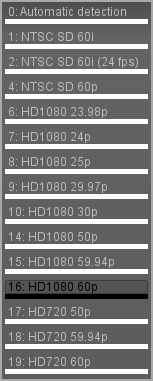
17模式检查的结果是(黑色只是鼠标悬停):
更新2
好的,我可以更改选中项目的字体的重量,但我不能从项目中删除勾选。我对我的样式表文件进行了实验,发现这两个选择器负责检查项目的高亮样式:
QWidget:item:selected
{
     border: 0px solid #999900;
     background: transparent;
}
QWidget:item:checked
{
     font-weight: bold;
}
如果我删除:: item :selected,那么::item:checked (它不会使选中的项粗体),并且滴答消失。
在Qt论坛上,他们建议我以某种方式缩短“组合框图标的空间”。我找不到对此负责的选择器。
回答 5
Stack Overflow用户
发布于 2015-05-15 08:46:04
好吧,经过一番努力,我找到了一些解决办法..它不是最好的,它不恰当,但它看起来很好。
我以这种方式添加了粗体效果(它影响到其他小部件,如checkable菜单项,但我可以接受):
QWidget:item:selected
{
     border: 0px solid #999900;
     background: transparent;
}
QWidget:item:checked
{
     font-weight: bold;
}
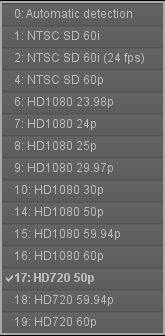
然后,当我添加项目时,我在它们的文本中加上空格,以便将其移到右边。我尝试了很多事情,但没有影响到QAbstractItemView的内部。
其结果是:
Stack Overflow用户
发布于 2018-02-14 10:44:30
我知道现在已经很晚了,但是对于有同样问题的人来说:我在这里发现了另一个问题:Not able to hide Choice-Indicator of the QComboBox
这应隐藏指示器/滴答:
QComboBox::indicator{
    background-color:transparent;
    selection-background-color:transparent;
    color:transparent;
    selection-color:transparent;
}Stack Overflow用户
发布于 2016-11-04 09:50:07
我成功地使用了不那么具体的样式表选择器和“填充-左”:
QComboBox:item {
    padding-left: 20px;  /* move text right to make room for tick mark */
}
QComboBox:item:selected {
    padding-left: 20px;  /* move text right to make room for tick mark */
    border: 2px solid black;
}
QComboBox:item:checked {
    padding-left: 20px;  /* move text right to make room for tick mark */
    font-weight: bold;
}
(这可能也是一些不必要的重复!)
https://stackoverflow.com/questions/29939990
复制相似问题
腾讯云开发者
