Linux下版本控制器(SVN) -服务器端环境搭建步骤
原创
Linux下版本控制器(SVN) -服务器端环境搭建步骤
原创
刘大猫
发布于 2025-06-03 21:17:38
发布于 2025-06-03 21:17:38

@toc
进阶知识-Linux下版本控制器(SVN)
4、服务器端环境搭建步骤
4.1 安装服务器端程序
yum install -y subversion4.2 验证是否安装成功
svn --version4.3 创建并配置版本库
- 创建版本库目录
mkdir -p /var/svn/repository- 在版本库目录下创建具体项目目录
mkdir pro_oa- 创建SVN版本库
svnadmin create /var/svn/repository/pro_oa- 版本库内容

4.4 配置 SVN对应的服务
- 思路
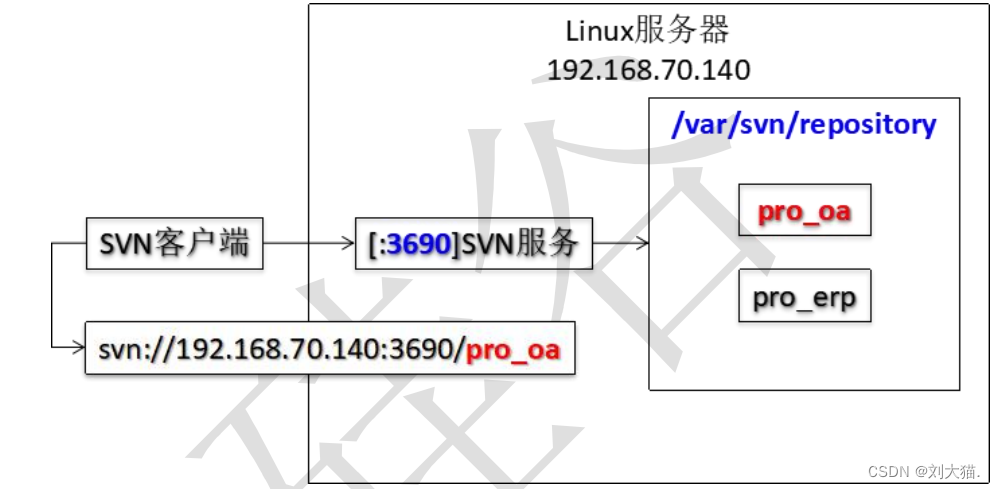
- SVN服务
- 名称:svnserve
- 默认情况下不是开机自动启动
  [root@rich repository]# chkconfig|grep svn
  svnserve 0:关闭 1:关闭 2:关闭 3:关闭 4:关闭 5:关闭 6:关闭
  [root@rich repository]# chkconfig svnserve on
  [root@rich repository]# chkconfig|grep svnsvn
serve 0:关闭 1:关闭 2:启用 3:启用 4:启用 5:启用 6:关闭- 对应可执行脚本文件路径
/etc/rc.d/init.d/svnserve- SVN服务具体配置
原版
args="--daemon --pid-file=${pidfile} $OPTIONS"
修改版
args="--daemon `--root 版本库根目录 --listen-port 指定端口号` --pid-file=${pidfile} $OPTIONS"
args="--daemon `--root /var/svn/repository --listen-port 2255` --pid-file=${pidfile} $OPTIONS"

使用默认端口号的配置方式
args="--daemon `--root /var/svn/repository` --pid-file=${pidfile} $OPTIONS"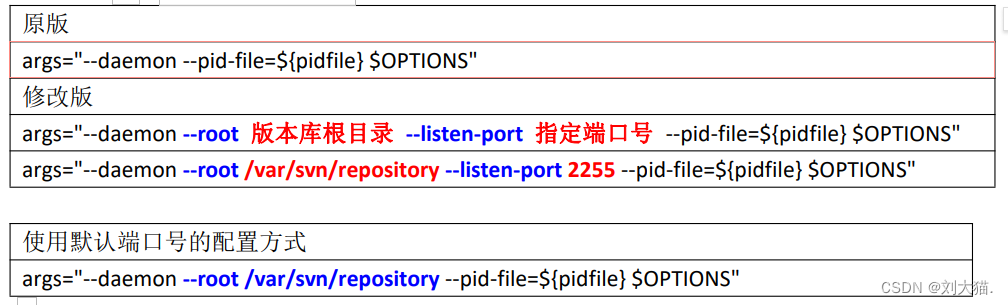
4.5 启动 SVN服务
[root@rich init.d]# service svnserve start
正在启动 svnserve:[确定]
[root@rich init.d]# service svnserve status
svnserve (pid 3443)正在运行...
[root@rich init.d]# netstat -anp|grep :2255
tcp 0 0 0.0.0.0:2255 0.0.0.0:* LISTEN3443/svnserve
[root@rich init.d]# ps -ef|grep svnserve|grep -v grep
root 3443 1 0 11:41 ? 00:00:00 /usr/bin/svnserve --daemon --root/var/svn/repository --listen-port 2255 --pid-file=/var/run/svnserve.pid
[root@rich init.d]# cat /var/run/svnserve.pid
3443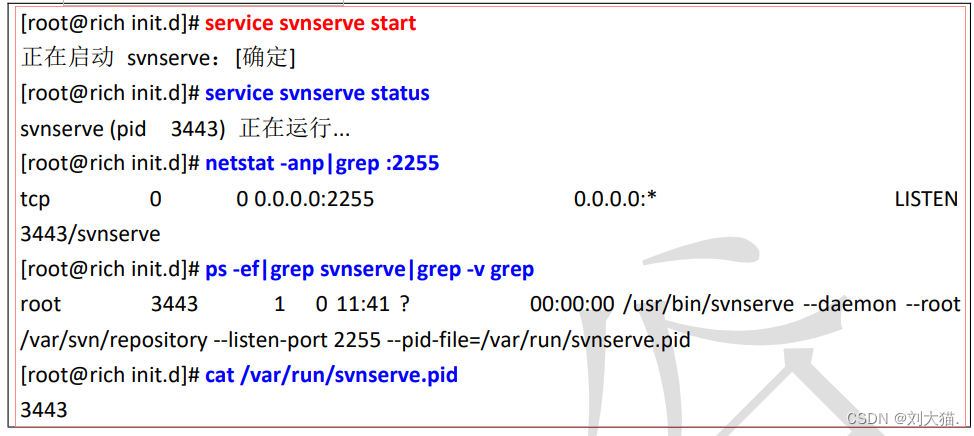
本人其他相关文章链接
原创声明:本文系作者授权腾讯云开发者社区发表,未经许可,不得转载。
如有侵权,请联系 cloudcommunity@tencent.com 删除。
目录
腾讯云开发者

Copyright © 2013 - 2026 Tencent Cloud. All Rights Reserved. 腾讯云 版权所有
深圳市腾讯计算机系统有限公司 ICP备案/许可证号:粤B2-20090059  粤公网安备44030502008569号
腾讯云计算(北京)有限责任公司 京ICP证150476号 | 京ICP备11018762号