Java图片处理实战:如何优雅地实现上传照片智能压缩

Java图片处理实战:如何优雅地实现上传照片智能压缩

SmileNicky
发布于 2025-07-15 14:56:19
发布于 2025-07-15 14:56:19
Java图片处理实战:如何优雅地实现上传照片智能压缩
前言
在现代Web应用中,图片处理是一个常见且重要的需求。无论是用户头像、商品图片还是访客照片,都需要进行适当的处理以确保系统性能和用户体验。本文将详细介绍如何使用Java实现一个智能的图片压缩工具,它能够自动检测图片尺寸并进行等比例缩放。
需求分析
在实际项目中,我们经常遇到以下场景:
- 用户上传的图片尺寸过大,需要压缩到指定大小
- 需要保持图片的宽高比例,避免图片变形
- 处理后的图片需要上传到云存储
- 整个处理过程需要异常处理和日志记录
解决方案设计
整体架构
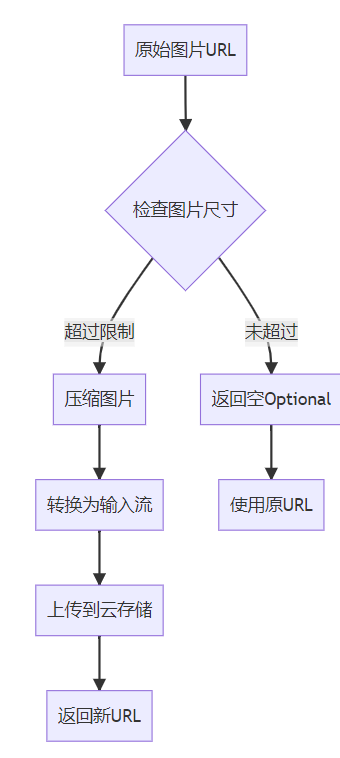
我们的解决方案包含以下几个核心组件:
- ImageUtil工具类:提供图片处理的核心功能
- resizeVisitorImage方法:业务逻辑封装,处理完整的图片压缩流程
- FileClient:负责上传处理后的图片到云存储
流程图
核心代码实现
1. 图片尺寸检查
public static boolean checkImageSize(String imageUrl, int size) throws Exception {
    HttpURLConnection connection = (HttpURLConnection) new URL(imageUrl).openConnection();
    connection.connect();
    InputStream inputStream = connection.getInputStream();
    BufferedImage image = ImageIO.read(inputStream);
    IoUtil.close(inputStream);
    return image.getWidth() <= size && image.getHeight() <= size;
}
关键点说明:
- 使用
HttpURLConnection从URL获取图片 - 通过
ImageIO.read()读取图片到内存 - 检查宽高是否都小于等于指定尺寸
2. 智能图片压缩
public static BufferedImage resizeImageIfNecessary(String imageUrl, int size) throws Exception {
    // 获取原始图片
    HttpURLConnection connection = (HttpURLConnection) new URL(imageUrl).openConnection();
    connection.connect();
    InputStream inputStream = connection.getInputStream();
    BufferedImage originalImage = ImageIO.read(inputStream);
    IoUtil.close(inputStream);

    int originalWidth = originalImage.getWidth();
    int originalHeight = originalImage.getHeight();

    // 如果图片尺寸超过,则进行调整
    if (originalWidth > size || originalHeight > size) {
        // 计算缩放比例
        double scaleX = Convert.toDouble(size) / originalWidth;
        double scaleY = Convert.toDouble(size) / originalHeight;
        double scale = Math.min(scaleX, scaleY);

        // 创建缩放后的图片
        int newWidth = (int) (originalWidth * scale);
        int newHeight = (int) (originalHeight * scale);

        BufferedImage resizedImage = new BufferedImage(newWidth, newHeight, originalImage.getType());
        Graphics2D graphics = resizedImage.createGraphics();

        // 设置高质量渲染
        graphics.setRenderingHint(RenderingHints.KEY_INTERPOLATION, RenderingHints.VALUE_INTERPOLATION_BILINEAR);
        graphics.setRenderingHint(RenderingHints.KEY_RENDERING, RenderingHints.VALUE_RENDER_QUALITY);
        graphics.setRenderingHint(RenderingHints.KEY_ANTIALIASING, RenderingHints.VALUE_ANTIALIAS_ON);

        // 执行缩放操作
        AffineTransform transform = AffineTransform.getScaleInstance(scale, scale);
        graphics.drawRenderedImage(originalImage, transform);

        graphics.dispose();

        return resizedImage;
    } else {
        return originalImage;
    }
}
核心算法解析:
等比例缩放计算:
double scaleX = Convert.toDouble(size) / originalWidth;
double scaleY = Convert.toDouble(size) / originalHeight;
double scale = Math.min(scaleX, scaleY);
这段代码确保图片按比例缩放,不会变形。我们取宽度和高度缩放比例的较小值,确保图片完全在指定尺寸内。
高质量渲染设置:
graphics.setRenderingHint(RenderingHints.KEY_INTERPOLATION, RenderingHints.VALUE_INTERPOLATION_BILINEAR);
graphics.setRenderingHint(RenderingHints.KEY_RENDERING, RenderingHints.VALUE_RENDER_QUALITY);
graphics.setRenderingHint(RenderingHints.KEY_ANTIALIASING, RenderingHints.VALUE_ANTIALIAS_ON);
这些设置确保缩放后的图片质量尽可能高,避免锯齿和模糊。
3. 完整的业务处理流程
private Optional<String> resizeVisitorImage(String originImageUrl) {
    try {
        // 检查图片是否需要调整大小
        if (!ImageUtil.checkImageSize(originImageUrl, 960)) {
            // 调整图片大小
            BufferedImage resizedImage = ImageUtil.resizeImageIfNecessary(originImageUrl, 960);

            // 将调整后的图片转换为输入流
            try (InputStream resizedInputStream = ImageUtil.convertBufferedImageToInputStream(resizedImage, "jpg")) {
                // 调用 API 上传图片
                String newImageUrl = fileClient.put(
                        resizedInputStream,
                        IdUtil.fastSimpleUUID() + ".jpg",
                        resizedInputStream.available(),
                        "visitorImage",
                        null,
                        null
                );

                return Optional.of(newImageUrl);
            }
        }
    } catch (Exception e) {
        LOG.error("调整图片异常: {}", e.getMessage(), e);
    }
    return Optional.empty();
}
使用示例:
// 处理图片URL
String imageUrl = searchDto.getImageUrl();
imageUrl = resizeVisitorImage(imageUrl).orElse(imageUrl);
关键技术点
1. 资源管理
使用try-with-resources语句确保输入流正确关闭:
try (InputStream resizedInputStream = ImageUtil.convertBufferedImageToInputStream(resizedImage, "jpg")) {
    // 使用流
}
2. 异常处理
整个处理过程被try-catch块包裹,确保任何异常都不会影响主流程:
catch (Exception e) {
    LOG.error("调整图片异常: {}", e.getMessage(), e);
}
3. 函数式编程
使用Optional避免空指针异常:
return Optional.of(newImageUrl);
// ...
return Optional.empty();
性能优化建议
- 缓存处理结果:对于相同的图片URL,可以缓存处理结果,避免重复下载和处理
- 异步处理:对于大量图片处理,可以考虑使用异步任务队列
- 图片格式选择:根据实际需求选择合适的图片格式(JPEG、PNG、WebP等)
- 尺寸预检:在客户端先进行尺寸检查,减少不必要的上传
测试验证
测试用例设计
- 正常图片处理:
- 输入:1920x1080的图片
- 期望输出:等比例缩放到960x540
- 小尺寸图片:
- 输入:800x600的图片
- 期望输出:不处理,返回空Optional
- 异常处理:
- 输入:无效URL
- 期望输出:记录日志,返回空Optional
测试结果截图
(此处应包含测试结果的截图,展示处理前后的图片对比)
总结
本文介绍了一个完整的Java图片处理解决方案,它具有以下特点:
- 智能检测:自动识别需要处理的图片
- 等比例缩放:保持图片原始比例,避免变形
- 高质量处理:使用高质量的渲染算法
- 异常安全:完善的异常处理机制
- 易于集成:简洁的API设计,易于在现有项目中集成
这个解决方案可以广泛应用于各种需要图片处理的场景,如用户头像处理、商品图片优化、内容管理系统等。
附录
工具类代码:
package cn.server.common;

import cn.hutool.core.convert.Convert;
import cn.hutool.core.io.IoUtil;
import cn.hutool.core.util.IdUtil;
import cn.hutool.core.util.StrUtil;
import com.google.common.base.Joiner;
import org.springframework.stereotype.Component;

import javax.imageio.ImageIO;
import java.awt.*;
import java.awt.geom.AffineTransform;
import java.awt.image.BufferedImage;
import java.io.ByteArrayInputStream;
import java.io.ByteArrayOutputStream;
import java.io.InputStream;
import java.net.HttpURLConnection;
import java.net.URL;

@Component
public class ImageUtil {


    /**
     * 校验图片大小是否超过
     *
     * @Date 2025/06/19 16:54
     * @Param [imageUrl, size]
     * @return boolean
     */
    public static boolean checkImageSize(String imageUrl, int size) throws Exception {
        HttpURLConnection connection = (HttpURLConnection) new URL(imageUrl).openConnection();
        connection.connect();
        InputStream inputStream = connection.getInputStream();
        BufferedImage image = ImageIO.read(inputStream);
        IoUtil.close(inputStream);
        return image.getWidth() <= size && image.getHeight() <= size;
    }

    /**
     * 图片超过大小,压缩图片
     *
     * @Date 2025/06/19 16:54
     * @Param [imageUrl, size]
     * @return java.awt.image.BufferedImage
     */
    public static BufferedImage resizeImageIfNecessary(String imageUrl, int size) throws Exception {
        HttpURLConnection connection = (HttpURLConnection) new URL(imageUrl).openConnection();
        connection.connect();
        InputStream inputStream = connection.getInputStream();
        BufferedImage originalImage = ImageIO.read(inputStream);
        IoUtil.close(inputStream);

        int originalWidth = originalImage.getWidth();
        int originalHeight = originalImage.getHeight();

        // 如果图片尺寸超过 ,则进行调整
        if (originalWidth > size || originalHeight > size) {
            // 计算缩放比例
            double scaleX = Convert.toDouble(size) / originalWidth;
            double scaleY = Convert.toDouble(size) / originalHeight;
            double scale = Math.min(scaleX, scaleY);

            // 创建缩放后的图片
            int newWidth = (int) (originalWidth * scale);
            int newHeight = (int) (originalHeight * scale);

            BufferedImage resizedImage = new BufferedImage(newWidth, newHeight, originalImage.getType());
            Graphics2D graphics = resizedImage.createGraphics();

            // 设置高质量渲染
            graphics.setRenderingHint(RenderingHints.KEY_INTERPOLATION, RenderingHints.VALUE_INTERPOLATION_BILINEAR);
            graphics.setRenderingHint(RenderingHints.KEY_RENDERING, RenderingHints.VALUE_RENDER_QUALITY);
            graphics.setRenderingHint(RenderingHints.KEY_ANTIALIASING, RenderingHints.VALUE_ANTIALIAS_ON);

            // 执行缩放操作
            AffineTransform transform = AffineTransform.getScaleInstance(scale, scale);
            graphics.drawRenderedImage(originalImage, transform);

            graphics.dispose();

            return resizedImage;
        } else {
            return originalImage;
        }
    }

    public static InputStream convertBufferedImageToInputStream(BufferedImage image, String format) throws Exception {
        ByteArrayOutputStream outputStream = new ByteArrayOutputStream();
        ImageIO.write(image, format, outputStream);
        outputStream.flush();
        ByteArrayInputStream inputStream = new ByteArrayInputStream(outputStream.toByteArray());
        outputStream.close();
        return inputStream;
    }

}
参考资料
希望这篇文章对你有所帮助!如果你有任何问题或建议,欢迎在评论区留言。
本文参与 腾讯云自媒体同步曝光计划,分享自作者个人站点/博客。
原始发表:2025-07-14,如有侵权请联系 cloudcommunity@tencent.com 删除
目录
腾讯云开发者

Copyright © 2013 - 2026 Tencent Cloud. All Rights Reserved. 腾讯云 版权所有
深圳市腾讯计算机系统有限公司 ICP备案/许可证号:粤B2-20090059  粤公网安备44030502008569号
腾讯云计算(北京)有限责任公司 京ICP证150476号 | 京ICP备11018762号