VBA: 一键批量重命名PDF文件


一、背景
工作中经常会遇到这种情况:
- 一批 PDF 文件需要统一修改名称
- 比如把
BYD批量改成TES - 文件一多,手动修改不仅慢,还容易出错
这种重复性操作,其实非常适合用 VBA 来解决。
二、工具说明
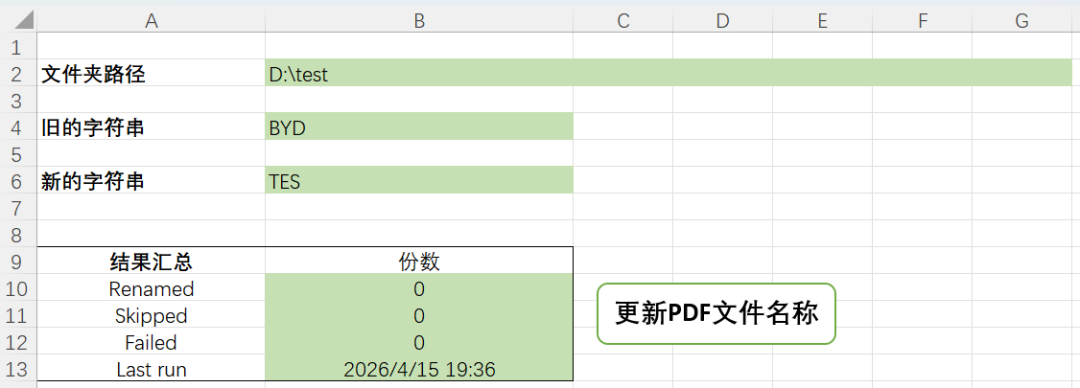
核心只需要填 3 个参数:
- 文件夹路径
- 旧字符串
- 新字符串
点击按钮,即可完成批量重命名。
执行结果会自动统计:
- 成功数量(Renamed)
- 跳过数量(Skipped)
- 失败数量(Failed)
VBA代码如下:
Option Explicit

Sub RefreshPDF_files()

    Dim folderPath As String
    Dim oldString As String
    Dim newString As String
    Dim fileName As String
    Dim newFileName As String
    Dim filePath As String
    Dim newFilePath As String
    Dim fso As Object
    Dim folder As Object
    Dim file As Object
    Dim processCount As Integer
    Dim skipCount As Integer
    Dim failCount As Integer
    Dim wt As Worksheet
    Dim errMsg As String

    On Error GoTo ErrorHandler

    ' 设置工作表
    On Error Resume Next
    Set wt = ThisWorkbook.Worksheets("RenamePDF")
    On Error GoTo 0

    If wt Is Nothing Then
        MsgBox "Worksheet 'RenamePDF' not found!", vbCritical, "Error"
        Exit Sub
    End If

    ' 读取参数
    folderPath = Trim(wt.Range("B2").Value)
    oldString = Trim(wt.Range("B4").Value)
    newString = Trim(wt.Range("B6").Value)

    ' 检查新旧字符串相同
    If oldString = newString Then
        MsgBox "Old and new strings are the same, no change needed.", vbInformation, "Notice"
        GoTo CleanUp
    End If

    ' 检查文件夹路径
    Set fso = CreateObject("Scripting.FileSystemObject")

    If Not fso.folderExists(folderPath) Then
        MsgBox "Folder does not exist, pls check!" & vbCrLf & "Path: " & folderPath, vbExclamation, "Error"
        GoTo CleanUp
    End If

    ' 检查字符串为空
    If oldString = "" Or newString = "" Then
        MsgBox "String is empty, pls check!", vbExclamation, "Error"
        GoTo CleanUp
    End If

    ' 遍历处理PDF文件
    Set folder = fso.GetFolder(folderPath)

    processCount = 0
    skipCount = 0
    failCount = 0

    For Each file In folder.Files

        fileName = file.Name

        filePath = file.Path

        If LCase(fso.GetExtensionName(fileName)) = "pdf" Then

            If InStr(fileName, oldString) > 0 Then

                newFileName = Replace(fileName, oldString, newString)

                newFilePath = fso.BuildPath(folderPath, newFileName)

                If fso.FileExists(newFilePath) Then

                    skipCount = skipCount + 1

                Else

                    ' 重命名(带错误处理)
                    On Error Resume Next
                    fso.MoveFile filePath, newFilePath

                    If Err.Number <> 0 Then

                        failCount = failCount + 1

                        errMsg = errMsg & fileName & ": " & Err.Description & vbCrLf

                        Err.Clear

                    Else

                        processCount = processCount + 1

                    End If

                    On Error GoTo 0

                End If

            End If

        End If

    Next file

    ' 输出结果
    wt.Range("B10").Value = processCount
    wt.Range("B11").Value = skipCount
    wt.Range("B12").Value = failCount
    wt.Range("B13").Value = Now

    ' 完成提示
    MsgBox "Done!" & vbCrLf & _
        "Renamed: " & processCount & " files" & vbCrLf & _
        "Skipped: " & skipCount & " files" & vbCrLf & _
        "Failed: " & failCount & " files" & IIf(errMsg <> "", vbCrLf & vbCrLf & "Failed details:" & vbCrLf & errMsg, ""), _
        vbInformation, "Complete"
    GoTo CleanUp

ErrorHandler:
    MsgBox "An error occurred: " & Err.Number & " - " & Err.Description, vbCritical, "Error"

CleanUp:
    Set file = Nothing
    Set folder = Nothing
    Set fso = Nothing
    Set wt = Nothing

End Sub
三、核心思路
这段代码本质就做了三件事:
1️⃣ 遍历文件夹
通过 FileSystemObject 获取目录下所有文件
2️⃣ 筛选 + 替换
只处理 PDF 文件,并对文件名进行字符串替换
3️⃣ 安全控制
- 已存在文件 → 跳过(防覆盖)
- 出错文件 → 记录原因
- 最终输出统计结果
四、两个实用细节
✔ 是否区分大小写
默认是区分的:
InStr(fileName, oldString)如果希望不区分大小写,可以改成:
InStr(1, fileName, oldString, vbTextCompare)✔ Replace 也要注意
Replace(fileName, oldString, newString)👉 默认也是区分大小写的
如果希望不区分大小写,可以改成:
Replace(fileName, oldString, newString, , , vbTextCompare)五、小结
这个小工具解决的是一个典型问题:
👉 用代码替代重复劳动
本文参与 腾讯云自媒体同步曝光计划,分享自微信公众号。
原始发表:2026-04-15,如有侵权请联系 cloudcommunity@tencent.com 删除
目录
腾讯云开发者

Copyright © 2013 - 2026 Tencent Cloud. All Rights Reserved. 腾讯云 版权所有
深圳市腾讯计算机系统有限公司 ICP备案/许可证号:粤B2-20090059  粤公网安备44030502008569号
腾讯云计算(北京)有限责任公司 京ICP证150476号 | 京ICP备11018762号