
为什么点云库的loadPCDFile这么慢?
我从一个PCD文件中读取220万个点,loadPCDFile在Release和Debug模式下都在使用大约13秒的时间。考虑到像CloudCompare这样的可视化程序可以在几毫秒内读取文件,我希望我正在做一些比需要做的更困难的事情。
我做错了什么?
我的PCD文件的顶部:
# .PCD v0.7 - Point Cloud Data file format
VERSION 0.7
FIELDS rgb x y z _
SIZE 4 4 4 4 1
TYPE F F F F U
COUNT 1 1 1 1 4
WIDTH 2206753
HEIGHT 1
VIEWPOINT 0 0 0 1 0 0 0
POINTS 2206753
DATA binary
    ¥•ÃöèÝÃájfD        ®§”ÃÍÌÝÃá:fD        H”ø¾ÝÃH!fD   .....
从我的代码中读取文件:
#include <iostream>
#include <vector>

#include <pcl/common/common.h>
#include <pcl/common/common_headers.h>
#include <pcl/common/angles.h>
#include <pcl/io/pcd_io.h>
#include <pcl/point_types.h>
#include <pcl/visualization/pcl_visualizer.h>
#include <pcl/console/parse.h>
#include <pcl/filters/extract_indices.h>
#include <pcl/features/normal_3d.h>
#include <boost/thread/thread.hpp>

int main() {
    (...)

    pcl::PointCloud<pcl::PointXYZRGB>::Ptr largeCloud(new pcl::PointCloud<pcl::PointXYZRGB>);
    largeCloud->points.resize(3000000); //Tried to force resizing only once. Did not help much.

    if (pcl::io::loadPCDFile<pcl::PointXYZRGB>("MY_POINTS.pcd", *largeCloud) == -1) {
        PCL_ERROR("Couldn't read file MY_POINTS.pcd\n");
        return(-1);
    }

    (...)
    return 0;
}
(使用PCL 1.8和Visual Studio 2015)
回答 3
Stack Overflow用户
发布于 2017-05-03 17:23:36
以下摘要..。
- PCL在加载云时稍慢,比较格式化的PCD文件。从头看,CC似乎在PCL不喜欢并且必须格式化的每一点上都添加了一个额外的变量。但这只是一个30%-40%的加载时间的差异。
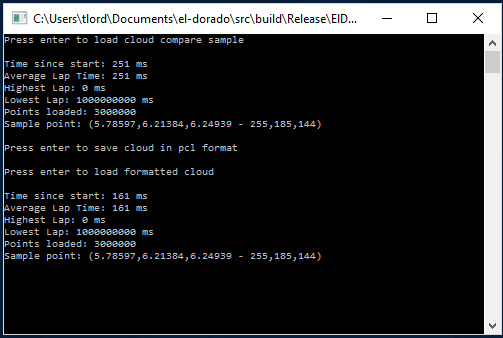
- 结果表明,在相同大小的点云(3M)下,我的计算机用了13秒的时间从云端加载,比较了程序在
Debug模式下编译时的情况,在Release模式下加载相同云的时间仅为0.25s。我认为您正在调试模式下运行。根据编译/安装Release的方式,可能需要重新构建PCL以生成适当的PCL构建。我的猜测是,无论您认为您在做什么,从Debug更改为Release,实际上并不是在使用PCL发布库。
在PCL中,在几乎所有函数中,从Debug迁移到Release通常会使处理速度提高一到两个数量级(因为PCL大量使用大型数组对象,这些对象必须在Debug模式下进行不同的管理,以提高可见性)
用云比较文件测试PCL
下面是我运行的生成以下输出的代码:
std::cout << "Press enter to load cloud compare sample" << std::endl;
    std::cin.get();

    TimeStamp stopWatch = TimeStamp();
    pcl::PointCloud<pcl::PointXYZRGB>::Ptr tempCloud2(new pcl::PointCloud<pcl::PointXYZRGB>);
    pcl::io::loadPCDFile("C:/SO/testTorusColor.pcd", *tempCloud2);

    stopWatch.fullStamp(true);
    std::cout <<"Points loaded: "<< tempCloud2->points.size() << std::endl;
    std::cout << "Sample point: " << tempCloud2->points.at(0) << std::endl;
    std::cout << std::endl;

    std::cout << "Press enter to save cloud in pcl format " << std::endl;
    std::cin.get();
    pcl::io::savePCDFileBinary("C:/SO/testTorusColorPCLFormatted.pcd", *tempCloud2);

    std::cout << "Press enter to load formatted cloud" << std::endl;
    std::cin.get();

    stopWatch = TimeStamp();
    pcl::PointCloud<pcl::PointXYZRGB>::Ptr tempCloud3(new pcl::PointCloud<pcl::PointXYZRGB>);
    pcl::io::loadPCDFile("C:/SO/testTorusColorPCLFormatted.pcd", *tempCloud3);
    stopWatch.fullStamp(true);
    std::cout << "Points loaded: " << tempCloud3->points.size() << std::endl;
    std::cout << "Sample point: " << tempCloud3->points.at(0) << std::endl;
    std::cout << std::endl;

    std::cin.get();
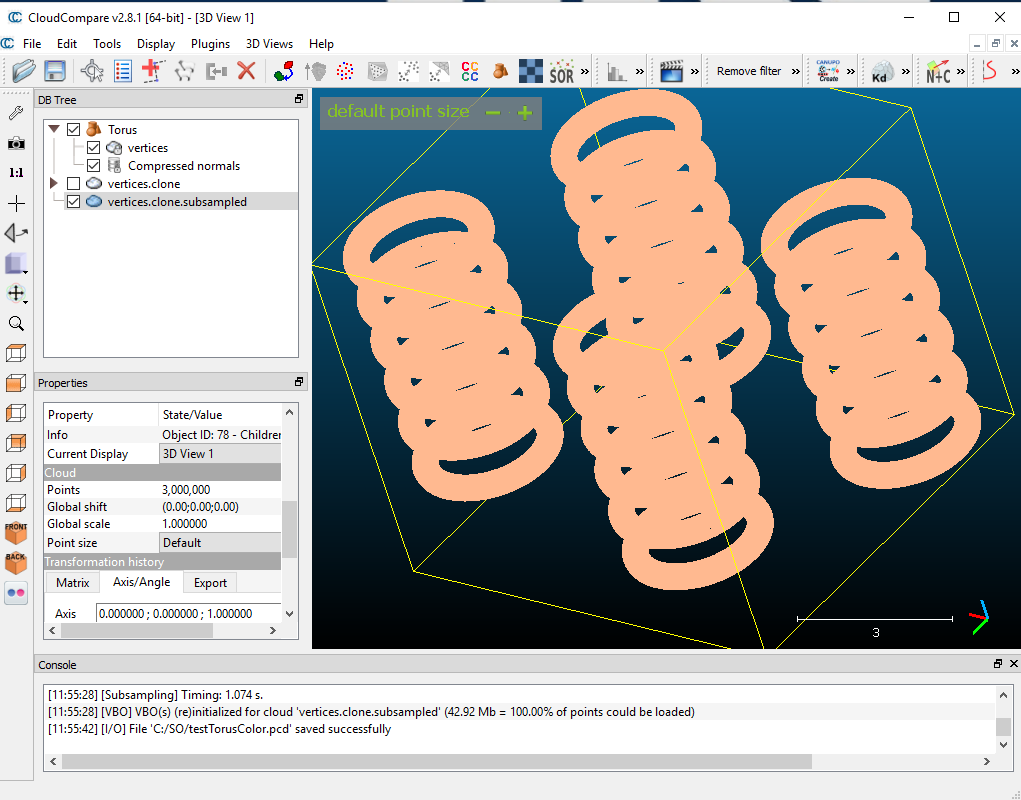
云比较生成的彩色云(3M点和颜色):
在Debug中运行,使用3M pt云再现您的大致加载时间:

在Release中运行
Stack Overflow用户
发布于 2017-05-03 14:07:55
我正好遇到了这种情况。它简单地归结为文件存储风格。您的文件(加载时间那么长)几乎肯定是ASCII风格的点云文件。如果您希望能够更快地加载它(x100),那么将其转换为二进制格式。作为参考,我在大约四分之一秒内加载了一个100万pt的云(但这取决于系统)。
pcl::PointCloud<pcl::PointXYZ>::Ptr tempCloud(new pcl::PointCloud<pcl::PointXYZ>);负载调用是相同的:
pcl::io::loadPCDFile(fp, *tempCloud);但是,为了保存为二进制文件,请使用以下内容:
pcl::io::savePCDFileBinary(fp, *tempCloud);为了防止有帮助,下面是我用来加载和保存云的代码片段(我稍微构造一下它们,但是它可能基于一个例子,所以我不知道这有多重要,但是如果切换到二进制文件,并且仍然看到很长的加载时间,您可能会想玩它)。
//save pt cloud
        std::string filePath = getUserInput("Enter file name here");
        int fileType = stoi(getUserInput("0: binary, 1:ascii"));
        if (filePath.size() == 0)
            printf("failed file save!\n");
        else
        {
            pcl::PointCloud<pcl::PointXYZ> tempCloud;
            copyPointCloud(*currentWorkingCloud, tempCloud);
            tempCloud.width = currentWorkingCloud->points.size();
            tempCloud.height = 1;
            tempCloud.is_dense = false;

            filePath = "../PointCloudFiles/" + filePath;
            std::cout << "Cloud saved to:_" << filePath << std::endl;
            if (fileType == 0){pcl::io::savePCDFileBinary(filePath, tempCloud);}
            else
            {pcl::io::savePCDFileASCII(filePath, tempCloud);}

        }

//load pt cloud
        std::string filePath = getUserInput("Enter file name here");
        if (filePath.size() == 0)
            printf("failed user input!\n");
        else
        {
            filePath = "../PointCloudFiles/" + filePath;
            pcl::PointCloud<pcl::PointXYZ>::Ptr tempCloud(new pcl::PointCloud<pcl::PointXYZ>);

            if (pcl::io::loadPCDFile(filePath, *tempCloud) == -1) //* load the file
            {
                printf("failed file load!\n");
            }
            else
            {
                copyPointCloud(*tempCloud, *currentWorkingCloud); std::cout << "Cloud loaded from:_" << filePath << std::endl;
            }
}- 列表项目
https://stackoverflow.com/questions/43521711
复制相似问题
腾讯云开发者

Copyright © 2013 - 2026 Tencent Cloud. All Rights Reserved. 腾讯云 版权所有
深圳市腾讯计算机系统有限公司 ICP备案/许可证号:粤B2-20090059  粤公网安备44030502008569号
腾讯云计算(北京)有限责任公司 京ICP证150476号 | 京ICP备11018762号