
PyUSB错误"USBError:[Errno 2]实体未找到“使用libusb0驱动程序(Windows 10)
我正在尝试建立与usb设备的通信。我确实在Python中安装了libusb1和libusb,并为与我通信的设备安装了驱动程序。设备在设备管理器中显示为libusb-win32 32-设备。我已经尝试遵循这个教程https://github.com/walac/pyusb/blob/master/docs/tutorial.rst,我不知道我做错了什么。
- Windows 10
- Python: 2.7.15
- pyusb:版本“1.0.2”
简单的代码示例:
import usb
dev = usb.core.find(idVendor=0x0683, idProduct=0x4108)
if dev is None:
       print 'Unable to find the usb device'
dev.set_configuration()
我知道这个错误:
---------------------------------------------------------------------------
USBError                                  Traceback (most recent call last)
Y:\All Projects\Lab Equipment\DataQ\python\DI-4108\DI_4108_SANDBOX.py in <module>()
      9
     10
---> 11 dev.set_configuration()
     12
     13 # get an endpoint instance

C:\Anaconda2\lib\site-packages\usb\core.pyc in set_configuration(self, configuration)
    867         without arguments is enough to get the device ready.
    868         """
--> 869         self._ctx.managed_set_configuration(self, configuration)
    870
    871     def get_active_configuration(self):

C:\Anaconda2\lib\site-packages\usb\core.pyc in wrapper(self, *args, **kwargs)
    100         try:
    101             self.lock.acquire()
--> 102             return f(self, *args, **kwargs)
    103         finally:
    104             self.lock.release()

C:\Anaconda2\lib\site-packages\usb\core.pyc in managed_set_configuration(self, device, config)
    146
    147         self.managed_open()
--> 148         self.backend.set_configuration(self.handle, cfg.bConfigurationValue)
    149
    150         # cache the index instead of the object to avoid cyclic references

C:\Anaconda2\lib\site-packages\usb\backend\libusb1.pyc in set_configuration(self, dev_handle, config_value)
    792     @methodtrace(_logger)
    793     def set_configuration(self, dev_handle, config_value):
--> 794         _check(self.lib.libusb_set_configuration(dev_handle.handle, config_value))
    795
    796     @methodtrace(_logger)

C:\Anaconda2\lib\site-packages\usb\backend\libusb1.pyc in _check(ret)
    593             raise NotImplementedError(_strerror(ret))
    594         else:
--> 595             raise USBError(_strerror(ret), ret, _libusb_errno[ret])
    596
    597     return ret

USBError: [Errno 2] Entity not found
我确实得到了关于我的设备的信息:
> DEVICE ID 0683:4108 on Bus 002 Address 005 =================  bLength
> :   0x12 (18 bytes)  bDescriptorType        :    0x1 Device  bcdUSB
> :  0x200 USB 2.0  bDeviceClass           :   0xff Vendor-specific
> bDeviceSubClass        :    0x0  bDeviceProtocol        :    0x0
> bMaxPacketSize0        :   0x40 (64 bytes)  idVendor               :
> 0x0683  idProduct              : 0x4108  bcdDevice              :
> 0x100 Device 1.0  iManufacturer          :    0x1 Error Accessing
> String  iProduct               :    0x2 Error Accessing String
> iSerialNumber          :    0x3 Error Accessing String
> bNumConfigurations     :    0x1   CONFIGURATION 1: 500 mA
> ==================================    bLength              :    0x9 (9 bytes)    bDescriptorType      :    0x2 Configuration    wTotalLength
> :   0x20 (32 bytes)    bNumInterfaces       :    0x1
> bConfigurationValue  :    0x1    iConfiguration       :    0x5 Error
> Accessing String    bmAttributes         :   0xc0 Self Powered
> bMaxPower            :   0xfa (500 mA)
>     INTERFACE 0: Vendor Specific ===========================
>      bLength            :    0x9 (9 bytes)
>      bDescriptorType    :    0x4 Interface
>      bInterfaceNumber   :    0x0
>      bAlternateSetting  :    0x0
>      bNumEndpoints      :    0x2
>      bInterfaceClass    :   0xff Vendor Specific
>      bInterfaceSubClass :    0x0
>      bInterfaceProtocol :    0x0
>      iInterface         :    0x4 Error Accessing String
>       ENDPOINT 0x81: Bulk IN ===============================
>        bLength          :    0x7 (7 bytes)
>        bDescriptorType  :    0x5 Endpoint
>        bEndpointAddress :   0x81 IN
>        bmAttributes     :    0x2 Bulk
>        wMaxPacketSize   :   0x40 (64 bytes)
>        bInterval        :    0x0
>       ENDPOINT 0x1: Bulk OUT ===============================
>        bLength          :    0x7 (7 bytes)
>        bDescriptorType  :    0x5 Endpoint
>        bEndpointAddress :    0x1 OUT
>        bmAttributes     :    0x2 Bulk
>        wMaxPacketSize   :   0x40 (64 bytes)
>        bInterval        :    0x0
因此,最后一个问题是:如何在Windows中获得预演?在Linux中,您可以通过udev来完成它。如何在Windows中解决此问题?
回答 2
Stack Overflow用户
发布于 2021-05-05 13:48:26
这个scnerio中有两个问题。1. pyusb库搜索问题,pyUSB将尝试搜索Windows中的任何libusb1 dll,而不是优先使用system32路径中的zadig安装的libusb0,您可以通过设置PYUSB_DEBUG标志找到这个问题。
 To enable PyUSB logging, you define the environment variable PYUSB_DEBUG with one of the following logging level values:

critical - only log critical errors
error - only log critical errors and errors
warning - log warnings, errors, and critical errors
info - log info, warnings, errors, and critical errors
debug - log everything including debug messages
但是有时出现问题,输出没有输出,您必须将输出重定向到本地文件,以查找其行为,尝试使用它在任何相关路径程序文件夹中找到的libusb1 dll。
By default, logged messages are sent to sys.stderr. You can redirect log messages to a file by defining the PYUSB_LOG_FILENAME environment variable to a string that is a valid file path and all logged messages will be written to the file rather than being sent to sys.stderr.2.来自sourceforge的libusb或libusb- way 32的libusb dll和libusb-way 32都不能提供某些特定python程序所需的函数导出,它可能是这样的。
- 未在此平台上找到+未实现的实体
- 权限被拒绝
这都是由于libusb1.0API在Windows平台上的实现不完全所致。
只需从上面的日志中删除任何libusb1 dll,并使pyUSB尝试使用libusb0。
Stack Overflow用户
发布于 2018-06-06 12:42:12
解决方案1:如果您的USB大容量设备在设备管理器中以libusb 32的形式出现。您需要更改使用libusb0 (v1.0.6.0)的libusb0 32驱动程序。

到libusbK USB设备,它使用libusbK驱动程序(在我的示例中是v3.0.7.0)。这将实际安装libusbK驱动程序并更改驱动程序。这可以通过Zadig自由软件无缝地完成。
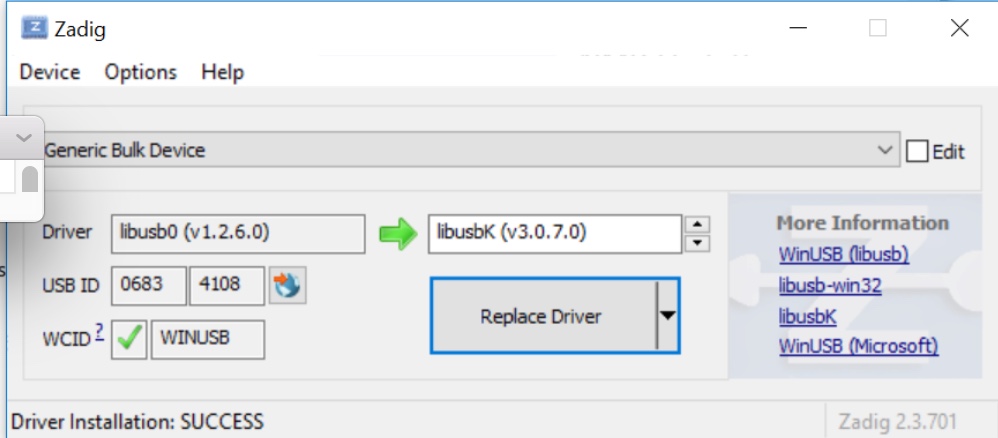

这将解决错误代码的问题。
USBError: [Errno 2] Entity not foundhttps://stackoverflow.com/questions/46458303
复制相似问题
腾讯云开发者
