Is the Tencent Cloud RT-Cube License Mandatory to Purchase?
If the Tencent Cloud RT-Cube feature modules you downloaded include live streaming (anchor broadcasting and anchor-audience mic connection / anchor cross-room PK), short video (video recording and editing / video uploading and publishing), terminal Top Speed Codec (TSC) and Special Effect SDK feature modules, you should unlock them for free by obtaining a License through purchasing the corresponding cloud service resource package. For details about unlocking feature modules, see SDK Download.
Is There a Separate Purchase Entrance For the Tencent Cloud RT-Cube License?
Unlock the functional modules of Live Streaming Push, Short Video Production and Video Playback. You can get a 1-year validity period (counting from the purchase date) of live streaming License, short video License and player License for free by purchasing the corresponding resource package of cloud services, or purchase independent live streaming License, short video License and player License. For details of relevant License billing, see Tencent Cloud Video Cube Price Overview. Click Buy Now.
Terminal Top Speed Codec Transcoding module is in the trial period and there is no official version License available. No purchase is required. If needed, you can use Trial License.
Unlocking the Tencent Effect feature module requires purchasing the Tencent Effect SDK package to obtain the corresponding Tencent Effect License usage authorization (valid from the purchase date until 00:00:00 the day after expiration). Click to go to the Tencent Effect SDK purchase page to buy.
What Is the Difference Between the Tencent Cloud RT-Cube License and the Feature Module License?
Type
Description
Tencent Cloud RT-Cube License
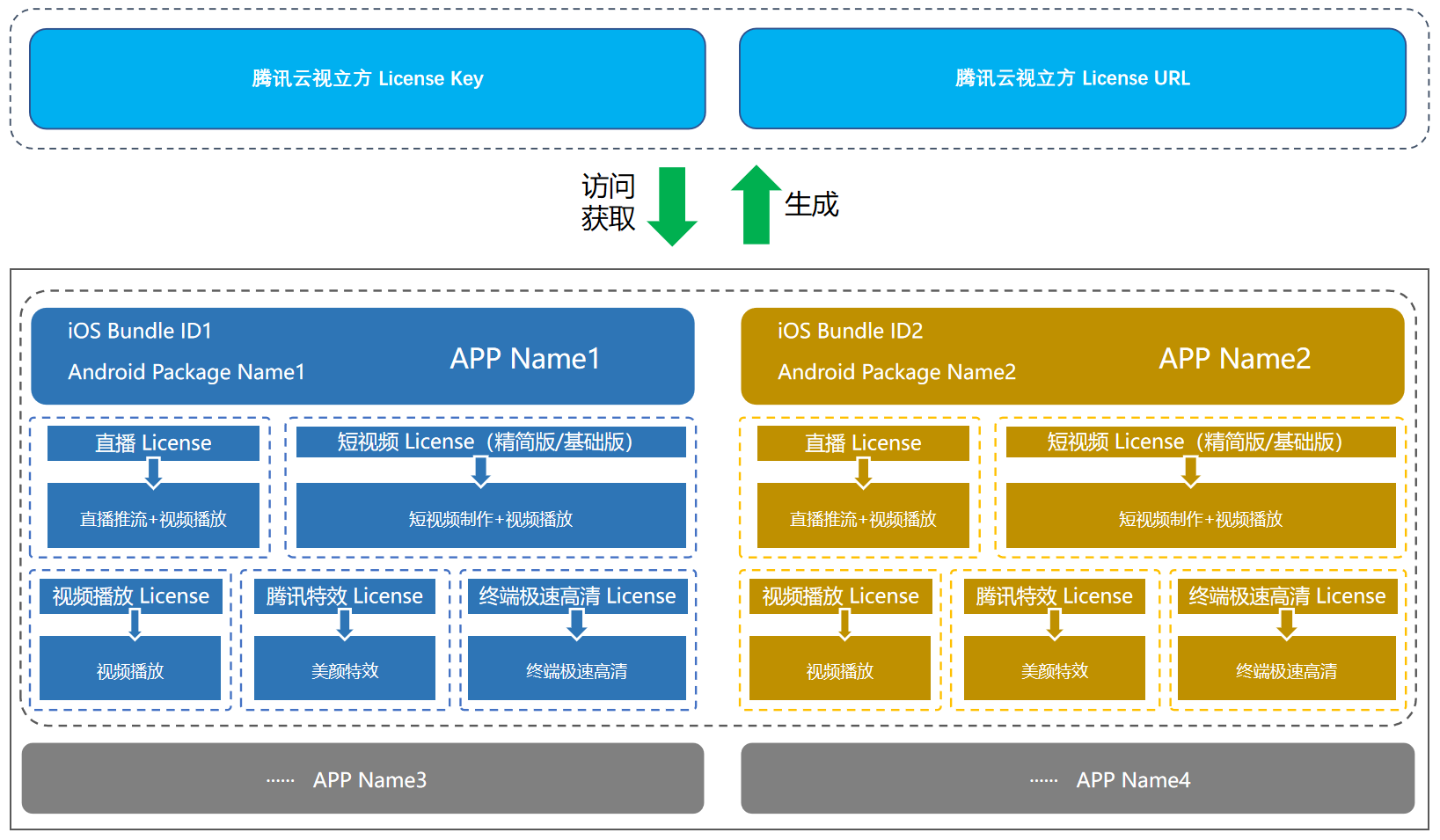
Obtain and verify the authorization of feature modules under an application through a set of License URLs and Keys, and manage the unlocking and use of live stream publishing license, short video license (Lite and Basic Edition) and player License feature modules under this application.
Feature module License
Including live stream publishing license, short video license and player License. It is to obtain License authorization for free use within a valid period of 1 year and unlock feature module authorization by purchasing the corresponding cloud service resource package, or purchase independent License authorization.
Live stream publishing License
(RTMP streaming + RTC streaming) can be used to enable the live stream publishing (anchor starts live streaming and mic connection between anchor and audience/anchor cross-room PK) feature module. The short video License (simplified edition/basic version) can be used to enable the short video (video recording and editing/video upload and publish) feature module.
What Is the Difference Between the Short Video Simplified Edition License and the Short Video Basic Version License?
The short video License includes the simplified edition License and the basic version License.
The simplified edition License supports multiple features such as video generation, upload, processing, distribution and playback.
The basic version License adds capabilities such as filters, special effects and transitions on the basis of the simplified edition, quickly and easily implementing mobile-based short video applications.
Can Multiple Tencent Cloud RT-Cube Licenses Be Created Under One Account?
A Tencent Cloud RT-Cube project is managed as a whole as a License for application management. One Tencent Cloud RT-Cube License corresponds to one Bundle ID and Package Name, managing live streaming, short video production (Lite/Basic version), video playback, terminal ultra-fast HD, and Special Effect features under this application.
There is no limit on the quantity of Tencent Cloud RT-Cube Licenses created under the same account, and multiple application projects can be managed. For ease of user management, it is recommended to extend the validity time of Tencent Cloud RT-Cube Licenses with the same package name by renewing them.
Note:
Package Name is the package name for Android, and Bundle Id is the package name for iOS.
Can Multiple Tencent Cloud RT-Cube Licenses Be Created With the Same Package Name?
It will not affect the use to fill in the same package name for multiple Tencent Cloud RT-Cube Licenses. Generally, it is not recommended to create multiple Licenses with the same package name.
Can the License of Tencent Cloud RT-Cube Modify the Bundle ID and Package Name?
The package name information of the official version License of Tencent Cloud RT-Cube cannot be modified. The package name of the trail version License of Tencent Cloud RT-Cube can be edited and changed. Please check whether the package name is occupied in the app store before adding the official version License of Tencent Cloud RT-Cube. It cannot be modified or replaced after submission.
When Does Tencent Cloud RT-Cube License Expire?
About Live Stream License, Short Video License and Player License:
Official Version License: The expiration time depends on the valid period of its bound feature module License. The latest valid period among any bound feature module License is the valid period of the official version License.
If the bound License is a feature module License given away with the purchase of a resource package, calculated from the date of resource package purchase, the authorization is valid until 00:00:00 the day after 1 year expires.
If it is an independent License, the activation validity period of the independent Tencent Cloud RT-Cube License binding package name. Calculated from the binding package name, the authorization validity period expires at 00:00:00 the day after 1 year.
Trail Version License: Each functional module can only apply for a trail License once, and each functional module can be renewed for free once (the Terminal TSC does not support self-renewal. If you need to modify the validity period, please contact the business or submit a ticket). For long-term use, it is recommended to purchase an official License. If you apply for a trail renewal during the trial period, the expiration time of the renewal will be based on the time of applying for the trail; if you apply for a trail renewal after the trial period ends, the expiration time of the renewal will be based on the time of applying for the trail renewal.
Example:
When the application test start time is 2021-08-12 10:28:41, the expiration time after 14 days is 2021-08-26 10:28:41.
When you can renew for free once, if you apply for renewal within 14 days of the trial period, the expiration time is 2021-09-09 10:28:41; if you apply for renewal after the 14-day trial period ends, and the application time is 2021-08-30 22:26:20, then the expiration time of the renewal is 2021-09-13 22:26:20.
About Special Effect License of Tencent (The Special Effect feature module of Tencent needs to pass the review before authorization can be issued):
Official Version License: The authorization expiration time is calculated from the approval time and expires at 00:00:00 the day after 1 year.
Trail version License: The authorization expiration time is based on the approval time; if a test renewal is applied for after the trial period ends, the renewal expiration time is based on the application time for the test renewal.
Example:
Official Version License: After creating a License and submitting the review information for the official version of Special Effect Module, it enters under review status. The review usually takes 1 - 2 working days. If the submission time is 2022-05-24 12:34:11 and the approval time is 2022-05-25 17:56:24, then the start time is 2022-05-25 17:56:24, and the expiration time after 1 year is 2023-05-26 00:00:00.
Trail Version License :
When submitting the review information for the trail version of Special Effect Module, it enters under review status. The review usually takes 1 - 2 working days. If the submission time is 2022-05-24 12:47:33 and the approval time is 2022-05-24 15:23:46, then the start time is 2022-05-24 15:23:46, and the expiration time 14 days later is 2022-06-09 00:00:00.
When you can renew for free once, if you apply for renewal within the first 14 days of the trial period, the expiration time will be 2022-06-23 00:00:00; if you apply for renewal after the first 14 days of the trial period, for example, at 2022-08-06 22:26:20, the expiration time of the renewal will be 2022-08-22 00:00:00.
Created Multiple Tencent Cloud RT-Cube Licenses, Are the License URL and License Key the Same?
The Tencent Cloud RT-Cube Licenses under the same account have the same default License URL and License Key for easy maintenance and management.
Is the Resource Package Associated With the License Only Available For This License?
The daily traffic settlement postpaid consumption generated by the live streaming playback domain under this account can be deducted. The association of the resource package is only used to synchronize the validity period. The traffic in it is not limited to License usage (the usage of the License will not be affected even if the traffic is used up).
For example:
User A is billed by daily traffic settlement postpaid. He purchased a 10TB live streaming playback domain traffic resource package and a 50TB live streaming playback domain traffic resource package, and created License A and License B respectively:
License A corresponds to an App using the domain name abc.com for playback, generating 20 TB of playback traffic.
License B corresponds to an App using the domain name def.com for playback, generating 30 TB of playback traffic.
As long as abc.com and def.com are the playback domains of live streaming under user A's Cloud Streaming Services account, the purchased 10TB + 50TB resource package can be deducted. After the deduction, there will be 10TB of traffic left in user A's live streaming traffic resource package.
Can Purchasing a Live Stream License Be Used For Mini Program Live Streams?
Not supported. The live stream License is only applicable to Apps on iOS and Android platforms when using the live stream Streaming (host starting a live stream and host-audience co - anchoring/host cross - room PK) functional modules. For mini programs to access the live stream function, corresponding service categories must be in place first. For details, see Scheme selection.
Why Does an Available Resource Pack Increase and a License Decrease After Upgrading the New Version License?
The new version of the License adds duplicate package name verification logic. When multiple similar Licenses are bound to the same set of package names (Bundle ID and Package Name), in fact, only one License will take effect. We will unbind the invalid and shorter-validity License binding relationships, release the resource packages of invalid bindings for you, and the released resource packages can be bound to new Licenses for use.
Example:
User A previously purchased two 10 TB live streaming traffic resource packages (with different expiration dates), received two live streaming Licenses, and bound the same set of package names twice (in fact, only one License was valid). After upgrading to Tencent Cloud RT-Cube Licenses, only the binding of the License with the longer validity period is retained; the other License with the shorter validity period is unbound, and the 10TB resource package is released. User A can bind a new License again.
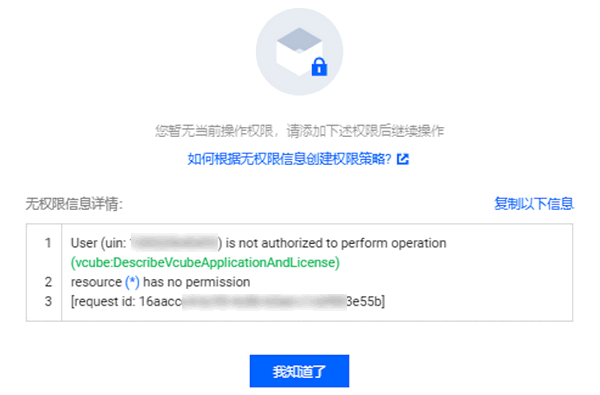
Why Does a Subaccount Get an Unauthorized Prompt When Opening the Audio and Video Terminal SDK (Tencent Cloud RT-Cube) Console?
Screenshot of the issue:
Problem analysis:
The Tencent Cloud Video Cube Console requires the root account to independently authorize policies for sub-accounts before accessing the console page.
If you only need to provide sub-accounts with read-only permission to access the Audio and Video Terminal SDK Console, please authorize the QcloudVCUBEReadOnlyAccess policy.
If you need to provide sub-accounts with all operation permissions to access the Audio and Video Terminal SDK, please authorize the QcloudVCUBEFullAccess policy.
For association guidelines on associating policies for users/user groups to authorize relevant operation permissions, see Policy Authorization Management.
Why Can'T Messages Related to Audio and Video Terminal SDK Products and Licenses Be Received?
You can subscribe to the audio and video terminal SDK in Message Subscription and configure message reception channels such as Internal Messages/Email/Short Message Service/WeChat/WeCom to receive expiry reminders for the official License. The official License will send you an expiration reminder once at 30 days, 15 days, 7 days, and 1 day before the expiration time, reminding you to renew in time to avoid affecting normal business operations.
Why Can a Live Stream License Unlock the Video Playback Feature Module?
After version 10.1 (launched at the end of May 2022), live streaming License (formerly live push stream License), Short Video License and player License can all authorize to unlock the video playback functional module of the new version SDK. You only need to purchase any one of these Licenses to use the live stream and on-demand playback features in the new version SDK normally. The details of authorization unlocking for each License are as follows:
License Type
Unlocked Feature Module Authorization
License Acquisition Method
Live stream pushing
Short video production
Video playback
Live stream License
✓
-
✓
Purchase 10TB, 50TB, 200TB, or 1PB CSS traffic resource packages and get one-year live stream publishing License usage authorization as a giveaway.
Purchase one - year usage authorization of standalone live streaming License
Short video License
-
✓
✓
Purchase 10TB, 50TB, 200TB, or 1PB Video on Demand (VOD) traffic resource packages and get one-year usage authorization for the short video lite/basic version License as a giveaway.
Purchase one-year usage authorization for the independent short video License
Player License
-
-
✓
Purchase 100GB, 500GB, 1TB, or 5TB live/video traffic packages and get one-year usage authorization of the basic version player for mobile terminals for free.
Purchase one-year usage authorization for the standalone player License