The communication between CLB instances and backend CVM instances is over the public network or private network?
Regardless of whether your account type is bill-by-IP or bill-by-CVM, communication between CLB and CVM instances occurs over the private network. The network traffic routes for both account types are as follows:
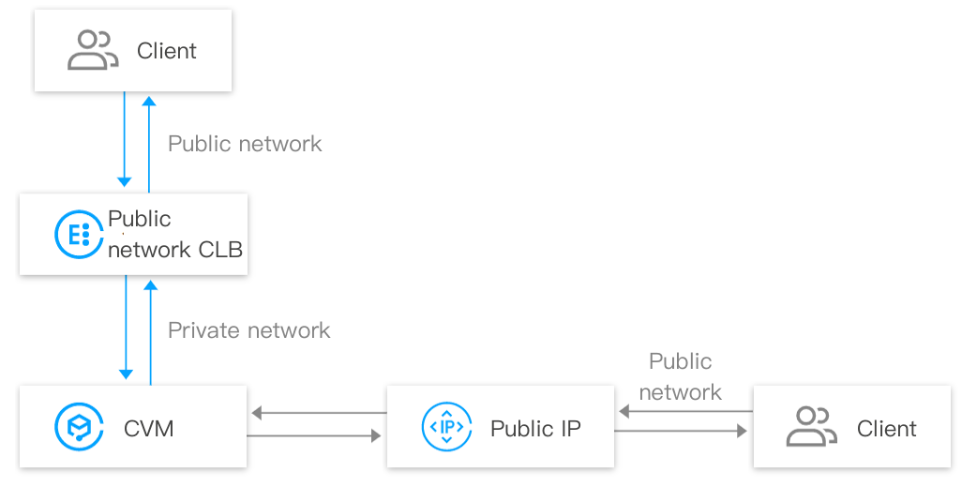
A client accesses a CLB instance over the public network, the CLB instance forwards the traffic to a CVM instance over the private network, then the CVM instance responds to the CLB instance over the private network, finally the CLB instance responds to the client.
When a CVM actively accesses the public network (or is passively accessed directly via a public IP), the CVM interacts with the client through its public IP (or Elastic Public IP).
CLB billing policies vary by account type. For more information, see Billing Overview. The main difference between bill-by-IP and bill-by-CVM accounts lays in the billing dimension, and other aspects such as service access and monitoring are the same. For more information about differences between account types, see Checking Account Type.
Public network fee of bill-by-IP accounts: For the public network traffic accessing a CLB instance or a public IP address, the public network fee is charged on the CLB instance or the public IP address.
Public network fee for bill-by-CVM accounts: The public network traffic accessing a CLB instance or a public IP address is charged on the CVM instance, not on the CLB instance or public IP address.
Cross-region binding fees are charged only when your CLB utilizes the cross-region binding feature; otherwise, no fees are incurred. For more information, please refer to Cross-region Binding Billing Description.
Cross region 1.0: The cross-region fee is charged on the CLB instance.
Cross-region 2.0: The cross-region binding fee is charged on the CCN instance, rather than the CLB instance.
Standard account type: When purchasing a CLB instance, you must select a bandwidth cap for the CLB. If the business bandwidth exceeds this cap, the CLB instance will automatically perform packet loss handling.
Bill-by-CVM account: You do not need to specify the CLB bandwidth cap when you purchase a CLB instance. The CLB bandwidth is restricted by the total public network bandwidth of the backend CVM instances.