The content of this page has been automatically translated by AI. If you encounter any problems while reading, you can view the corresponding content in Chinese.
Help & Documentation>实践教程>TDMQ for Apache Pulsar>Traffic Throttling Mechanism Explanation

Traffic Throttling Mechanism Explanation

Last updated: 2025-02-06 10:35:30

Cluster-Level Distributed Traffic Throttling

Applicable to Pulsar professional clusters. Pulsar producers and consumers produce/consume a large number of messages at very high speed, consuming server resources and causing saturation of CPU, memory, network, and disk IO. Therefore, Pulsar designs a throttling scheme, setting different throttling thresholds according to instance specifications to protect the cluster, avoiding high resource consumption that affects cluster quality and causes global stability risks.


Explanation Of Traffic Throttling Mechanism

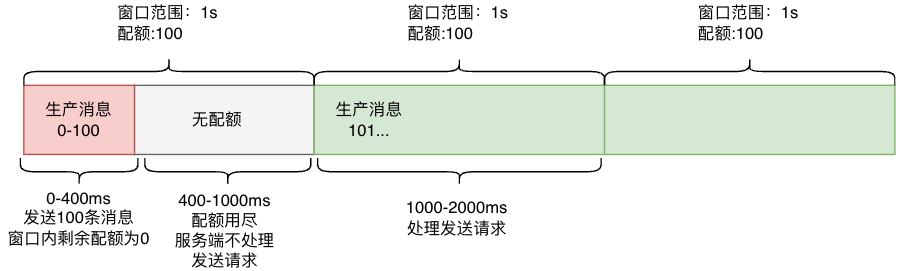
Pulsar production traffic throttling mechanism adopts packet response delay. The throttling statistics window is 1s.
Take production TPS throttling as an example:
Assuming the production TPS is set to 100, if the user sends 100 messages in the first 400ms of 1s, the request to send the 101st message will need to wait 600ms before being processed.
From the producer's perspective, when production traffic throttling occurs, the duration of sending messages will increase, and even sending timeout may occur.
From the consumer's perspective, when consumption throttling occurs, the overall latency from production to consumption will increase, potentially causing message backlog.

Description Of Throttling Principle


Producer Side:
The traffic throttling statistics window is 1s. When the quota within the statistics window is exhausted, the server-side will close all producer channels, stopping the acceptance of message sending requests until the next time window, when the producer channels will be reopened to process message sending requests.
Consumer End:
The traffic throttling statistics window is 1s. When the quota within the statistics window is exhausted, the server-side will stop pushing messages to consumers until the next time window.
Note:
How to understand closing the channel after traffic throttling on the production side?
When traffic throttling occurs on the production side, the server-side will close the producer's corresponding TCP connection channel. After closing, the server-side will no longer accept requests for the corresponding TCP connection until the TCP connection channel is reopened.

Tutorial On Pulsar Distributed Traffic Throttling Practice

1. It is recommended that users select cluster specifications based on the actual peak production/consumption quantity of their business. Set the traffic throttling production/consumption allocation ratio according to the production and consumption fan-out ratio. It is advisable to conduct stress testing before going live to evaluate whether the cluster capacity meets the requirements.
2. For non-delayed messages, do not set the delayed message field. Once the sender sets the delayed message field, regardless of the delay time, the server-side will calculate the rate according to the delayed message statistics rate. A typical scenario: In Java (similar for GO and other SDKs), as long as deliverAfter or deliverAt is set when sending a message, it will be considered a delayed message, even if the value is 0 or less than the current time.
3. Configure alarms for the production/consumption rate and bandwidth of the cluster. When the production/consumption rate and bandwidth exceed 80% of the set specification, it is recommended to promptly upgrade the Pro Edition instance specification to avoid the risk of increased duration due to throttling.
4. Configure alarms for the throttle count of production/consumption. When throttling occurs, it indicates that there is an exceeded limit in the production/consumption within a second-level window. It is recommended to promptly upgrade the Pro Edition instance specification to avoid the risk of increased duration due to throttling.

Explanation Of Common Symptoms

Question 1: Why is traffic throttling triggered when the production/consumption is lower than the specification?
As mentioned above, traffic throttling is measured in seconds (s), but the monitoring platform in the console collects and reports data at the minute (min) level. The formula for calculating the statistical value of production/consumption on the monitoring platform is [message volume within 1 min/60]. When the client production/consumption volume is unevenly distributed within 1 min, it may be concentrated in 1 sec or a few seconds within the 1 min time window, resulting in a high production/consumption volume that exceeds the quota in the throttling window, while the volume in other times is far below the quota. In this case, the monitored production/consumption is lower than the instance specification, but traffic throttling is triggered.
Question 2: Why is the peak production/consumption traffic higher than the instance specification?
Case 1: Pulsar is a distributed system, and a Pulsar node consists of multiple broker nodes. At the same time point (within a traffic throttling window), throttling is performed by each node, and the throttling threshold for each node is the remaining threshold of the current cluster. For example, if the cluster throttling threshold is 1000 and there are 5 broker nodes, when the actual usage is 750 (assuming the usage is evenly distributed, 150 per node), the throttling threshold for each node at this time is 400 (150 + 1000-750). At this time, the instantaneous traffic that can be reached may be 2000 (400*5), so it is possible to exceed the specification within a throttling window.
Case 2: As described in the throttling principle above, when throttling occurs, the write channel will be closed, but the current requests (even if they have exceeded the throttling threshold) will continue to be processed. Therefore, when there are high concurrent requests, it is possible to exceed the throttling threshold within a statistics window.
Question 3: How to determine if Pulsar has experienced traffic throttling?
View the cluster monitoring information on the cluster monitoring page in the Pulsar Professional Version console. If the number of throttling occurrences is greater than 0, throttling has occurred.

Topic Partition Traffic Throttling

Applicable to all types of Pulsar clusters.

Explanation Of Throttling Principle

Producer Side

Server-side throttling logic description: Production side throttling is not precise and relies on internal scheduled tasks (executed every 50ms by default) to check if the production volume exceeds the quota within a 1s window for each partition.
Behavior after server-side throttling: The production side uses soft throttling. When throttling occurs, the read channel of the producer corresponding to the topic is closed, and production requests are no longer processed. After waiting for up to 1s, the producer's read channel is restored, and message sending requests can continue to be processed until throttling occurs again.
Client behavior after throttling: When throttling occurs, the sending duration will increase, and sending timeout may occur.
Note:
How to understand closing the channel after traffic throttling on the production side?
When traffic throttling occurs on the production side, the server-side will close the producer's corresponding TCP connection channel. After closing, the server-side will no longer accept requests for the corresponding TCP connection until the TCP connection channel is reopened.

Consumer Side

Server-side throttling logic description: Consumer end throttling is not precise. It checks if the consumption TPS and bandwidth exceed the quota within a 1s time window.
Behavior after server-side throttling: The server stops pushing messages to the consumer for 1s.
Client behavior after throttling: When throttling occurs, the overall latency from the production side to the consumer end will increase, potentially causing message backlog.

Practical Tutorial On Traffic Throttling For Pulsar Topic Partitions

1. A single topic partition has TPS and bandwidth limits for production/consumption. If the TPS/bandwidth concurrency of the topic is relatively high, it is necessary to appropriately scale out the partitions.
2. Configure alarms for the production/consumption rate and traffic usage quota percentage of the topic. When it exceeds 80%, it is recommended to scale out the number of partitions to avoid triggering single topic partition throttling.

Explanation Of Common Symptoms

Question 1: Why can the production/consumption traffic of a partition exceed the throttling threshold?
As described in the throttling principle above, the throttling of topic partitions uses an imprecise soft throttling algorithm. Combined with the throttling logic of the production side and the consumer end, both production and consumption may exceed the throttling threshold.