The content of this page has been automatically translated by AI. If you encounter any problems while reading, you can view the corresponding content in Chinese.
Namespace is a resource management concept in TDMQ for Pulsar. Generally, different business scenarios can be isolated by namespace and configured with dedicated settings, such as message retention period. Topics, subscriptions, and role permissions in different namespaces are isolated from each other.
This document describes how to create multiple namespaces in TDMQ for Pulsar to use the same TDMQ for Pulsar cluster in different scenarios.
Description
Within the same namespace, the names of topics and subscriptions are unique.
Directions
Description
If the version of the newly created tdmq for pulsar cluster is 2.6.1, the system will create a default namespace by default. The default message expiry time for this namespace is 7 days. This namespace can be modified but cannot be deleted.
If the version of the newly created tdmq for pulsar cluster is 2.7.1 or above, the system will not automatically create a default namespace.
2. On the Namespace page, select the region and click Create to enter the new namespace creation page.
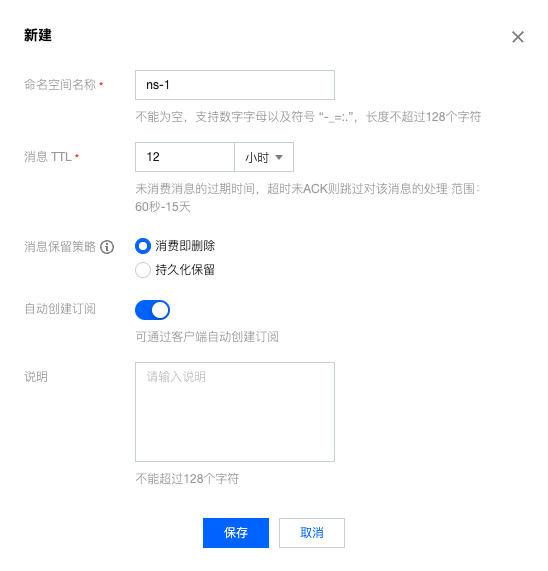
3. In the new namespace creation dialog, configure the relevant properties for the namespace:
Namespace name: Set the name of the namespace (cannot be modified after creation), cannot be empty, supports numbers, letters, and symbols "-_=:.", length up to 128 characters.
Message TTL: Set the ACK timeout of an unconsumed message. The message will not be processed if it is not acknowledged within the ACK timeout. Value range: 60 seconds ~ 15 days.
Message Retention Policy
Deletion after consumption: A message will be asynchronously cleared within a certain period of time after being successfully acknowledged (ACK) to save storage space.
Note
If there are no subscriptions under the topic, asynchronously discard will directly apply to newly produced messages.
Persistent retention: No matter whether messages are consumed or not, they will be stored persistently within the maximum retention period and maximum storage space and then deleted chronologically after the limit is reached. Additionally, the retention policy applies to acknowledged messages and does not affect unacknowledged messages, which will enter the cleanup queue only after the TTL expires.
Automatic creation of subscriptions: Whether subscriptions can be automatically created by the client.
Description: Enter the remarks of the namespace.
4. Click Save to complete the creation.
Description
After the above steps, you can create a topic in the namespace to produce and consume messages.
Modifying the Namespace
To modify the namespace, follow the steps below:
1. On the Namespace list page, click Edit in the Operation column to enter the edit page.
2. To modify the namespace configuration, click Save to complete the changes.
Deleting a Namespace
To delete the created namespace, follow the steps below:
1. On the Namespace list page, click Delete in the Operation column.
2. In the confirmation popup, click Yes to delete the namespace.
Note
The namespace cannot be deleted if there are topics within it.
A role cannot be deleted if it has permissions configured in namespaces.