The content of this page has been automatically translated by AI. If you encounter any problems while reading, you can view the corresponding content in Chinese.
This document explains how to view detailed information about producers connected to a Topic on the TDMQ Pulsar console, helping you to monitor the status of producers connected to a Topic in real-time and promptly address any related issues.
2. In the Topic Management list page, find the Topic for which you want to view producers, and click on View Producers in the operation column to enter the subscription list.
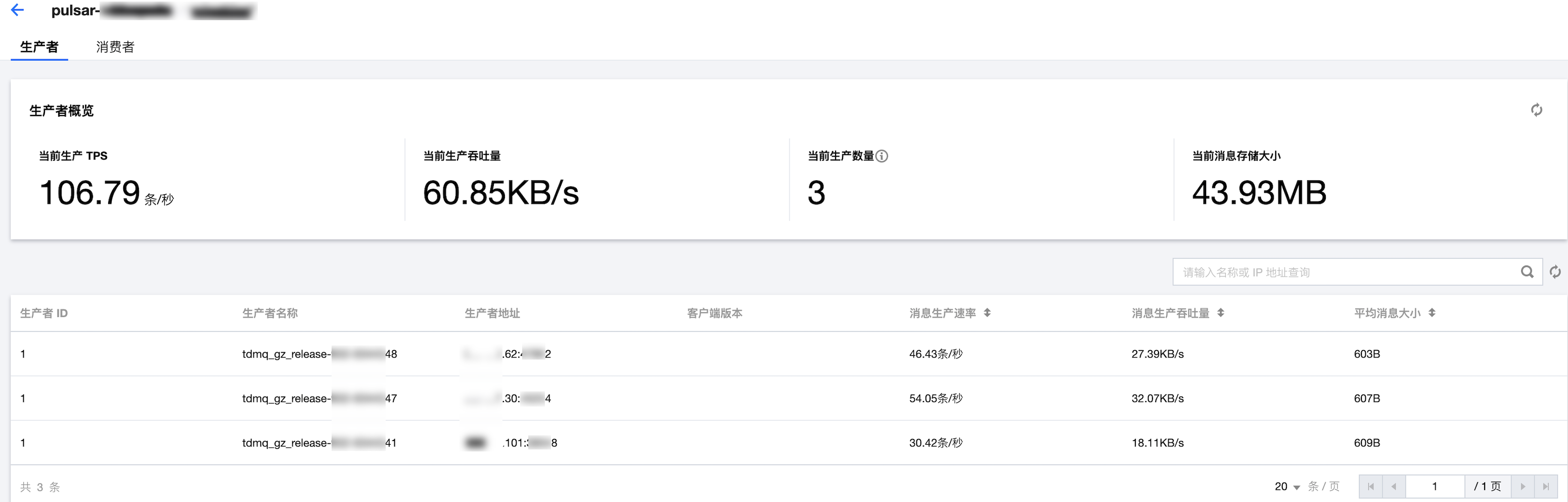
Producer Overview
Current Production TPS: The total number of messages produced per second by producers connected to the Topic.
Current Production Throughput: The total size of messages produced per second by producers connected to the Topic.
Current Number of Producers: The total number of producers connected to the Topic (the list items represent a combination of producers and partitions, so the total number of producers displayed in the overview may be lower than the list items).
Current Message Storage Size: The total size of messages stored in the Topic.
Producer Details
Parameter
Description
Producer ID
The ID of the producer.
Producer Name
The name of the message producer.
Producer Address
Producer Address and Port.
Client Version
Pulsar client version.
Message production rate (messages/second).
The number of messages a producer sends to the topic per unit of time.
Message production throughput (Mbps).
The size of messages produced by the producer per second.
Average message size (Bytes).
The average size of messages produced by the producer to the topic.