The content of this page has been automatically translated by AI. If you encounter any problems while reading, you can view the corresponding content in Chinese.

Sub-Device Access Guide

Last updated: 2026-05-09 16:52:01

The IoT Explorer C SDK is oriented to devices that can communicate directly with the platform. Since subdevices are unable to communicate directly with the platform, they do not need to integrate the IoT Explorer C SDK. Theoretically, users can fully customize the interaction logic between subdevices and gateways. However, to enable subdevices to interact with the platform, this document provides some commonly used handling suggestions.

Sub-Device Information Management

The gateway needs to get the device information of subdevices before it can proxy them to realize corresponding features.

Sub-Device Discovery and Authentication

The discovery logic of gateways for subdevices can be implemented freely based on different communication methods (for example, BLE, Zigbee, and 485). However, after device discovery, it is usually recommended to perform legitimacy authentication of devices. Authentication can be implemented by combining the device information of the platform. It is usually recommended that the product corresponding to a subdevice select the key authentication method. Each subdevice has corresponding triplet information on the platform, that is, productId + deviceName + psk. If the gateway side saves the psk information of a subdevice, signature verification can be performed based on the psk.
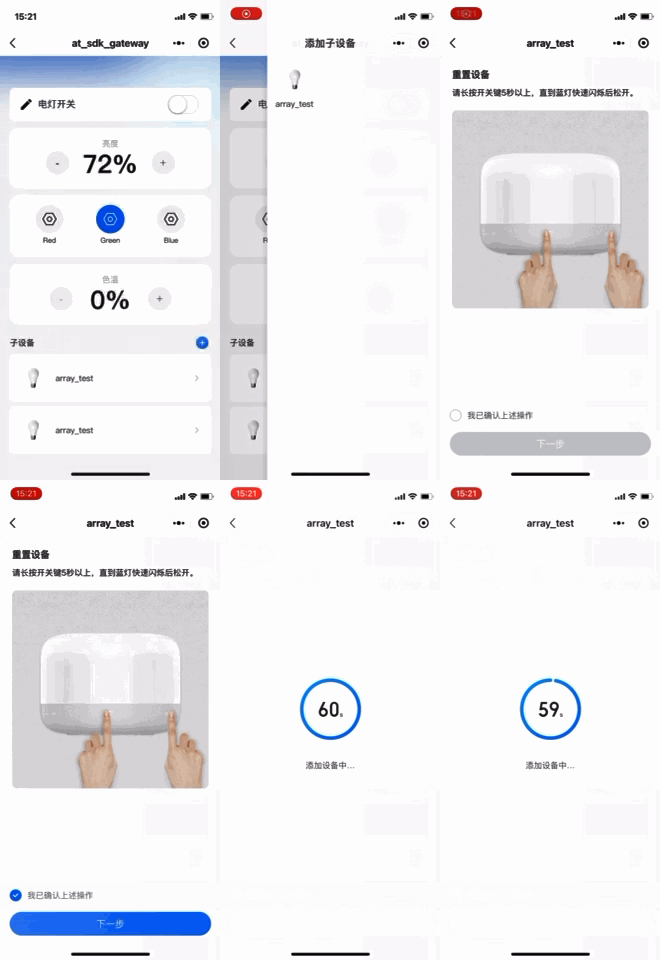
1. Click the Discover Sub-devices button in the Tencent Lianlian Mini Program. There are two ways to enter the process of binding a primary device in the Tencent Lianlian Mini Program:
On the gateway device interface, click the "+" button to add a sub-device.
Scan the Device QR Code in the Batch Production section of the Product Development interface for the sub-device in the console.


2. The gateway device will receive a search_devices message. At this point, the gateway device can start the process of discovering and searching for subdevices. The gateway receives the payload for searching subdevices: {"payload":{"status":1},"type":"search_devices"}. The gateway replies with the payload to start search:
{"type":"search_devices",
"payload":{"status":1, "result":0}}
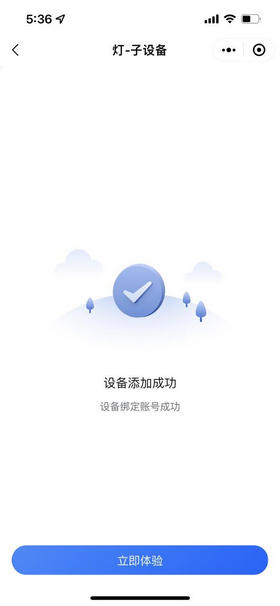
3. The search logic here is implemented by the customer. After successfully discovering subdevices (discovery conditions are customer-defined), the subdevice can be bound to the gateway. For specific binding, refer to the implementation of IOT_Gateway_Subdev_Bind. Then, the Mini Program Interface will display the device that was successfully bound just now.


Note:
A subdevice generally refers to a device that cannot directly connect to IoT Explorer and needs to connect to the platform through a gateway. A gateway product needs to add a subproduct before it can add subdevices under the gateway device. Please refer here for the description of the topological relationship and parameter fields of gateway subdevices.

Dynamic Binding of Sub-Devices

The topological binding relationship between gateway devices and subdevices can be pre-completed on the console or dynamically bound during the running process. The prerequisite for gateway devices and subdevices to perform dynamic binding is that the binding relationship between the gateway product and the subdevice product has been completed on the console. After a gateway device discovers a subdevice, the judgment logic on whether to initiate dynamic binding needs to be developed and implemented by the gateway side based on the device management logic of the gateway side. Dynamic binding requires signature information based on the subdevice key. For signature calculation, refer to the C SDK API subdev_bind_hmac_sha1_cal. The signature calculation can be sent to the gateway after being completed on the subdevice or completed on the gateway side. The latter requires the gateway to save the psk information of the subdevice.
A successful binding log, see the following content:
DBG|2022-01-14 16:57:25|mqtt_client_publish.c|qcloud_iot_mqtt_publish(346): publish packetID=0|topicName=$gateway/operation/TZ9Y9CLTEA/gateway_001|payload={"type":"bind","payload":{"devices":[{"product_id":"xxxx","device_name":"subdev_003","signature":"xxxxx","random":1820758684,"timestamp":1642150644,"signmethod":"hmacsha1","authtype":"psk"}]}}
INF|2022-01-14 16:57:25|gateway_sample.c|_message_handler(138): Receive Message With topicName:$thing/down/property/HW9ME416BI/subdev_002, payload:{"method":"report_reply","clientToken":"xxxx-45","code":0,"status":"success"}
DBG|2022-01-14 16:57:25|gateway_common.c|_gateway_message_handler(419): gateway recv : {"type":"bind","payload":{"devices":[{"result":0,"product_id":"HW9ME416BI","device_name":"subdev_003"}]}}
INF|2022-01-14 16:57:25|gateway_common.c|_gateway_message_handler(510): client_id(HW9ME416BI/subdev_003), bind result 0
DBG|2022-01-14 16:57:25|gateway_sample.c|show_subdev_bind_unbind(262): bind HW9ME416BI/subdev_003 success

Dynamic Registration of Sub-Devices

Considering the mass production convenience of the product, subdevices can use the dynamic registration method to obtain the triplet information of subdevices. Dynamic registration requires the product key of the subdevice as a signature. The calculation of the signature can be sent to the gateway after being completed on the subdevice side, or it can be completed on the gateway side. The latter requires the gateway to save the psk information of the subdevice. It is recommended that the name of the dynamically registered subdevice be unique information that the gateway can obtain during the device discovery process, such as MAC address, EUI, etc.

Sub-Device Communication

Gateway and Subdevice Communicate

The communication protocol and data format between the gateway and subdevices are not restricted by the platform. However, when the gateway proxy communicates with the cloud on behalf of the subdevice, it needs to convert the messages of the subdevice into formatted data of data template.

Sub-Device and Sub-Device Interconnection

Configure the message forwarding rules between subdevices through the console or Mini Program Configuration to achieve device interconnection between subdevices.