CaptchaAppid 鉴权是通过前端传递加密符(aidEncrypted 参数),有效防止因 CaptchaAppid 泄露导致的资源盗刷风险。
说明:
此功能非必选能力,可根据业务安全性需求选择性接入。
步骤一:开启控制台强制校验
在实现 CaptchaAppid 校验前,需先在验证码控制台开启强制校验并完成配置。
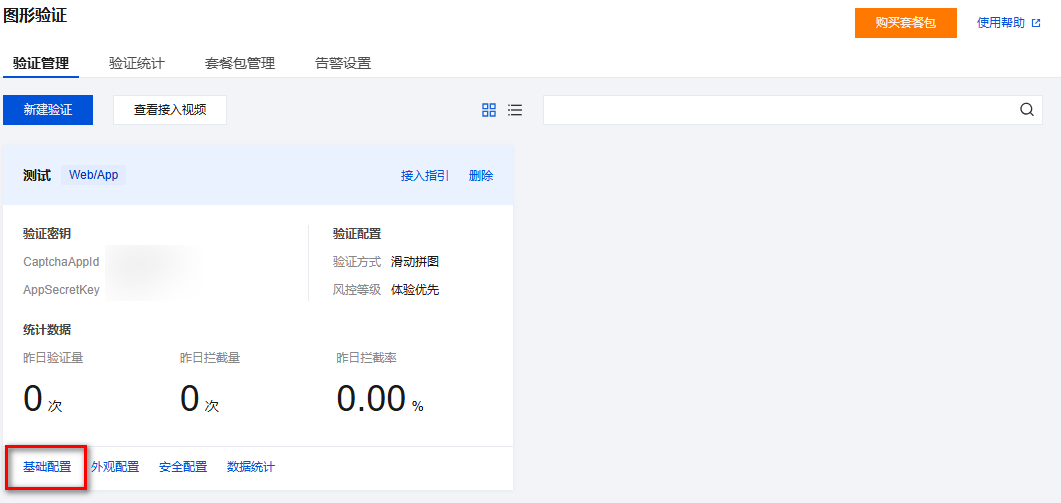
1. 登录 验证码控制台,左侧导航栏选择图形验证 > 验证管理。
2. 在验证管理页面,选择目标场景,单击基础配置。
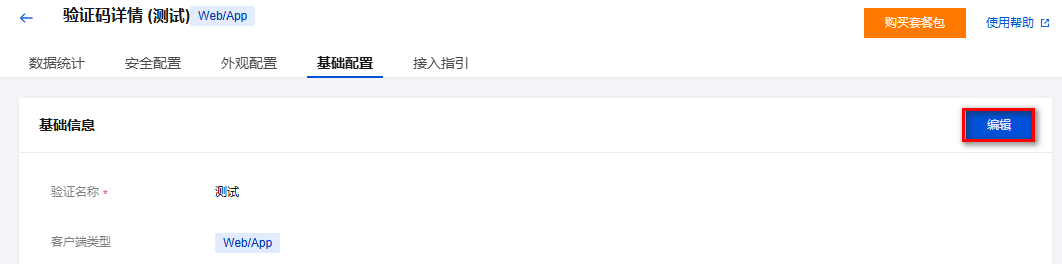
3. 在基础配置页面,单击右上角的编辑。
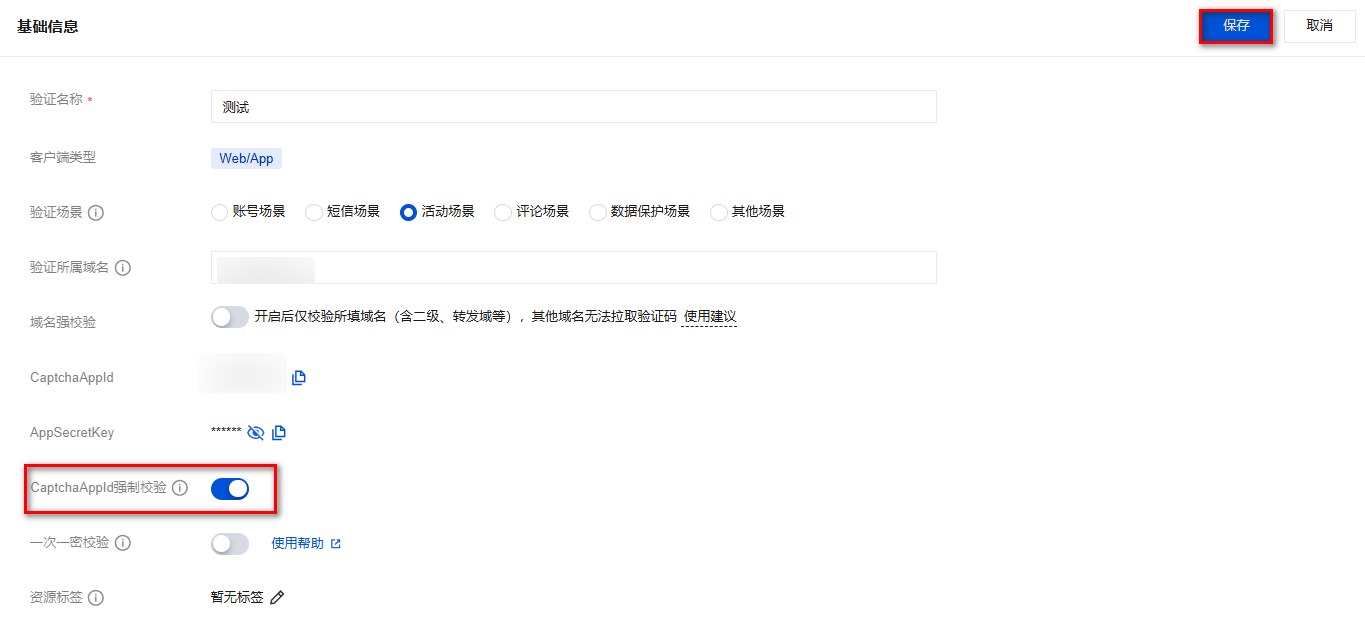
4. 单击 CaptchaAppid 强制校验的
注意:
如果当前 CaptchaAppid 正在使用过程中,请谨慎开启,建议迁移到新建的 CaptchaAppid 实现加密鉴权,避免影响当前业务。
开启 CaptchaAppid 强制校验后,前端必须传入加密符。
步骤二:核心参数说明
参数 | 说明 |
CaptchaAppid | 验证码业务唯一标识,从验证码控制台验证管理页面获取 |
AppSecretKey | 密钥,从验证码控制台验证管理页面获取,若长度<32 字节,循环填充自身至 32 字节作为加密密钥 |
aidEncryptedType | 加密方式,大小写不敏感:"cbc",为默认方式; "gcm",需显式传入 |
aidEncrypted | 加密后的字符串,前端传递给验证码的核心参数 |
aidEncryptedAad | GCM 加密模式可选参数 Aad,自定义认证数据,传递到验证码时需 Base64 编码,最长 128 字节,实际参与加密数据长度不超过约 96 字节 |
步骤三:加密流程详解
步骤1:确定加密方式与密钥
加密方式:通过 aidEncryptedType 指定,值为"cbc"或者"gcm",若不传该参数,默认用 "cbc"。
密钥处理:取控制台 AppSecretKey,若长度不足 32 字节,循环填充自身补足 32 字节,如:25 位密钥 + 补密钥头 7 位自身字符 = 32 位密钥。
步骤2:构造业务数据对象
加密明文格式:CaptchaAppid&时间戳&密文过期时间,用 & 拼接。
时间戳:当前 Unix 秒级时间戳,不可为未来时间。
过期时间:密文有效期,单位:秒,最大 86400 秒,即 24 小时。
可选参数 Aad(仅 gcm):若需传入自定义数据(如 "user:alice"),加密时需一起作为输入参与加密,后续该参数需要传递给验证码。
步骤3:分模式加密(CBC/GCM)
CBC 加密模式
IV 要求:随机生成 16 字节,即 128bit。
加密算法:AES256,模式 CBC/PKCS7Padding。
加密结果:CaptchaAppidEncrypted,即 AES 加密后的字节数组。
最终密文 aidEncrypted:Base64(IV + CaptchaAppidEncrypted),将 IV 与密文直接拼接,中间无分隔符,并 Base64 后,传递到验证码。
GCM 加密模式
IV 要求:随机生成 12 字节,即 96bit。
加密算法:AES256,模式 GCM,无需填充。
加密结果:
CaptchaAppidEncrypted,即 AES 加密后的字节数组。
tag,即 16 字节完整性认证标签。
最终密文 aidEncrypted:Base64(IV + CaptchaAppidEncrypted + tag),将 IV、密文与 tag 直接拼接,中间无分隔符,并 Base64 后,传递到验证码。
可选参数 aidEncryptedAad:Base64(Aad),若加密时使用了 Aad,需将其 Base64 编码后传递到验证码。
加密示例与代码
示例输入参数(通用)
参数 | 说明 | 示例值 |
CaptchaAppid | 验证码业务 ID | 123456789 |
curTime | 当前时间戳(秒) | 1710144972 |
expireTime | 过期时间(秒) | 最大值 86400 秒,即 24 小时 |
AppSecretKey | 原始密钥(25位) | "1234567891011121314151516" |
IV | CBC:16 字节随机数 GCM:12 字节随机数 | CBC:"0123456789012345"(示例值) GCM:"0123456789012"(示例值) |
Aad | 自定义认证数据,GCM 可选 | CBC:无 GCM:"user:alice" |
示例输出参数(通用)
参数 | 说明 | 示例值 |
aidEncrypted | 加密后的字符串: CBC: Base64(IV + CaptchaAppidEncrypted) GCM: Base64(IV + CaptchaAppidEncrypted + tag) | 例如: CBC: MDEyMzQ1Njc4OTAxMjM0NWvZ11atw+1uzYmoIyt5rAQVPyMK9ZDavskPw5hcayeT GCM: MDEyMzQ1Njc4OTAxM2Z/8bOrwpERW9Y2ck0g1fjNmXU9ENU0nom67XsjSMjSra1vAVJ2ZO3h |
aidEncryptedAad | 参与 GCM 加密使用的 Aad,需要 Base64 编码后输出,如果加密过程未使用到 Aad,则不需要输出 | 例如客户数据 Aad"user:alice",Base64 后 dXNlcjphbGljZQ== |
CBC 加密示例(Python)
#!/usr/bin/env python# -*- coding: utf-8 -*-from Crypto.Cipher import AESfrom Crypto.Util.Padding import pad, unpadimport base64import timedef encrypt(plaintext, key, iv):cipher = AES.new(key, AES.MODE_CBC, iv) # 创建一个新的 AES cipher,CBC 模式ciphertext = cipher.encrypt(pad(plaintext.encode(), AES.block_size))# 对数据进行填充,然后加密。pad(plaintext.encode(), AES.block_size) 将检查明文长度是否为 16 字节倍数,若非 16 字节倍数,将使用 PKCS7 填充方式将明文填充到 16 字节倍数。ciphertextBase64 = base64.b64encode(iv + ciphertext).decode('utf-8') # iv拼接加密后的数据,并进行 Base64 返回后进行传输。return ciphertextBase64# 加密示例AppSecretKey = b'1234567891011121314151516' #客户从控制台获取对应验证码账号下的 AppSecretKey,25 位remainder = 32 % AppSecretKey.__len__() # 计算需要补充的密钥长度key = AppSecretKey + AppSecretKey[:remainder] # 最终加密 key,补充满 32 位。Captchaappid = "123456789" # 客户自身的验证码 CaptchaAppidcurTime = 1710144972 # 获取当前的时间戳,示例暂设置成固定时间戳,客户应该设置成最新的时间戳,使用 int(time.time())expireTime = 86400 # 过期时间设置,这里暂设置成该值,客户根据自身需要设置plaintext = Captchaappid + "&" + str(curTime) + "&" + str(expireTime) # 拼接待加密的业务数据对象,CaptchaAppid &时间戳&密文过期时间iv = "0123456789012345".encode() # 随机生成 16 字节的 IV,这里暂设置成该值,客户使用时应该用随机生成的数据,使用 os.urandom(16)ciphertext = encrypt(plaintext, key, iv) # 加密print("Ciphertext (Base64):", ciphertext) # 本示例数据将输出 MDEyMzQ1Njc4OTAxMjM0NWvZ11atw+1uzYmoIyt5rAQVPyMK9ZDavskPw5hcayeT
CBC 加密示例(Java)
import javax.crypto.Cipher;import javax.crypto.spec.IvParameterSpec;import javax.crypto.spec.SecretKeySpec;import java.nio.charset.StandardCharsets;import java.util.Base64;/*** CBC 加密示例(Java)* 验证码 CaptchaAppid 加密校验 - CBC 模式*/public class CbcEncryptDemo {/*** AES CBC 加密* @param plaintext 明文* @param key 密钥(32字节)* @param iv 初始化向量(16字节)* @return Base64(IV + 密文)*/public static String encrypt(String plaintext, byte[] key, byte[] iv) throws Exception {// 创建 AES 密钥规格SecretKeySpec secretKey = new SecretKeySpec(key, "AES");// 创建 IV 参数IvParameterSpec ivSpec = new IvParameterSpec(iv);// 创建 Cipher 实例,使用 AES/CBC/PKCS5Padding(等同于 PKCS7Padding)Cipher cipher = Cipher.getInstance("AES/CBC/PKCS5Padding");cipher.init(Cipher.ENCRYPT_MODE, secretKey, ivSpec);// 加密byte[] encrypted = cipher.doFinal(plaintext.getBytes(StandardCharsets.UTF_8));// 拼接 IV + 密文byte[] ivAndCiphertext = new byte[iv.length + encrypted.length];System.arraycopy(iv, 0, ivAndCiphertext, 0, iv.length);System.arraycopy(encrypted, 0, ivAndCiphertext, iv.length, encrypted.length);// Base64 编码return Base64.getEncoder().encodeToString(ivAndCiphertext);}/*** 循环填充密钥至 32 字节* @param appSecretKey 原始密钥* @return 32 字节密钥*/public static byte[] padKey(byte[] appSecretKey) {if (appSecretKey.length >= 32) {return appSecretKey;}byte[] key = new byte[32];int srcPos = 0;for (int i = 0; i < 32; i++) {key[i] = appSecretKey[srcPos];srcPos++;if (srcPos >= appSecretKey.length) {srcPos = 0;}}return key;}public static void main(String[] args) throws Exception {// 客户从控制台获取对应验证码账号下的 AppSecretKey,25位String appSecretKeyStr = "1234567891011121314151516";byte[] appSecretKey = appSecretKeyStr.getBytes(StandardCharsets.UTF_8);// 密钥填充至 32 字节byte[] key = padKey(appSecretKey);// 业务参数String captchaAppid = "123456789";long curTime = 1710144972L; // 当前时间戳(秒)long expireTime = 86400L; // 过期时间(秒),最大 86400// 构造明文:CaptchaAppid&时间戳&过期时间String plaintext = captchaAppid + "&" + curTime + "&" + expireTime;// IV(16字节随机数,示例使用固定值,生产环境请使用安全随机数)String ivStr = "0123456789012345";byte[] iv = ivStr.getBytes(StandardCharsets.UTF_8);// 加密String ciphertext = encrypt(plaintext, key, iv);System.out.println("Plaintext: " + plaintext);System.out.println("Ciphertext (Base64): " + ciphertext);}}
GCM 加密示例(Python)
#!/usr/bin/env python# -*- coding: utf-8 -*-from Crypto.Cipher import AESfrom Crypto.Util.Padding import pad, unpadimport base64import timedef encrypt_gcm(plaintext, key, iv,Aad):cipher = AES.new(key, AES.MODE_GCM, iv) # 创建一个新的 AES cipher,GCM 模式cipher.update(Aad) #如果 aidEncryptedAad 不传,该行代码可不执行去掉ciphertext, tag = cipher.encrypt_and_digest(plaintext.encode())# 不需要对数据进行填充,加密。ciphertextBase64 = base64.b64encode(iv + ciphertext + tag).decode('utf-8') # iv,密文,tag 拼接加密后的数据,并进行 Base64 返回后进行传>输。return ciphertextBase64# 加密示例AppSecretKey = b'1234567891011121314151516' #客户从控制台获取对应验证码账号下的 AppSecretKey,25 位remainder = 32 % AppSecretKey.__len__() # 计算需要补充的密钥长度key = AppSecretKey + AppSecretKey[:remainder] # 最终加密 key,补充满 32 位。Captchaappid = "123456789" # 客户自身的验证码 CaptchaAppidcurTime = 1710144972 # 获取当前的时间戳,示例暂设置成固定时间戳,客户应该设置成最新的时间戳,使用 int(time.time())expireTime = 86400 # 过期时间设置,这里暂设置成该值,客户根据自身需要设置plaintext = Captchaappid + "&" + str(curTime) + "&" + str(expireTime) # 拼接待加密的业务数据对象,CaptchaAppid &时间戳&密文过期时间iv = "012345678901".encode() # 随机生成 12 字节的 IV,这里暂设置成该值,客户使用时应该用随机生成的数据,使用 os.urandom(12)Aad = "user:alice".encode()aidEncryptedAad = base64.b64encode(Aad).decode('utf-8')print(aidEncryptedAad) #本示例数据将输出 dXNlcjphbGljZQ==,aidEncryptedAad 可为空不传数据ciphertext = encrypt_gcm(plaintext, key, iv,Aad) # 加密print("Ciphertext (Base64):", ciphertext) # 本示例数据将输出 MDEyMzQ1Njc4OTAxM2Z/8bOrwpERW9Y2ck0g1fjNmXU9ENU0nom67XsjSMjSra1vAVJ2ZO3h
GCM 加密示例(Java)
import javax.crypto.Cipher;import javax.crypto.spec.GCMParameterSpec;import javax.crypto.spec.SecretKeySpec;import java.nio.charset.StandardCharsets;import java.util.Base64;/*** GCM 加密示例(Java)* 验证码 CaptchaAppid 加密校验 - GCM 模式*/public class GcmEncryptDemo {private static final int GCM_TAG_LENGTH = 128; // 16 字节 = 128 bit/*** AES GCM 加密* @param plaintext 明文* @param key 密钥(32字节)* @param iv 初始化向量(12字节)* @param aad 附加认证数据(可为 null)* @return Base64(IV + 密文 + tag)*/public static String encrypt(String plaintext, byte[] key, byte[] iv, byte[] aad) throws Exception {// 创建 AES 密钥规格SecretKeySpec secretKey = new SecretKeySpec(key, "AES");// 创建 GCM 参数(tag 长度 128 bit)GCMParameterSpec gcmSpec = new GCMParameterSpec(GCM_TAG_LENGTH, iv);// 创建 Cipher 实例,使用 AES/GCM/NoPaddingCipher cipher = Cipher.getInstance("AES/GCM/NoPadding");cipher.init(Cipher.ENCRYPT_MODE, secretKey, gcmSpec);// 设置 AAD(附加认证数据)if (aad != null && aad.length > 0) {cipher.updateAAD(aad);}// 加密(结果包含密文 + tag)byte[] encryptedWithTag = cipher.doFinal(plaintext.getBytes(StandardCharsets.UTF_8));// 拼接 IV + 密文 + tagbyte[] ivAndCiphertext = new byte[iv.length + encryptedWithTag.length];System.arraycopy(iv, 0, ivAndCiphertext, 0, iv.length);System.arraycopy(encryptedWithTag, 0, ivAndCiphertext, iv.length, encryptedWithTag.length);// Base64 编码return Base64.getEncoder().encodeToString(ivAndCiphertext);}/*** 循环填充密钥至 32 字节* @param appSecretKey 原始密钥* @return 32 字节密钥*/public static byte[] padKey(byte[] appSecretKey) {if (appSecretKey.length >= 32) {return appSecretKey;}byte[] key = new byte[32];int srcPos = 0;for (int i = 0; i < 32; i++) {key[i] = appSecretKey[srcPos];srcPos++;if (srcPos >= appSecretKey.length) {srcPos = 0;}}return key;}public static void main(String[] args) throws Exception {// 客户从控制台获取对应验证码账号下的 AppSecretKey,25位String appSecretKeyStr = "1234567891011121314151516";byte[] appSecretKey = appSecretKeyStr.getBytes(StandardCharsets.UTF_8);// 密钥填充至 32 字节byte[] key = padKey(appSecretKey);// 业务参数String captchaAppid = "123456789";long curTime = 1710144972L; // 当前时间戳(秒)long expireTime = 86400L; // 过期时间(秒),最大 86400// 构造明文:CaptchaAppid&时间戳&过期时间String plaintext = captchaAppid + "&" + curTime + "&" + expireTime;// IV(12字节随机数,示例使用固定值,生产环境请使用安全随机数)String ivStr = "012345678901";byte[] iv = ivStr.getBytes(StandardCharsets.UTF_8);// AAD(附加认证数据,GCM 可选参数)String aadStr = "user:alice";byte[] aad = aadStr.getBytes(StandardCharsets.UTF_8);// AAD Base64 编码(需要传递给前端)String aidEncryptedAad = Base64.getEncoder().encodeToString(aad);System.out.println("aidEncryptedAad (Base64): " + aidEncryptedAad);// 加密String ciphertext = encrypt(plaintext, key, iv, aad);System.out.println("Plaintext: " + plaintext);System.out.println("Ciphertext (Base64): " + ciphertext);}}
Running Environment
Operating System: Ubuntu 24.04.3 LTS / x86_64
Runtime Version: openjdk version "20" 2023-03-21 OpenJDK Runtime Environment Zulu20.28+85-CA (build 20+36) OpenJDK 64-Bit Server VM Zulu20.28+85-CA (build 20+36, mixed mode, sharing)
前端接入指南
核心参数说明
参数 | 类型 | 说明 | 是否必填 |
aidEncrypted | String | 加密后的字符串(CBC:Base64(IV + 密文) GCM:Base64(IV + 密文 + tag)) | 是 |
aidEncryptedType | String | 加密方式:"cbc"(默认)或 "gcm" | 否 |
aidEncryptedAad | String | 采用 GCM 模式加密时,若使用了 Aad 参数参与加密过程,则需要传入 Base64 编码后的参数,采用 CBC 模式加密则无需传入 | 否 |
CBC 方式前端代码示例(JavaScript)
const encryptAppid = async () => {/** 从后端获取加密后的 CaptchaAppid 字符串, aidEncryptedType 传入"cbc",或者为空 **/const { aidEncrypted } = await fetch('/api/encryptAppid');const { aidEncryptedType } = await fetch('/api/aidEncryptedType');/** 回调函数 */const callBack = (ret) => {console.log('ret', ret);};/** 错误回调函数 */const errorCb = (error) => {console.log('error', error);};try {/** 将获取的加密字符串传入 aidEncrypted 参数,aidEncryptedType,其中 aidEncryptedType 如果不传,默认 cbc 加密方式*/const captcha = new TencentCaptcha('123456789', callBack, {aidEncrypted: aidEncrypted,aidEncryptedType:aidEncryptedType});captcha.show();} catch (error) {errorCb(error);}};
GCM 方式前端代码示例(JavaScript)
const encryptAppid = async () => {/** 从后端获取加密后的 CaptchaAppid 字符串, aidEncryptedType 传入"gcm" */const { aidEncrypted } = await fetch('/api/encryptAppid');const { aidEncryptedType } = await fetch('/api/aidEncryptedType');/**可选字段aidEncryptedAad,加密过程中没有使用可不传。**/const { aidEncryptedAad } = await fetch('/api/aidEncryptedAad');/** 回调函数 */const callBack = (ret) => {console.log('ret', ret);};/** 错误回调函数 */const errorCb = (error) => {console.log('error', error);};try {/** 将获取的加密字符串传入 aidEncrypted 参数,aidEncryptedType,aidEncryptedAad,aidEncryptedAad为gcm 方式的加密可选参数,加密过程中使用到必传,否则不传或为空*/const captcha = new TencentCaptcha('123456789', callBack, {aidEncrypted: aidEncrypted,aidEncryptedType:aidEncryptedType,aidEncryptedAad: aidEncryptedAad});captcha.show();} catch (error) {errorCb(error);}};
注意:
IV 随机性:生产环境中,IV 必须通过安全随机数生成(如 Python 的 os.urandom() 或 JavaScript 的 crypto.getRandomValues()),禁止使用固定值。
一次一密开启后 IV 不可重复性:控制台开启一次一密后,每个加密串中的 IV 仅能使用一次,已使用过的 IV 重复使用时将被服务端判定为重放攻击并直接拒绝。
时间戳有效性:curTime 必须为当前或过去的时间戳,未来时间戳将导致校验失败。
密钥安全:AppSecretKey 必须严格保密,禁止在前端存储或传输。
GCM 模式 Aad:若加密时使用 Aad,前端必须提供 Base64 编码的 aidEncryptedAad,否则解密将失败。


