Subscription Message Center
CFW defaults to non-subscription push method. The notified account refers to the account configuration in notification settings. CFW will automatically identify accounts that have logged in to the CFW console and add them to the optional list.
1. 1. Log in to the CFW console. In the left sidebar, click notification settings.
2. On the Notification Settings Page, configure push notifications for the firewall. If you need to adjust to subscription-based push or enable the configuration of the message center, click Message Center Subscription Settings and toggle the switch.

Note:
After the message center is enabled, the alarm objects of all alarm types in the notification settings will become invalid. For details, see the settings of Message Center.
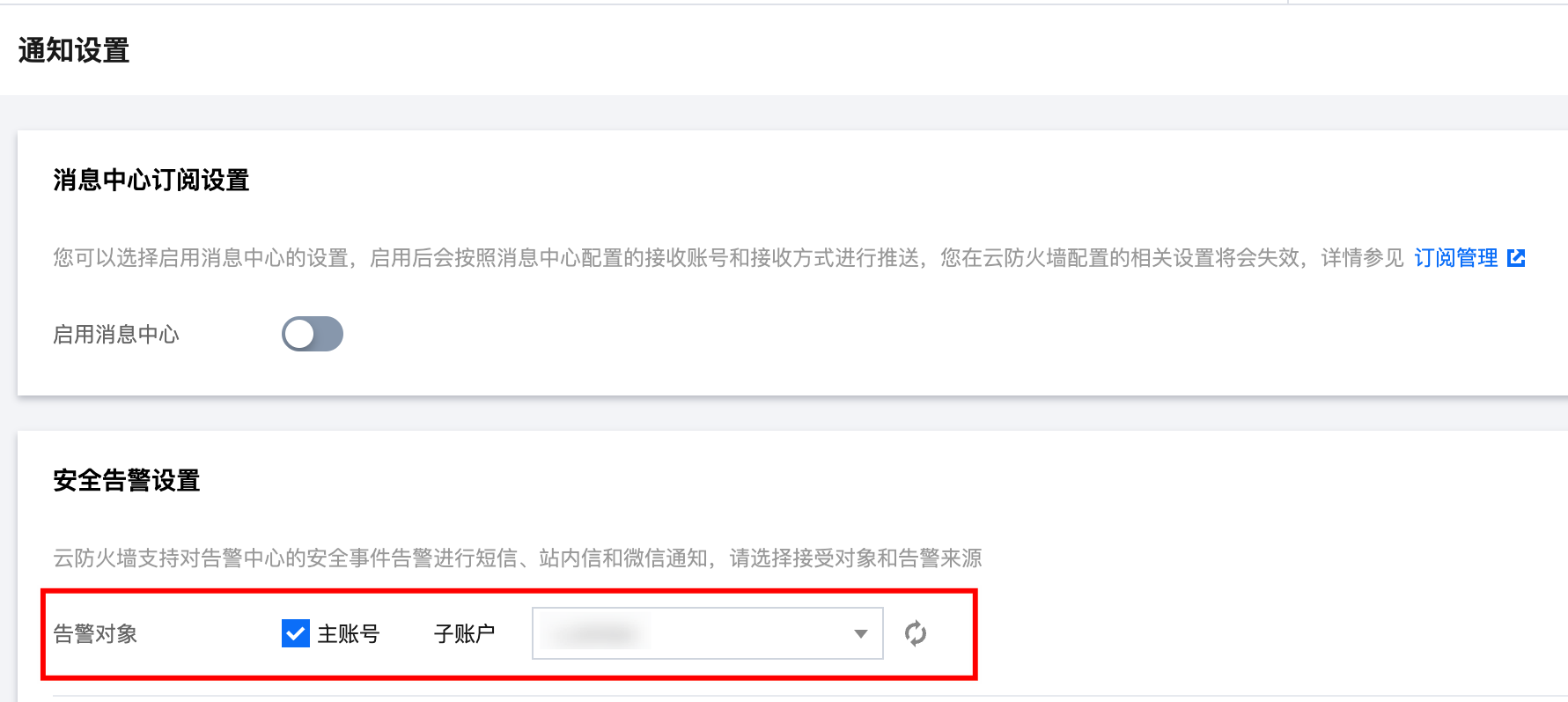
Configuring Notification Settings
Notification Type | Notification Content | Supported Configuration Items |
Security alarm notification | CFW supports sending SMS, Message Center notifications, and WeChat notifications for security event alerts in the alert center. On the console, you can configure the configuration object and alarm source. | Supports configuration of WeChat Service Account Alerts for Tencent Cloud security. Support triggering notifications based on alarm type |
Bandwidth Alarm Notification | We offer you a three-tier bandwidth alert. When the firewall bandwidth reaches the threshold percentage you set, it will trigger alarm notifications via SMS, Message Center, and WeChat to the selected account. | Supports distinguishing different cascaded alarms based on firewall type |
Storage Alarm Notification | We offer you a two-tier storage alarm. When the firewall storage reaches the threshold percentage you set, it will trigger alarm notifications via SMS, Message Center, and WeChat to the selected account. | Configurable cascaded alerts |
Disaster recovery alarm notification | When your NAT boundary firewall or VPC firewall triggers BYPASS, alarm notifications via SMS, Message Center, and email will be sent to the selected account. | - |
Newly-added exposure surface alert notification | When newly-selected exposure surface types are detected in your account, alarm notifications via SMS, Message Center, and email will be triggered for the selected account. | Support triggering notifications by exposure surface type. |
Enterprise security group change notification | When changes are detected in the enterprise security group of your account, we will push relevant notifications to you regardless of whether automatic distribution is enabled. | - |
Automation task exception notification | If exceptions in your automation task are detected, we will push relevant notifications to you. | - |
System Log Push Notifications | When you generate new system logs, we will notify you as per your settings. | Support triggering notifications by system log event type. |
Universal Setting
Setting Item Name | Setting Item Description | Must-Knows |
Cloud IP Blocking Setting | When CFW blocks an IP, it can automatically deliver corresponding enterprise security group rules to the DMZ zone based on malicious IP type. Do not manually modify the corresponding parameter template and enterprise security group rules. | The Internet Bypass Firewall is unable to block cloud internal IPs. Serial and NAT firewalls support this feature. It is recommended to prioritize their use. |
Log storage settings | Enterprise edition and above users can modify the log storage type and storage duration, and can only modify it once every 2 months. We will automatically delete your expired logs for you. You can also manually clear the logs, but note that each user only has 4 chances per calendar month. | Existing logs will not be affected after log settings are modified. Only new logs created after the edit will be affected. For example, if you change the log storage duration from 180 days to 90 days, existing logs will still be stored for 180 days, while new logs will be stored for 90 days. |
Access Control Rule Settings | In the access control rule list, set the enable status of the rule each time you add, insert, or import a control rule. | - |
Automatic Reconstruction Settings of Honeypot | In a network honeypot, if a honeypot breach occurs, you can choose whether to automatically reconstruct the honeypot and set the interval time. | - |
Tag Settings | CFW has no resource attributes. Adding tags is only supported for billing resources of the account. You can modify the tag value here. | - |