The content of this page has been automatically translated by AI. If you encounter any problems while reading, you can view the corresponding content in Chinese.

Add TCHouse-P cluster allowlist

Last updated: 2024-11-25 14:19:47

To use and access the TCHouse-P cluster in the project, you need to add the following Tencent Cloud WeData access IP addresses to the TCHouse-P cluster's allowed allowlist.
118.89.220.0/24, 139.199.116.0/24, 140.143.68.0/24, 152.136.131.0/24, 81.70.150.0/24, 81.70.161.0/24, 81.70.195.0/24, 81.70.198.0/24, 82.156.22.0/24, 82.156.221.0/24, 82.156.23.0/24, 82.156.24.0/24, 82.156.27.0/24, 82.156.82.0/24, 82.156.84.0/24, 82.157.119.0/24

Operation step

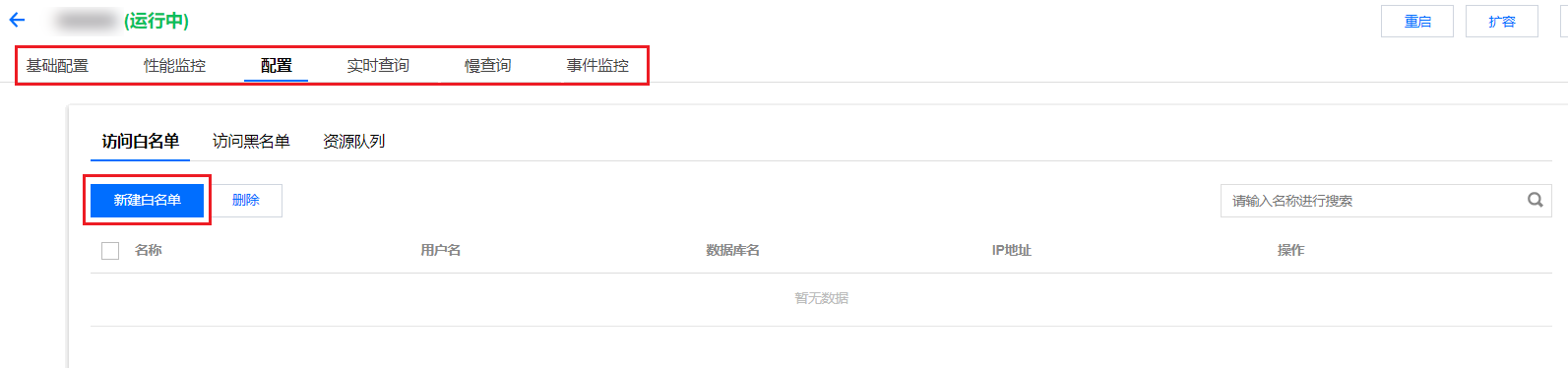
1. Log in to Tencent Cloud Data Warehouse TCHouse-P Console, select the target cluster in the Cluster List and click Management.


2. Select Configuration, and click Create Allowlist.


3. In the pop-up, configure the allowlist name, users, and database information.


Note
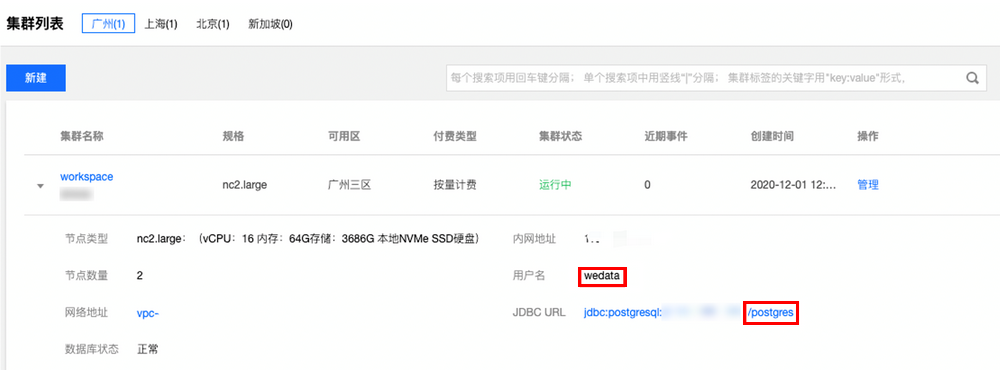
Tencent Cloud's WeData uses the TCHouse-P cluster's default database to perform connectivity tests. Please provide the default username and grant allowlist access to at least the default database, postgresql. If you also need to use other databases in the cluster, grant allowlist access to those databases as well. To check the default username and database information:


Example: If you need to bind a TCHouse-P cluster named "workspace" (default cluster username: wedata, default database name: postgres) in your project, and use the database "database1" in that cluster for data development, then you need to use the username "wedata" to grant allowlist access to both the default database "postgres" and "database1".