功能简介
EdgeOne 默认全局开启 Gzip 或 Brotli 压缩,当客户端请求头中携带有
Accept-Encoding:br,gzip 或者 Accept-Encoding:br 或者 Accept-Encoding:gzip时,节点将根据文件的 Content-Type 来进行智能压缩,压缩后文件可以有效地减少资源的大小,加快内容的传输速度。开启智能压缩可以帮助您:1. 提高用户体验:通过减少资源大小,可以显著提高网页加载速度,从而提供更好的用户体验。特别是对于拥有大量 CSS、JavaScript 等资源的网站,启用压缩可以大幅度减少加载时间。
2. 节省流量:压缩后的资源会占用更少的网络流量,这将有助于降低运营成本。
操作步骤
说明:
默认情况下,您无需修改该配置。如果在某些场景中,例如:当前客户端会对文件进行 MD5 校验或者当前客户端不支持解析指定压缩文件,您希望当前站点只使用 Brotli 压缩或者 Gzip 压缩,或者不进行压缩,可以参考以下步骤操作。
场景一:站点所有域名开启/关闭智能压缩
若您需要对整个接入站点开启/关闭智能压缩,可参考以下步骤:
1. 登录 边缘安全加速平台 EO 控制台,在左侧菜单栏中,进入服务总览,单击网站安全加速内需配置的站点。
2. 在站点详情页面,单击站点加速,进入站点全局配置页面,在右侧导航栏中,单击文件优化。
3. 找到智能压缩配置卡片,默认为全部开启状态,单击开关可配置开启/关闭。

场景二:针对指定域名开启/关闭智能压缩
若您只需要针对指定域名开启/关闭智能压缩,可参考以下步骤:
1. 登录 边缘安全加速平台 EO 控制台,在左侧菜单栏中,进入服务总览,单击网站安全加速内需配置的站点。
2. 在站点详情页面,单击站点加速,进入站点全局配置页面,单击规则引擎 Tab 页。
3. 在规则引擎页面,单击创建规则,选择新增空白规则。
4. 在规则编辑页面,选择 Host 匹配类型以匹配指定域名的请求。
5. 单击操作 > 选择框,在弹出的操作列表内,选择操作为智能压缩 ,单击开关开启/关闭 Gzip 或 Brotli 压缩 。

6. 单击保存并发布,即可完成该规则配置。
相关参考
智能压缩生效规则
1. 智能压缩支持的文件大小(Content-Length)范围:256B - 30MB。
2. 当源站响应为 Transfer-Encoding: chunked 时,由于数据以流式分块方式传输,EdgeOne 节点在接收完整响应前无法获知文件的总长度。受限于“256B - 30MB”的文件大小判断规则及性能考量,节点不会在同步传输过程中进行实时压缩,后续请求可以基于缓存的资源进行压缩。
3. 智能压缩为同步压缩,在回源获取文件同时压缩文件,首次请求压缩文件时节点可直接响应压缩后的文件。
4. 智能压缩默认根据
Content-Type 压缩,支持以下类型:text/htmltext/xmltext/plaintext/csstext/javascriptapplication/jsonapplication/javascriptapplication/x-javascriptapplication/rss+xmlapplication/xmltextimage/svg+xmlimage/tifftext/richtexttext/x-scripttext/x-componenttext/x-java-sourcetext/x-markdowntext/jsimage/x-iconimage/vnd.microsoft.iconapplication/x-perlapplication/x-httpd-cgiapplication/xmlapplication/xml+rssapplication/vnd.api+jsonapplication/x-protobufmultipart/bagmultipart/mixedapplication/xhtml+xmlfont/ttffont/otffont/x-woffapplication/vnd.ms-fontobjectapplication/ttfapplication/x-ttfapplication/otfapplication/x-otfapplication/truetypeapplication/opentypeapplication/x-opentypeapplication/font-woffapplication/eotapplication/fontapplication/font-sfntapplication/wasmapplication/javascript-binastapplication/manifest+jsonapplication/ld+json
5. 如果您当前同时开启 Gzip 压缩和 Brotli 压缩,且客户端请求头
Accept-Encoding 同时携带有 br 和 gzip 时:如果节点内已有缓存内容,则按照如下规则响应:
若节点同时有 Brotli 和 gzip 压缩的缓存内容,则优先响应 Brotli 压缩。
若节点仅有 Brotli 压缩的缓存内容,则优先响应 Brotli 压缩。
若节点仅有 gzip 压缩的缓存内容,则优先响应 Gzip 压缩。
如果节点内未有缓存内容,则优先响应 Brotli 压缩。
6. 仅开启 Brotli 压缩时,若请求压缩头为 gzip,则压缩不会生效,将返回原始资源;仅开启 Gzip 压缩时,若请求压缩头为 br,则压缩不会生效,将返回原始资源。
7. 若源站开启了压缩功能,且服务端携带响应头:
Content-Encoding,则智能压缩功能将不再生效。8. 节点根据源站响应头中的 Content-Encoding 判断并缓存对应的压缩版本。因此,建议源站严格按照请求头 Accept-Encoding 返回相应编码。若请求未携带 Accept-Encoding,但源站仍返回了 gzip 内容,则该内容会被节点缓存为 gzip 版本。此后,对于同样不带 Accept-Encoding 的请求,由于节点中不存在非压缩版本的缓存,只能透传回源站处理。针对该场景,建议规范源站的压缩行为:当请求不含 Accept-Encoding 时,返回未压缩内容;或者关闭源站压缩,改由 EdgeOne 侧启用智能压缩。
请求示例
未开启智能压缩
首次请求 gzip 压缩文件,未命中节点缓存,回源获取原文件并缓存至节点,EdgeOne 响应原文件:
开启智能压缩
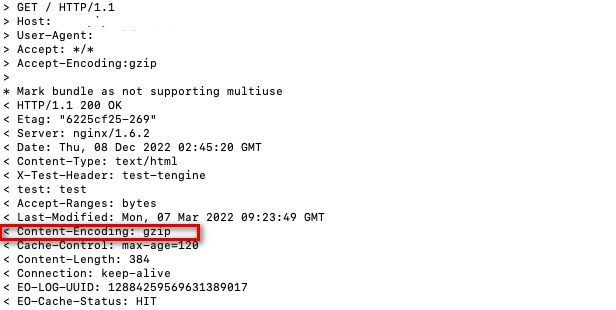
首次请求 gzip 压缩文件,未命中节点缓存,回源获取文件,节点同步压缩并缓存压缩后的文件,EdgeOne 响应压缩文件:
智能压缩支持 chunk 流式压缩,若请求未命中节点缓存,回源获取文件后会以 chunk 的方式响应。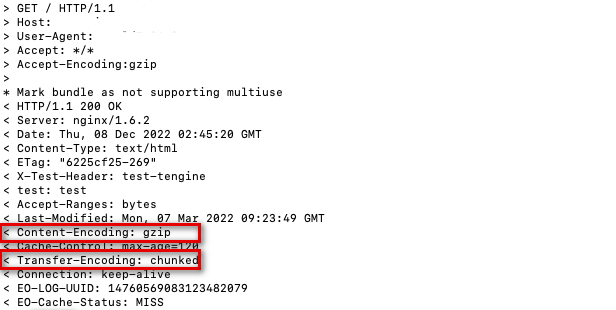
再次请求,命中节点 gzip 压缩文件的缓存,节点直接响应压缩文件。