Cache prefresh

Last updated: 2023-09-07 15:05:01

Overview

Upon expiration of cached resources within an EdgeOne node, EdgeOne will fetch the latest resource files from the origin server upon receiving corresponding client requests, which may lead to a significant increase in origin server traffic during peak times. The cache pre-refresh capability allows for verification of cache resource validity prior to cache expiration, eliminating the need to wait until after expiration for verification. This aids in maintaining resource timeliness and faster response to requests. The cache pre-refresh time can be configured as a percentage of the file cache TTL.

Use Cases

As the cache pre-refresh feature allows for early verification of resource validity from the origin server, it is recommended for use in scenarios where frequent content updates are required or where high user experience standards are demanded:
High Real-Time Requirements: For rapidly updating content such as news or event pages, clients wish for users to access the most recent resources upon request. By enabling the cache pre-refresh feature, nodes verify and update the cache from the origin server prior to resource expiration, ensuring users access more recent resources, thereby eliminating additional wait time during user requests and enhancing user experience.
Reducing Origin Server Load: For some hot resources, expiration may trigger a large number of requests to the origin server. By enabling the cache pre-refresh feature, these requests can be made in advance, reducing the concentration of a large number of requests to the origin server upon resource expiration, thereby alleviating the load on the origin server.

Instructions

Scenario 1: Configuring Cache Pre-Refresh for All Domain Names of a Site

To configure the same cache pre-refresh for all domain names used to access a site, or as a fallback configuration at the site level, refer to the following steps:
1. Log in to the EdgeOne console. In the left-hand menu, click on Site List. Within the site list, click on the site that needs to be configured.
2. On the site details page, select Site Acceleration > Cache Configuration.
3. Within the cache pre-refresh card, click to enable Global Site Settings, and in the pop-up confirmation box, enter the percentage value for the pre-refresh time.

Configuration Status: By default, it is disabled. You can enable it by clicking on the slider.
Prefresh Interval: A percentage of the node cache TTL. Enter an integer from 1 to 99. Default value: 90%.
4. Click Save to deliver the configuration.

Scenario 2: Configuring Cache Pre-Refresh for Specified Domain Names, Paths, or File Extensions

If you need to configure different cache pre-refresh settings for different domain names, paths, or file extensions, for example, setting an earlier pre-refresh time - 60% for the domain name www.example.com under the example.com site, you can refer to the following steps:
1. Log in to the EdgeOne console. In the left-hand menu, click on Site List. Within the site list, click on the site that needs to be configured.
2. On the site details page, click Rule Engine.
3. On the rule engine management page, click Create rule to access the new rule editing page. On the rule editing page, select Host as the matching type and configure it as www.example.com.
4. Click Action, in the pop-up operation list, select Cache Prefresh and set it to 60% of TTL.
5. The complete configuration is as shown. Click Save and Publish to finalize the rule configuration.


Appendix: Functional Principle


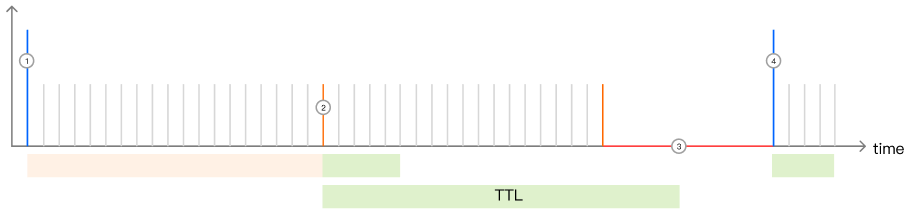
Suppose a specific image test.jpg has a node cache TTL of 10 seconds, and the cache pre-refresh time is 80% of the TTL (i.e., 8 seconds), then:
1. Upon initial receipt of a client request, if the current node has not cached the file, it will fetch the resource from the origin server and cache it within the node, with a cache TTL of 10 seconds. If another client request is received within 0-7 seconds, the node will directly provide the resource from the cache, responding normally to the client request;
2. When the cached test.jpg within the node reaches the pre-refresh time, between the 8th and 10th second, if a client request is received, the node will continue to respond to the client request as usual, but will also asynchronously verify the validity of the cached resource from the origin server.
If the resource is valid, the cache TTL of the resource on the node is updated and reset to 10 seconds;
Should the resource become invalid, the latest valid resource will be retrieved from the origin server to the node, and the node cache TTL will be reset to 10 seconds;
3. If there are no client requests beyond the file's node cache TTL, the resource will expire on the node after the cache TTL time has elapsed.
4. Upon receiving the next client request, the node will initiate a request to the origin server to verify the validity of the resource. If a file update is detected, the latest file will be fetched; otherwise, the file will be re-cached and the cache refresh time will be reset to 10 seconds.