Spot Instance

Last updated: 2024-06-02 15:49:41

What is a spot instance?

Spot instances are a billing mode for cloud server CVMs, characterized by discounted pricing and a system interruption mechanism. You can purchase instances at a discount, but the system may automatically reclaim these discounted instances. Once you purchase and obtain a spot instance, its usage is virtually identical to that of a pay-as-you-go CVM instance, including console operations, remote login, service deployment, and VPC association.

Special policies for the current stage

System-initiated Interruption (Inventory Fluctuation): At the current stage, the system will not interrupt due to market price reasons, but only due to insufficient spot instance resource inventory. When the inventory is insufficient, the system will randomly reclaim allocated spot instances, and instance data will not be retained.
Available in All Regions: Spot instances have been launched in most Tencent Cloud regions, supporting instance types in sync with the pay-as-you-go billing mode. For the latest regions and instance types, please refer to Spot Instances - Supported Regions and Types.

Product Features

Cost-effectiveness


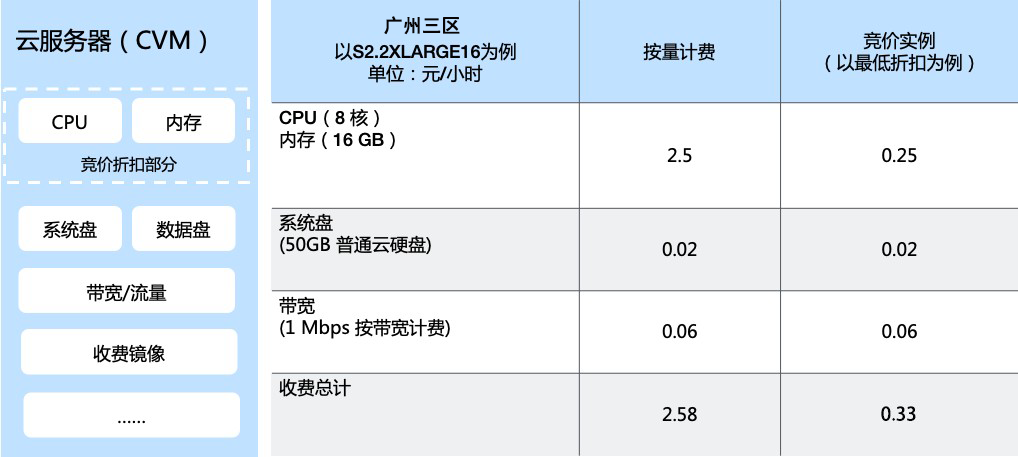
Spot instances are sold at a discount of up to 95% off the prices of pay-as-you-go instances.
Discount Range: The price of spot instances is based on the pay-as-you-go instances with the same specifications, and is sold at a discount ranging from 5% to the original price.
Discounted Components: The discount only applies to the CPU and memory portions of the cloud server. Other components, such as system disks, data disks, bandwidth, and paid images, are not affected by the spot discount.
Price Fluctuation: The discount rate remains stable over a period of time, but when large-scale purchasing occurs in an availability zone, the price may fluctuate.

System interruption mechanism


Unlike pay-as-you-go instances which can only be released by users, spot instances may be interrupted by the system due to price or resource availability reasons.
System-initiated Interruption (Inventory Fluctuation): At the current stage, the system will not interrupt due to market price reasons, but only due to insufficient spot instance resource inventory. When the inventory is insufficient, the system will randomly reclaim allocated spot instances, and instance data will not be retained.

Non-applicable scenarios

As spot instances may be interrupted, their lifecycle is not under your control. Therefore, it is not recommended to run services with high stability requirement on a spot instance. For example:
Database services
Online and website services without load balancers
Core control nodes in a distributed architecture
Prolonged big data computing job lasting over 10 hours

Applicable scenarios and industries

Scenarios

Big data computing
Online and website services with load balancers
Web crawler service
Other computing scenarios with fine granularity or support for checkpoint restart

Applicable Industries

Gene sequencing and analysis
Drug crystal form analysis
Video transcoding and rendering
Financial and transaction data analysis
Image and multimedia processing
Science calculations, such as in geography and hydromechanics

Restrictions

Quota Limits: Unlike the number of cloud servers, the quota limit for spot instances is based on the total number of vCPU cores for all spot instances owned by a user in an availability zone. At this stage, each account can have up to 50 vCPU cores in total for spot instances in each availability zone. To increase the quota, please submit a ticket.
Operation restriction 1: You cannot upgrade and degrade the configuration of spot instances.
Operation restriction 2: Spot instances cannot be converted to monthly subscriptions.
Operation restriction 3: Spot instances do not support the "No Charge when Shut Down" feature.
Operation restriction 4: System reinstallation is not supported for spot instances.
Operation restriction 5: You cannot expand the system disks and data disks of spot instances.

Best practices

Splitting tasks

Split a prolonged task into fine-grained subtasks for lower possibility of interruption.
Utilize big data suites with a natural partitioning mindset, similar to EMR.

Using load balancers to ensure the stability of online and website services

Use load balancers, such as CLB, at the access layer.
Use a combination of some pay-as-you-go instances and many spot instances for backend resources.
Monitor the interruptions of spot instances and remove instances that are about to be interrupted from the CLB.

Using a computing scheduling mode that supports checkpoint restart

Store intermediate computing results on permanent storage products such as COS, CFS, and NAS.
Be aware of the instance metadata to monitor which instances are about to be interrupted and save the computing results within the retention period of 2 minutes.
Upon recreating a spot instance, continue the previous computation.