CLB 支持实例维度个性化配置功能,允许用户设置单 CLB 实例的配置参数,如 client_max_body_size,ssl_protocols 等,满足您的个性化配置需求。
说明:
个性化配置的个数限制为每个地域200条。
当前一个实例仅允许绑定一个个性化配置,一个个性化配置可以绑定多个实例。
个性化配置仅针对负载均衡(原“应用型负载均衡”)的七层 HTTP/HTTPS 监听器生效。
CLB 个性化配置参数说明
当前 CLB 的个性化配置支持如下字段:
配置字段 | 默认值/建议值 | 参数范围 | 说明 |
ssl_protocols | 默认值: TLSv1、TLSv1.1、TLSv1.2 建议值: TLSv1.2、TLSv1.3 | TLSv1 TLSv1.1 TLSv1.2 TLSv1.3 | 使用的 TLS 协议版本。TLSv1、TLSv1.1协议已经较为不安全,强烈建议您按照建议值进行配置和绑定 CLB 实例对象。 |
ssl_ciphers | 加密套件。 | ||
client_header_timeout | 60s | [30-120]s | 获取到 Client 请求头部的超时时间,超时返回408。 |
client_header_buffer_size | 4k | [1-256]k | 存放 Client 请求头部的默认 Buffer 大小。 |
client_body_timeout | 60s | [30-120]s | 获取 Client 请求 Body 的超时时间,不是获取整个 Body 的持续时间,而是指空闲一段时间没有传输数据的超时时间,超时返回408。 |
client_max_body_size | 60M | [1-10240]M | 客户端请求 body 最大的大小。 默认配置范围为1M-256M,直接配置即可。 最大支持10240M,即10G。当 client_max_body_size 的配置范围大于256M 时, 必须设置 proxy_request_buffering 的值为 off。 |
keepalive_timeout | 75s | [0-900]s | |
add_header | 用户自定义添加 | - | 向客户端返回特定的头部字段,格式为 add_header xxx yyy。例如针对让浏览器强制使用 HTTPS 协议,从而避免了通过 HTTP 访问网站时的安全风险。 add_header Strict-Transport-Security "max-age=86400; includeSubdomains";也可以利用 add_header 达成 CORS 的能力: add_header Access-Control-Allow-Origin "*":允许所有域访问资源。如果您只想允许特定域访问,可以将 * 替换为具体的域名,例如 https://example.com。add_header Access-Control-Allow-Methods "GET, POST, OPTIONS, DELETE, PUT":指定允许的 HTTP 方法。add_header Access-Control-Allow-Headers "Origin, X-Requested-With, Content-Type, Accept, Authorization":指定允许的请求头。 |
more_set_headers | 用户自定义添加 | - | 向客户端返回特定的头部字段,格式为 more_set_headers "A:B"。 |
proxy_connect_timeout | 4s | [1-120]s | upstream 后端连接超时时间。 |
proxy_read_timeout | 60s | [30-3600]s | 读取 upstream 后端响应超时时间。 |
proxy_send_timeout | 60s | [30-3600]s | 向 upstream 后端发送请求的超时时间。 |
server_tokens | off | on,off | on 表示显示版本信息。 off 表示隐藏版本信息。 |
keepalive_requests | 100 | [1-10000] | Client-Server 长连接上最多能发送的请求数量。 |
proxy_buffer_size | 16k | [1-32]k | Server 响应头的大小,默认为 proxy_buffer 中设置的单个缓冲区大小,使用 proxy_buffer_size 时,必须同时设置 proxy_buffers。 |
proxy_buffers | 4 16k | [3-8] [4-16]k | 缓冲区数量和缓冲区大小。 |
proxy_request_buffering | off | on,off | on 表示缓存客户端请求体:CLB 会缓存请求,全部接收完成后再分块转发给后端 CVM。 off 表示不缓存客户端请求体:CLB 收到请求后,立即转发给后端 CVM,此时会导致后端 CVM 有一定性能压力。 |
proxy_set_header | X-Real-Port $remote_port | X-Real-Port $remote_port X-clb-lbid $lbid Stgw-request-id $stgw_request_id X-Forwarded-Port $vport X-Method $request_method X-Uri $uri X-Args $args | 转发给后端服务器添加的请求 header 头 X-Real-Port $remote_port 表示客户端端口。 X-clb-lbid $lbid 表示 CLB 的 LBID,是 CLB 实例的标识。 Stgw-request-id $stgw_request_id 表示请求 ID(CLB 内部使用)。 X-Forwarded-Port 表示 CLB 监听器的端口。 X-Method 表示客户端请求方法。 X-Uri 表示客户端请求路径 URI。 X-Args $args 表示客户端请求中的参数。 |
send_timeout | 60s | [1-3600]s | 服务端向客户端传输数据的超时时间,是连续两次发送数据的间隔时间,非整个请求传输时间。 |
ssl_verify_depth | 5 | [1,10] | 设置客户端证书链中的验证深度。 |
proxy_redirect | http:// https:// | http:// https:// | 当上游服务器返回的响应是重定向或刷新请求(如 HTTP 响应码是301或者302)时,proxy_redirect 重设 HTTP 头部的 Location 或 Refresh 字段中的 http 为 https,实现安全跳转。 |
ssl_early_data | off | on,off | 启用或禁止 TLS 1.3 0-RTT。仅当 ssl_protocols 字段取值包含 TLSv1.3 时,开启 ssl_early_data 才会生效。开启 ssl_early_data 后,有重放攻击的风险,请谨慎开启。 |
http2_max_field_size | 4k | [1-16]k | 限制 HPACK 压缩的请求头字段的最大大小( Size )。 |
proxy_intercept_errors | off | on,off | 是否开启代理 error_page。 配置 error_page 必须提前设置 proxy_intercept_errors 为 on。 |
error_page | - | error_page code [ = [response]] uri | 当发生特定错误码(Code)的时候,能够显示一个预定义的 URI,默认状态码(Response)为302。URI 必须是以 / 开头的路径。配置 error_page 必须提前设置 proxy_intercept_errors 为 on。 |
proxy_ignore_client_abort | off | on,off | 当客户端不等待响应结果主动中断与 CLB 的连接时,配置 CLB 与后端服务器的连接是否中断。 |
l7_toa | off | on,off | TOA 功能开关。开启 toa 功能后,默认将 TOA 中的客户端源 IP 和客户端源端口,分别添加在 $remote_addr 和 $remote_port 中。即 X-Forwarded-For 和 X-Real-IP 中已经透传了 TOA 中的 IP 信息。 注意:此参数仅支持 IPv4 CLB 实例配置。 |
l7_toa_proxy_transparent | off | on,off | 该配置关闭时,CLB 跟后端 RS 新建连接时,默认将收到的四元组的源 IP 地址作为客户端源 IP 封包传给后端。 该配置打开时,代表将 TOA 中的客户端源 IP 封包传给后端 RS。如果开启了长连接,则统一使用100.127.0.0/16网段内的 IP。 注意:此参数仅支持 IPv4 CLB 实例配置。 |
说明:
其中,proxy_buffer_size 和 proxy_buffers 配置的值需要满足约束条件:2 * max(proxy_buffer_size, proxy_buffers.size) ≤(proxy_buffers.num - 1)* proxy_buffers.size。例如,配置 proxy_buffer_size 为 24k,proxy_buffers 为 8 8k,则2 * 24k = 48k,(8 - 1)* 8k = 56k,此时 48k ≤ 56k,因此配置不会报错,否则报错。
以下参数已由负载均衡器默认下发,故不允许将头字段名称设置为以下字段(不区分大小写):X-Stgw-Time、Host、X-Client-Proto、X-Forwarded-Proto、X-Client-Proto-Ver、X-Client-Spdy、X-Real-IP、X-Forwarded-For、Upgrade、Connection。
ssl_ciphers 配置说明
配置 ssl_ciphers 加密套件时,格式需同 OpenSSL 使用的格式保持一致。算法列表是一个或多个
<cipher strings>,多个算法间使用“:”隔开,“!”表示不启用该算法,“+”表示将该算法排到最后一位。默认强制禁用的加密算法为:
!aNULL:!eNULL:!EXPORT:!DES:!RC4:!MD5:!PSK:!DHE。
默认值
:ECDHE-RSA-AES128-GCM-SHA256:ECDHE-ECDSA-AES128-GCM-SHA256:ECDHE-RSA-AES256-GCM-SHA384:ECDHE-ECDSA-AES256-GCM-SHA384:ECDHE-RSA-CHACHA20-POLY1305:kEDH+AESGCM:ECDHE-RSA-AES128-SHA256:ECDHE-ECDSA-AES128-SHA256:ECDHE-RSA-AES128-SHA:ECDHE-ECDSA-AES128-SHA:ECDHE-RSA-AES256-SHA384:ECDHE-ECDSA-AES256-SHA384:ECDHE-RSA-AES256-SHA:ECDHE-ECDSA-AES256-SHA:AES128-GCM-SHA256:AES256-GCM-SHA384:AES128:AES256:AES:HIGH:!aNULL:!eNULL:!EXPORT:!DES:!RC4:!MD5:!PSK:!DHE:3DES;
参数范围
:ECDHE-RSA-AES128-GCM-SHA256:ECDHE-ECDSA-AES128-GCM-SHA256:ECDHE-RSA-AES256-GCM-SHA384:ECDHE-ECDSA-AES256-GCM-SHA384:ECDHE-RSA-CHACHA20-POLY1305:kEDH+AESGCM:ECDHE-RSA-AES128-SHA256:ECDHE-ECDSA-AES128-SHA256:ECDHE-RSA-AES128-SHA:ECDHE-ECDSA-AES128-SHA:ECDHE-RSA-AES256-SHA384:ECDHE-ECDSA-AES256-SHA384:ECDHE-RSA-AES256-SHA:ECDHE-ECDSA-AES256-SHA:ECDH-ECDSA-AES128-SHA256:ECDH-RSA-AES256-SHA:ECDH-ECDSA-AES256-SHA:SRP-DSS-AES-256-CBC-SHA:SRP-AES-128-CBC-SHA:ECDH-RSA-AES128-SHA256:DH-RSA-AES128-SHA256:DH-RSA-CAMELLIA128-SHA:DH-DSS-AES256-GCM-SHA384:DH-RSA-AES256-SHA256:AES256-SHA256:SEED-SHA:CAMELLIA256-SHA:ECDH-RSA-AES256-SHA384:ECDH-ECDSA-AES128-GCM-SHA256:DH-RSA-AES128-SHA:DH-RSA-AES128-GCM-SHA256:DH-DSS-AES128-SHA:ECDH-RSA-AES128-SHA:DH-DSS-CAMELLIA256-SHA:SRP-AES-256-CBC-SHA:DH-DSS-AES128-SHA256:SRP-RSA-AES-256-CBC-SHA:ECDH-ECDSA-AES256-GCM-SHA384:ECDH-RSA-AES256-GCM-SHA384:DH-DSS-AES256-SHA256:ECDH-ECDSA-AES256-SHA384:AES128-SHA:DH-DSS-AES128-GCM-SHA256:AES128-SHA256:DH-RSA-SEED-SHA:ECDH-ECDSA-AES128-SHA:IDEA-CBC-SHA:AES128-GCM-SHA256:DH-RSA-CAMELLIA256-SHA:CAMELLIA128-SHA:DH-RSA-AES256-GCM-SHA384:SRP-RSA-AES-128-CBC-SHA:SRP-DSS-AES-128-CBC-SHA:ECDH-RSA-AES128-GCM-SHA256:DH-DSS-CAMELLIA128-SHA:DH-DSS-SEED-SHA:AES256-SHA:DH-RSA-AES256-SHA:kEDH+AESGCM:AES256-GCM-SHA384:DH-DSS-AES256-SHA:HIGH:AES128:AES256:AES:!aNULL:!eNULL:!EXPORT:!DES:!RC4:!MD5:!PSK:!DHE
CLB 个性化配置示例
1. 登录 负载均衡控制台,在左侧导航栏单击个性化配置。
2. 在个性化配置页面顶部选择地域,单击新建。
3. 在新建个性化配置页面,填写配置名和代码配置项,代码配置项以
;结尾。配置完成后,单击确认。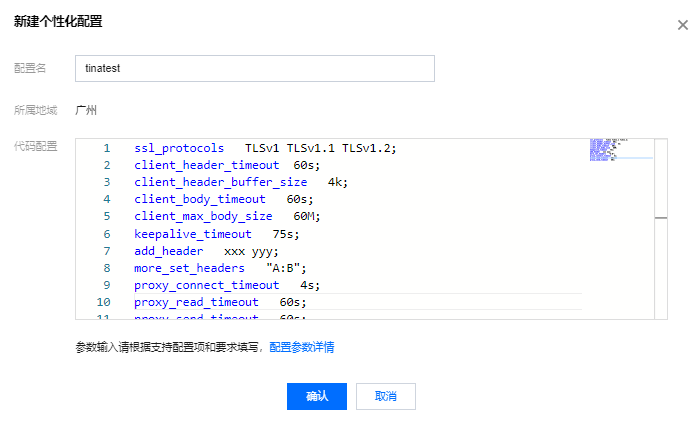
4. 返回个性化配置页面,在右侧操作栏下单击绑定。
5. 在弹出的绑定对话框中选择需绑定的负载均衡实例,单击确定。
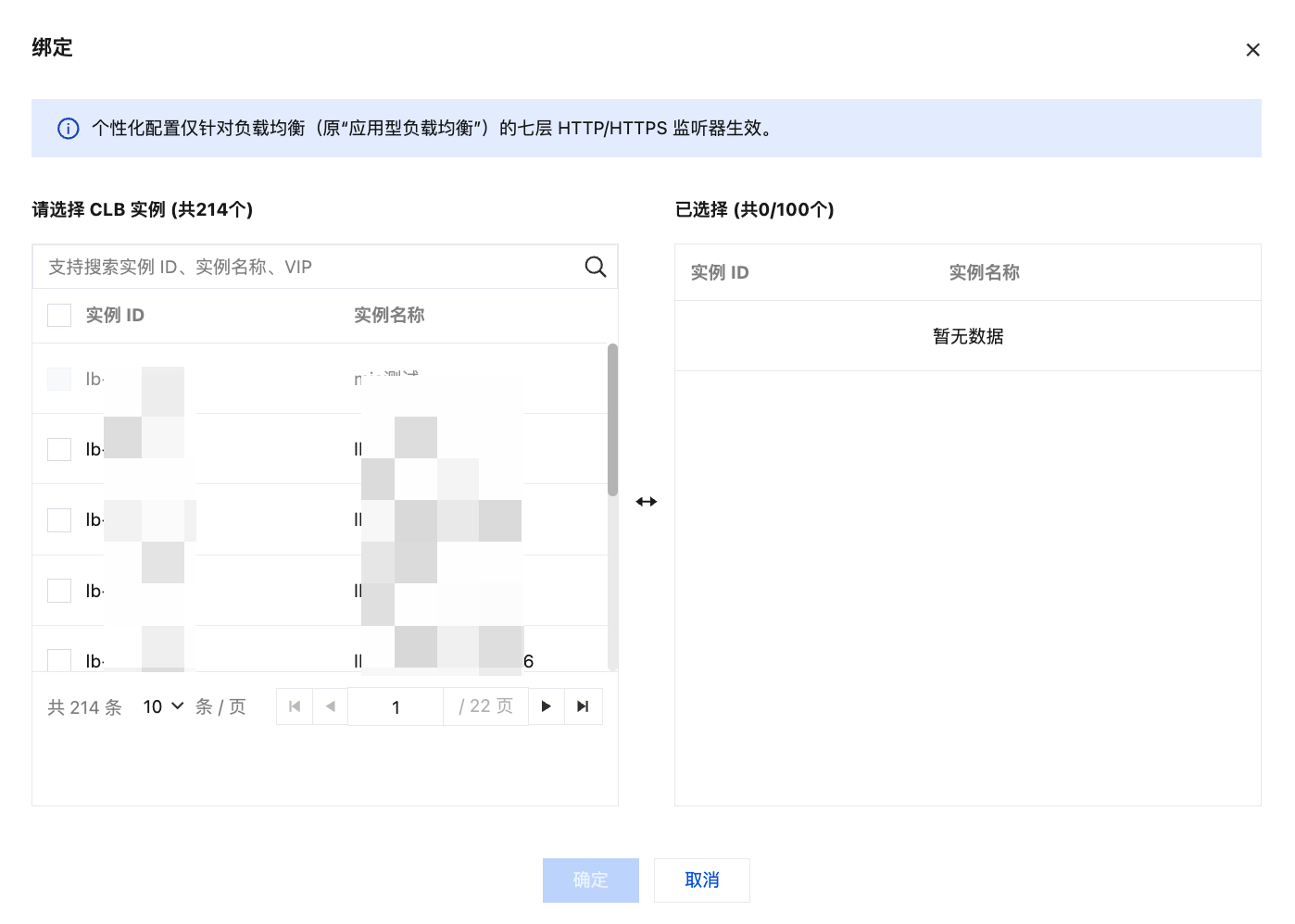
6. 绑定实例后,在个性化配置页面单击刚才配置的个性化配置 ID 进入详情页面,单击绑定列表页签即可查看到刚才绑定的负载均衡实例。
7. (可选)绑定实例后,也可以在实例的列表页中找到对应的个性化配置信息。
说明:
若列表页中未显示“绑定个性化配置”列,则在列表页右上角单击
默认配置代码示例如下,代码复制时请您确认尾行无空行,以确保配置成功:
ssl_protocols TLSv1 TLSv1.1 TLSv1.2;client_header_timeout 60s;client_header_buffer_size 4k;client_body_timeout 60s;client_max_body_size 60M;keepalive_timeout 75s;add_header xxx yyy;more_set_headers "A:B";proxy_connect_timeout 4s;proxy_read_timeout 60s;proxy_send_timeout 60s;


