Single VPC
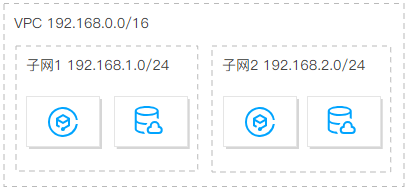
It's suitable for small-scale scenarios where services are deployed within the same region, and there is no need to isolate service through VPCs.
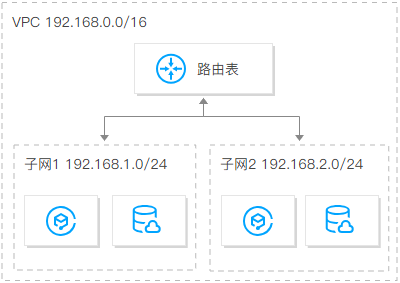
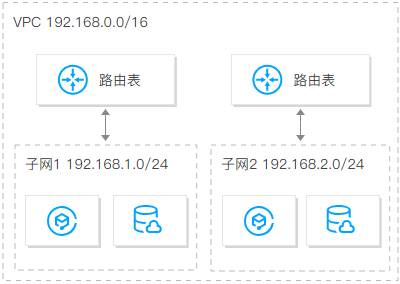
You can create multiple subnets and route tables in a single VPC for fine-grained traffic management. Additionally, it is recommended to distribute multiple subnets across AZs to enable disaster recovery.
Multiple VPCs
A multi-VPC architecture is recommended in the following cases:
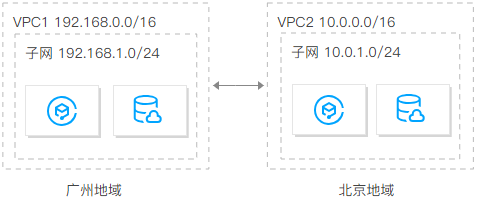
Deploy services in multiple regions
When deploying your applications across multiple regions, you need to plan for multiple VPCs. As a single VPC cannot span across regions, you must deploy at least one VPC in each region.
By default, VPCs do not communicate with each other. To connect VPCs, you can establish connections using Peering Connections or CCN.
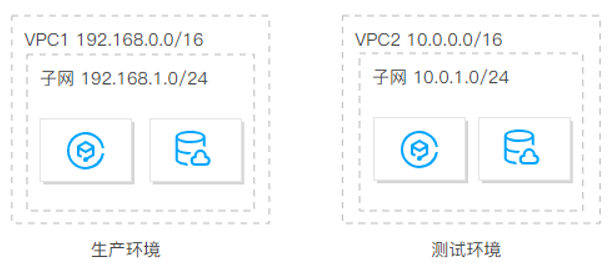
Deploy multiple services in the same region and isolate them
When you have multiple services deployed in the same region and need to isolate them from one another, you need to create multiple VPCs, assigning one VPC for each service. Since VPCs are not interconnected by default, no additional actions are required to achieve isolation between services.
Number of subnets
One VPC can have multiple subnets (100 by default). Different subnets in the same VPC can communicate with each other over a private network.
To achieve disaster recovery across AZs, you can create at least two subnets in different AZs for each VPC.
IP ranges (CIDR blocks) of VPCs and subnets
Once set, the IP range masks of VPCs and subnets cannot be modified. Therefore, be sure to carefully plan VPCs and subnets based on your service scale and scenarios. This will facilitate smooth scaling and Ops in the future.
Notes
Both IPv4 and IPv6 addresses are supported in VPCs. IPv6 addresses are global unicast addresses (GUAs) rather than private addresses, so custom planning is not supported. This document describes the planning of IPv4 private address IP ranges.
IPv6 addresses are assigned based on the following rules: A /56 IPv6 CIDR block is assigned to each VPC, a /64 IPv6 CIDR block is assigned to each subnet, and an IPv6 address is assigned to each ENI.
Planning VPC IP ranges
You can use any of the following IP ranges as your VPC IP ranges:
10.0.0.0 - 10.255.255.255 (mask: 12 - 28)
172.16.0.0 - 172.31.255.255 (mask: 12 - 28)
192.168.0.0 - 192.168.255.255 (mask: 16 - 28)
When planning VPC IP ranges, note that:
If you need to create multiple VPCs that communicate with each other or with IDCs, make sure that the IP ranges of the VPCs do not overlap.
If your VPC needs to communicate with the classic network, create a VPC with an IP range of 10.[0-47].0.0/16 and its subset, as VPCs with other IP ranges cannot communicate with the classic network.
After a VPC and subnet is created, the CIDR block cannot be modified. When there are not enough addresses, you can create secondary CIDR blocks.
Planning subnet IP ranges
Subnet IP range: You can set a subnet IP range within the VPC IP range, or even the same as the VPC IP range. For example, if the VPC IP range is 10.0.0.0/16, the subnet IP range can be between 10.0.0.0/16-10.0.255.255/28.
Subnet size and IP capacity: After a subnet is created, the subnet size cannot be modified. When creating subnets, make sure that the subnet IP ranges can meet your application needs. However, you also need to control the subnet size, allowing you to create subnets later for the scale-out.
Service requirements: A single VPC can be divided into subnets based on the service modules. For example, you can deploy the web layer, logic layer, and data layer in different subnets and use network ACLs to implement the access control.
Notes
If the VPC in which subnets are located needs to communicate with other VPCs or IDCs, make sure that the subnet IP range does not overlap with the peer IP range. Otherwise, the interconnection via a private network may fail.
If subnet IP ranges overlap, you can change the instance subnet and use CCN, or create a new VPC and purchase CVMs.
Number of route tables
A route table is used to control the traffic direction within a subnet. Each subnet can only be bound with one route table. You can use the default route table and custom route tables in Tencent Cloud VPCs.
Single route table
If different subnets in your VPC have the same or similar requirements for traffic direction, we recommend that you plan one route table. Then, you can create different routing policies to control the traffic direction.
Multiple route tables
If different subnets in your VPC have different requirements for traffic direction, we recommend that you plan multiple route tables. Subnets with different needs are bound to corresponding route tables respectively, and traffic direction is controlled with routing policies.
Cross-region multi-IDC hybrid cloud network
If you need to create multiple VPCs that communicate with each other or with IDCs, make sure that the IP ranges of the VPCs do not overlap with the peer IP range.
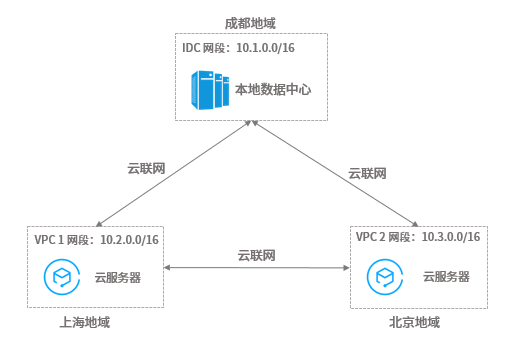
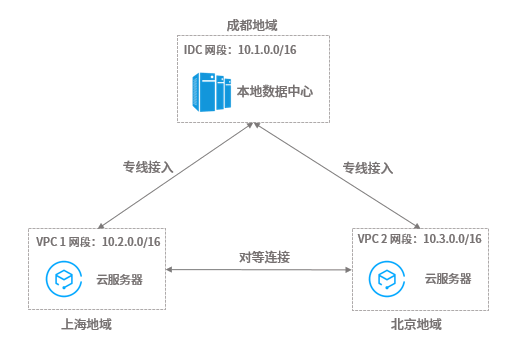
Assume that you have a local IDC with the IP range of 10.1.0.0/16 in Chengdu, and want to create two cloud IDCs in Shanghai and Beijing which need to communicate with your local IDC. In this case, we recommend that you use 10.2.0.0/16 and 10.3.0.0/16 as the VPC IP ranges of the two cloud IDCs in Shanghai and Beijing respectively, to avoid communication failure caused by overlapping IP ranges. You can enable communication between the local IDC and cloud IDCs (VPC 1 and VPC 2) and between the cloud IDCs (VPC 1 and VPC 2) using the following two methods.
Method 1: Add them to a CCN to implement the interconnection over the public and private network.
Method 2: Use Direct Connect to connect the cloud IDCs in Shanghai and Beijing to the local IDC in Chengdu, thus enabling communication between the local IDC and the cloud IDCs. To enable communication between the cloud IDCs in Shanghai and Beijing, use peering connection to connect the corresponding VPCs.
Suggestions for multi-VPC use cases:
Try to plan different IP ranges for each VPC.
Try to plan different IP ranges for VPC subnets if each VPC cannot have distinct IP range.
Ensure that the IP ranges of subnets that need to communicate are different if each subnet cannot have distinct IP range.
Documentation
For more information about how to quickly build a VPC with an IPv4 CIDR block, including creating a VPC and subnet, purchasing a CVM, and binding an EIP to enable the public network access, see Building Up an IPv4 VPC.
For more information about how to build a VPC with an IPv6 CIDR block and enable IPv6 for CVMs within the VPC, see Building Up an IPv6 VPC.