This document uses FIO as the testing tool, please refrain from conducting FIO tests on the system disk to prevent damage to crucial system files.
To prevent data corruption due to damage to the underlying file system metadata, please refrain from conducting tests on the business data disk. Use a cloud disk on a test machine that does not store business data for stress testing, and ensure to create a snapshot in advance to safeguard your data.
Please ensure that there are no mount configurations for the disk under test in the /etc/fstab file configuration items, as this could lead to a failure in starting the cloud server.
Metrics
The block storage devices provided by Tencent Cloud have different performances and prices depending on their type. For detailed information, please refer to Cloud Disk Types. As different applications have different workloads, the maximum performance of a cloud disk may not be achieved if sufficient I/O requests are not provided to fully utilize the cloud disk.
The performance of cloud disks is generally measured using the following metrics:
IOPS: The number of read/write operations per second, measured in counts. The underlying driver type of the storage device determines the different IOPS.
Throughput: read/written data volume per second, in MB/s.
Latency: Time from I/O operation sending to receiving, in microseconds.
Test Tool
FIO is a tool for testing disk performance, used for stress testing and verification of hardware. This document uses FIO as an example. When using FIO, it is recommended to use the libaio I/O engine for testing. Please refer to Tool Installation to complete the installation of FIO and libaio.
Recommended test objects
We recommend that you perform FIO test on empty disks that do not store important data, and re-create the file system after completing the test..
When testing disk performance, we recommend that you directly test raw data disks (such as /dev/vdb).
When testing file system performance, we recommend that you specify the specific file (such as /data/file) for testing.
2. Run the following command to check whether the cloud disk is 4KiB-aligned.
fdisk -lu
As depicted below, if the Start value in the returned results is divisible by 8, it indicates that the disk is 4 KiB-aligned. If not, please ensure the disk is 4 KiB-aligned before proceeding with the test.
3. Run the following commands in sequence to install the testing tools, FIO and libaio.
yum install libaio -y
yum install libaio-devel -y
yum install fio -y
Upon completion of the installation, please refer to the test examples to commence the performance testing of the cloud disk.
Test Example
The test formulas for different scenarios are essentially the same, with only the rw, iodepth, and bs (block size) parameters differing. For instance, each workload is suited to a different optimal iodepth, depending on your specific application's sensitivity to IOPS and latency.
Parameters:
Parameter
Note
Sample Value
bs
The block size for each request. Values include 4k, 8k, and 16k, among others.
4k
ioengine
I/O Engine. It is recommended to use the asynchronous I/O engine of Linux.
libaio
iodepth
Queue depth of an I/O request.
1
direct
Specify the direct mode.
True (1) denotes the specification of the O_DIRECT identifier, bypassing the I/O cache for direct data writing.
False (0) indicates that the O_DIRECT identifier is not specified.
Default is True (1).
1
read
Read/Write modes. The values include sequential read (read), sequential write (write), random read (randread), random write (randwrite), mixed random read/write (randrw), and mixed sequential read/write (rw, readwrite).
read
time_based
Specify the use of time mode. There is no need to set this parameter value as long as FIO operates based on time.
N/A
runtime
Specifies the test duration, which is the FIO runtime.
100
refill_buffers
FIO will refill the I/O buffer with each submission. The default setting is to only populate and reuse the data initially.
N/A
norandommap
During random I/O, FIO will overwrite each block of the file. If this parameter is provided, a new offset will be chosen without reviewing the I/O history.
N/A
randrepeat
Determines whether the random sequence can be repeated. True (1) indicates that the random sequence can be repeated, while False (0) signifies that the random sequence cannot be repeated. The default is True (1).
0
group_reporting
When multiple jobs are concurrent, statistics for the entire group are printed.
N/A
name
Name of the job.
fio-read
size
Address space of the I/O test.
1G
filename
Test object, which is the name of the disk to be tested.
/dev/sdb
numjobs
The number of concurrent threads is set to 1 by default. When the performance of the disk under test is high, it is recommended to increase the numjobs count (such as 2 or 4) to intensify the load.
1
Common use cases are as follows:
展开全部
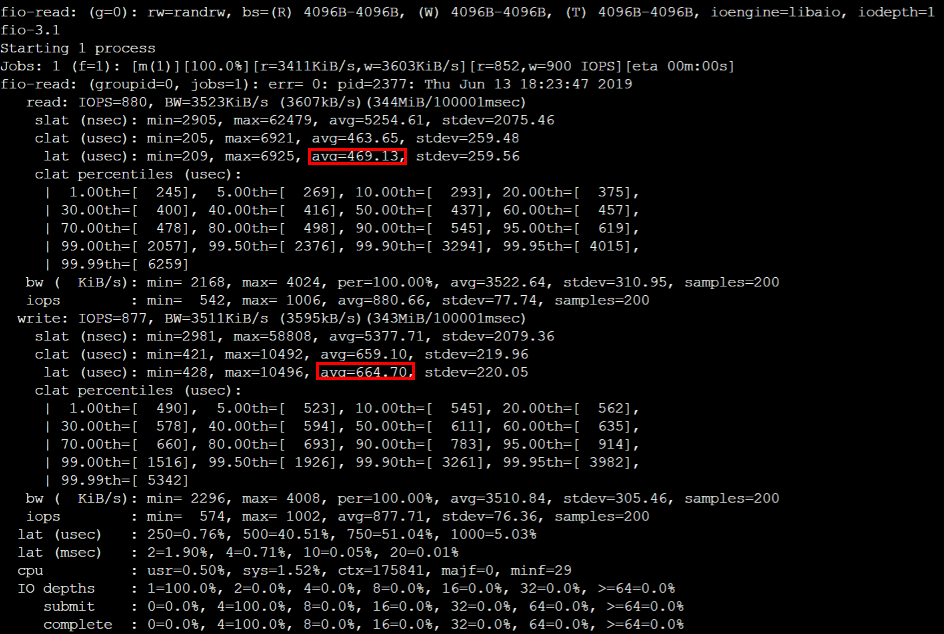
bs = 4k iodepth = 1: Random read/write test, which can reflect the latency performance of the disk
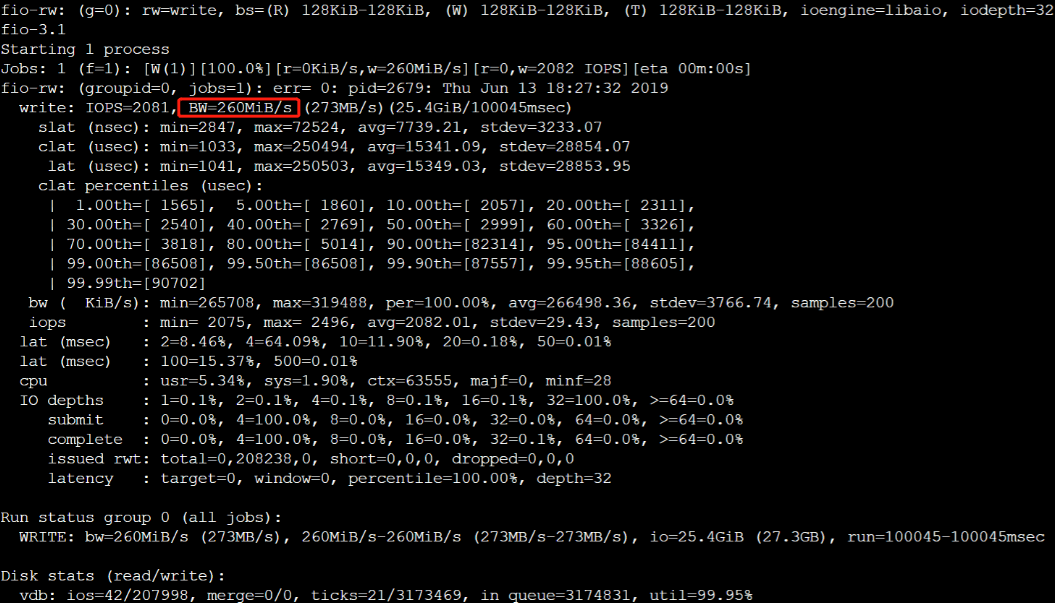
bs = 128k iodepth = 32: Sequential read/write test, which can reflect the throughput performance of the disk
Reminder:
Please refrain from conducting FIO tests on the system disk to prevent damage to crucial system files.
To prevent data corruption due to damage to the underlying file system metadata, please refrain from conducting tests on the business data disk. Use a cloud disk on a test machine that does not store business data for stress testing, and ensure to create a snapshot in advance to safeguard your data.
Run the following command to test the sequential read throughput bandwidth:
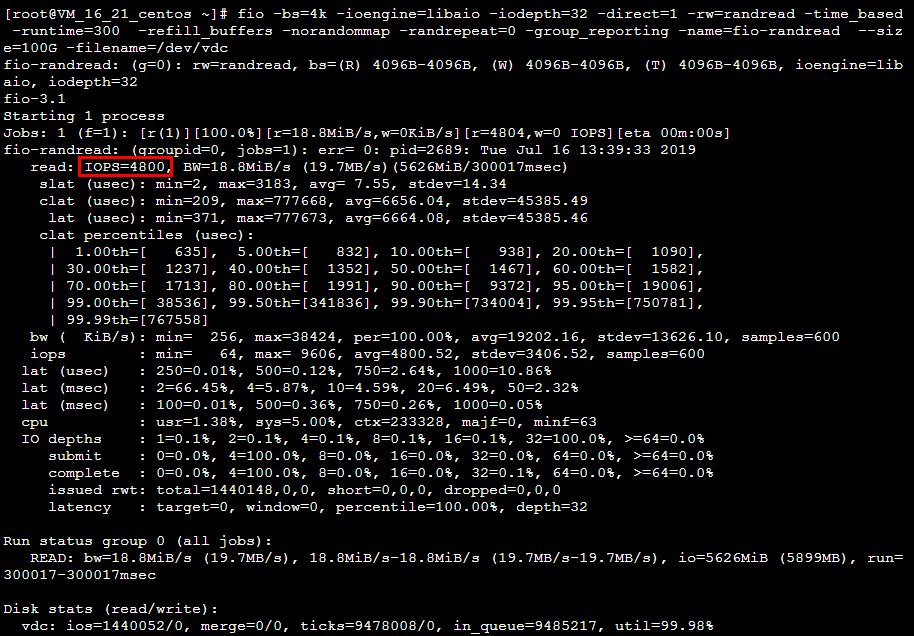
bs = 4k iodepth = 32: Random read/write test, which can reflect the IOPS performance of the disk
Reminder:
Please refrain from conducting FIO tests on the system disk to prevent damage to crucial system files.
To prevent data corruption due to damage to the underlying file system metadata, please refrain from conducting tests on the business data disk. Use a cloud disk on a test machine that does not store business data for stress testing, and ensure to create a snapshot in advance to safeguard your data.
Run the following command to test the random read IOPS of the disk: