Deleting Key

Last updated: 2023-08-24 17:04:43

Scenario

You can log in to the Tencent Cloud Key Management System (Compliant) Console or call KMS TCCLI to enable/disable the status of created Customer Master Keys (CMKs). This document introduces how to enable/disable keys through the console.

Instructions

1. Log in to the Key Management System (Compliance) console.
2. In the left navigation menu, click User Key Management under the HSM Exclusive Key Management menu. Select the key's region and HSM cluster ID. You can view the master key list of other regions by switching the region and cluster ID at the top.


Single operation

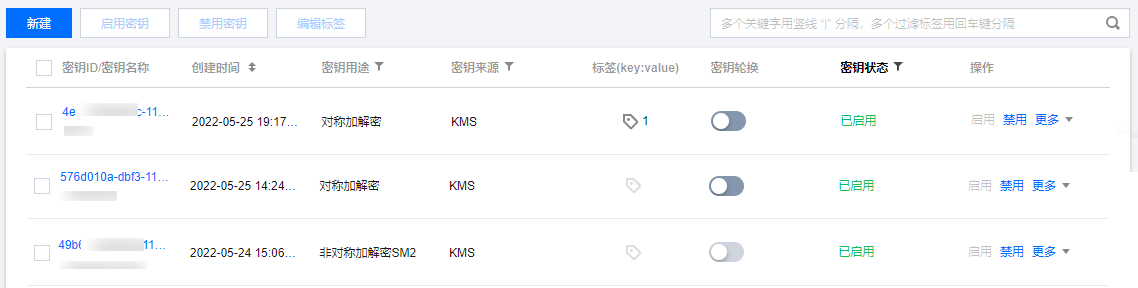
Locate the key for which you need to change the status. In the operation area on the right side of the key information, you can enable or disable the key.


Batch Operation

1. Select multiple keys for which you need to change the status.


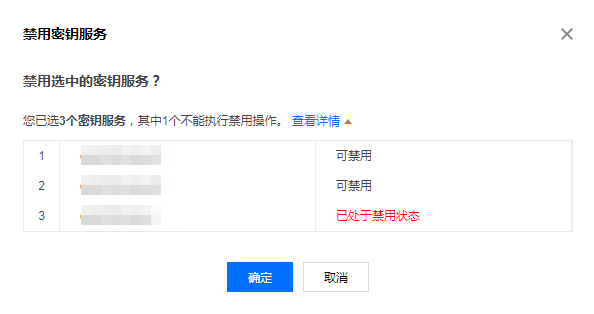
2. At the top of the list, click Enable Key or Disable Key. The system will display a confirmation box as shown below. Click View Details to confirm the status of the keys in this batch operation.


3. After confirming that everything is correct, click OK to enable or disable keys in bulk.