This document describes how to view database audit logs and fields.
Note:
A new version of the audit log page was released on July 12, 2023. The new version added a new audit log search field "Scanned Rows". For existing audit logs before this release date, the data in this field will be displayed as "-", and the corresponding downloaded files and APIs will be displayed as "-1".
The units of the audit log fields "Execution Time" and "CPU Time" in the console and downloaded audit log files are all adjusted to microseconds.
When searching audit logs, the character used to separate multiple search items is changed from comma to line break.
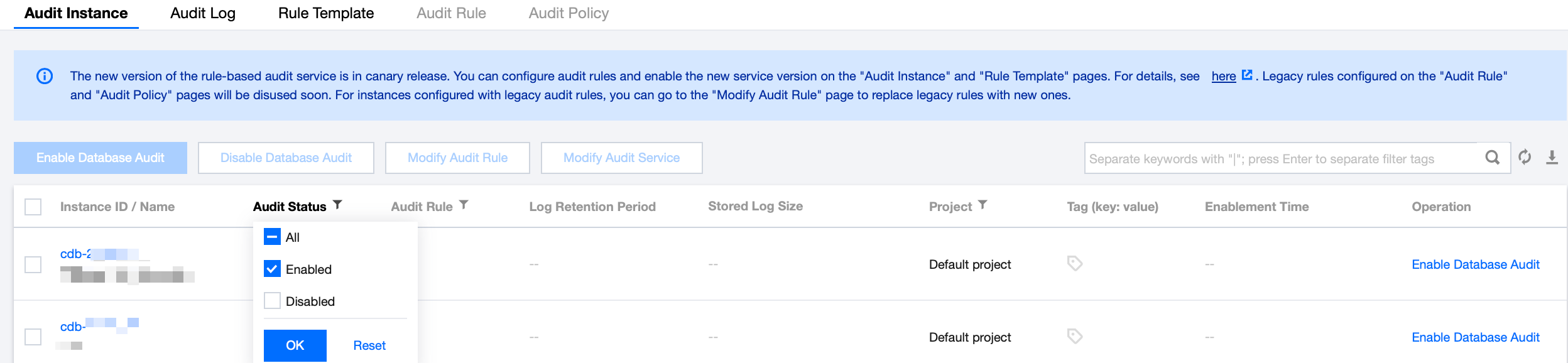
3. Select Region at the top and click the Audit Instance tab. Then, click Audit Status, select Enabled to filter audit-enabled instances.
4. Find the target instance in the Audit Instance list, or search for it by resource attribute in the search box, and click View Audit Log in the Operation column to enter the Audit Log tab and view logs.
Tool List
In the audit instance filter box, you can choose to switch to other audit instances that have enabled the audit service.
Click the time box and select a time period to view the audit logs in the selected time period.
Note
You can select any time period with data for search. Up to the first 60,000 eligible records can be displayed.
In the search box, select search items (SQL details, client IP, user account, database name, SQL type, error code, execution time (μs), lock wait time (μs), IO wait time (μs), transaction duration (μs), CPU time (μs), thread ID, scanned rows, affected rows, returned rows, etc.) to search, and you can view relevant audit results. Multiple keywords are separated by line breaks.
Search Item
Operator
Note
SQL Details
Include - or - tokenization
Rule Description
Enter the details of the SQL command and separate multiple keywords by line break.
The SQL command details search box has three levels of matching criteria: the first level sets the matching mode (include or exclude); the second level sets the logical relationship between keywords (OR or AND); and the third level sets the matching mode for each keyword (segment or wildcard).
Note:
The search of SQL command details is case-insensitive.
Supports both "Include" and "Exclude" matching modes.
Keywords support two types of logical matching: "OR" and "AND". "OR" represents the "union" relationship between different keywords, while "AND" represents the "intersection" relationship between different keywords.
Each keyword supports two matching modes: "Segmentation" and "Wildcard". "Segmentation" means that each keyword in the SQL command details must be an exact match, while "Wildcard" means that each keyword in the SQL command details can be a fuzzy match.
Example Description
Assuming the SQL command details are: SELECT * FROM test_db1 JOIN test_db2 LIMIT 1;
In the "Include (segment)" search mode, you can search using segment keywords such as "SELECT", "select * from", "*", "SELECT * FROM test_db1 join test_db2 LIMIT 1;", "from Test_DB1", etc. However, you cannot search using wildcard keywords like "SEL", "sel", or "test".
In the "Include (Wildcard)" search mode, you can search using wildcard keywords such as "SEL", "sel", "test", and "DB".
In the "Include (AND)" search mode, multiple keywords are related by "AND". For example, entering keywords such as "SELECT" and "test_db" will query all SQL commands containing both "SELECT" and "test_db".
In the "Include (OR)" search mode, multiple keywords are related by "OR". For example, entering "test_db1" and "test_db2" will return all SQL commands containing either "test_db1" or "test_db2".
Include - And - Segmentation
Exclude - and - tokenization
Include - or - Wildcard
Includes - and - wildcard
Exclude - and - Wildcard
The client IP
Include
Exclude
Equal to
Not equal to
You can filter client IP addresses by using the wildcard "*" and separate them by line break. For example, if you enter "client IP: 9.223.23.2*", IP addresses that start with "9.223.23.2" will be searched.
User Account
Include
Exclude
Equal to
Not equal to
Enter a user account and separate multiple keywords by line break.
Database Name
Include
Exclude
Equal to
Not equal to
Enter a database name and separate multiple keywords by line break.
Note:
The database name search is case-insensitive.
SQL Type
Equal to
Not equal to
Pull down the list to select a SQL type (ALTER, CHANGEUSER, CREATE, DELETE, DROP, EXECUTE, INSERT, LOGOUT, OTHER, REPLACE, SELECT, SET, UPDATE). You can select multiple types.
Error Codes
Equal to
Not equal to
Enter an error code and separate multiple keywords by line break.
Execution Time (μs)
Range format
Enter an execution time in the format of M-N, such as 10-100 or 20-200.
Lock Wait Time (μs)
Range format
Enter a lock wait time in the format of M-N, such as 10-100 or 20-200.
IO Wait Time (μs)
Range format
Enter an IO wait time in the format of M-N, such as 10-100 or 20-200.
Transaction Duration (μs)
Range format
Enter a transaction duration in the format of M-N, such as 10-100 or 20-200.
CPU Time (μs)
Range format
Enter a CPU time in the format of M-N, such as 10-100 or 20-200.
Thread ID
Equal to
Not equal to
Enter a thread ID and separate multiple keywords by line break.
Scanned Rows
Range format
Enter a range of scanned rows in the format of M-N, such as 10-100 or 20-200.
Affected Rows
Range format
Enter a range of affected rows in the format of M-N, such as 10-100 or 20-200.
Returned Rows
Range format
Enter a range of returned rows returned in the format of M-N, such as 10-100 or 20-200.
Log list
In the SQL Type of the list, you can select multiple SQL types for filtering.
The Returned Rows field represents the specific number of rows returned by executing the SQL command, which is mainly used to determine the impact of SELECT commands.
Audit Fields
The following fields are supported in TencentDB for MySQL audit logs. On the Audit Log tab, click the download icon in the top-right corner. After download, click the file list icon. On the page redirected to, copy the download address and access it to get the complete SQL audit logs.
Note
Currently, you can download audit log files of a database instance only at the Tencent Cloud private network address by using a CVM instance in the same region. For example, to download the audit logs of database instances in Beijing region, download them with a CVM instance in Beijing.
Log files are valid for 24 hours. Download them promptly.
Up to 30 log files can be retained for one database instance. Delete files promptly after download.
If the status is Failed, there may be too many logs. You can download them in batches by narrowing down the time range.
No.
Field
Remarks
1
Time
-
2
The client IP
-
3
Database Name
-
4
User Account
-
5
SQL Type
-
6
SQL Details
-
7
Error Codes
0 means success
8
Thread ID
-
9
Scanned Rows
-
10
Returned Rows
-
11
Affected Rows
-
12
Execution Time (μs)
-
13
CPU Time (μs)
-
14
Lock Wait Time (μs)
-
15
IO Wait Time (μs)
-
16
Transaction Duration (μs)
-
17
Rule Name
-
Relationship Between SQL Statement Type and SQL Statement Mapping Object
No.
SQL Statement Type
SQL Statement Mapping Object
0
OTHER
All SQL statement types except for the following ones