Help & Documentation>Tencent Container Registry>Best Practice>Image Data Synchronization and Replication Between Multiple Platforms in Hybrid Cloud

Image Data Synchronization and Replication Between Multiple Platforms in Hybrid Cloud

Last updated: 2023-09-13 16:18:33

Scenario

During the development and operation process, users may encounter scenarios where multiple container image repositories are needed simultaneously, which may span across main accounts, regions, countries, and platforms. Users can manually complete the push and distribution tasks between instances, but this may result in higher operational costs, untimely synchronization, and difficulties in management.
To address this scenario, TCR currently offers synchronization and replication features, as well as open-source image migration tools. These include:
The instance synchronization feature allows users to configure image synchronization based on rules for on-demand synchronization. For more information, please refer to Configuring Instance Synchronization.
The instance replication feature enables users to fully replicate instance image data from the primary instance to the secondary instance. For more information, please refer to Configuring Instance Replication.
The image migration tool supports Docker image data migration for various image repositories. For more information, please refer to Image Migration Tool: image-transfer.
Additionally, when migrating from other image repository services to TCR, users can configure custom domain names for TCR instances to continue using the original domain names, ensuring service continuity. For more information, please refer to Configuring Custom Domain Names.
This document describes how to sync and replicate image data between different image registries in a hybrid cloud.

Preparations

Make sure that the following conditions are met before creating and managing the replica instances of a TCR Enterprise Edition instance:
You have successfully purchased an Enterprise Edition instance. The instance synchronization feature requires a Standard or Premium instance, while the instance replication feature requires a Premium instance.
If you are using a sub-account, the sub-account must have obtained operation permissions on the corresponding instance. For more information, see TCR Enterprise Authorization Management.

Instructions

Scenario 1: cross-region TCR instance replication

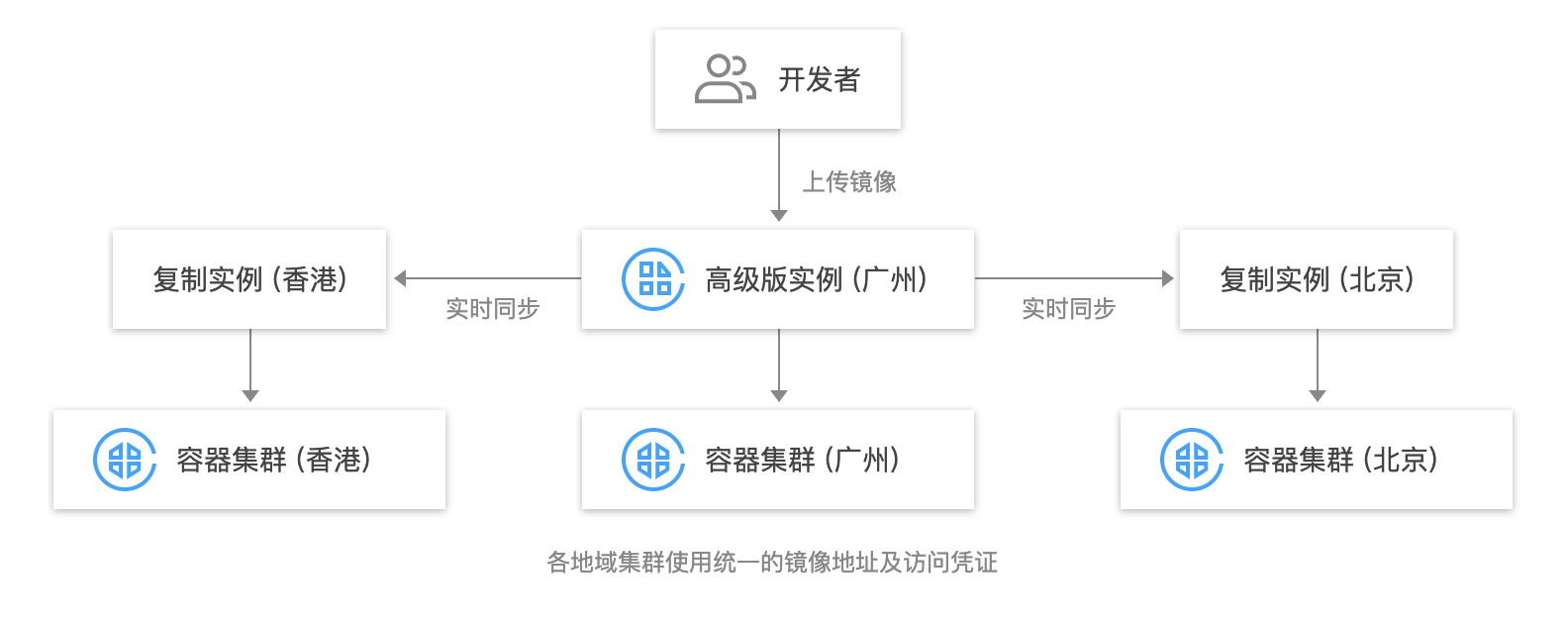
Cross-region instance replication

When users have cross-regional business requirements, they can utilize the instance replication feature to achieve single-region upload, real-time high-speed synchronization across multiple regions, and local private network retrieval. Compared to the instance synchronization feature, this functionality unifies the deployment configurations of multi-regional clusters and improves the cross-regional synchronization speed of cloud-native application artifacts.


Cross-border cross-region instance synchronization and replication

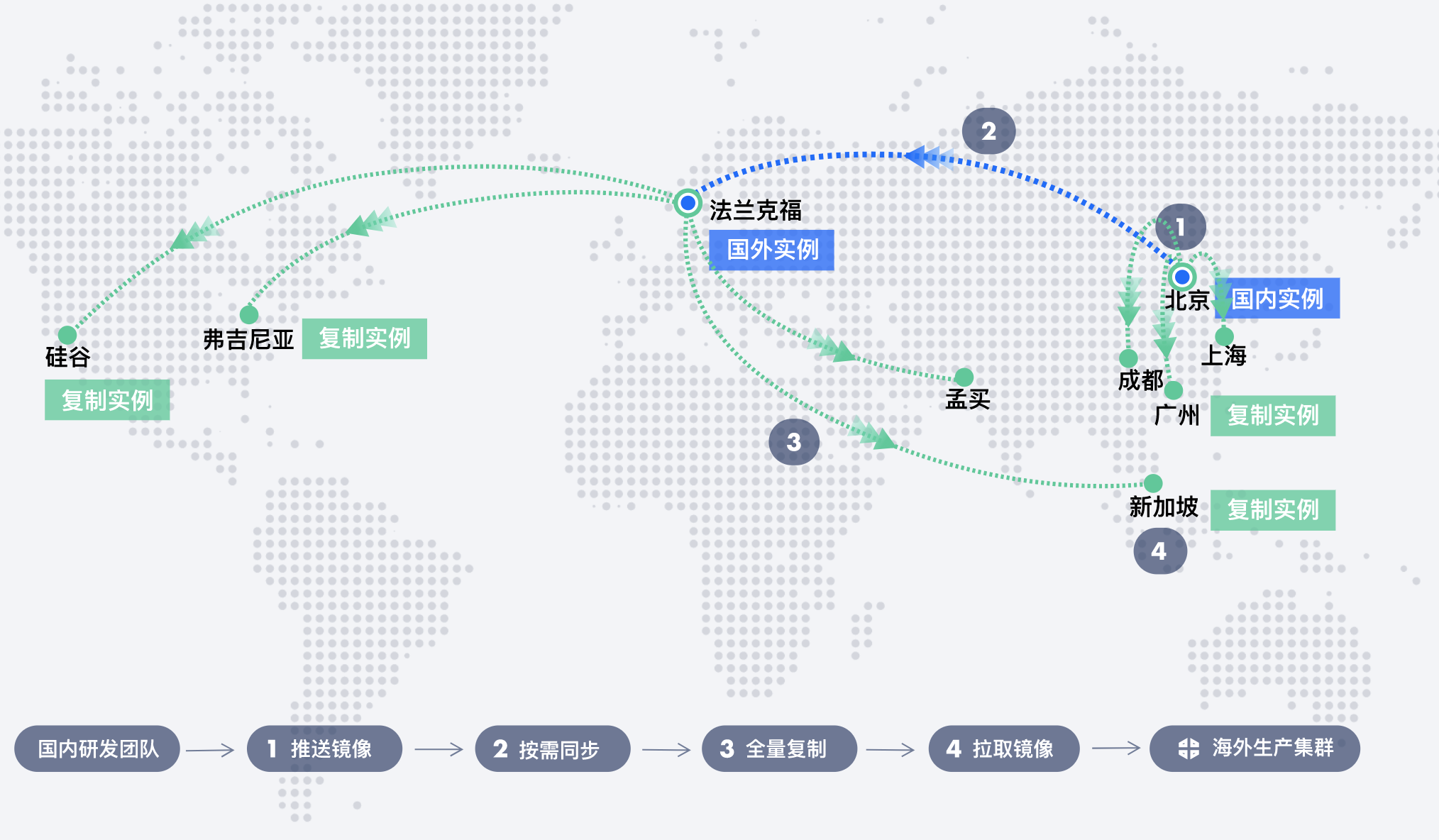
However, when cross-region business involves cross-border scenarios, users need to combine the use of the Instance Synchronization feature. Due to security and compliance considerations, cross-border instance replication is currently not supported.
1. After purchasing a TCR Advanced Edition instance in both domestic and international regions, users should first create synchronization rules to achieve on-demand data synchronization across countries.
2. Create and manage replica instances separately in two instances by creating and managing replica instances, achieving single-point upload, real-time replication across multiple regions, and nearby private network retrieval for both domestic and international locations.


Note
To achieve optimal private network access, users need to manually connect the VPC in the replication region to the instance. For more information, please refer to Private Network Access Control and select the VPC within the replication region.

Scenario 2: cross-platform image migration or synchronization

When users simultaneously use public cloud image repositories and self-built image repositories, or multiple public cloud image repositories, there is often a need for cross-platform image migration or synchronization. In cross-platform scenarios, users can choose to use TCR's custom domain name feature to achieve unified access across multiple platforms with a single configuration, ensuring service continuity. For more information, please refer to Configuring Custom Domain Names.

Cross-platform image migration

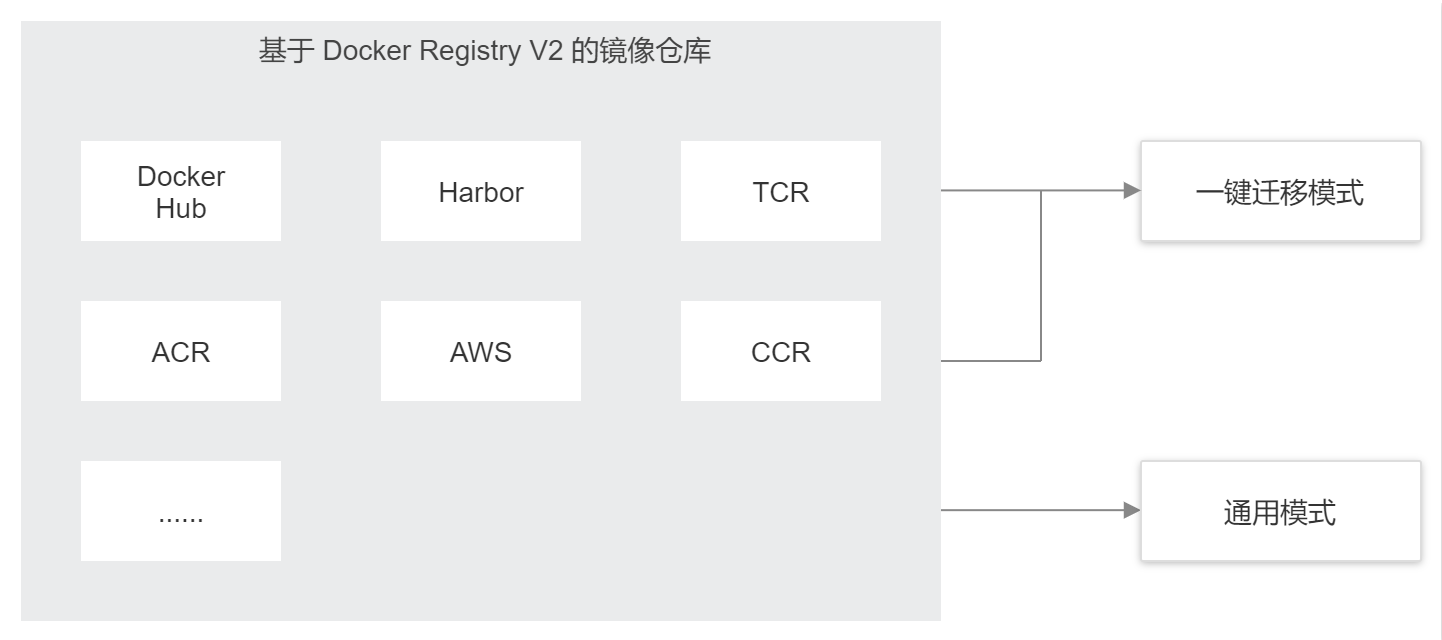
Image-transfer is an open-source tool developed by Tencent Cloud for image migration, supporting batch migration between Docker images in various image repositories. It only requires the repository to be based on Docker Registry V2 built Docker image repository services (such as Tencent Cloud TCR Personal Edition (CCR)/TCR Enterprise Edition, Docker Hub, Quay, Alibaba Cloud Image Service ACR, Harbor, etc.). The tool has two usage modes: general mode and one-click migration mode for Tencent Cloud.
General Mode
Quick Migration Mode
Using the general mode of image-transfer, users can achieve image migration from multiple image repositories to multiple image repositories. Users only need to configure the authentication and authorization files and migration rule files to start the migration. For information on downloading, installing, and using the tool, please refer to image-transfer.
To migrate from TCR Individual Edition to TCR Enterprise Edition, you can use the one-click migration mode provided by image-transfer. For more information, please refer to Migration from TCR Individual to TCR Enterprise. The guide includes two main parts: one-click data migration using the open-source tool image-transfer and business migration in the TCR console, helping you achieve a smooth migration of your business. TCR currently offers both Individual and Enterprise Edition services. The Individual Edition is designed for individual developers and provides basic container image storage and distribution features. The Enterprise Edition offers secure, dedicated, and high-performance cloud-native application artifact hosting and distribution services for enterprise customers. For differences between the Individual and Enterprise Edition services, please refer to Specification Description.

Cross-platform image synchronization

In cross-platform scenarios, in addition to batch data migration, you often also need to sync images across platforms in real time.
To synchronize images from a self-built Harbor to TCR Enterprise Edition, please refer to Synchronizing Images from Self-built Harbor to TCR Enterprise Edition. Configure synchronization rules on the Harbor side. By transitioning from a self-built container image service to TCR, users can reduce operational management costs and enjoy stable cloud-based hosting services and technical support. Additionally, it enables seamless integration with cloud container services, providing a consistent user experience for container deployment on the cloud. Users can also pull images from container clusters through private networks, reducing public network bandwidth costs. Similarly, users can configure rules on the Harbor side to synchronize images with other third-party repository service platforms. Apart from Harbor itself, the following image repository services are currently supported by Harbor:
Docker Hub
Docker registry
AWS Elastic Container Registry
Azure Container Registry
Ali Cloud Container Registry
Google Container Registry
Huawei SWR
Artifact Hub
Gitlab
Quay
Jfrog Artifactory
Tencent Container Registry
You can also use the external Harbor registry as a relay to sync images between third-party registry service platforms.
As illustrated below, an example of real-time synchronization of images from Alibaba Cloud ACR to Tencent Cloud TCR:
1. Configure a pull-based replication policy in Harbor to pull an image from ACR to Harbor in real time and use Harbor as a relay registry.
2. Configure a push-based replication policy in Harbor to push the image from ACR in Harbor to TCR in real time.


In this way, the image can be synced from ACR to TCR. You can also configure image synchronization between other platforms in the same way.

Scenario 3: DevOps image flow

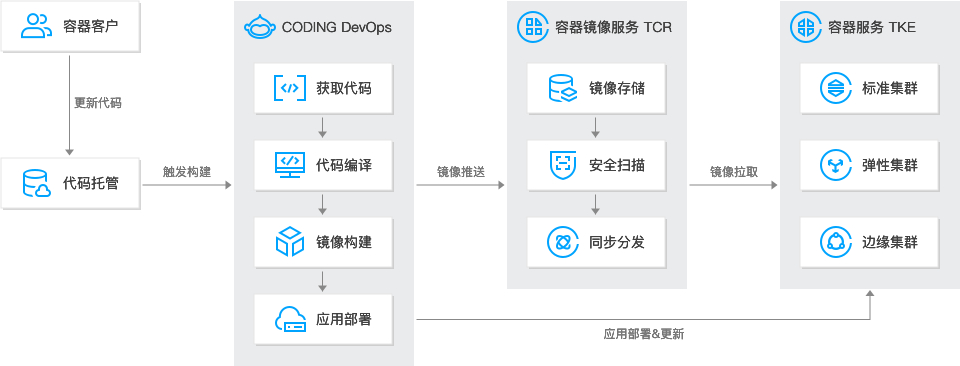
During development and OPS, an application usually needs to undergo multiple steps from development and testing to pre-production and eventual release into the production environment. The corresponding image also needs to flow through multiple steps.
Users can leverage TCR's instance synchronization feature to build the aforementioned DevOps pipeline for image circulation. If the main accounts for different environments are not the same, enable "Support cross-main account instance synchronization" when configuring instance synchronization rules.
Note
Currently, TCR's delivery pipeline feature only supports pre-configured fixed pipelines. If users have more complex DevOps pipeline requirements, they can use CODING DevOps. CODING DevOps is a one-stop DevOps development platform provided by Tencent Cloud, and TCR's delivery pipeline feature relies on the continuous integration and continuous deployment features of CODING DevOps.