When your prepaid resource package (traffic packages, HTTPS request packages) is exhausted, it will be billed as pay-as-you-go on Tencent Cloud CDN. If you are concerned about large bandwidth or traffic caused by malicious users stealing resources, leading to high bills, you can use the usage limit feature for usage control.
When the bandwidth or traffic usage during a statistical period exceeds the configured alarm threshold, CDN will push a message notification to you; when the access threshold is exceeded, you can disable CDN to avoid incurring more CDN service fees.
Note
Note: It will take about ten minutes for the usage limit configuration to take effect, during which the usage will be normally billed. For more information, see Attack Risk Prevention Plan.
Configuration Guide
View Configuration
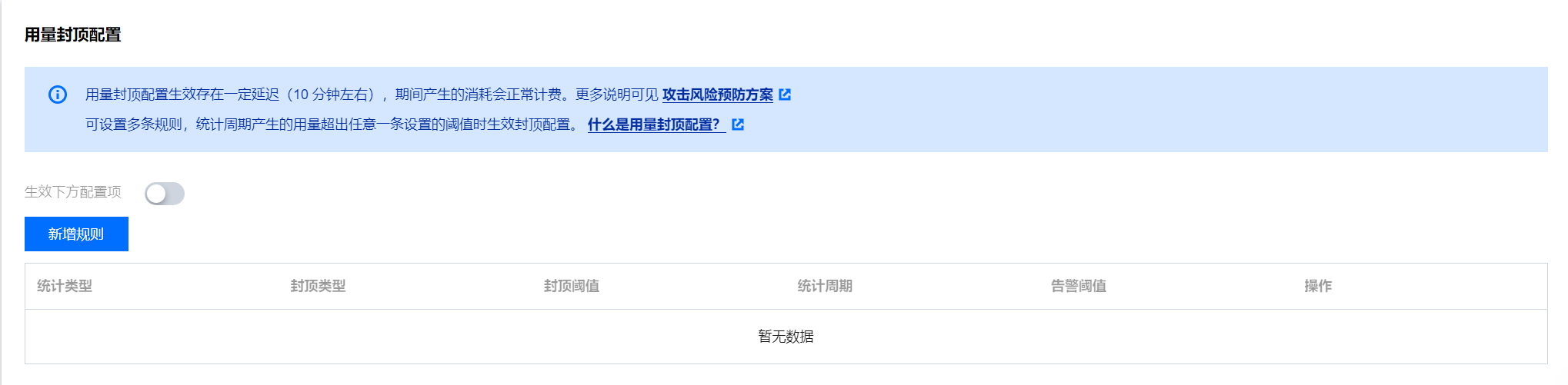
Log in to the CDN console, select Domain Name Management from the menu bar, click Management on the right side of the domain name to enter the domain name configuration page. In Advanced Configuration, you can see the usage limit configuration, which is disabled by default.
Detailed configuration items
1. Adding a new rule
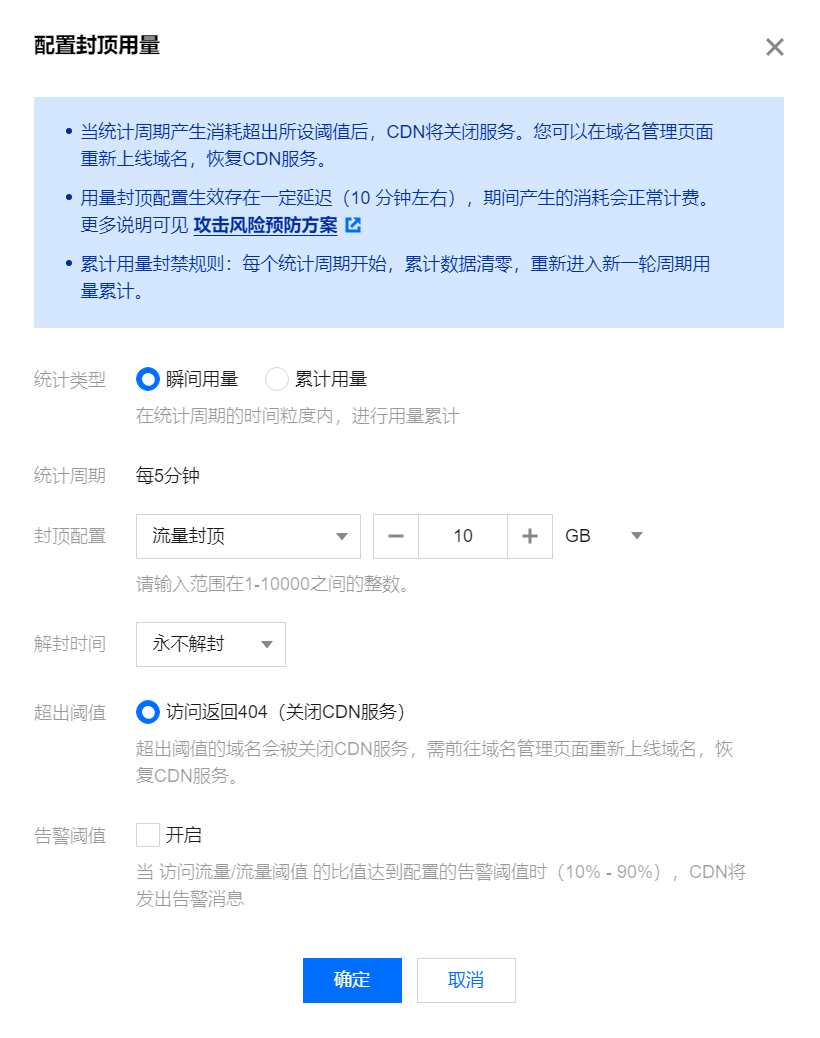
Click Add New Rule to configure:
Statistic Type:
Instantaneous usage: It collects statistics on the traffic/bandwidth/number of HTTPS requests once every five minutes
Cumulative usage: Compared with instantaneous usage, it supports a longer statistical period and provides usage statistics for every hour, calendar day, or calendar month.
Note
Cumulative usage limit configuration is not supported for domain names with the acceleration type of dynamic content or dynamic & static content.
Statistical period: Per 5 minutes, per hour, per day (before 24:00 of the day), or per month
Note
A statistical period starts from 5 minutes before the configuration time in 5-minute intervals:
If the statistical period selection is "per hour," then: (1) For the first data statistical period after setting, the duration will be less than one hour; (2) Entering the next statistical period, usage statistics will be conducted on a natural hour basis.
Note: If the rule is configured at 2022-01-13 9:23:10, the first data statistical period is from 9:20:00 to 9:59:59; the next statistical period is from 10:00:00 to 10:59:59.
If the statistical period selection is "before 24:00 on the same day," then the cumulative period is from 2022-01-13 9:20:00 to 2022-01-13 23:59:59.
If the statistical period selection is "calendar month," then the cumulative period is from 2022-01-13 9:20:00 (effective date) to 2022-01-31 23:59:59, with the next month starting to count from the 1st day at 00:00.
Traffic: It collects statistics on the traffic usage of the domain name. The traffic limit is the maximum traffic for user access to the domain name.
Bandwidth: It collects statistics on the bandwidth usage of the domain name. The maximum bandwidth is the maximum bandwidth for user access to the domain name.
HTTPS request capping: Refers to the consumption of HTTPS requests for a domain, setting the upper limit for the number of HTTPS requests users can make to that domain.
Request capping: Refers to the consumption of requests for a domain, setting the upper limit for the total number of requests users can make to that domain.
Note
Note: HTTPS request capping is only supported for domains with acceleration types of CDN web page small files, CDN large file download, and CDN audio/video on-demand.
Request cap is only supported for domain names with the acceleration type of ECDN dynamic acceleration and ECDN dynamic & static acceleration. Note: This feature is highlighted.
Scheduled unblocking: Scheduled unblocking supports 60 minutes, 12 hours, 24 hours, 3 days. For example, if the domain ex.com exceeds the threshold, it returns a 404 error (CDN service is disabled), with an automatic unblocking time of 60 minutes. After the domain exceeds the set cumulative usage cap, the CDN service for the domain will be disabled and the acceleration domain will be taken offline. After 60 minutes, the domain will be automatically unblocked and acceleration will be enabled.
Never unblock: If you are concerned that your domain may be subject to high traffic/bandwidth attacks, you can set it to never unblock. If set, exceeding the threshold will return a 404 error (CDN service is disabled). Once the domain exceeds the set cumulative usage cap, the domain will be taken offline, and you will need to manually go to the console to enable domain acceleration.
When cap is exceeded:
Access returns 404: Exceeding the threshold will directly disable the CDN service for that domain. You can go to the domain management page to bring the domain back online and restore CDN service.
Alarm Threshold:
When the ratio of access bandwidth to traffic limit exceeds the configured percentage (only a multiple of 10 is supported, i.e., 10%–90%), CDN will push an alarm message.
Note
After detecting that the domain bandwidth (traffic) exceeds the threshold, the configuration to return 404 on access needs to take effect gradually across all network nodes, so there will be a certain effective delay.
If the alarm threshold is enabled: As the scanning granularity is 5 minutes, if there is a sudden increase in usage or the configured percentage value is large, it may happen that the percentage threshold is not triggered during the previous scan, and the access threshold is directly reached during the next scan. In this case, CDN will send two notification messages successively: a percentage alarm and an access threshold alarm.
Supports configuring multiple rules. Only one rule can be configured for each capping configuration under instant capping and accumulated capping. When any condition threshold is triggered under multiple rules, access returns 404 (i.e., shut down CDN service).
Configuration Example
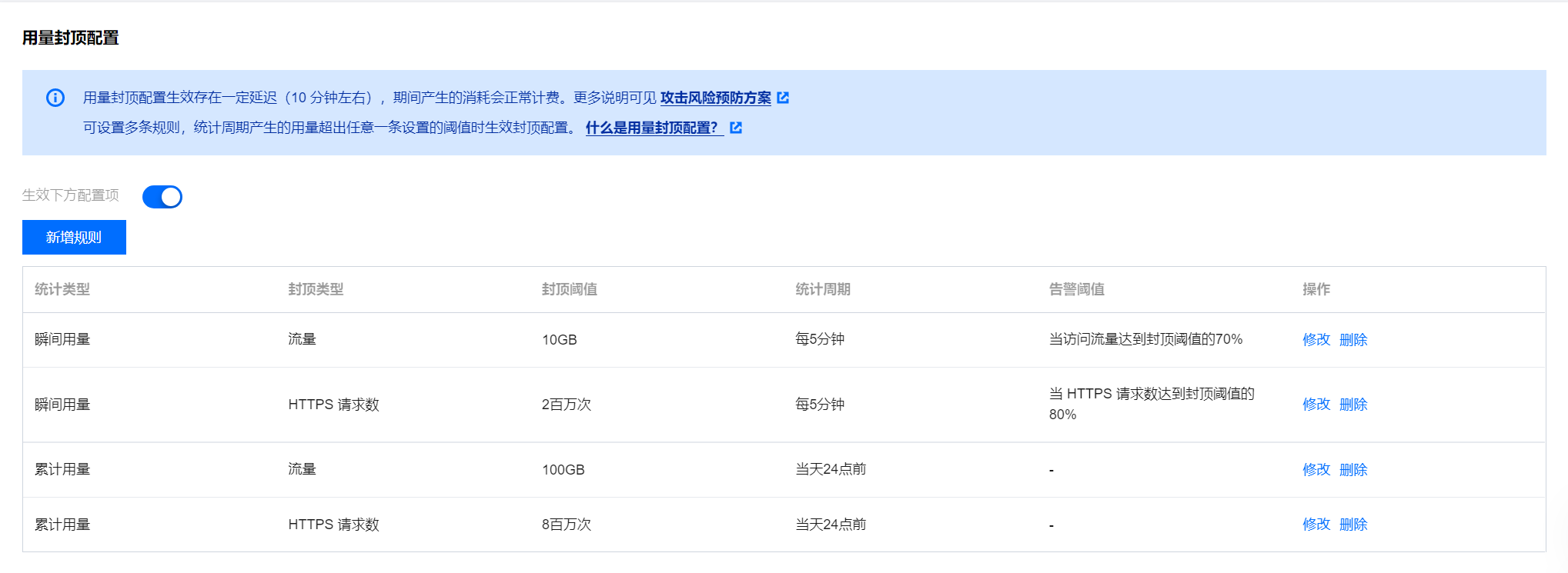
Configuration instructions:
1. 1. If the acceleration domain name consumes 12GB of traffic and 1 million HTTPS requests within 5 minutes, it triggers the 10GB instant traffic capping, and access to the domain name returns 404 in about 10 minutes (shut down CDN service).
2. 2. If the acceleration domain name consumes 3 million HTTPS requests and 5GB of traffic within 5 minutes, it triggers the 2 million instant HTTPS request capping, and access to the domain name returns 404 in about 10 minutes (shut down CDN service).
3. 3. If the acceleration domain name consumes 3 million HTTPS requests and 12GB of traffic within 5 minutes, it triggers the 10GB instant traffic capping and 2 million instant HTTPS request capping, and access to the domain name returns 404 in about 10 minutes (shut down CDN service).
4. 4. If the acceleration domain name accumulates 101GB of traffic and 3 million HTTP requests by 23:00, it triggers the 100GB accumulated traffic capping, and access to the domain name returns 404 in about 10 minutes (shut down CDN service).
5. If the acceleration domain name accumulates 50GB of traffic and 8 million HTTP requests by 23:00, it triggers the 8 million accumulated HTTPS request capping, and access to the domain name returns 404 in about 10 minutes (shut down CDN service).
Note
Instant usage traffic and bandwidth only support one rule configuration, which is either instant traffic capping or instant bandwidth capping.
Calendar day and calendar month rules start to be counted from the time the configuration takes effect. For calendar days, the count starts at 00:00, and for calendar months, the count starts at 00:00 on the first day of the next month.
3. Disabling the configuration
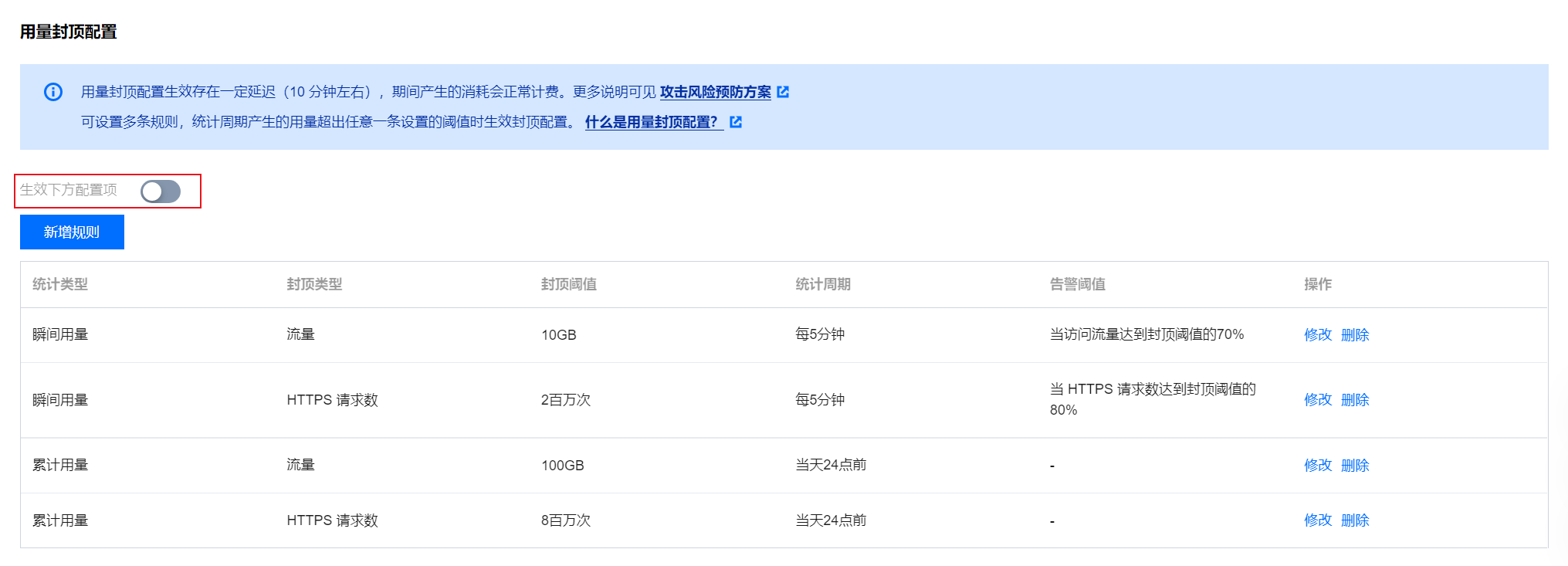
You can disable the usage cap by closing the effective configuration item. Even if there is existing configuration below, it will not take effect in the production environment. If needed, re-enable the configuration by turning it on again.