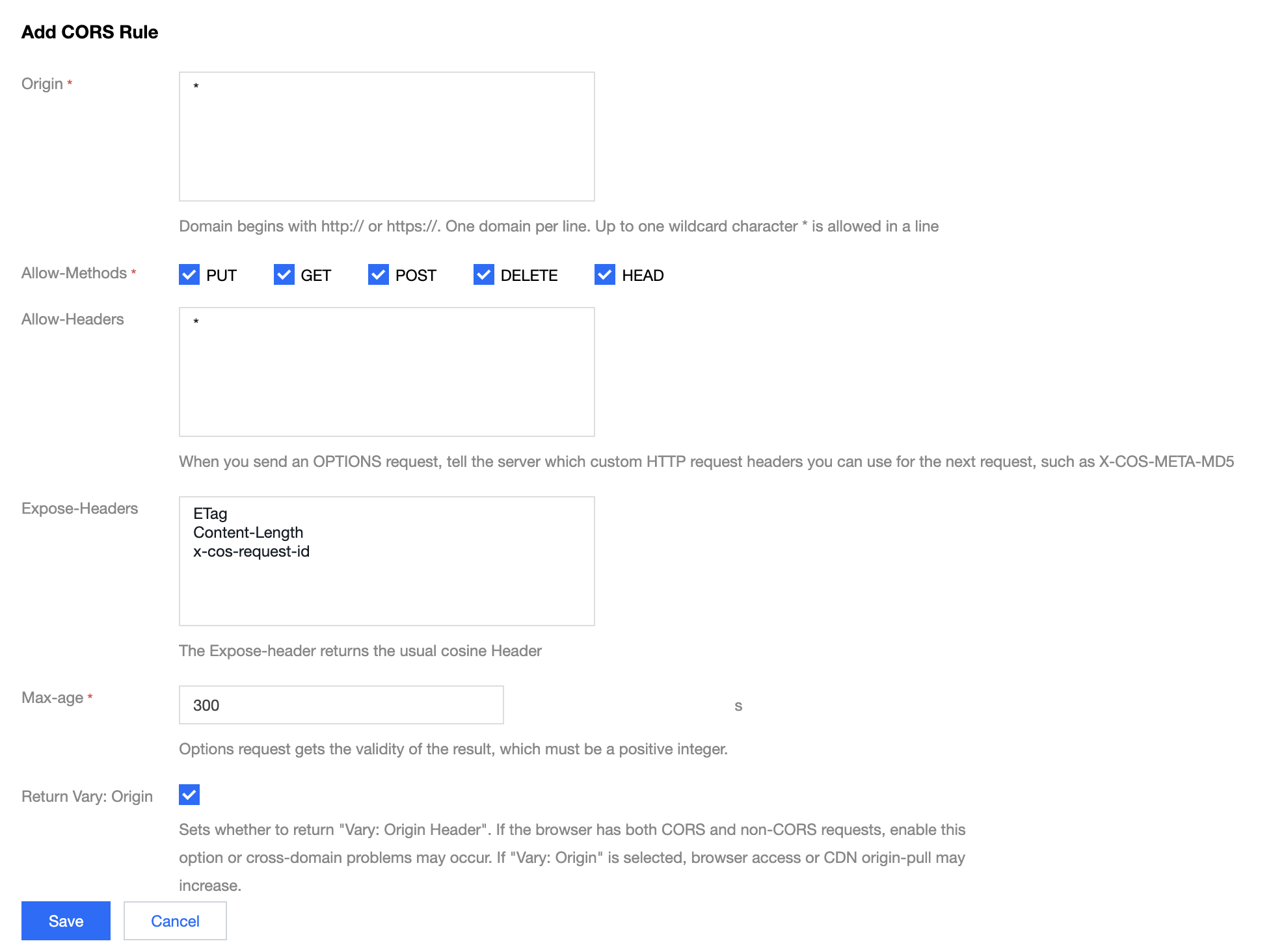
Cross-origin resource sharing (CORS) is to request resources over HTTP from a domain for another domain. Two origins that differ in protocol, domain name, or port are treated as different origins. To enable cross-origin access, see Setting Cross-Origin Access or the best practice documentation Setting Cross-Origin Access.
What should I do if COS denies my access request with headers in the allowlist after I configure CORS?
If your access request is denied, troubleshoot the issue as follows:
1. Check that your configuration is consistent with the headers your request includes, especially for the presence of invisible characters, such as spaces.
2. Check the domain name with which you initiate the request. If you use a CDN acceleration domain name, you need to configure CORS in the CDN console. For operation details, see HTTP Response Header.
3. Check the permissions of your bucket and determine whether your access will be granted.
4. Inspect your browser cache, as the error may be caused by cached data. You can resolve this issue by pressing Ctrl+F5 to force-refresh the browser or by selecting Disable cache in the browser's Network tab.
How do I configure the file headers in the bucket to return "Access-Control-Allow-Origin:* "?
Set the origin to * when configuring CORS. For more information, see the best practice documentation Setting Cross-Origin Access.
What should I do if the error "get ETag error, please add ETag to CORS ExposeHeader setting." occurs during an upload operation?
Please configure CORS rules as shown in the image below, try switching browsers, and test if it works. For more information, see Setting Cross-Origin Access.
What should I do if both COS and CDN are used but CORS does not work in COS?
If you are using a CDN acceleration domain name, configure CORS in the CDN console. For operation details, see HTTP Response Header.
Does CORS configuration support fuzzy match of origins?
The console supports fuzzy match of second-level domain names.
What should I do if COS CORS reports an error?
Please troubleshoot the issue as follows:
1. Check that CORS rules are configured in the COS console. For operation details, please see Setting Cross-Origin Access.
2. Check whether a CDN acceleration domain name is used. If yes, you need to configure CORS rules in the CDN console. For operation details, please see HTTP Response Header.
3. To test if the CORS rule is effective, use the command line with the following format: curl -Lvo /dev/null "<object_url>" -H "origin:<domain>". Replace the values in <> according to your business requirements, for example: curl -Lvo /dev/null "https://bucketname-1250000000.cos.ap-guangzhou.myqcloud.com/test.png" -H "origin:https://www.baidu.com". If the returned status code is 200, the rule is effective. Clear your browser cache and try again.
4. If the problem persists, try to configure max-age=0 in the CORS rules.
What should I do if a CORS error is reported when I use CDN to access files in COS although CDN has been configured in COS?
Enable CORS in the CDN console. For operation details, see HTTP Response Header.
What should I do if a CORS error is reported when I access file URLs?
Verify that CORS is configured correctly. If so, clear your browser cache and try again. If the issue persists, consider setting max-age=0 in the CORS rules. For guidance on configuring CORS, see Setting Cross-Origin Access.