腾讯云
最新活动
大模型
产品
解决方案
定价
企业中心
云市场
开发者
客户支持
合作与生态
了解腾讯云
搜索
SSL 证书
文档中心
入门中心
API 中心
SDK 中心
文档活动
我的反馈
文档中心
>
SSL 证书
>
SSL 证书生效相关
>
如何在浏览器中检查 SSL 证书是否生效?
如何在浏览器中检查 SSL 证书是否生效?
最近更新时间:2024-03-06 14:29:51
微信扫一扫
QQ
新浪微博
复制链接
链接复制成功
我的收藏
本页目录:
如何在浏览器中检查 SSL 证书是否生效?
如何在浏览器中检查 SSL 证书是否生效?
证书安装成功并解析至服务器 IP 后,您可以按照以下步骤检查 SSL 证书生效情况:
1.
打开浏览器(本文以 Chrome 浏览器为例),在浏览器地址栏中以 https 格式输入 SSL 证书绑定的域名地址。
2.
按回车键,访问域名地址。检查是否具备以下情况:
域名地址可以成功访问网站。
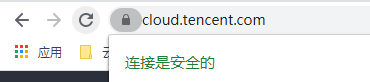
浏览器地址栏左侧显示安全锁标志,则说明您的 SSL 数字证书已生效。如下图所示:
上一篇: 服务器 IP 地址更换后原来的 SSL 证书能否生效?
下一篇: GlobalSign 证书 Windows 7 系统下不受信任怎么办?
文档“捉虫”活动
检视指定产品文档,发现和反馈有效问题,奖!
API专项"捉虫"
反馈API文档问题,代金券、周边好礼奖不停!
文档建议,你提了吗
快来使用腾讯云产品文档,提出有效建议,奖!
咨询