腾讯云
最新活动
大模型
产品
解决方案
定价
企业中心
云市场
开发者
客户支持
合作与生态
了解腾讯云
搜索
运维安全中心(堡垒机)
文档中心
入门中心
API 中心
SDK 中心
文档活动
我的反馈
帮你快速理解、总结文档
立即下载
文档中心
>
运维安全中心(堡垒机)
>
操作指南
>
管理配置手册
>
资产管理
>
资产组
>
新建资产组
新建资产组
最近更新时间:2025-06-27 10:13:11
微信扫一扫
QQ
新浪微博
复制链接
链接复制成功
我的收藏
本页目录:
操作场景
操作步骤
操作场景
运维安全中心(堡垒机)系统支持将具有相同属性或管理需求的资产归类在一起,便于统一管理和权限分配。下面将为您详细介绍如何新建资产组。
操作步骤
1.
登录
运维安全中心(堡垒机)控制台
。
2.
在左侧导航栏中,选择
资产管理
>
资产组
。
3.
在资产组页面,单击
新建资产组
。
4.
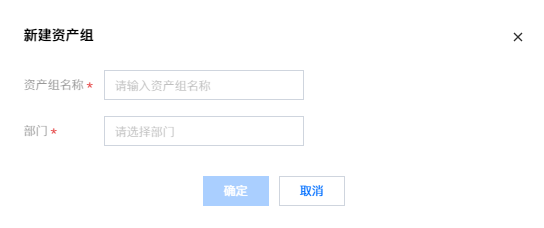
在新建资产组弹窗中,需配置如下信息:
5.
资产组信息配置完成后,单击
确定
,即可新建资产组。
上一篇: 删除应用资产
下一篇: 添加资产
文档“捉虫”活动
检视指定产品文档,发现和反馈有效问题,奖!
API专项"捉虫"
反馈API文档问题,代金券、周边好礼奖不停!
文档建议,你提了吗
快来使用腾讯云产品文档,提出有效建议,奖!
咨询