方法一(推荐)
1. 使用 Chrome 浏览器打开
https://www.hlsplayer.net/ 等 m3u8 在线播放器。2. 按【F12】打开开发者工具,输入云存的播放地址并播放。
3. 可以在 Network 标签页中看到若干 ts 文件,如图所示: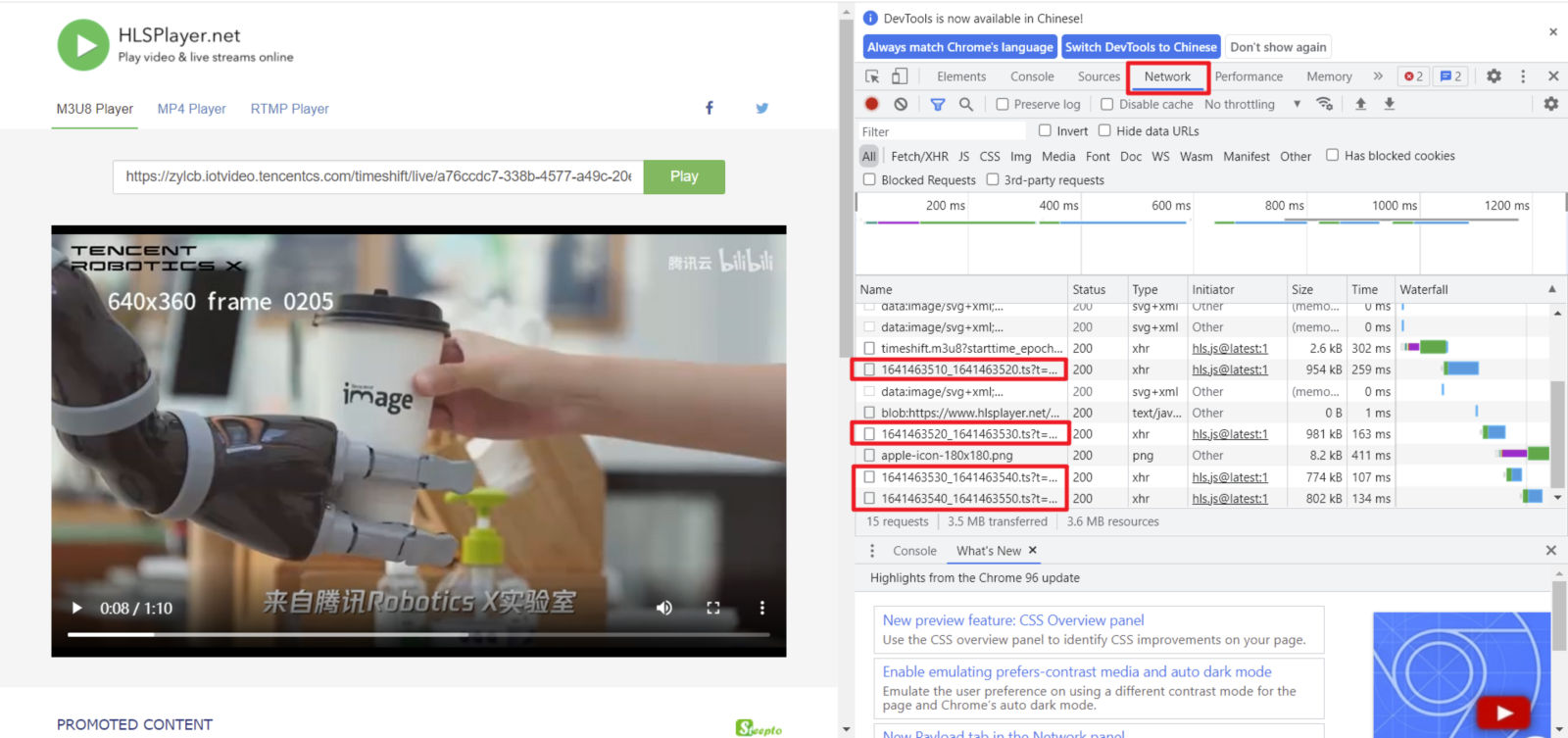
4. 在这些 ts 文件上右键选择 Copy > Copy link address。
5. 将复制的链接放入任意下载器中进行下载(Chrome 直接访问该链接也可下载)。
方法二(推荐)
自行编写 Python 脚本进行下载,这里给出简易下载脚本,仅供参考。
from urllib.parse import urlparseimport requestsdef get_m3u8(url):r = requests.get(url)if (r.status_code != 200):return Nonereturn r.content.decode("utf-8")def make_ts_list(url, m3u8):ts_list = []m3u8_url = urlparse(url)url_head = m3u8_url.scheme + '://' + m3u8_url.hostnamem3u8_lines = m3u8.split("\\n")for each_line in m3u8_lines:if not each_line.startswith('#') and each_line != '':ts_list.append('%s%s' %(url_head, each_line))return ts_listdef download_ts(ts_list):for each_ts in ts_list:ts_url = urlparse(each_ts)pos = ts_url.path.rfind('/') + 1filename = ts_url.path[pos:]print("download " + filename)r = requests.get(each_ts)if (r.status_code != 200):returnwith open(filename, "wb") as fw:fw.write(r.content)print("download finish")def main():aim_url = "https://zylcb.iotvideo.tencentcs.com/timeshift/live/timeshift.m3u8"m3u8 = get_m3u8(aim_url)ts_list = make_ts_list(aim_url, m3u8)download_ts(ts_list)if (__name__ == "__main__"):main()
方法三
1. Chrome 浏览器安装“网页资源嗅探器”等类似插件(此类插件众多,这里不做推荐)。
2. 打开
https://www.hlsplayer.net/ 等 m3u8 在线播放器。3. 输入云存的播放地址并播放,嗅探器会自动识别视频并下载。
注意事项
不要使用 ffmpeg,vlc 等工具进行下载,这类工具会进行二次封装或二次格式转换,导致原始信息丢失。


