本文将介绍如何基于腾讯云物联网设备端 SDK,接入物模型(Data Model)能力,演示属性的上报与控制、事件的上报、行为的下发与回复等核心流程。
关键概念
物模型(Data Model)是物理世界中的设备在云端的数字化抽象。它将设备能力拆解为三个维度:属性(Property)、事件(Event)、行为(Action),让云端、应用端可以用统一的语言理解设备。
属性(Property)
设备运行时的状态或配置参数,既可被云端读取,也可被云端设置,是双向的。例如灯的开关、当前温度、亮度档位。
事件(Event)
设备主动上报到云端的信息,常用于告警、故障、运行状态变化等不可预期的场景,由设备单向推送。
行为(Action)
由云端下发给设备执行的命令,设备接收后需执行并回复结果。行为通常带有输入参数(云端下传)和输出参数(设备回传)。
data_id
属性、事件参数、行为参数的标识符,在同一物模型下唯一,调用 SDK 时必须与云端定义保持一致。
前提条件
在接入物模型通信功能前,若您是 Linux & RTOS 设备端,请先完成 Linux & RTOS 设备端的 登录与注册 文档跑通
tc_iot_login 登录功能;若您是 Android 智能设备端,请先完成 Android 智能设备端的 登录与注册 文档跑通登录功能,如果您已经完成,可以跳过该操作。接入步骤
本节介绍如何调用 SDK 完成物模型的核心调用:上报属性、上报事件、接收云端对属性的设置、接收云端下发的行为并回复结果。
步骤 1:控制台定义物模型
控制台必须定义物模型,设备才可以上报物模型数据到服务器,上报未定义的物模型数据,服务器会拒绝。
1. 登录 物联网开发平台控制台,在产品列表中单击创建的产品名称进入详情。

2. 选择功能定义,单击新增功能或导入物模型,成功后会自动生成对应功能类型。
新增功能:在当前物模型基础上新增一条物模型属性,事件,或行为。
导入物模型:将同类产品的物模型配置文件导入当前产品。
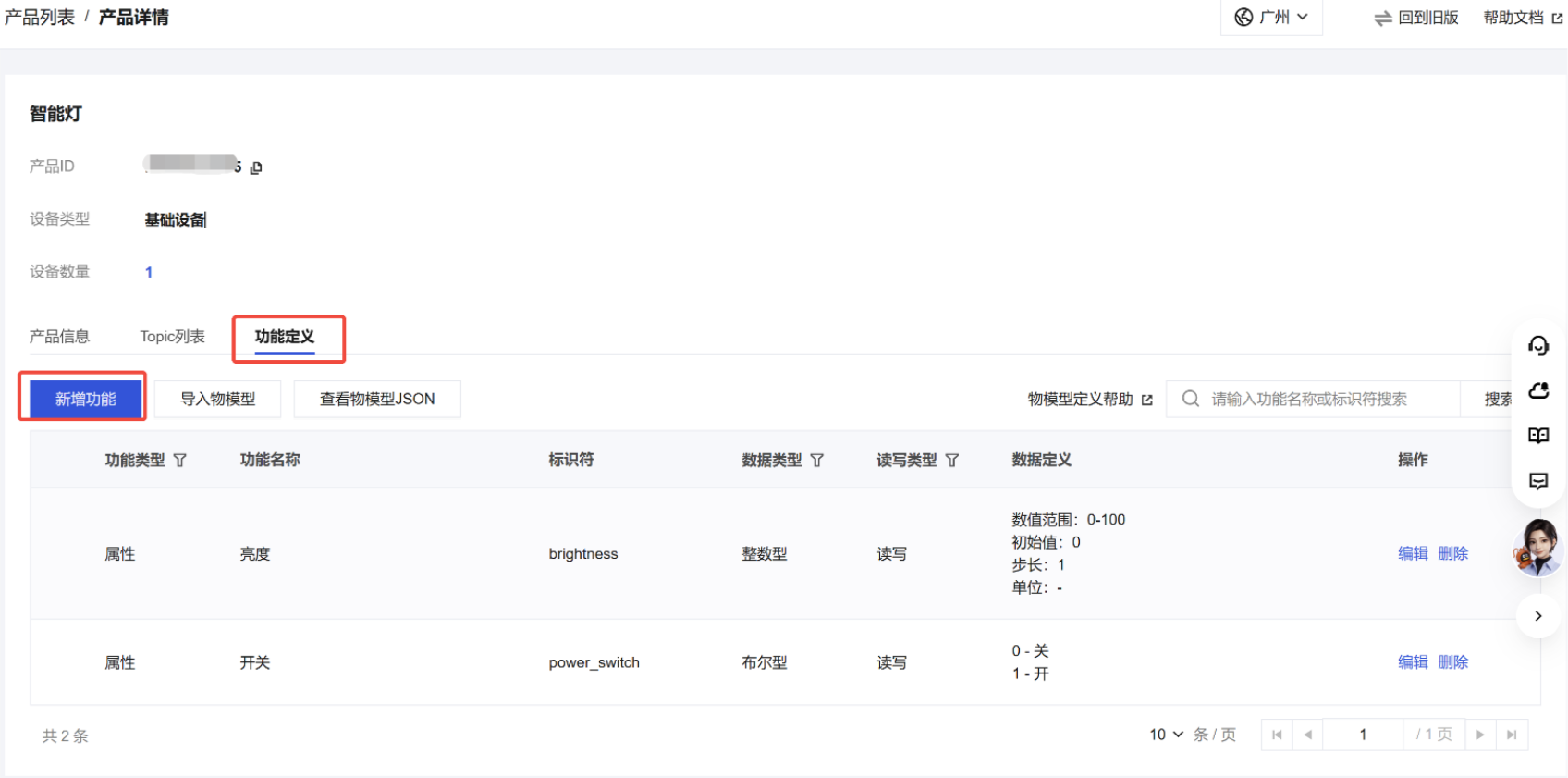
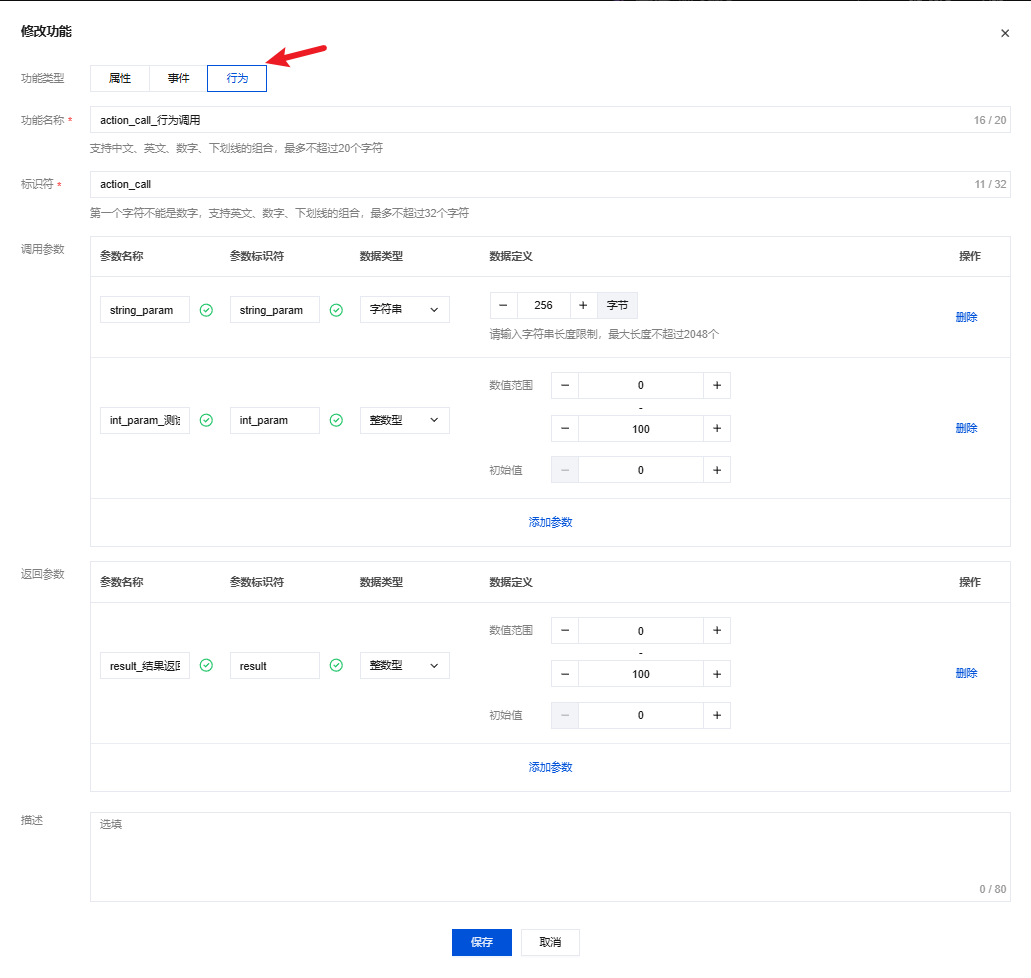
新增功能可以选择新增属性、事件或行为。
界面如下图:
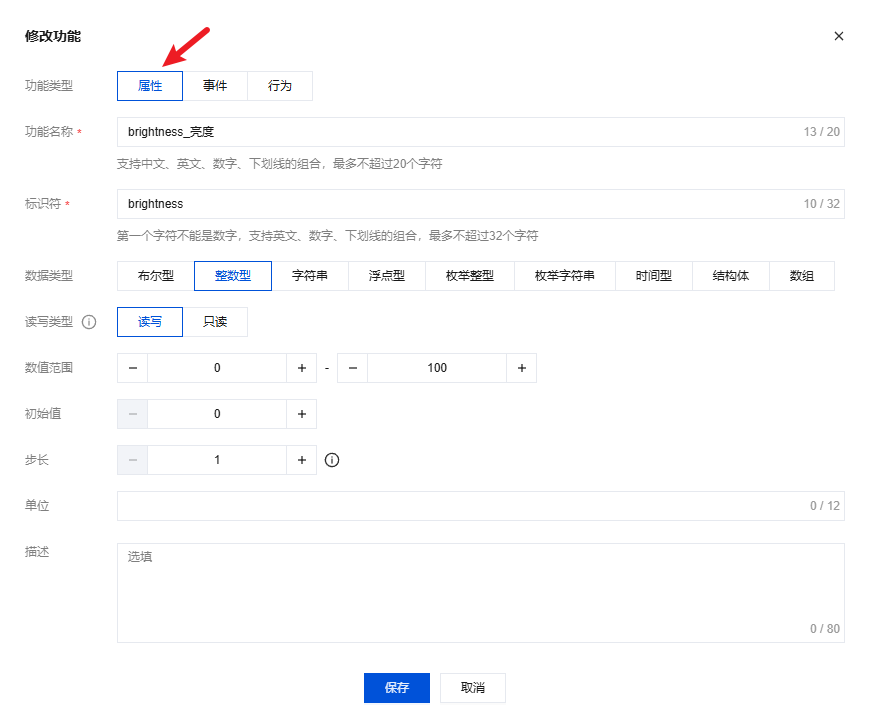
界面如下图:
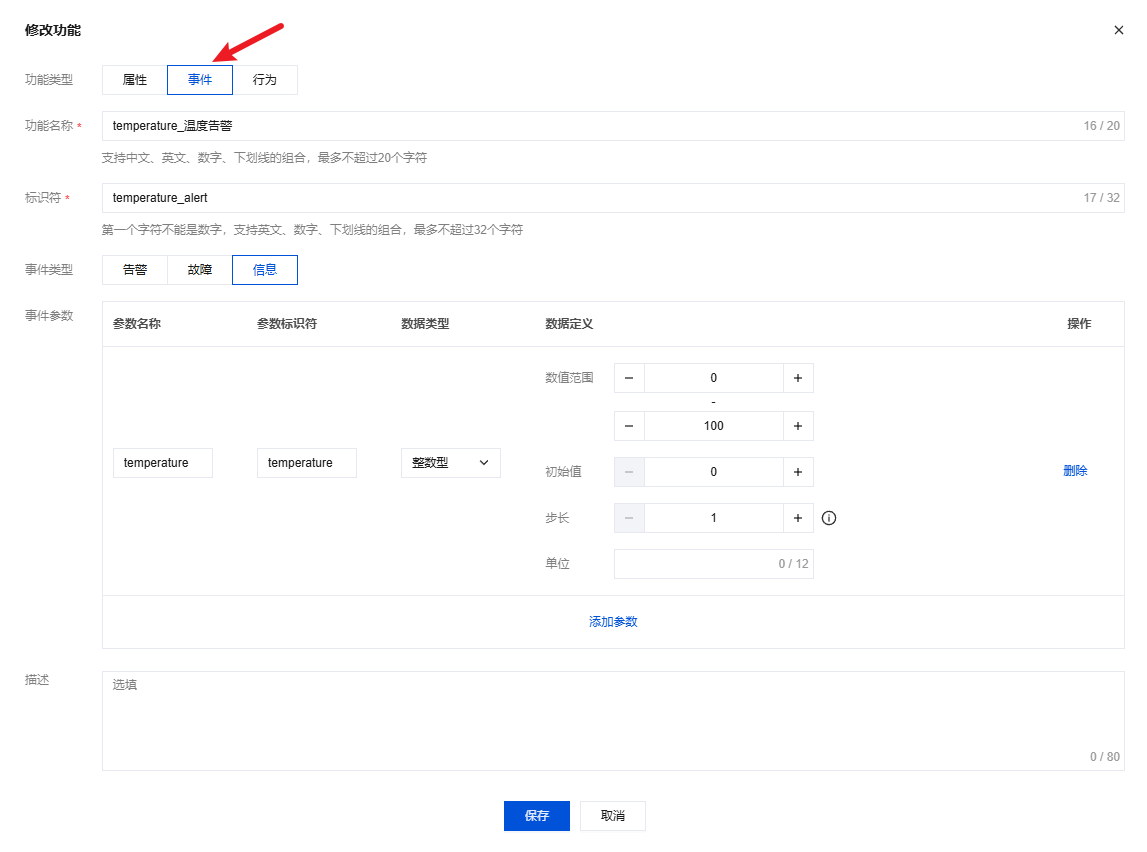
界面如下图:
步骤 2:设备初始化物模型模块
登录成功后进行物模型模块初始化,Linux & RTOS 设备端调用
tc_iot_data_model_init 注册 tc_iot_data_model_callback_t 回调函数完成初始化;Android 智能设备端则通过 TXIoTDataModelSession.getInstance() 获取物模型会话单例,并调用 addListener 注册 TXIoTDataModelSession.Listener 回调。物模型的回调如下:回调 | 说明 |
on_report_property_result_cb | 属性上报后,收到服务器响应或设备发送超时后触发,属性上报结果通过 data_model_report_result_t 告知用户。 |
on_receive_property_changed_cb | 云端修改属性值时,触发设备回调,云端修改后的属性值通过回调参数 data_model_property 告知用户。 |
on_report_event_result_cb | 事件上报后,收到服务器响应或网络超时后触发,事件上报结果通过 data_model_report_result_t 告知用户。 |
on_receive_new_action_cb | 云端调用行为时,触发设备回调,云端下发的行为输入参数通过回调参数 data_model_action 告知用户。 |
回调 | 说明 |
onReceivePropertyChanged | |
onReceiveNewAction |
说明:
Android 智能设备端属性、事件的上报结果不通过监听器回调返回,而是通过对应上报接口(
reportProperty、reportEvent)的 TXIoTCallback / TXIoTValueCallback 异步回调告知。初始化物模型模块
static void on_report_property_result_cb(char *property_id, void *user_data,data_model_report_result_t result_code);static void on_receive_property_changed_cb(char *property_id,tc_iot_data_model_property_t *data_model_property);static void on_report_event_result_cb(char *event_id, void *user_data,data_model_report_result_t result_code);static int on_receive_new_action_cb(char *action_id,tc_iot_data_model_action_t *data_model_action);tc_iot_data_model_callback_t callback;memset(&callback, 0, sizeof(callback));callback.on_report_property_result_cb = on_report_property_result_cb;callback.on_receive_property_changed_cb = on_receive_property_changed_cb;callback.on_report_event_result_cb = on_report_event_result_cb;callback.on_receive_new_action_cb = on_receive_new_action_cb;tc_iot_error_e dm_rc = tc_iot_data_model_init(callback);if (dm_rc != TC_IOT_ERR_SUCCESS) {printf("tc_iot_data_model_init failed: %d\\n", dm_rc);}
TXIoTDataModelSession dataModelSession = TXIoTDataModelSession.getInstance();TXIoTDataModelSession.Listener listener = new TXIoTDataModelSession.Listener() {@Overridepublic void onReceivePropertyChanged(TXIoTDataModelSession.Data property) {// 云端修改属性,设备据此更新本地状态}@Overridepublic int onReceiveNewAction(TXIoTDataModelSession.Action action) {// 云端下发行为,执行后返回结果码(0 表示成功)return 0;}};dataModelSession.addListener(listener);
属性和事件的上报结果:Linux & RTOS 设备端通过回调参数
data_model_report_result_t 告知,取值和说明如下;Android 智能设备端则通过上报接口(reportProperty、reportEvent)的 TXIoTCallback / TXIoTValueCallback 异步回调告知,onSuccess 表示上报成功,onError(code, desc) 表示上报失败。取值 | 说明 |
DATA_MODEL_REPORT_SUCCESS | 上报成功,云端已确认。 |
DATA_MODEL_REPORT_REJECTED | 上报被云端拒绝。 |
DATA_MODEL_REPORT_NO_RESPONSE | 上报无响应(通常为超时)。 |
DATA_MODEL_REPORT_LOCAL_TIMEOUT | 本地超时。 |
回调 | 说明 |
onSuccess | 上报成功,云端已确认。 |
onError(code, desc) | 上报失败, code 为错误码(如被云端拒绝、无响应、本地超时等),desc 为对应的错误描述。 |
步骤 3:设备上报属性
上报属性到云端:Linux & RTOS 设备端调用
tc_iot_data_model_report_property 上报一条或多条属性,属性类型使用 data_model_data_type_t;Android 智能设备端调用 TXIoTDataModelSession.reportProperty 上报属性列表,属性类型使用 TXIoTDataModelSession.DataType 枚举。属性支持的数据类型如下:取值 | 说明 |
DATA_MODEL_DATA_TYPE_BOOL | 布尔值。 |
DATA_MODEL_DATA_TYPE_INT | 32 位整数。 |
DATA_MODEL_DATA_TYPE_FLOAT | 双精度浮点。 |
DATA_MODEL_DATA_TYPE_STRING | 字符串。 |
DATA_MODEL_DATA_TYPE_TIME | 32 位无符号时间戳(秒)。 |
DATA_MODEL_DATA_TYPE_ENUM | 32 位无符号枚举。 |
取值 | 说明 |
DataType.BOOL | 布尔值。 |
DataType.INT | 32 位整数。 |
DataType.FLOAT | 双精度浮点。 |
DataType.STRING | 字符串。 |
DataType.TIME | 32 位无符号时间戳(秒)。 |
DataType.ENUM | 32 位无符号枚举。 |
上报一个布尔属性(灯的开关):
#include "tc_iot_data_model.h"tc_iot_data_model_property_t property[1];memset(property, 0, sizeof(property));char power_switch_id[] = "power_switch";property[0].property.data_id = power_switch_id;property[0].property.data_type = DATA_MODEL_DATA_TYPE_BOOL;property[0].property.data_value.value_bool = true;rc = tc_iot_data_model_report_property(property, 1, NULL);if (rc != TC_IOT_ERR_SUCCESS) {printf("tc_iot_data_model_report_property failed: %d\\n", rc);}
上报多种不同类型的属性:
tc_iot_data_model_property_t property[4];memset(property, 0, sizeof(property));char id_power[] = "power_switch";char id_bright[] = "brightness";char id_color[] = "color";char id_name[] = "device_name";property[0].property.data_id = id_power;property[0].property.data_type = DATA_MODEL_DATA_TYPE_BOOL;property[0].property.data_value.value_bool = true;property[1].property.data_id = id_bright;property[1].property.data_type = DATA_MODEL_DATA_TYPE_INT;property[1].property.data_value.value_int = 80;property[2].property.data_id = id_color;property[2].property.data_type = DATA_MODEL_DATA_TYPE_ENUM;property[2].property.data_value.value_enum = 2;property[3].property.data_id = id_name;property[3].property.data_type = DATA_MODEL_DATA_TYPE_STRING;property[3].property.data_value.value_string = "test_device_001";rc = tc_iot_data_model_report_property(property, 4, NULL);if (rc != TC_IOT_ERR_SUCCESS) {printf("tc_iot_data_model_report_property failed: %d\\n", rc);}
TXIoTDataModelSession.Data power = new TXIoTDataModelSession.Data();power.id = "power_switch";power.dataType = TXIoTDataModelSession.DataType.BOOL;power.dataValue = new TXIoTDataModelSession.DataValue();power.dataValue.valueBool = true;List<TXIoTDataModelSession.Data> propertyList = new ArrayList<>();propertyList.add(power);dataModelSession.reportProperty(propertyList, new TXIoTValueCallback<List<TXIoTDataModelSession.ResultItem>>() {@Overridepublic void onSuccess(List<TXIoTDataModelSession.ResultItem> results) {// 上报成功,results 中为每个属性的处理结果}@Overridepublic void onError(int code, String desc) {// 上报失败}});
上报多种不同类型的属性:
List<TXIoTDataModelSession.Data> propertyList = new ArrayList<>();TXIoTDataModelSession.Data power = new TXIoTDataModelSession.Data();power.id = "power_switch";power.dataType = TXIoTDataModelSession.DataType.BOOL;power.dataValue = new TXIoTDataModelSession.DataValue();power.dataValue.valueBool = true;propertyList.add(power);TXIoTDataModelSession.Data brightness = new TXIoTDataModelSession.Data();brightness.id = "brightness";brightness.dataType = TXIoTDataModelSession.DataType.INT;brightness.dataValue = new TXIoTDataModelSession.DataValue();brightness.dataValue.valueInt = 80;propertyList.add(brightness);TXIoTDataModelSession.Data color = new TXIoTDataModelSession.Data();color.id = "color";color.dataType = TXIoTDataModelSession.DataType.ENUM;color.dataValue = new TXIoTDataModelSession.DataValue();color.dataValue.valueEnum = 2;propertyList.add(color);TXIoTDataModelSession.Data name = new TXIoTDataModelSession.Data();name.id = "device_name";name.dataType = TXIoTDataModelSession.DataType.STRING;name.dataValue = new TXIoTDataModelSession.DataValue();name.dataValue.valueString = "test_device_001";propertyList.add(name);dataModelSession.reportProperty(propertyList, new TXIoTValueCallback<List<TXIoTDataModelSession.ResultItem>>() {@Overridepublic void onSuccess(List<TXIoTDataModelSession.ResultItem> results) { }@Overridepublic void onError(int code, String desc) { }});
说明:
tc_iot_data_model_report_property 是异步接口,返回值仅表示参数是否合法以及消息是否成功入队;真正的上报结果通过 on_report_property_result_cb 异步回调返回。
data_id 必须与控制台物模型中定义的属性标识符完全一致,否则云端会返回错误码。
data_type 与 data_value 的 union 字段必须一一对应(例如 data_type=INT 时只能写 value_int)。
步骤 4:设备上报事件
上报事件到云端:Linux & RTOS 设备端调用
tc_iot_data_model_report_event 上报一个或多个事件,事件类型使用 data_model_event_type_t;Android 智能设备端调用 TXIoTDataModelSession.reportEvent 上报事件,事件类型使用 TXIoTDataModelSession.EventType 枚举。事件类型如下:取值 | 说明 |
DATA_MODEL_EVENT_TYPE_INFO | 普通信息事件,例如设备上线、心跳等。 |
DATA_MODEL_EVENT_TYPE_ALERT | 告警事件,例如温度过高、门被打开。 |
DATA_MODEL_EVENT_TYPE_FAULT | 故障事件,例如传感器异常。 |
取值 | 说明 |
EventType.INFO | 普通信息事件,例如设备上线、心跳等。 |
EventType.ALERT | 告警事件,例如温度过高、门被打开。 |
EventType.FAULT | 故障事件,例如传感器异常。 |
上报一个告警事件(带参数):
#include "tc_iot_data_model.h"tc_iot_data_model_event_t event[1];memset(event, 0, sizeof(event));char event_id[] = "temperature_alert";event[0].event_id = event_id;event[0].event_type = DATA_MODEL_EVENT_TYPE_ALERT;data_model_data_item_t event_data[1];memset(event_data, 0, sizeof(event_data));char temp_id[] = "temperature";event_data[0].data_id = temp_id;event_data[0].data_type = DATA_MODEL_DATA_TYPE_INT;event_data[0].data_value.value_int = 85;event[0].event_data_list = event_data;event[0].event_data_num = 1;rc = tc_iot_data_model_report_event(event, 1, NULL);if (rc != TC_IOT_ERR_SUCCESS) {printf("tc_iot_data_model_report_event failed: %d\\n", rc);}
上报一个故障事件(不带参数):
tc_iot_data_model_event_t fault[1];memset(fault, 0, sizeof(fault));fault[0].event_id = "device_error";fault[0].event_type = DATA_MODEL_EVENT_TYPE_FAULT;fault[0].event_data_num = 0;fault[0].event_data_list = NULL;rc = tc_iot_data_model_report_event(fault, 1, NULL);if (rc != TC_IOT_ERR_SUCCESS) {printf("tc_iot_data_model_report_event failed: %d\\n", rc);}
import com.tencent.liteav.iot.TXIoTCallback;TXIoTDataModelSession.Data temp = new TXIoTDataModelSession.Data();temp.id = "temperature";temp.dataType = TXIoTDataModelSession.DataType.INT;temp.dataValue = new TXIoTDataModelSession.DataValue();temp.dataValue.valueInt = 85;List<TXIoTDataModelSession.Data> eventData = new ArrayList<>();eventData.add(temp);TXIoTDataModelSession.Event event = new TXIoTDataModelSession.Event();event.id = "temperature_alert";event.eventType = TXIoTDataModelSession.EventType.ALERT;event.eventDataList = eventData;dataModelSession.reportEvent(event, new TXIoTCallback() {@Overridepublic void onSuccess() {// 事件上报成功}@Overridepublic void onError(int code, String desc) {// 事件上报失败}});
上报一个故障事件(不带参数):
TXIoTDataModelSession.Event fault = new TXIoTDataModelSession.Event();fault.id = "device_error";fault.eventType = TXIoTDataModelSession.EventType.FAULT;fault.eventDataList = null;dataModelSession.reportEvent(fault, new TXIoTCallback() {@Overridepublic void onSuccess() { }@Overridepublic void onError(int code, String desc) { }});
说明:
事件的 event_data_list 中的 data_id 同样必须与云端物模型中该事件定义的参数标识符一致。
事件如果没有参数,可以将 event_data_num 置为 0、event_data_list 置为 NULL。
步骤 5:控制台查看设备上报的属性和事件
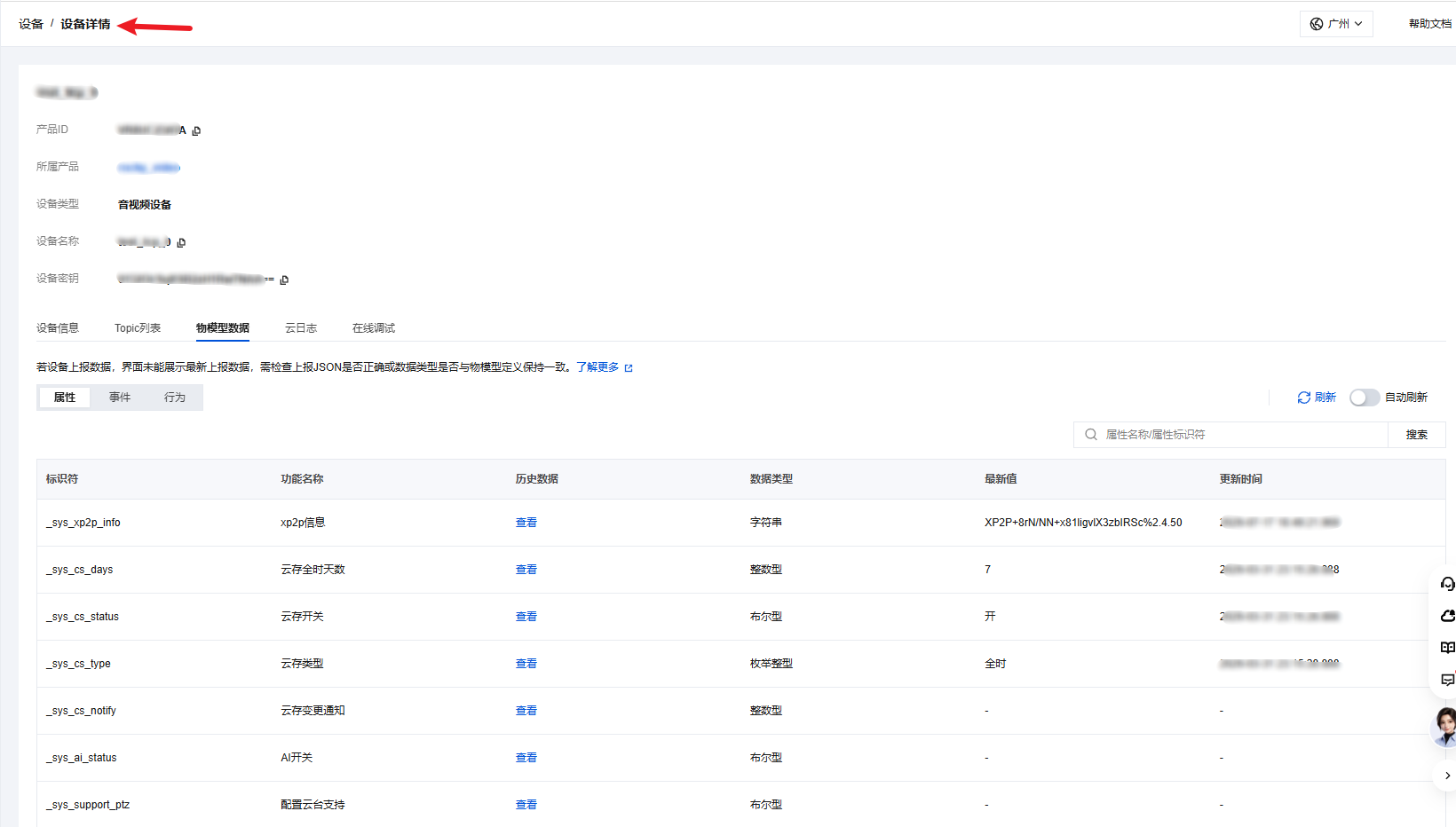
1. 登录 物联网开发平台控制台,在设备列表单击设备名称进入详情页面,选择物模型数据即可查看设备上报的属性和事件,
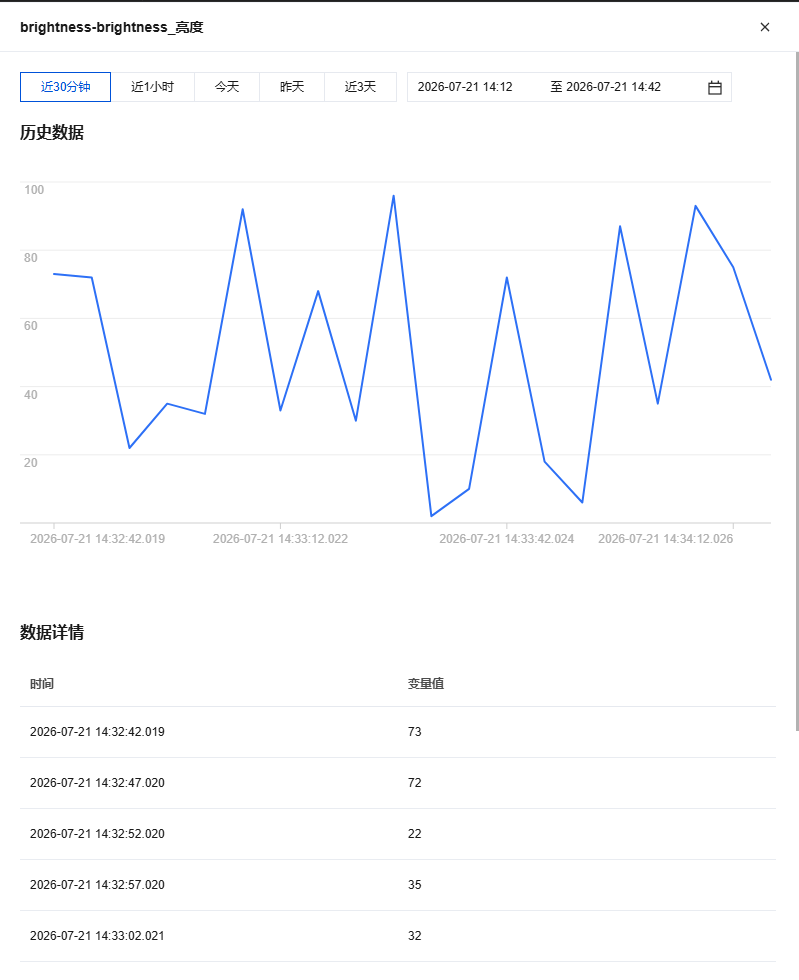
2. 选择需要查看的属性,单击查看。

可以查看属性的变化曲线,以及每次上报的属性值。
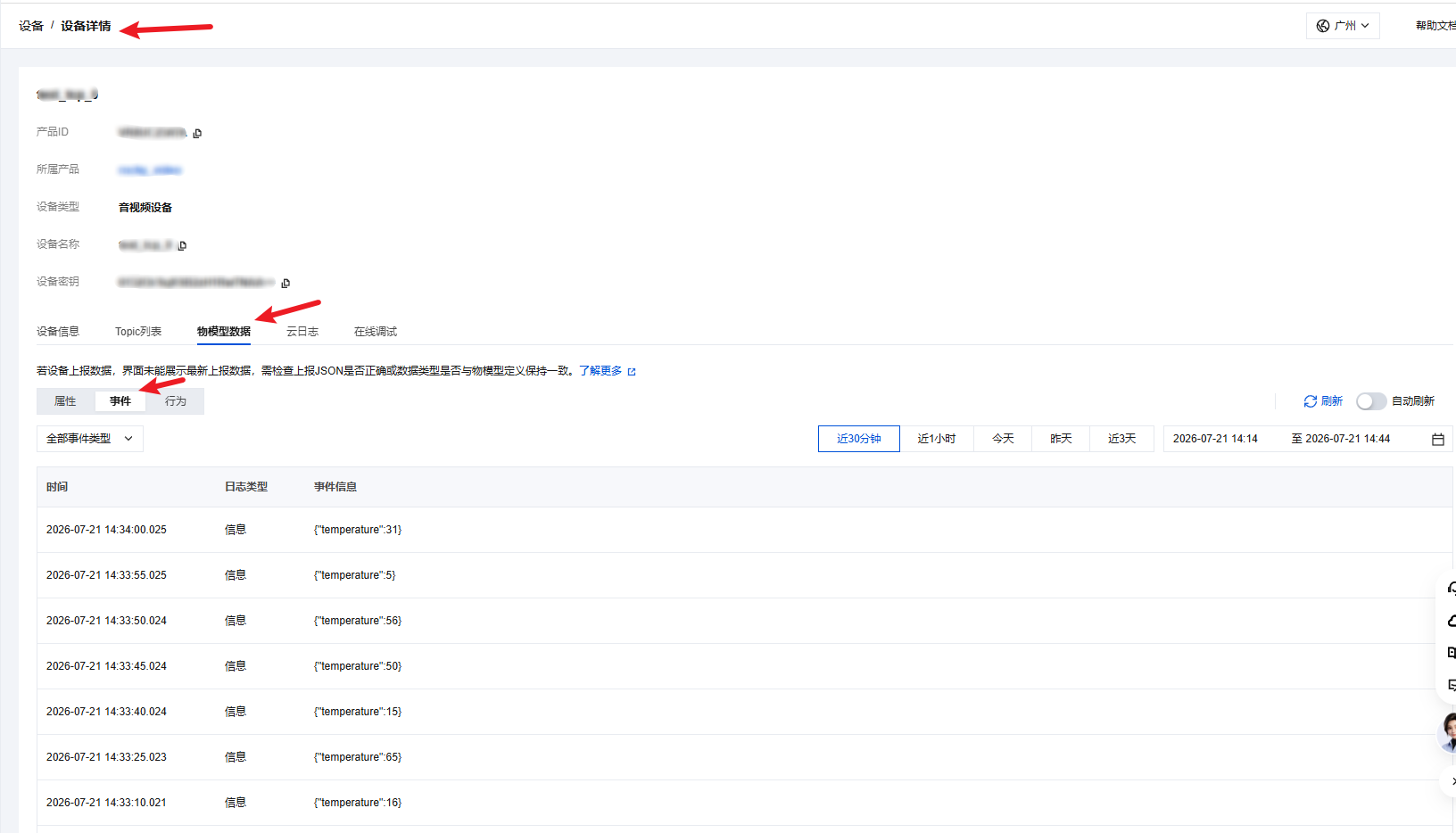
3. 在设备详情页选择物模型数据后,单击事件,即可查看设备上报的所有事件数据。
步骤 6:控制台修改属性和调用行为
1. 登录 物联网开发平台控制台,在设备列表单击设备名称进入详情页面。
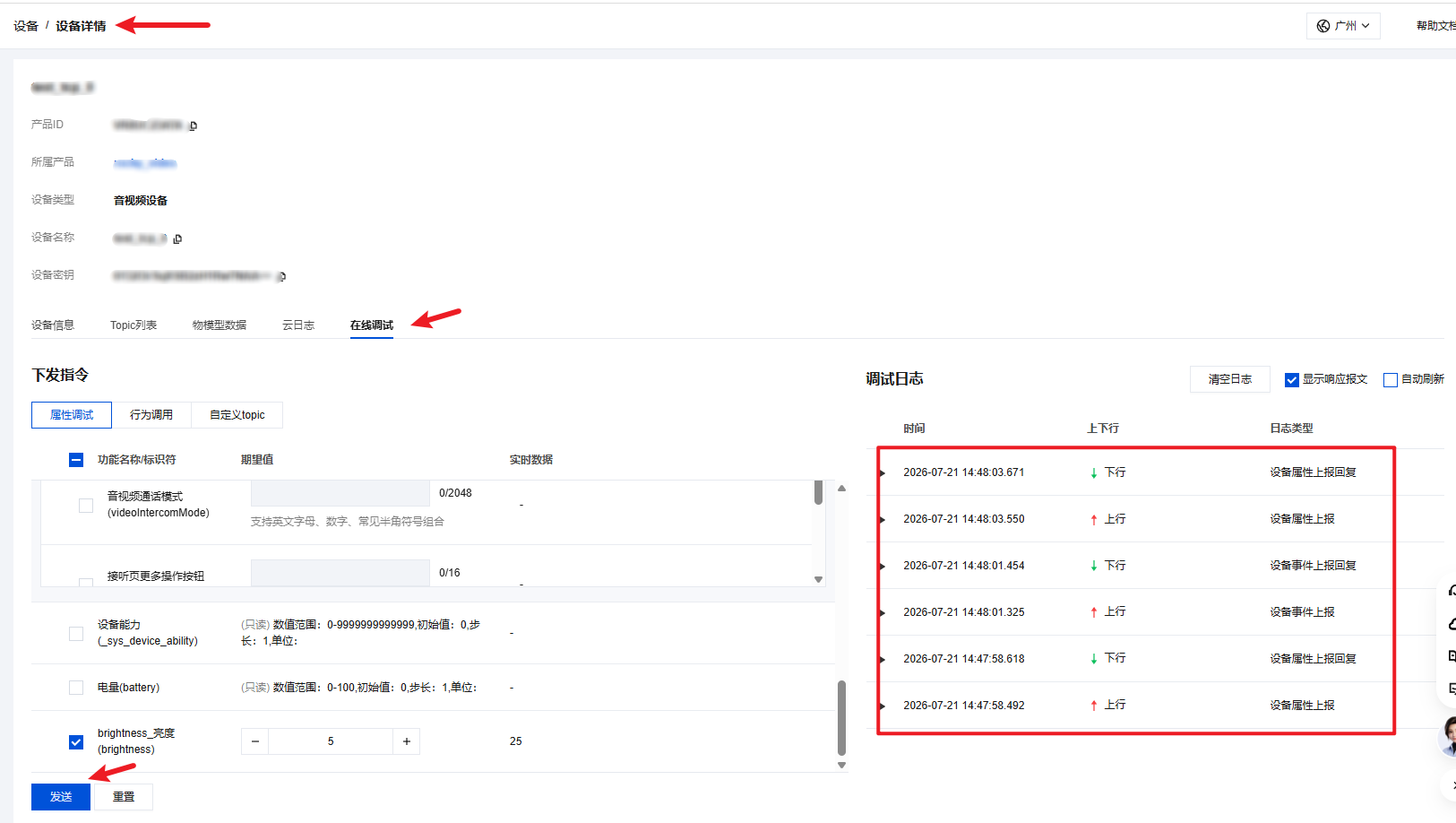
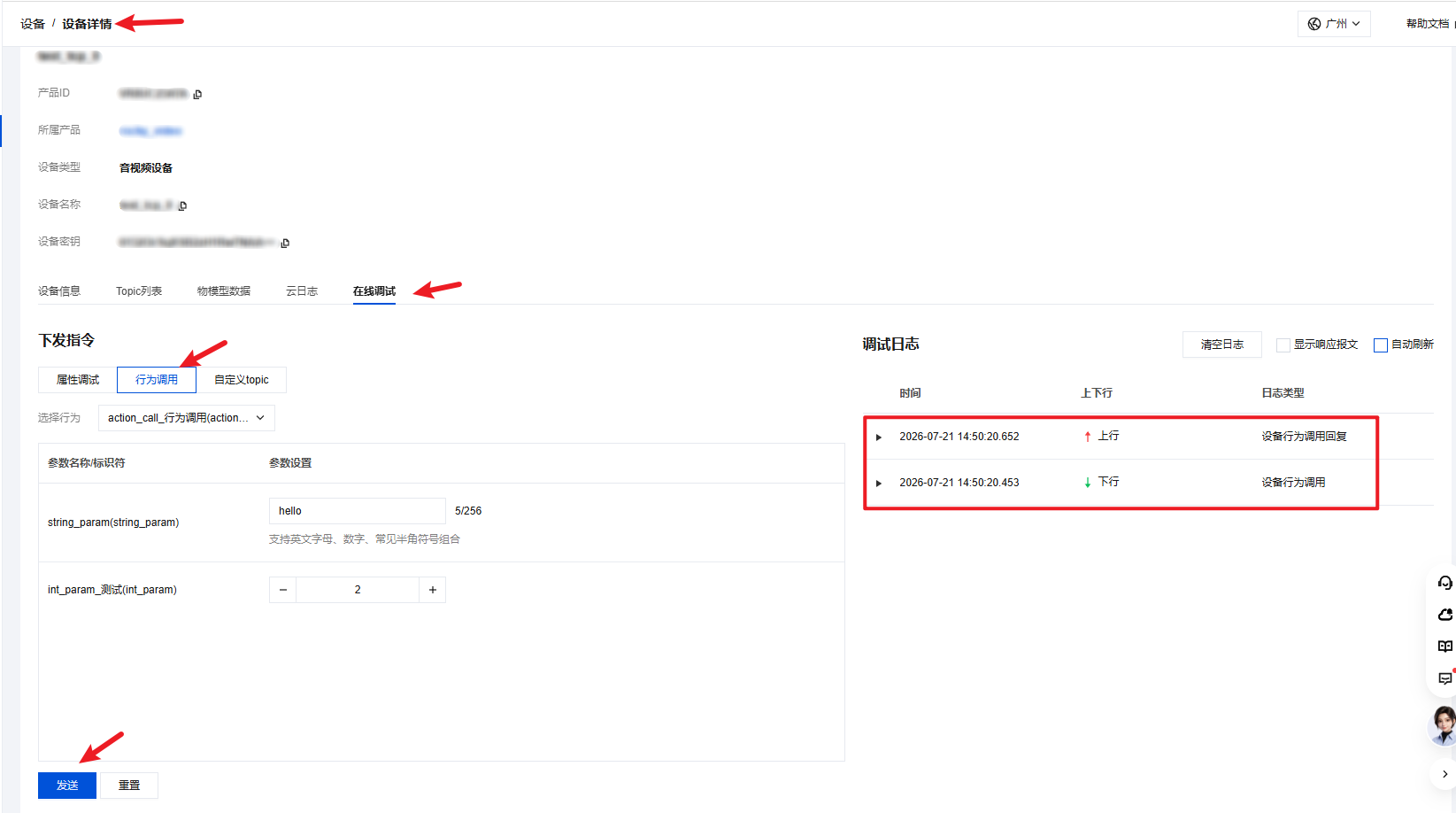
2. 选择在线调试 > 属性调试,勾选要修改的属性,填写修改后的数据,单击发送即可
3. 选择在线调试 > 行为调用,在左侧设置行为参数并发送,右侧会显示行为调用时间,以及设备对行为调用的响应报文和响应时间。
步骤 7:设备端接收属性变更
当云端修改了设备的某个属性时,SDK 会通知上层:Linux & RTOS 设备端通过
on_receive_property_changed_cb 回调触发,Android 智能设备端通过 TXIoTDataModelSession.Listener 的 onReceivePropertyChanged 回调触发。Linux & RTOS 设备端根据回调参数
tc_iot_data_model_property_t 确定属性名称、数据类型与数据值;Android 智能设备端根据回调参数 TXIoTDataModelSession.Data 的 id、dataType 与 dataValue 确定对应信息。static void on_receive_property_changed_cb(char *property_id,tc_iot_data_model_property_t *data_model_property) {if (property_id == NULL || data_model_property == NULL) {return;}data_model_data_item_t *item = &data_model_property->property;printf("[demo] property changed: id=%s, type=%d\\n", item->data_id, (int)item->data_type);switch (item->data_type) {case DATA_MODEL_DATA_TYPE_BOOL:// 根据 item->data_value.value_bool 调整设备状态break;case DATA_MODEL_DATA_TYPE_INT:// 根据 item->data_value.value_int 调整设备状态break;case DATA_MODEL_DATA_TYPE_FLOAT:// 根据 item->data_value.value_float 调整设备状态break;case DATA_MODEL_DATA_TYPE_STRING:// 根据 item->data_value.value_string 调整设备状态break;case DATA_MODEL_DATA_TYPE_ENUM:// 根据 item->data_value.value_enum 调整设备状态break;case DATA_MODEL_DATA_TYPE_TIME:// 根据 item->data_value.value_time 调整设备状态break;default:break;}}
@Overridepublic void onReceivePropertyChanged(TXIoTDataModelSession.Data property) {if (property == null) {return;}switch (property.dataType) {case BOOL:// 根据 property.dataValue.valueBool 调整设备状态break;case INT:// 根据 property.dataValue.valueInt 调整设备状态break;case FLOAT:// 根据 property.dataValue.valueFloat 调整设备状态break;case STRING:// 根据 property.dataValue.valueString 调整设备状态break;case ENUM:// 根据 property.dataValue.valueEnum 调整设备状态break;case TIME:// 根据 property.dataValue.valueTime 调整设备状态break;default:break;}}
说明:
收到属性变更回调后,设备如果修改了属性值,可以将最新的属性值上报云端:Linux & RTOS 设备端调用
tc_iot_data_model_report_property,Android 智能设备端调用 TXIoTDataModelSession.reportProperty。步骤 8:设备端接收行为调用
当云端调用设备的行为时,SDK 会通知上层:Linux & RTOS 设备端通过
on_receive_new_action_cb 回调触发,Android 智能设备端通过 TXIoTDataModelSession.Listener 的 onReceiveNewAction 回调触发;如果行为定义了输出参数:Linux & RTOS 设备端需在回调里给 action_output_data_list / action_output_data_num 赋值,Android 智能设备端需给 action.actionOutputDataList 赋值,SDK 会自动把结果回传给云端。static int on_receive_new_action_cb(char *action_id, tc_iot_data_model_action_t *data_model_action) {if (action_id == NULL || data_model_action == NULL) {return -1;}printf("[demo] receive new action: id=%s, token=%s, timestamp=%u, input_num=%d\\n",action_id,data_model_action->token ? data_model_action->token : "",(unsigned)data_model_action->timestamp,data_model_action->action_input_data_num);// 1. 解析输入参数for (int i = 0; i < data_model_action->action_input_data_num; i++) {data_model_data_item_t *input = &data_model_action->action_input_data_list[i];printf(" input[%d]: id=%s, type=%d\\n", i, input->data_id, (int)input->data_type);// 根据业务需要读取 input->data_value ...}// 2. 执行行为逻辑(同步执行,避免在回调里做长时间阻塞)// 3. 填充输出参数(按云端定义的输出参数顺序和类型)int output_num = data_model_action->action_input_data_num; // 示例:与输入参数个数保持一致data_model_action->action_output_data_num = output_num;data_model_action->action_output_data_list = NULL;if (output_num > 0) {data_model_action->action_output_data_list =(data_model_data_item_t *)calloc(output_num, sizeof(data_model_data_item_t));if (data_model_action->action_output_data_list == NULL) {return -2; // 内存不足,回复云端失败}for (int i = 0; i < output_num; i++) {data_model_data_item_t *input = &data_model_action->action_input_data_list[i];data_model_data_item_t *output = &data_model_action->action_output_data_list[i];output->data_id = input->data_id; // 与云端约定好的输出参数标识output->data_type = input->data_type; // 与云端约定好的输出参数类型if (input->data_type == DATA_MODEL_DATA_TYPE_INT) {output->data_value.value_int = input->data_value.value_int + 1;} else {output->data_value = input->data_value;}}}// 4. 返回 0:执行成功;返回非 0:执行失败,云端会收到对应错误码return 0;}
@Overridepublic int onReceiveNewAction(TXIoTDataModelSession.Action action) {if (action == null) {return -1;}// 1. 解析输入参数if (action.actionInputDataList != null) {for (TXIoTDataModelSession.Data input : action.actionInputDataList) {// 根据 input.dataType 读取 input.dataValue ...}}// 2. 执行行为逻辑(同步执行,避免在回调里做长时间阻塞)// 3. 填充输出参数(按云端定义的输出参数顺序和类型)List<TXIoTDataModelSession.Data> outputList = new ArrayList<>();if (action.actionInputDataList != null) {for (TXIoTDataModelSession.Data input : action.actionInputDataList) {TXIoTDataModelSession.Data output = new TXIoTDataModelSession.Data();output.id = input.id;output.dataType = input.dataType;output.dataValue = new TXIoTDataModelSession.DataValue();if (input.dataType == TXIoTDataModelSession.DataType.INT) {output.dataValue.valueInt = input.dataValue.valueInt + 1;} else {output.dataValue = input.dataValue;}outputList.add(output);}}action.actionOutputDataList = outputList;// 4. 返回 0:执行成功;返回非 0:执行失败,云端会收到对应错误码return 0;}
说明:
如果行为没有输出参数:Linux & RTOS 设备端把
action_output_data_num 置为 0、action_output_data_list 置为 NULL 即可;Android 智能设备端把 action.actionOutputDataList 置为空列表或 null 即可。返回 0 表示执行成功,云端收到的 action_reply 消息中 code=0、status=success;返回非 0 时 code=返回值、status=action execution failed。Linux & RTOS 与 Android 两端行为一致。
完整示例代码
#include <stdio.h>#include <stdlib.h>#include <string.h>#include <unistd.h>#include "tc_iot.h"#include "tc_iot_data_model.h"static volatile int s_login_done = 0;static tc_iot_error_e s_login_rc = TC_IOT_ERR_SUCCESS;// 登录回调static void on_login(tc_iot_error_e error_code, const char *error_message) {s_login_rc = error_code;s_login_done = 1;if (error_code == TC_IOT_ERR_SUCCESS) {printf("[demo] login success\\n");} else {printf("[demo] login failed: %d, msg=%s\\n", error_code,error_message ? error_message : "");}}// 属性上报结果回调static void on_report_property_result_cb(char *property_id, void *user_data,data_model_report_result_t result_code) {printf("[demo] report property result: id=%s, code=%d\\n",property_id ? property_id : "(null)", (int)result_code);}// 事件上报结果回调static void on_report_event_result_cb(char *event_id, void *user_data,data_model_report_result_t result_code) {printf("[demo] report event result: id=%s, code=%d\\n",event_id ? event_id : "(null)", (int)result_code);}// 云端修改属性static void on_receive_property_changed_cb(char *property_id,tc_iot_data_model_property_t *data_model_property) {if (!property_id || !data_model_property) {return;}data_model_data_item_t *item = &data_model_property->property;printf("[demo] property changed: id=%s, type=%d\\n", item->data_id, (int)item->data_type);// 按 item->data_type 解析 item->data_value 并更新本地状态 ...}// 云端下发行为static int on_receive_new_action_cb(char *action_id, tc_iot_data_model_action_t *data_model_action) {if (!action_id || !data_model_action) {return -1;}printf("[demo] receive new action: id=%s, input_num=%d\\n",action_id, data_model_action->action_input_data_num);// 解析输入参数并执行业务逻辑(示例:直接回传)int n = data_model_action->action_input_data_num;data_model_action->action_output_data_num = n;data_model_action->action_output_data_list = NULL;if (n > 0) {data_model_action->action_output_data_list =(data_model_data_item_t *)calloc(n, sizeof(data_model_data_item_t));if (!data_model_action->action_output_data_list) {return -2;}for (int i = 0; i < n; i++) {data_model_data_item_t *in = &data_model_action->action_input_data_list[i];data_model_data_item_t *out = &data_model_action->action_output_data_list[i];out->data_id = in->data_id;out->data_type = in->data_type;out->data_value = in->data_value; // 示例:原样回传}}return 0;}int main(int argc, char **argv) {if (argc < 7) {printf("Usage: %s -p <product_id> -d <device_id> -s <device_secret>\\n", argv[0]);return 0;}const char *product_id = NULL;const char *device_id = NULL;const char *device_secret = NULL;for (int i = 1; i < argc; i++) {if (strcmp(argv[i], "-p") == 0 && i + 1 < argc) {product_id = argv[++i];} else if (strcmp(argv[i], "-d") == 0 && i + 1 < argc) {device_id = argv[++i];} else if (strcmp(argv[i], "-s") == 0 && i + 1 < argc) {device_secret = argv[++i];}}if (!product_id || !device_id || !device_secret) {printf("device info error\\n");return 1;}// 1. 初始化 SDKtc_iot_config_s config;memset(&config, 0, sizeof(config));config.storage_path = "./";config.log_level = TC_IOT_LOG_LEVEL_INFO;tc_iot_error_e rc = tc_iot_init(&config);if (rc != TC_IOT_ERR_SUCCESS) {printf("tc_iot_init failed: %d\\n", rc);return 1;}// 2. 登录tc_iot_device_info_s device_info;device_info.product_id = product_id;device_info.device_id = device_id;device_info.device_secret = device_secret;rc = tc_iot_login(&device_info, on_login);if (rc != TC_IOT_ERR_SUCCESS) {printf("tc_iot_login call failed: %d\\n", rc);tc_iot_deinit();return 1;}int waited_ms = 0;while (!s_login_done && waited_ms < 5000) {usleep(100 * 1000);waited_ms += 100;}if (!s_login_done || s_login_rc != TC_IOT_ERR_SUCCESS) {printf("login timeout or failed\\n");tc_iot_deinit();return 1;}// 3. 初始化物模型模块tc_iot_data_model_callback_t callback = {.on_report_property_result_cb = on_report_property_result_cb,.on_receive_property_changed_cb = on_receive_property_changed_cb,.on_report_event_result_cb = on_report_event_result_cb,.on_receive_new_action_cb = on_receive_new_action_cb,};rc = tc_iot_data_model_init(callback);if (rc != TC_IOT_ERR_SUCCESS) {printf("tc_iot_data_model_init failed: %d\\n", rc);tc_iot_logout();tc_iot_deinit();return 1;}// 4. 上报一个布尔属性:power_switch = truetc_iot_data_model_property_t property[1];memset(property, 0, sizeof(property));char id_power[] = "power_switch";property[0].property.data_id = id_power;property[0].property.data_type = DATA_MODEL_DATA_TYPE_BOOL;property[0].property.data_value.value_bool = true;rc = tc_iot_data_model_report_property(property, 1, NULL);if (rc != TC_IOT_ERR_SUCCESS) {printf("tc_iot_data_model_report_property failed: %d\\n", rc);}// 5. 上报一个告警事件:temperature_alert,参数 temperature = 85tc_iot_data_model_event_t event[1];memset(event, 0, sizeof(event));char id_event[] = "temperature_alert";event[0].event_id = id_event;event[0].event_type = DATA_MODEL_EVENT_TYPE_ALERT;data_model_data_item_t event_data[1];memset(event_data, 0, sizeof(event_data));char id_temp[] = "temperature";event_data[0].data_id = id_temp;event_data[0].data_type = DATA_MODEL_DATA_TYPE_INT;event_data[0].data_value.value_int = 85;event[0].event_data_list = event_data;event[0].event_data_num = 1;rc = tc_iot_data_model_report_event(event, 1, NULL);if (rc != TC_IOT_ERR_SUCCESS) {printf("tc_iot_data_model_report_event failed: %d\\n", rc);}// 6. 等待云端交互(属性修改、行为调用等),观察回调打印sleep(10);// 7. 释放资源tc_iot_data_model_deinit();tc_iot_logout();tc_iot_deinit();printf("[demo] main exit\\n");return 0;
import android.content.Context;import java.util.ArrayList;import java.util.List;import com.tencent.liteav.iot.TXIoTCallback;import com.tencent.liteav.iot.TXIoTDeviceEngine;import com.tencent.liteav.iot.TXIoTDataModelSession;import com.tencent.liteav.iot.TXIoTValueCallback;public class DataModelDemo {private TXIoTDataModelSession mDataModelSession;private TXIoTDataModelSession.Listener mListener;public void start(Context context, String productId, String deviceId, String deviceSecret) {// 1. 初始化 SDKTXIoTDeviceEngine engine = TXIoTDeviceEngine.getInstance(context);TXIoTDeviceEngine.Config config = new TXIoTDeviceEngine.Config();config.storagePath = context.getFilesDir().getAbsolutePath();config.logLevel = TXIoTDeviceEngine.LogLevel.INFO;engine.initSDK(config);// 2. 登录TXIoTDeviceEngine.DeviceInfo deviceInfo = new TXIoTDeviceEngine.DeviceInfo();deviceInfo.productId = productId;deviceInfo.deviceId = deviceId;deviceInfo.deviceSecret = deviceSecret;engine.login(deviceInfo, new TXIoTCallback() {@Overridepublic void onSuccess() {onLoginSuccess();}@Overridepublic void onError(int code, String desc) {// 登录失败处理}});}private void onLoginSuccess() {// 3. 获取物模型会话并注册监听器mDataModelSession = TXIoTDataModelSession.getInstance();mListener = new TXIoTDataModelSession.Listener() {@Overridepublic void onReceivePropertyChanged(TXIoTDataModelSession.Data property) {// 云端修改属性}@Overridepublic int onReceiveNewAction(TXIoTDataModelSession.Action action) {// 云端下发行为,执行并回填输出参数return 0;}};mDataModelSession.addListener(mListener);// 4. 上报一个布尔属性:power_switch = trueTXIoTDataModelSession.Data power = new TXIoTDataModelSession.Data();power.id = "power_switch";power.dataType = TXIoTDataModelSession.DataType.BOOL;power.dataValue = new TXIoTDataModelSession.DataValue();power.dataValue.valueBool = true;List<TXIoTDataModelSession.Data> propertyList = new ArrayList<>();propertyList.add(power);mDataModelSession.reportProperty(propertyList,new TXIoTValueCallback<List<TXIoTDataModelSession.ResultItem>>() {@Overridepublic void onSuccess(List<TXIoTDataModelSession.ResultItem> results) { }@Overridepublic void onError(int code, String desc) { }});// 5. 上报一个告警事件:temperature_alert,参数 temperature = 85TXIoTDataModelSession.Data temp = new TXIoTDataModelSession.Data();temp.id = "temperature";temp.dataType = TXIoTDataModelSession.DataType.INT;temp.dataValue = new TXIoTDataModelSession.DataValue();temp.dataValue.valueInt = 85;List<TXIoTDataModelSession.Data> eventData = new ArrayList<>();eventData.add(temp);TXIoTDataModelSession.Event event = new TXIoTDataModelSession.Event();event.id = "temperature_alert";event.eventType = TXIoTDataModelSession.EventType.ALERT;event.eventDataList = eventData;mDataModelSession.reportEvent(event, new TXIoTCallback() {@Overridepublic void onSuccess() { }@Overridepublic void onError(int code, String desc) { }});}public void release() {// 6. 释放资源if (mDataModelSession != null && mListener != null) {mDataModelSession.removeListener(mListener);}TXIoTDeviceEngine.getInstance(null).logout(new TXIoTCallback() {@Overridepublic void onSuccess() { }@Overridepublic void onError(int code, String desc) { }});}}
编译并运行
1. 在项目根目录执行 CMake 编译。
cmake -B buildcmake --build build -j
2. 运行可执行文件,传入设备三元组。
./build/iot_quickstart_demo -p YOUR_PRODUCT_ID -d YOUR_DEVICE_NAME -s 'YOUR_DEVICE_SECRET'
3. 观察日志输出,出现以下内容代表登录与信令发送均成功。
[demo] login success[demo] report property result: id=power_switch, code=0[demo] report event result: id=temperature_alert, code=0
云端在控制台对设备发起一次行为调用(如 set_brightness),设备端会打印:
[demo] receive new action: id=set_brightness, input_num=1 input[0]: id=brightness, type=2
云端在控制台修改一次属性(如把 brightness 改为 90),设备端会打印:
[demo] property changed: id=brightness, type=2
常见问题
现象 | 排查建议 |
tc_iot_data_model_init 返回 TC_IOT_ERR_NOT_INITIALIZED | 确认在调用前已成功调用 tc_iot_init 和 tc_iot_login,且 on_login 回调返回 TC_IOT_ERR_SUCCESS。 |
tc_iot_data_model_init 返回 TC_IOT_ERR_ALREADY_INITIALIZED | 物模型模块只允许初始化一次,确认没有重复调用,或先调用 tc_iot_data_model_deinit 再重新 init。 |
tc_iot_data_model_report_property 返回 TC_IOT_ERR_INVALID_ARGUMENT | 检查 property 指针是否为空、property_num 是否 ≤ 0。 |
云端收不到上报的属性 / 事件 | 检查 data_id、event_id 是否与控制台物模型定义完全一致;data_type 与 data_value 的 union 字段是否对应正确。 |
on_report_property_result_cb 回调里 result_code ≠ DATA_MODEL_REPORT_SUCCESS | 查看 SDK 日志中的错误码;常见原因有网络抖动、MQTT 断连、设备未登录。 |
云端行为调用,设备执行后并响应后,云端没有收到结果 / 一直 pending | 确认 on_receive_new_action_cb 在合理时间内返回(0 表示成功);回调中不要做阻塞或 sleep;输出参数按云端约定填写。 |
编译报错找不到头文件 | 确认 CMakeLists.txt 中 target_include_directories 正确指向 tc_iot_sdk/include。 |
联系我们


