The content of this page has been automatically translated by AI. If you encounter any problems while reading, you can view the corresponding content in Chinese.

Android

Last updated: 2024-12-26 15:40:21

2.9.8.267 @ 2024.12.12

Initialization Parameters
New property added to TEduBoardInitParam: androidVideoFillMode, sets whether the video fills the screen.
New property added to TEduBoardInitParam: enableContainerViewAlpha, sets whether the whiteboard container view is transparent.
Adapted for Android 14

2.9.5.258 @ 2023.1.31

Callback Event Changes
In the new transcoding scheme, Audio and Video now include the currentTime property during play/pause, indicating media playback progress.
API changes
playH5PPTVideo,pauseH5PPTVideo,playH5PPTAudio,pauseH5PPTAudio APIs now support controlling Audio and Video playback in new transcoding scheme (CI) PPT, PPTX files.
Note:
Due to technical limitations, the new transcoded courseware can only achieve all play/pause of media (does not distinguish between audio and video) on the current page.
Optimized experience
Image elements now support dragging beyond the whiteboard boundary.
Fixes
In Group Mode, there is a probability of segment erasure failure.
For the protractor teaching aid, setting 0° will display as 30° on the remote.

2.9.4.257 @ 2023.12.28

Initialization Parameters
Added config.h5PPTDownGradeTimeoutTimes, H5PPT resource load timeout times, default is 0, no downgrade processing; if it exceeds the default number of times, the SDK will actively give the TEduBoard.EVENT.TEB_H5PPT_DOWN_GRADE callback event, invoke setDownGradeEnable API, to determine downgrade settings. If downgraded, display as thumbnails of transcoded files.
New interface
1.1 Automatic selection of geometric elements autoSelectedElement, used with TEduBoard.EVENT.TEB_ADDELEMENT, invoked when callback parameter type == TEduBoard.TEduBoardElementType.TEDU_BOARD_ELEMENT_GEOMETRY, the element will be automatically selected.
1.2 Set H5 PPT file downgrade rendering setDownGradeEnable.
New callback event
1.3 New H5 PPT page downgrade rendering event notification: TEduBoard.EVENT.TEB_H5PPT_DOWN_GRADE, used with setDownGradeEnable interface to proceed with downgrade rendering settings.
API changes
1.4 Add whiteboard APIaddBoard with new configuration attributeindex to specify the page number for adding whiteboard.
1.5 H5 PPT internal multimedia resource playback status callback eventTEB_H5PPT_MEDIA_STATUS_CHANGED adds a new return parametercurrentTime, indicating H5PPT media playback progress.
Others
1.6 mini programs webview version adds dot eraser feature.
1.7 mini programs other known bugs.

2.9.3.252 @ 2023.11.30

New interface
1.1 Play H5 transcoded PPT current page video:playH5PPTVideo
1.2 Pause H5 transcoded PPT current page video:pauseH5PPTVideo
1.3 Play H5 transcoded PPT current page audio:playH5PPTAudio
1.4 Pause H5 transcoded PPT current page audio: pauseH5PPTAudio
API changes
1.1 Get file information API getFileInfo: new field pptMediaInfo added in the return result, which contains the list of audio and video element IDs on the current page of the H5 transcoded PPT.
Feature changes
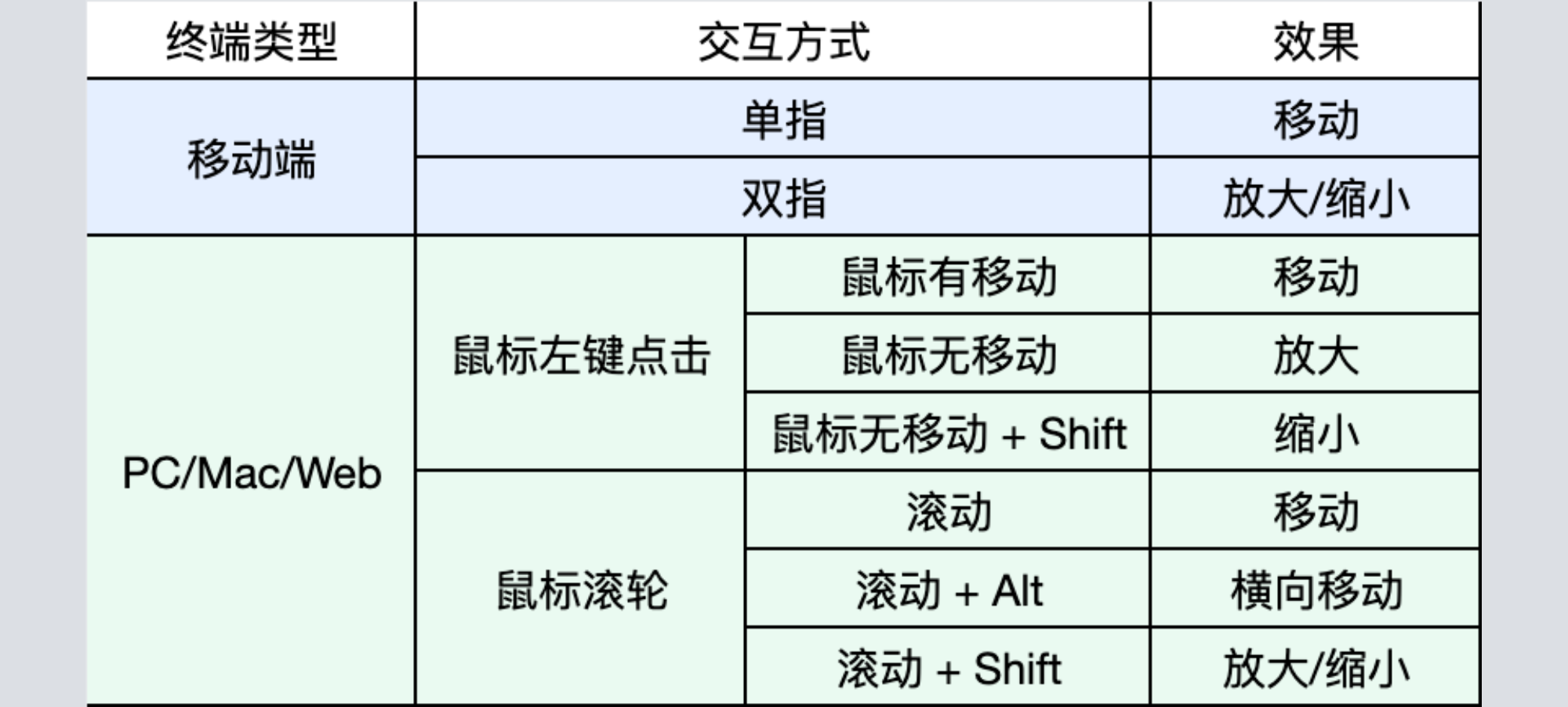
1.1 Zoom and move tool: Now supports Alt key (Option Key on macOS) + Scroll Wheel for horizontal movement of the whiteboard. Complete usage instructions are as follows:

1.2 Rectangle Selection Tool: When moving/scaling elements, they will now stay within the whiteboard's range.
1.3 Text tool: When the text content is too long, input will be blocked, and the text content will not be automatically truncated at the end.
Fixes
1.1 Zoom and move tool: On macOS, Shift + Scroll Wheel does not trigger scaling.
1.2 Zoom and move tool: Occasional occurrence of Shift + Scroll Wheel allows horizontal movement of the whiteboard.

2.9.2.249 @ 2023.10.30

New interface
1.1 Add Cursor Position Setting Interface: setCursorPosition, can be used in scenarios where you want explicit cursor for local and remote while disabling mouse response.
1.2 API to set text tool line height: setTextLineHeight, supports passing in numbers. The created text box will use the set line height after setting.
New callback event
1.1 New callback event: TIW_RESET_DATA, triggers when invoking the reset API.
Interface Optimization
1.1 Modify element API: updateElementById now adds a new type typeTEduElementOperatorType.ROTATION_ANGLE, supports modification of element rotation angle. See Details in API documentation.
1.2 Add element interface: addElement now also supports setting the rotation angle for elements other than watermark elements deg.
1.3 Add Transcoding File Interface: addTranscodeFile now also supports adding COS transcoded PDF files.
Fixes
1.1 Show/Hide Element,Clear Whiteboard then performing an undo operation will definitely cause the element to be displayed.
1.2 Setting Image or H5 Background and turning to other pages causes a large number of requests for background resources issue.
1.3 Error occurs in full-size screenshot when no courseware is added issue.
1.4 In drawing disabled state, clicking text elements sends active input events issue.

2.9.1.248 @ 2023.09.13

Optimization
1.1 Optimize input performance of text tool in large text volume scenario.

2.9.0.247 @ 2023.08.22

New Events
1.1 Add new drawing action state switching event TEB_DRAW_STATUS_CHANGED.
Optimization
1.1 Fix the issue of modifying color in mathematical formulas not supported.
1.2 Fix the issue where custom graphics still display on the canvas when deleting a whiteboard.
1.3 Fix the issue where the free zoom drag icon appears when rotating custom elements.

2.8.9.246 @ 2023.07.21

Initialization Parameters
1.1 Add styleConfig.scrollbarThumbColor parameter to set whiteboard scrollbar slider color.
1.2 Add styleConfig.scrollbarTrackColor parameter to set whiteboard scrollbar slide rail color.
Optimized Processing
1.1 In the scenario of whiteboard auto zoom, the TEB_BOARD_SCALE_CHANGE event callback will now also be triggered.

2.8.8.244 @ 2023.06.26

Update Events
1.1 The warning code for warning events adds TEDU_BOARD_WARNING_FILE_NOT_FOUND. If the file to be operated on does not exist, this warning will be triggered.
1.2 The screenshot event (TEduBoard.EVENT.TEB_SNAPSHOT) adds the code field to indicate whether this screenshot is successful.
1.3 The H5 PPT loading status event adds TEDU_BOARD_H5_PPT_STATUS_IMAGE_ABNORMAL. If the image resource inside the PPT fails to load, this status code will be triggered.
Optimized Processing
1.1 Fixed the issue of discrepancies in the pause time points of video file play pause across all platforms.

2.8.7.241 @ 2023.05.23

Add Initialization Parameters
1.1 Added H5 PPT LoadTimeout parameter to configure H5 PPT loading timeout time.
1.2 Added H5 PPT ResourceTimeout parameter to configure H5 PPT internal resource loading timeout time.
New interface
1.1 Added element locking interface lockElements, supporting locking and unlocking of elements.
New Events
1.1 Add element lock state change event TEB_BOARD_ELEMENT_LOCKED_CHANGED.
1.2 Add H5 PPT multimedia resource playback status TEB_H5PPT_MEDIA_STATUS_CHANGED.
Update Interface
1.1 Get Element Details Interface getElementById returned result adds a locked field, indicating whether the element is locked.
Update Events
1.1 TEB_GOTOBOARD Page Turning Event adds a parameter to indicate the operator who triggered this page turning.
1.2 Warning event warning code adds TEDU_BOARD_WARNING_ELEMENT_IS_LOCKED, which will be triggered when performing delete, move, rotate, etc. operations on locked elements.

2.8.6.225 @ 2023.04.11

New interface
1.1 snapshot interface adjusts the whiteboard screenshot area, supports specified parameters to set whether to capture the full-size whiteboard.
1.2 importInLocalMode interface supports undo and redo data export, allowing undo and redo operations after exportInLocalMode.
Optimization
1.1 Repair the issue where a video file would automatically play on iPhone 6.

2.8.5.222 @ 2023.03.13

New interface
1.1 Set Elements Display to show or hide elements.
Update Interface
1.1 exportInLocalMode supports specifying element type/element ID, hidden elements, etc. during export.
1.2 importInLocalMode supports specifying element type/element ID, hidden elements, etc. during import.
1.3 getBoardElementList adds a second parameter, supporting the retrieval of hidden elements in the page.
New Events
1.1. Element size, position change TEB_BOARD_ELEMENT_POSITION_CHANGE event, add status field to indicate the state of element start change, changing, and end change.
1.2. Alarm code TEduBoardWarningCode adds TEDU_BOARD_WARNING_EXPORTIMPORT_FILTERRULE_ILLEGAL, TEDU_BOARD_WARNING_ELEMENTTYPE_NOT_EXISTS, TEDU_BOARD_WARNING_ELEMENTID_NOT_EXISTS.

2.8.4.220 @ 2023.03.01

New interface
1.1 Get background image information getBackgroundImage.
Update Interface
1.1. setBackgroundImage, setBackgroundH5 interfaces support setting an empty string to clear the background.
1.2. exportData interface renamed to exportInLocalMode.
1.3. importData interface renamed to importInLocalMode.
1.4. Support for setting the operational behavior after selecting elements (can configure whether to allow scaling, moving, rotating, scaling proportionally), initParams.authConfig.elementOperationAuthority.
New Events
1.1. importInLocalMode interface data import completion event onTEBImportInLocalModeCompleted.

2.8.3.219 @ 2023.01.12

New interface
1.1 New interface setBackgroundImageAngle for setting the background image angle.
Update Interface
1.1 addElementWatermark interface supports text watermark.
Optimization
1.1. Optimization of static transcoding courseware page turning effect.

2.8.2.228 @ 2022.12.23

New interface
1.1 Exporting data exportData.
1.2 Importing data importData.

2.8.1.227 @ 2022.12.12

New support
1.1. addVideoFile interface supports carrying parameters in the URL for assisting business party URL authentication.
1.2. addElement supports image watermark, with new type TEDU_BOARD_ELEMENT_WATERMARK in TEduBoardElementType.

2.8.0.216 @ 2022.11.16

New permission system
1.1. Enable permission verification enablePermissionChecker.
1.2. Disable permission verification disablePermissionChecker.
1.3. Permission change event TEB_BOARD_PERMISSION_CHANGED.
1.4. No operation permission event TEB_BOARD_PERMISSION_DENIED.

2.7.9.204 @ 2022.10.19

New interface
1.1 Whether to display local graffiti enableShowGraffiti.
Update Interface
1.1 addElement Update Element's new input parameter type to TEDU_BOARD_ELEMENT_AUDIO, TEDU_BOARD_ELEMENT_GLOBAL_AUDIO, allows setting the element title.
1.2 getElementById When getting element data, a new field 'title' was added.
New features
1.1 Remote synchronization of educational tool element operation display screen.
Bug and feature optimizations
1.1 PPT Transcoding operation feature optimization.
1.2 Handling of other known issues.

2.7.8.203 @ 2022.09.20

New interface
1.1 Enable multi-touch enableMultiTouch.
1.2 Setting the modified signaling synchronization frequency, the allowed range is [5, 20], element style setSyncFps.
Update Interface
1.1 updateElementById Update the element, a new position offset type TEduElementOperatorType.CHANGE_POSITION was added.
1.2 setToolType Interface added new type: coordinate system TEDU_BOARD_TOOL_TYPE_COORDINATE.
Bug and optimization handling
1.1 Optimize compass operation.
1.2 Graphic fitting optimization.
1.3 Other known issues optimization.

2.7.7.194 @ 2022.08.31

New interface
1.1 Enable single instance mode setSingleMode, enabled by default (when creating the second whiteboard instance, the SDK will automatically recycle the old instance), set to false to allow multiple instances.
1.2 Get element information getElementById.
1.3 Set element style updateElementById.
1.4 Set highlighter color, brush color for all highlighter drawings setHighlighterColor.
1.5 Get highlighter color getHighlighterColor.
1.6 Enable automatic graphic fitting during graffiti drawing enablePenAutoFit.
1.7 Set graphic style setGraphStyle.
1.8 Get graphic style getGraphStyle.
Deprecated interface:
1.1 Discard setLineStyle, please use setGraphStyle.
1.2 Discard getLineStyle, please use getGraphStyle.
New features
1.1 Add mathematical teaching tool compass.
1.2 Add new geometric figures (Right Triangle, Isosceles Triangle, Parallelogram, Cube, Cylinder, Cone).
1.3 Other Features
Bug fixes and optimization handling.
1.1 PPT page turning optimization.
1.2 Other known issues optimization.

2.7.6.186 @ 2022-08-16

New features
1.1 Add mathematical teaching aids feature, supporting Ruler, Triangle, and Protractor.
1.2 Add new retrieval of PPT notes feature.

2.7.5.185 @ 2022-08-01

New features
1.1 PPT old version transcoding, supports mp3 and mp4 playback synchronization.
1.2 PPT new version transcoding, supports mp3 and mp4 playback synchronization.
1.3 Add reporting for error and warning events.
Bug and optimization handling
1.1 Fix the issue where Host lacks protocol when retrieving resources.
1.2 Other known issues have been fixed.

2.7.4.184 @ 2022-07-04

Interface Adjustment
1.1 Courseware/Custom resource loading loadResource/loadCustomResource interface, add callback to return loading progress.
Adjust Global Variables
1.1 Whiteboard error code adds TEDU_BOARD_WARNING_IMAGE_MEDIA_BITRATE_TOO_LARGE for excessive bitrate of multimedia resources.
Bug Fix
1.1 Eraser does not erase cleanly during fast movement, causing omissions.
1.2 PPT transcoding issue, transcoded files are considered as pad by the system, only responding to slide turning, not click events.
1.3 Other known issues have been fixed.

2.7.3.177 @ 2022-06-07

Adjust Initialization Parameters
1.1 Under Permission Configuration, add the customCursorIcon parameter: whether to customize mouse style, default false to display system built-in style. When true, custom mouse style needs to be based on the returned mouse position.
Adjust Event
1.1 When customizing mouse style, coordinate position callback (TEB_BOARD_CURSOR_POSITION), user customizes mouse style based on position.
New interface
1.1 Whether to display local alias (setOwnerNickNameVisible), when set to false, pen part does not display own NickName.
Optimize Historical Data Pull
1.1 First frame rendering only pulls active whiteboard historical data.
1.2 When users turn pages, the operator will pull, corresponding whiteboard page historical data, and broadcast to other users in the room.
Bug Fix
1.1 Other known issues have been fixed.

2.7.2.165 @ 2022-04-07

Interface Adjustment TEduBoardErrorCode adds an enumeration: TEDU_BOARD_MAX_BOARD_LIMITED = 10 ///The number of whiteboard pages in a single classroom has reached the upper limit.

2.7.1.155 @ 2022-02-24

New Class
1.1 TEduBoardResourceController supports resource preloading, loadResource: cache courseware resource package ; preloadFile: cache a single file.
New interface
1.1 loadCustomResource loads custom resources.
Interface Adjustment
1.1 setSyncVideoStatusEnable adds parameter isAppActiveChange: only needs to be called when switching between foreground and background on mobile devices.

2.6.9.145 @ 2021-12-31

New interface
1.1 Support PPT courseware mute operation (soundMuteForPPT).
1.2 Courseware Resource Preloading, supports loading before and during class. For details, please refer to Courseware Preloading Documentation.
Feature Optimization
1.1 Optimized Courseware Loading
1.2 The screenshot feature loses several pixels in abnormal dpr cases.

2.6.8.144 @ 2021.12.10

New interface
1.1 gotoStep(boardId, step) Jump to Specified Animation Steps.
1.2 getBoardScroll() Get Whiteboard Scrolling Position.
1.3 setPiecewiseErasureEnable(enable) Whether to Enable Point Erase (Segmented Erasure) feature.
1.4 isPiecewiseErasureEnable() Get Segmented Erasure Mode On Status.
1.5 setEraserSize(radius) Set Eraser Size.
1.6 getEraserSize() Get Eraser Size.
1.7 setGlobalBackgroundPic(url, mode, type) Set Whiteboard Background Image.
1.8 getGlobalBackgroundPic() Get Whiteboard Background Image.
Add new initialization parameter globalBackgroundPic.
Adjust Interface
1.1 addElement New Add Text Element TEDU_BOARD_ELEMENT_TEXT.
New Events
1.1 onTEBScrollChanged Whiteboard Move Callback.
Adjust Event
1.1 onTEBSelectElement ElementItem add boundingbox Attribute.

2.6.7.139 @ 2021.11.17

Feature Optimization
1.1 Optimize Whiteboard Log Module to Frequently Obtain Device Version Information.

2.6.7.137 @ 2021.10.29

add interface 1. Set Custom Font (setTextFontFamily). 2. Add Custom Font (addTextFontFamily). 3. Retrieve Current Font in use (getTextFontFamily).
Adjust Initialization Parameters 1. Whether to display the remote cursor in pen mode (remoteCursorVisible).
Adjust Interface 1.Set whether the remote pen is visible locally (setRemoteCursorVisible).
Adjust global variables 1.Whiteboard warning code (TEduBoardWarningCode), added a static PPT duplicate warning code.
Feature Optimization 1.Graffiti synchronization in weak network environment. 2.Optimize graffiti display effect.
Bug Fix 1.Repair several known issues.

2.6.6.135 @ 2021.10.09

New interface
1.1 Set whether the whiteboard scrollbar is visible (setScrollBarVisible).
Interface Adjustment
1.1 addImagesFile(urls, title, needSwitch) supports title, needSwitch.
1.2 addH5File(url, title, needSwitch) supports title, needSwitch.
1.3 addVideoFile(url, title, needSwitch) supports title, needSwitch.
Entity Class Adjustment
1.1 TEduBoardFileInfo, added a fileType field.
Add Constants
1.1 TEduBoardFileType.

2.6.5.131 @ 2021.09.01

New interface
1.1 Set output log level (setLogLevel).
Adjust Global Variables
1.1 Geometric Element Type (TEduBoardMathGraphType).
1.2 Log Level (TEduBoardLogLevel).
Deprecated interfaces and events in the current version
1.1 SDK interface: Initiate file transcoding request (applyFileTranscode).
1.2 Callback Event: Transcoding progress callback (TEB_TRANSCODEPROGRESS) .
1.3 Global Constants: File Transcoding Status (TEduBoardFileTranscodeStatus).
Feature Optimization
1.1 Add support for various geometric shapes in geometry drawing board.
Bug Fix
1.1 Some known problems have been fixed.

2.6.4.126 @ 2021-08-16

New interface
1.1 Add whiteboard (addBoard), option to not jump to the newly added whiteboard.
1.2 Group Mode feature
1.2.1 Enable group mode (setClassGroupEnable)
1.2.2 Set group (setClassGroup)
1.2.3 Set group title (setClassGroupTitle)
1.2.4 Reset all groups (resetClassGroup)
1.2.5 Get all group IDs (getAllClassGroupIds)
1.2.6 Get group mode status (getClassGroupEnable)
1.2.7 Get the group where the user is located (getClassGroupIdByUserId)
1.2.8 Acquire group information (getClassGroupInfoByGroupId)
1.2.9 Remove whiteboard from group (removeBoardInClassGroup)
1.2.10 Remove user from group (removeUserInClassGroup)
1.2.11 Delete group (removeClassGroup)
1.2.12 Add whiteboard to group (addBoardToClassGroup)
1.2.13 Add user to group (addUserToClassGroup)
1.2.14 Jump within group (gotoClassGroupBoard)

2.6.4.125 @ 2021.08.06

New interface
1.1 Set geometric shape type (setMathGraphType)
1.2 Operation permissions in mouse mode (setMouseToolBehavior)
1.3 Set whiteboard remark information (setBoardRemark)
1.4 Get whiteboard remark information (getBoardRemark)
1.5 Add function element API (addElement)
Add Initialization Parameters
1.1 Operation permissions in mouse mode (mouseToolBehavior)
1.2 Enable formula element support (formulaEnable)
Feature Optimization
1.1 Add support for various geometric shapes in geometry drawing board.
1.2 Add support for new formula elements.
1.3 Optimize video loading and playback logic.
1.4 Real-time synchronization display of graphic graffiti drawing.
1.5 Optimize PPT resource loading retry logic.
1.6 Add local cache to improve resource loading speed.
Bug Fix
1.1 Scroll bar jitter when interactive whiteboard width and height change.
1.2 Reset remote PPT animation steps when deleting files.
1.3 Remote graphic display error when custom graphic height is 0.
1.4 Several known issues fixed

2.6.3.113 @ 2021.07.04

New interface
1.1 Set pen automatic fitting mode (setPenAutoFittingMode).
1.2 Generate Whiteboard Image (addSnapshotMark)
Interface Adjustment
1.1 Add whiteboard (addBoard) supports setting the background H5 directly for new whiteboards
Add Initialization Parameters
1.1 Whiteboard offline alarm time interval (offlineWarningTimeout)
New Events
1.1 Whiteboard offline alarm (TEB_OFFLINE_WARNING)
Adjust Event
1.1 Add element callback (TEB_ADDELEMENT) Add element callback return value added new element type type
Optimization
1.1 Magic pen feature
1.2 Supports directly creating H5 background whiteboards
1.3 Supports whiteboard offline detection
bug fix
1.1 Several known issues

2.6.2.106 @ 2021.06.14

Interface Adjustment
1.1 addElementMathCanvas (Add mathematical function canvas)
1.2 addElementFunctionGrapher (Add mathematical function image)
Adjust Initialization Parameters
1.1 TEduBoardInitParam added mathGraphEnable (whether to preload mathematical function tool library)
New Events
1.1 onTEBSelectElement (Callback for the selection made by the selection tool)
1.2 onTEBMathGraphEvent (Event for Mathematical Functions Image Tool)
1.3 onTEBZoomDragStatus (Remote Whiteboard Zoom Drag Status Callback)
Abolish Interface
1.1 addImageElement (Add Image Element)
Optimization
1.1 Support Mathematical Image Display
1.2 Support movement, zoom, and rotation of HTML5 elements.
1.3 Add Element supports custom position, support for Image Element, HTML5 Element, and Mathematical Functions Image.
1.4 The mobile version supports two-finger zooming of the whiteboard under any tool.
Bug Fix 1. Several known issues

2.6.1.100 @ 2021.06.03

Interface Adjustment
1.1 setToolTypeTitle (Set the tool's Prompt Message)
1.2 setAccessibleUsers (Set which users' Graphics are allowed to operate)
Initialization Parameters: Optimization of Parameter Structure
New interface:
1.1 Text Component Status Callback (onTEBTextElementStatusChange)
1.2 Image element loading status (onTEBImageElementStatusChanged)
1.3 Whiteboard text tool exception warning (onTEBTextElementWarning)

2.6.0.94 @ 2021.05.08

Key features:
1.1 Support for the latest transcoding schemes. For details, please refer to new document transcoding.
New interface:
1.1 Added [set the number of layers for single erasure (setEraseLayerLimit)].
1.2 Added [limit data types erasable by the eraser (setEraseLayerType)].
Optimization:
1.1 Doodling performance optimization.
1.2 Laser pen movement performance optimization.
1.3 Laser pen multi-end synchronization effect optimization.
1.4 PPT and image element loading.
1.5 Error in the selection range when doodling exceeds the whiteboard area.
1.6 Optimization of rearrangement and redraw operations during whiteboard rendering.
Bug fixes:
1.1 Text elements are occluded by iframe elements when taking screenshots.
1.2 Straight line collision detection calculation error.
1.3 Several other known issues.

2.5.7.86 @ 2021.02.04

New interface:
1.1 Add mobile whiteboard interface (setScaleAnchor)
1.2 Add interface to display remote cursor during drawing (setRemoteCursorVisible)
1.3 Audio Element - Set Volume Level (setAudioVolume)
1.4 Audio Element - Retrieve Volume Level (getAudioVolume)
1.5 Add the scale ratio setting for the zoom tool (setScaleToolRatio)
1.6 Add primary and backup domain name mapping for resources (addBackupDomain)
1.7 Remove primary and backup domain name mapping for resources (removeBackupDomain)
New Events:
1.1 Remove element event
New initialization parameters:
1.1 Add initialization parameters to disable the scaling feature of the mobile tool (enableScaleTool).
Optimization:
1.1 Add support for specifying primary and backup URLs for resources such as H5PPT, image elements (imageElement)/image files (imagesFile), background images, and videos. Requires the addition of a backup domain interface.
1.2 Optimization of static PPT page turning interaction effects.
1.3 Whole Point Selection Box Style.
1.4 Performance optimization and bug fixes for the laser pen feature.
Bug fixes:
1.1 Issue with incorrect scaling ratio after image rotation.
1.2 Missing vertical scrollbar in Chrome version 88.
1.3 Issue with exceptional scrolling triggered by the scrollbar.
1.4 Incorrect selection box range when adding custom elements.
1.5 Related issues with the Text Tool.
1.6 Several other known issues.

2.5.6.85 @ 2020.12.14

New interface:
Added interface to enable or disable the native system cursor setSystemCursorEnable.
After enabling this feature, the Brush Icon and Laser Pointer Icon will use the system's cursor style, providing a slight smoothness improvement locally.
After enabling this feature, there will be a slight delay phenomenon with the Brush Icon and Doodling, which is normal.
After enabling this feature, the cursor might revert to the default mouse pointer on the Mac Terminal under certain circumstances, such as message pop-ups, which is normal.
Added interface for setting the prompts for the Brush and Laser Pointer tools setToolTypeTitle.
Support for audio elements
Added audio addElement.
Play audio playAudio.
Pause audio pauseAudio.
Seek audio seekAudio.
Enable or disable the audio control panel enableAudioControl.
New features:
Click and rectangle selection tools are merged.
Laser pointer and brush support for multiple persons.
Experience Optimization:
Optimized selection accuracy for the selection tool and eraser.

2.5.5.83 @ 2020.12.03

Bug Fix
Fixed WebView RD vulnerability.
Replaced log module to prevent memory leak.

2.5.5.71 @ 2020.11.09

New features:
Added preset text content for the text tool using setNextTextInput.
Optimized whiteboard scaling tool to support mouse wheel zoom, focus zoom, and reduced interaction method with the shift key.
TEduBoardToolType includes a new custom graphic tool.
Added addElement interface to support adding custom graphic elements.
Added onTEBAddElement callback.
Scrollbar displayed after whiteboard enlargement.
Bug Fix
Fixed occasional pen non-disappearance bug.

2.5.4.67 @ 2020.10.15

Added tool type
Added perfect circle and square tool classes; also supports using the Ellipse Tool and Rectangle Tool to draw perfect circles and squares by pressing the Shift key.
Optimization
Optimized the inaccuracy issue of the Eraser Erase Arrow Tool.
Bug Fix
Fixed the synchronization issue when simultaneously moving image elements on multiple ends.
Fixed other known issues.

2.5.3.61 @ 2020.08.31

Add Callback
Added video status callback TEDU_BOARD_VIDEO_STATUS_WAITING and TEDU_BOARD_VIDEO_STATUS_PLAYING.
Bug Fix
Fixed the inconsistency issue of the laser pen display ratio on each end.
Fixed the occasional latency issue of whiteboard operations on the Mobile Terminal.
Fixed the micro-change issue of graffiti outside the whiteboard.
Optimization
Continuous display during use of the desktop pen.
Callback on ERROR status after multiple video playback failures.
Related optimization of log reporting.

2.5.2.49 @ 2020.08.18

WebView Version Update - Enforced use of System WebView for Android 10 and above.

2.5.2.48 @ 2020.08.07

Add Callback
Added H5 PPT Status Callback onTEBH5PPTStatusChanged.

2.5.1.47 @ 2020.07.23

Supported Features
Image elements support arbitrary angle rotation and eight-directional scaling.
Interface Optimization
When you call the deleteFile interface to delete a non-current file, it will not redirect to the default file #DEFAULT.
bug fix
Fixed the issue where the text tool input process caused invisible entered text in some input methods.
Fixed the issue where the keyboard would flash once when the mobile text tool is clicked at the whiteboard boundary position.
API changes
Added the needSwitch parameter to the addTranscodeFile interface, indicating whether to switch to the added file after adding.

2.5.0.46 @ 2020.07.2

Feature changes
addVideoFile/addTranscodeFile/addImagesFile interfaces return the file ID when adding existing files.
Unified video playback control bar interface across platforms.
Supported Features
Supported PPT hyperlink click synchronization feature.
bug fix
Fixed the issue where some Android phones could not display the video control bar when clicking on on-demand videos.
Fixed the issue where erasing graffiti during the graffiti process caused graffiti synchronization issues.
Fixed the issue where adding video files in specific scenarios resulted in additional redundant whiteboards.
Performance Optimization

2.4.9.32 @ 2020.06.10

New interface
Added whiteboard sync and refresh interface syncAndReload.
Added whiteboard snapshot interface snapshot.
Add Callback
Added onTEBSnapshot callback.
Added error code
TEDU_BOARD_ERROR_PATH_INVALID Invalid Path.
TEDU_BOARD_ERROR_WRITE_ERROR File Writing Error.
Bug Fix
Fixed the issue where frequent video operations caused permission disorder.
Resolved the issue where clicking the text tool at the bottom resulted in invalid input.
Fixed occasional residual issues when clearing.

2.4.8.31 @ 2020.05.21

New interface
Added refresh interface to refresh the current whiteboard.
Add Callback
TEduBoardImageStatus added TEDU_BOARD_IMAGE_STATUS_READ_ERROR.
Added refresh callback onTEBRefresh.
Feature Optimization
Video file URL supports carrying signature information.
Optimized checkbox feature, allowing movement by clicking inside the box.
Bug Fix
Fixed the issue where switching video caused progress errors.
Fixed laser pointer flickering issue.
Fixed laser pointer jumping issue.

2.4.7.25 @ 2020.04.30

Optimized experience
Smoothness optimization of doodling on the receiving end.
Bug Fix
Fixed an issue where resetting data caused the initial state to be incorrect.

2.4.6.20 @ 2020.04.02

Add Callback
Added three status callbacks for TEduBoardImageStatus.
TEDU_BOARD_IMAGE_STATUS_LOAD_ABORT Image loading interrupted.
TEDU_BOARD_IMAGE_STATUS_LOAD_TIMEOUT Image loading timeout.
TEDU_BOARD_IMAGE_STATUS_LOAD_CANCEL Image loading canceled.
onTEBRectSelected Callback for the selection made by the selection tool.
New interface
TEduBoardInitParam adds two Parameters.
progressEnable Enable Loading Icon.
progressBarUrl Customize Loading Icon.
imageTimeout Image Loading Timeout.
Bug Fix
Fixed the issue where loading the same image did not trigger a callback.

2.4.4.14 @ 2020.03.14

Bug Fix
Fix the problem of Automatic Playback on the student side when playing video in the Whiteboard.
When Batch Import Image Group, limit the URL String Length to 7K; if it exceeds, return an Empty String and simultaneously Callback Error TEDU_BOARD_ERROR_DATA_TOO_LARGE.
Remove the redundant callback for onGotoBoard. In one PPT slide having multiple steps, only callback at the final or first step.

2.4.4.12 @ 2020.03.09

Replace the Internal mp4 Player with videojs
New interface
addImagesFile Batch Import Images to the Whiteboard.
setHandwritingEnable Enable or disable Brush Stroke Function.
isHandwritingEnable Check whether the brush stroke function is enabled on the whiteboard.
unInit Deinitialize Whiteboard
Add Callback
onTEBAddImagesFile Callback for adding a batch of image files.
Parameter modification
Default value of smoothLevel in TEduBoardInitParam changed to 0.
Enumeration modification
New value added to TEduBoardErrorCode: TEDU_BOARD_ERROR_AUTH_TIMEOUT Service Authentication Timeout, please make sure to handle this error.
New value added to TEduBoardWarningCode: TEDU_BOARD_WARNING_IMAGESFILE_ALREADY_EXISTS.
TEDU_BOARD_VIDEO_STATUS_PLAYING changed to TEDU_BOARD_VIDEO_STATUS_TIMEUPDATE.

2.4.1.1 @ 2020.01.08

Callback modification
onTEBFileUploadProgress callback parameter fileId changed to path.
onTEBFileUploadStatus callback parameter fileId changed to path.
API changes
addImageElement Add Local Image supported.
Added interface
Added image element callback onTEBAddImageElement.

2.4.0.286 @ 2019.12.26

Added interface supporting the video playback feature
Add video file String AddVideoFile(String url).
Show or hide video control bar void ShowVideoControl(boolean show).
Play video void PlayVideo().
Pause video void PauseVideo().
Seek video void SeekVideo(double time).
Enable syncing local video operation to remote void SetSyncVideoStatusEnable(boolean enable).
Periodic sync of video status to remote void StartSyncVideoStatus(int interval).
Stop syncing video status void StopSyncVideoStatus().
Added interface supporting HTML5 page display feature
Add HTML5 page String AddH5File(String url).
Added interface supporting image element feature
Add image resource void AddImageElement(String url).

2.3.7.255 @ 2019.11.21

Added setAccessibleUsers interface to allow specific users to draw graphics.
Added clearBackground interface to delete selected doodling.
Added setCursorIcon interface to customize the mouse style.

2.3.6.242 @ 2019.11.14

Added client-side transcoding interface (PPT, PDF, Word file transcoding applyFileTranscode).
Added client-side transcoding callback (onTEBFileTranscodeProgress).
Deleted the interface for adding normal and H5 files (AddFile, AddH5PPTFile).

2.3.5.227 @ 2019.10.30

Added callback interface for the number of steps to jump to the whiteboard page (onTEBGotoStep).
Added interface to get thumbnail images for specified files (getThumbnailImages).
Fixed the issue causing crashes during whiteboard zoom.
Fixed the issue of precision loss and image misalignment on all terminals after the whiteboard is enlarged.

2.3.4.192 @ 2019.09.25

Graffiti shield multi-touch.
Passthrough for PPT click events.
Mobile terminal PPT page turning interaction supports swipe left/right to turn pages.

2.3.3.135 @ 2019.08.19

1. Whiteboard
Supports large rooms with more than 1000 people and low-latency video.

2.3.2.125 @ 2019.08.07

1. Whiteboard
The straight line tool supports dashed lines and arrow styles.
Ellipse tool supports drawing with a fixed start point or center point.
Add the addTranscodeFile interface for displaying transcoding files.
Remove the interface for setting fonts.

2.3.1.118 @ 2019.08.01

1. Whiteboard
Fix inaccurate text box selection issue.
Add built-in fonts to ensure consistent font usage across all platforms for the text input feature.
Add mouse styles for each tool.
Laser pointer interaction optimization.
Add protection logic to prohibit calling whiteboard interface operations before loading historical data is complete.

2.3.0.109 @ 2019.07.18

1. Whiteboard
First screen rendering optimization.
Support drawing on the whiteboard before drawing in.
Add failure retry logic for loading ppt css and js.

2.2.2.99 @ 2019.06.30

1. Whiteboard
AddFile interface synchronous return FileID.
onTEBFileUploadProgress callback interface returns FileID and progress percentage.
onTEBFileUploadStatus callback interface returns FileID and error code.

2.2.0 @ 2019.06.20

1. Whiteboard
Support whether to reset steps when jumping pages on the whiteboard.
Support obtaining file information for a specified file id.
Added error codes to TEduBoardErrorCode.
TEDU_BOARD_ERROR_TIM_HISTORYDATA Synchronize historical data failed.
TEDU_BOARD_ERROR_RUNTIME Whiteboard runtime error.

2.1.0 @ 2019.05.29

1. Whiteboard
Support image preloading feature;
Support whether to synchronize graffiti data to other end feature.
Optimize graffiti stroke anti-aliasing to make lines smoother.
Optimize eraser tool to support swipe erasure.
Optimize H5 PPT error prompt, issue a warning when the H5 PPT file already exists.
Optimize document display to support independently setting the whiteboard aspect ratio and support swipe zooming.

2.0.0.2 @ 2019.05.22

1. Whiteboard
Fixed bugs.

2.0.0.1 @ 2019.05.15

1. New feature support:
Whiteboard
Added feature to use a webpage as whiteboard background.
New tool mouse feature to facilitate gesture page turning.
2. Fixes
Corrected the way the whiteboard is constructed in the demo, moved to TIC SDK for unified initialization and deinitialization.

2.0.0_RC3 @ 2019.05.10

1. New feature support:
Whiteboard
Support setting text style and font attributes.
Initialization interface supports passing all attribute initial values.
Initialization supports setting whiteboard aspect ratio.
AddFile interface supports passing COS transcoding URL.
2. Fixes
Demo dependencies IM version specified as 4.3.81, fixes the compilation exception issue caused by the latest IM modification interface.

2.0.0_RC2 @ 2019.05.08

1. New feature support:
Whiteboard
PPT animation display
2. New service:
PPT animation transcoding service

2.0.0_RC1 @ 2019.04.26

1. New feature support:
Audio and video communication
TRTC communication
Screen Sharing/Playback (can coexist with camera feed)
IM
Message
Group
Relationship Chain Management
Whiteboard
Doodling (pencil, eraser, laser pointer, line, hollow oval, hollow rectangle, solid oval, solid rectangle, text).
Background color, background image.
Click, box selection, mobile graffiti, undo, redo.
Whiteboard Zoom, Mobile.
File Display (Static: supports PPT, PDF, WORD, EXCEL), Multi-file Support.