TRTC V1(iLiveSDK) 和 V2(LiteAVSDK)版本有什么区别?
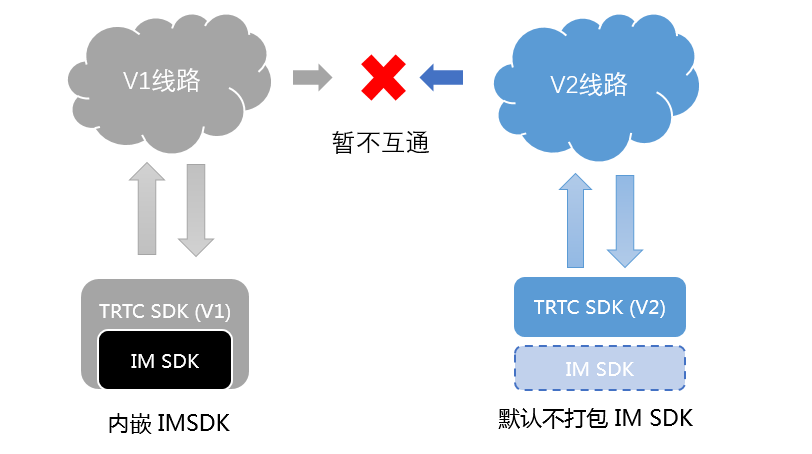
差异项 | 旧版本 V1 | 新版本 V2 |
内核架构 | iLiveSDK | LiteAVSDK |
IM SDK | 内嵌 | 不内嵌 |
API 接口 | V1 | V2 |
CDN 推流 | 使用 REST API 开启 | 支持客户端开启 |
云端线路 | V1 线路 | V2 线路 |
TRTC V1(iLiveSDK)如何升级至 V2(LiteAVSDK)?
如果您的项目从未集成过 TRTC SDK,强烈推荐直接使用 V2(LiteAVSDK),V2 在通话质量、线路规格、接入难度以及功能扩展上均有优势。
如果您的项目已经稳定并且没有问题,由于 V1 和 V2 的云端线路目前是不互通的,如果您的项目已经进入稳定运营阶段,可以暂时不升级。
如果您的项目正在对接旧版本 V1,推荐您可以直接对接 V2 版本,V2 版本的 API 接口采用全新设计,对接时间上相比于旧版本要减少很多。
如果您已经在使用旧版本 V1 并希望提升通话质量,由于 V1 和 V2 的云端线路目前是不互通的,所以升级新版本 SDK 需要经过一个“SDK 集成”、“放量铺开”以及“云端切换”的过程,大致步骤如下:
1. 在现有的项目中集成新版本的 SDK,并通过测试。
2. 在房间列表中增加 SDK 版本号字段,App 根据服务端的字段决定使用 V1 版本还是 V2 版本。
3. 发布新版本 App 并等待版本逐渐覆盖您的用户群。
4. 将房间列表中的 SDK 版本号字段从 V1 切换到 V2,完成线路的切换。
Android 端 LiteAVSDK 和 iLiveSDK 如何同时兼容集成?
iLiveSDK 和 LiteAVSDK 都使用到了 TRAE 来进行回声消除和降噪等音频处理,LiteAVSDK 中使用的 TRAE 版本更新,且包含了 iLiveSDK 中使用的全部功能接口,因此您只需要配置项目中使用 LiteAVSDK 中的 TRAE 库即可。
使用 aar 方式集成工程,修改您子项目(app 目录)下的 build.gradle,在 android{} 节点中进行如下配置:
注意:
添加引用时,LiteAVSDK 必须要在 iLiveSDK 前面。
android{//1、在 gradle 配置 packagingoptionspackagingOptions {pickFirst 'lib/armeabi-v7a/libTRAECodec.so'pickFirst 'lib/armeabi-v7a/libstlport_shared.so'pickFirst 'lib/armeabi/libTRAECodec.so'pickFirst 'lib/armeabi/libstlport_shared.so'}//2、引入 dempendenciesimplementation(name:'LiteAVSDK_TRTC_6.4.7108', ext:'aar') // 注意,TRTC 必须要在 iLiveSDK 前面implementation 'com.tencent.ilivesdk:ilivesdk:1.9.4.6.4'}
iOS 端 LiteAVSDK + iLiveSDK + BeautySDK 如何同时兼容集成?
TRTC V1 版本中,使用了 BeautySDK 来实现美颜及动效等功能,TRTC V2 版本里,我们将 BeautySDK 的功能内嵌到了 LiteAVSDK 之中,更加方便用户使用。如果已经集成了 iLiveSDK,且在您的工程中已引入了 BeautySDK,就会遇到文件冲突,解决办法如下:
版本 | 处理办法 |
BeautySDK 基本版(不带 P 图版本) | 您仅需在 Xcode 工程配置 BeautySDK 的头文件搜索路径,并取消链接 BeautySDK。 |
BeautySDK 高级版(带 P 图版本) | 您需要使用 LiteAVSDK 全功能版,并在 Xcode 工程配置 BeautySDK 的头文件搜索路径,同时取消链接 BeautySDK(LiteAVSDK 全功能版中带有 P 图组件,可以直接使用您之前购买的 P 图 licence,您无须再次付费)。 |
Windows 端 LiteAVSDK 和 iLiveSDK 如何同时兼容集成?
Windows 端的 LiteAVSDK 和 iLiveSDK 都使用到了 TRAE 来进行回声消除和降噪等音频处理,但 LiteAVSDK 使用的 TRAE 版本更新,且在功能使用上有差异,因此不能直接替换,您可以按以下方法进行处理。
工程结构
建议您的工程采用如下结构:
||- 主程序.exe|- 主程序.exe依赖的其他文件|- iLiveSDK.dll|- iLiveSDK.dll依赖的其他文件|- LiteAV| |- liteav.dll| |- liteav.dll依赖的其他文件
初始化方法
使用时,iLiveSDK 可以直接用 .lib 链接,也可以使用如下代码动态加载:
HMODULE hiLive = LoadLibrary("iLiveSDK.dll");
当您需要使用 LiteAVSDK 时,使用如下代码加载并进行初始化:
typedef ITRTCCloud* (*getTRTCShareInstanceMtd)();typedef void(*destroyTRTCShareInstanceMtd)();TCHAR dllPath[MAX_PATH];GetModuleFileName(nullptr, dllPath, MAX_PATH);PathRemoveFileSpec(dllPath);wcscat(dllPath, L"\\\\LiteAV\\\\");SetDllDirectory(dllPath);HMODULE hLiteAV = LoadLibrary(L"liteav.dll");if (!hLiteAV) {printf("载入liteav.dll失败: %d", GetLastError());return;}getTRTCShareInstanceMtd pGetTRTCShareInstance = (getTRTCShareInstanceMtd)GetProcAddress(hLiteAV, "getTRTCShareInstance");if (!pGetTRTCShareInstance) {printf("载入函数getTRTCShareInstance失败");return;}destroyTRTCShareInstanceMtd pDestroyTRTCShareInstance = (destroyTRTCShareInstanceMtd)GetProcAddress(hLiteAV, "destroyTRTCShareInstance");if (!pDestroyTRTCShareInstance) {printf("载入函数destroyTRTCShareInstance失败");return;}ITRTCCloud *pTrtcCloud = m_pGetTRTCShareInstance();if (!pTrtcCloud) {printf("创建TRTC实例失败");return;}SetDllDirectory(nullptr);pTrtcCloud->enterRoom(...);


