路由关系是指消息从 Exchange 传递到 Exchange/Queue 的规则。当生产者向 Exchange 发送消息时,Exchange 会依据预设的路由规则,将消息自动转发到与之绑定的目标 Exchange 或 Queue 中。一个 Exchange 可以绑定多个目标 Exchange/Queue,一个 Queue 可以绑定多个源 Exchange。
本文介绍在控制台创建绑定规则的操作步骤。
约束与限制
开源托管版集群中系统自动创建的名称为 “(AMQP default exchange)”的默认 Exchange 默认绑定到每个 Queue,routing key 等于 Queue 名称。默认 Exchange 的绑定关系无法取消或删除。
Internal 设置为 true 的 Exchange 不能直接被 Producer 使用,只能用于 RabbitMQ 内部的路由机制,如果直接向其发布消息,会返回错误。可以通过将其与其它的 Exchange 或者 Queue 绑定,形成路由链。
前提条件
已提前创建好需要绑定的 Exchange 或者 Queue 。
新建绑定关系
1. 登录 TDMQ RabbitMQ 版控制台。绑定路由关系有多个入口:
入口一:在左侧导航栏选择集群管理 > Exchange 列表,找到目标 Exchange,单击操作栏的绑定路由。此时该 Exchange 只能作为源 Exchange 被绑定,绑定目标可以选择 Exchange 或者 Queue。
入口二:在左侧导航栏选择集群管理 > Queue 列表,找到目标 Queue,单击操作栏的绑定路由。此时该指定 Queue 作为绑定目标,可以为其绑定源 Exchange。
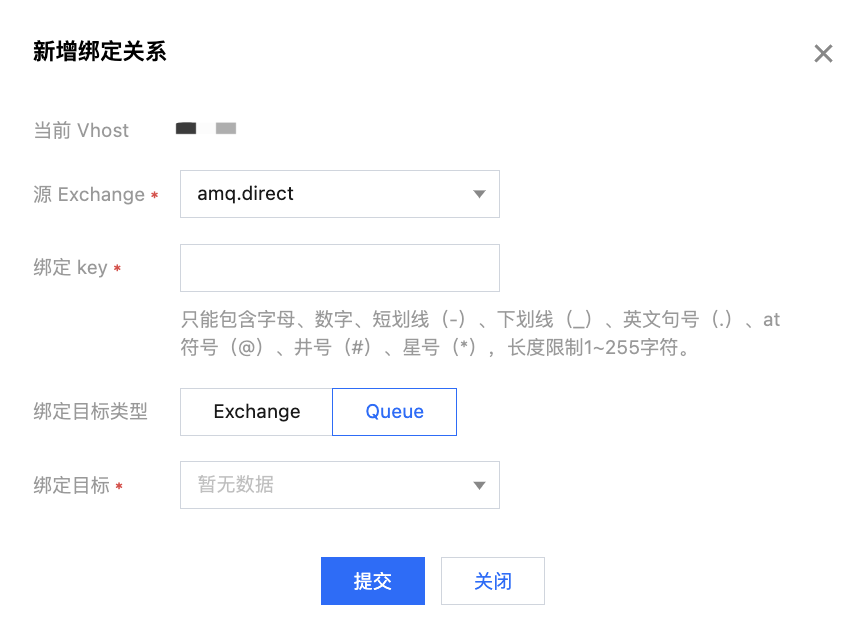
入口三:在左侧导航栏选择集群管理 > Vhost,找到目标 Vhost,单击 Vhost 的名称,在页面上方选择路由关系页签,单击新建。此时可以自由设置源 Exchange 和绑定目标。
2. 在新增绑定关系弹窗中,设置好源 Exchange、绑定 Key,绑定目标类型和绑定目标,单击提交,完成绑定关系创建。