Help & Documentation>Tencent Cloud EdgeOne

Overview

Last updated: 2023-09-07 15:41:01

Feature Overview

Once your site is connected to EdgeOne, it provides a wealth of pre-configured reports to assist you in monitoring and analyzing your business operations, including traffic analysis, cache analysis, L4 proxy, and security analysis. However, in data analysis, you may have more personalized data analysis needs, such as the following data analysis scenarios:
Scenes
Scenario Requirements
In-depth Data Analysis
You need to specify one or more conditions to find the logs that meet these criteria. For instance:
Retrieve access statistics (accessed URLs, number of visits, etc.) within a specified time range by specifying the client IP.
Refine the distribution of status codes by filtering them based on status code, time, and URL.
By filtering logs set to observe, summarizing the content of the carried request headers and other request characteristic information, you can adjust your security strategy.
Monitoring Service Metrics
Analyze the quality of EdgeOne service and the efficiency of user access to promptly detect anomalies. Access efficiency includes overall response time of EdgeOne, download speed, and response time of the origin server.
Identifying Fraudulent Swipes
Identify client IPs exhibiting behaviors such as traffic anomalies, access patterns, and access frequency, indicative of fraudulent activities.
Unified Monitoring Data Across Multiple Vendors
Construct your own data dashboard to uniformly monitor application data from multiple cloud providers.
Log Storage
User-related access logs need to be retained for more than 30 days.

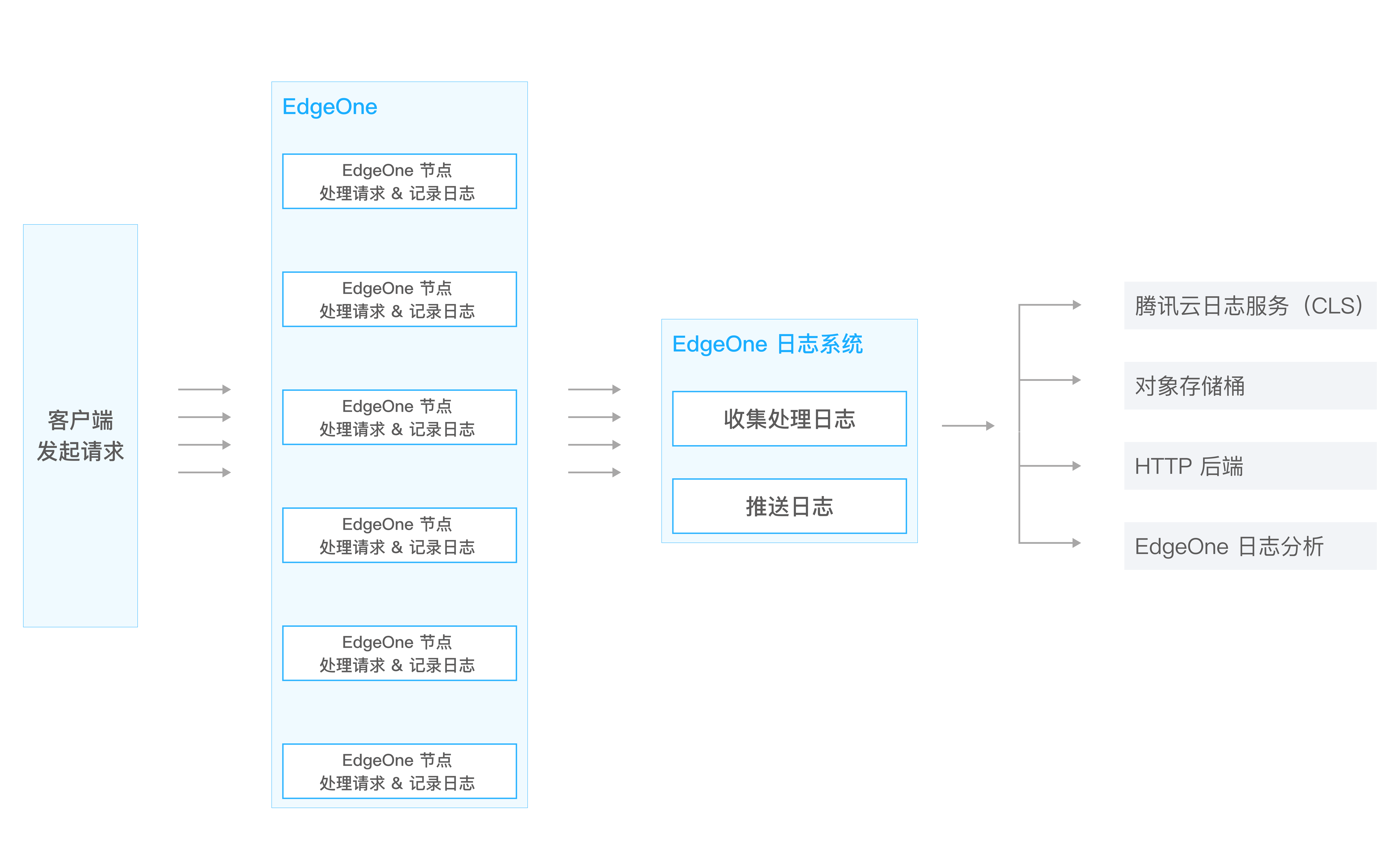
To address the above scenario requirements, EdgeOne's real-time log service provides the capability of real-time log collection and delivery. It can push your logs to Tencent Cloud Log Service (CLS) or your self-built data center, assisting you in flexibly retrieving and analyzing log data. Currently, EdgeOne supports pushing site logs, L4 proxy logs, and security service logs to the following destinations:
Tencent Cloud Log Service (CLS): Push to the one-stop log processing service provided by Tencent Cloud (CLS), which can be used for further log retrieval and analysis on CLS.
Object Storage: A storage bucket compatible with the AWS Signature V4 authentication method.
HTTP Service (POST): Logs are pushed to the designated backend server via HTTP POST requests.

Note:
1. Under normal circumstances, the delay in log delivery is within 2 - 5 minutes. To ensure the timeliness of log delivery, EdgeOne pushes logs to the corresponding destination in batches based on a fixed number of logs or a fixed time period.
2. Real-time log pushing to CLS may incur traffic and storage costs in CLS. These costs are charged by the CLS product. For details, please see Log Service Billing Description.

Billing and Quota Overview

Billing Note: Real-time log push is a value-added service, and the billing method is based on the number of logs pushed. For more details, please refer to Value-Added Service Usage Unit Cost (Postpaid).
Quota Description: The number of real-time log push tasks varies according to the package, with different task quotas for each. For specific quotas, please refer to the Package Selection Comparison.