Help & Documentation>Tencent Cloud EdgeOne

Configuring Origin-Pull HTTPS

Last updated: 2023-09-07 15:38:03

Note

You can specify the protocol that EdgeOne uses in the origin-pull request.
In scenarios that requires a high level of security, HTTPS can be used to access a website to ensure the security of website data. When HTTPS is specified as the origin-pull protocol, all origin-pull requests from EdgeOne to the origin use HTTPS, which prevents data tampering or theft during transmission.
In situations necessitating swift responses, the utilization of HTTP for origin-pull can expedite website accessibility. By designating HTTP as the origin-pull protocol, intricate operations such as SSL handshakes between EdgeOne and the origin can be circumvented, thereby enhancing the speed of website access. If your origin is yet to support HTTPS, opting for HTTP origin-pull is advisable.

1. An EdgeOne node initiates an origin-pull request by using the specified origin-pull protocol.
2. The origin responds to the request and establishes a connection by using the same protocol as the request.

Scenario 1: Configuring Origin-Pull HTTPS for All Domain Names

To configure origin-pull HTTPS for all domain names used to access a site, refer to the following steps:
1. Log in to the EdgeOne console. In the left-hand menu, click on Site List. Within the site list, click on the site that needs configuration to enter the site details page.
2. On the site details page, select Site Acceleration > HTTPS to navigate to the HTTPS details page.
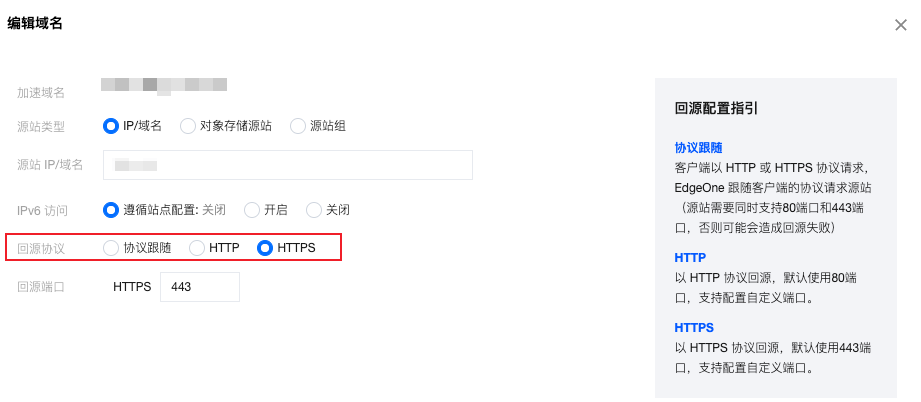
3. Locate the origin-pull HTTPS configuration card and click on Global Site Settings. Here, you can specify the protocol to be used for origin-pull requests.

Option
Note
Supports and Limits
Follow protocol (default)
The client request protocol is used for origin-pull. For instance, if the client request is made over HTTP, EdgeOne will also make an origin-pull request over HTTP.
The origin must support the request protocol used by the client.
HTTPS
EdgeOne uses HTTPS for origin-pull, regardless of the request protocol used by the client.
Valid SSL certificates must have been configured for the origin to support HTTPS requests.
HTTP
EdgeOne uses HTTP for origin-pull, regardless of the request protocol used by the client.
The origin must support HTTP requests.

Scenario 2: Configuring Origin-Pull HTTPS for Specified Domain Names

To configure origin-pull HTTPS for specified domain names used to access a site, refer to the following steps:
1. Log in to the EdgeOne console. In the left-hand menu, click on Site List. Within the site list, click on the site you wish to configure.
2. On the site details page, click Rule Engine.
3. On the rule engine management page, click Create rule to enter the new rule editing page.
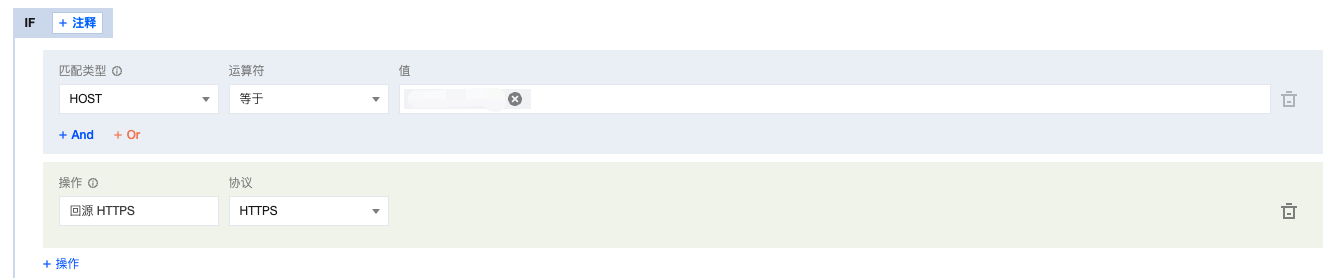
4. On the page that appears, select HOST from Matching type and specify an operator and a value to match the requests of specified domain names.
5. Click on Operation > Selection Box. From the pop-up operation list, select Origin-pull HTTPS.

6. Click Save and publish to complete the rule configuration.