Project Management: Use Smart Table Lightweight Project Management Tool to Customize an Exclusive Dashboard
Table View: Project Plan Deconstruction
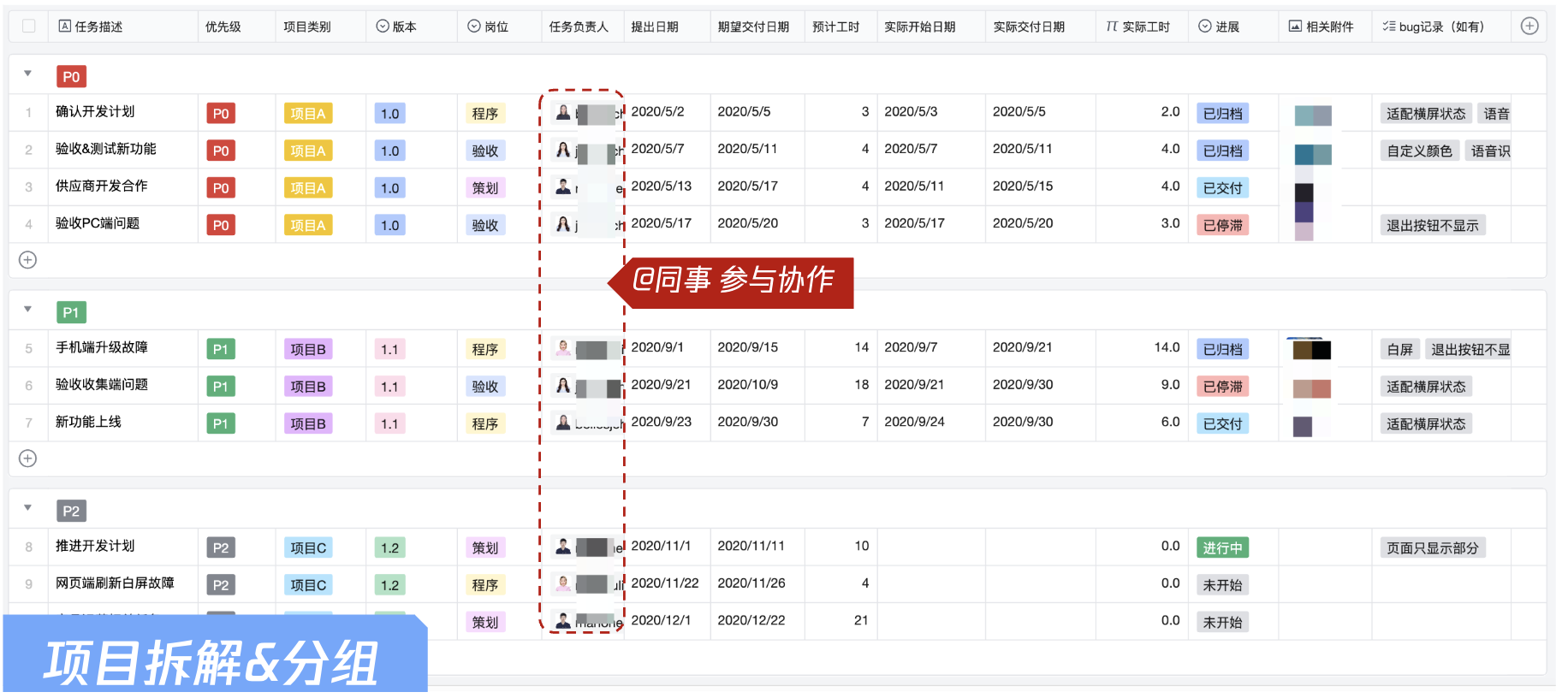
Create an intelligent spreadsheet as a project management table or requirement planning table, designed to collect and manage task content, priority, owner, delivery time and progress information. All information can be accumulated through standard column formats, making it easier to filter and view in groups compared to traditional tables.
In table view, use the grouping capacity in the toolbar to group tasks by priority, allowing you to intuitively see the task info under each priority. For example: in the figure below, there are 4 P0 priority tasks and 3 P1 priority tasks.
Meanwhile, in the field types of intelligent spreadsheets, using the member field allows you to conveniently add colleagues from the enterprise contact list. It also enables you to remind designated colleagues to focus on project information according to project management needs, ensuring clear and concise project progress management with responsibility assigned to individuals.

Gantt View: Project Progress Management
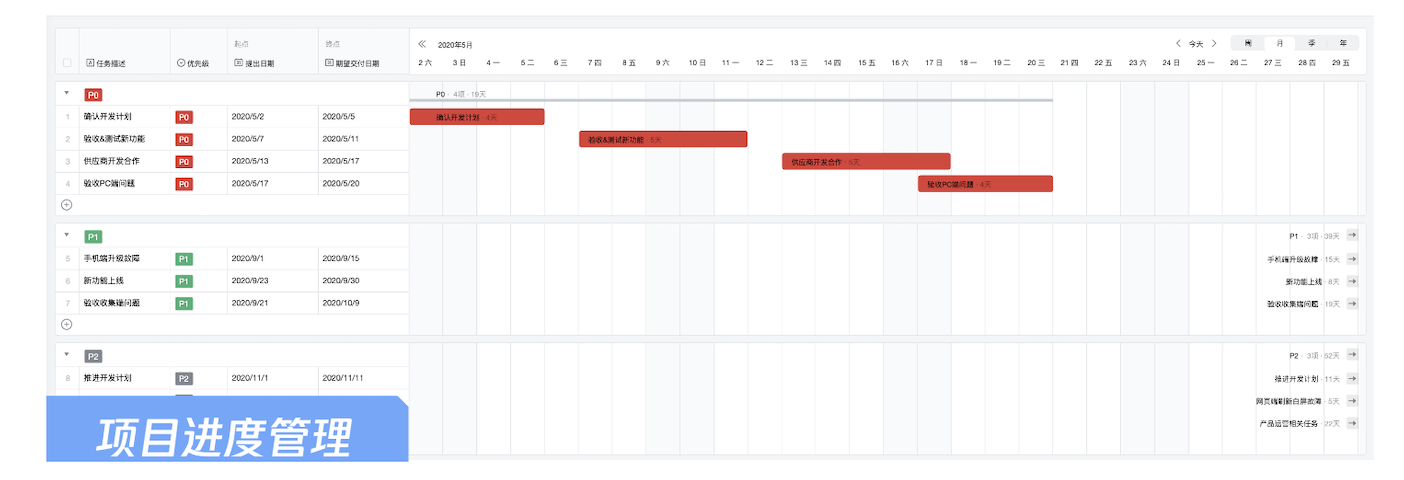
In the task table, we show each responsible person's current planning task situation in the form of Gantt view, to align task progress promptly during project meetings and team meetings. For tasks at risk, rapid coordination can be conducted.
The responsible person for each task can also intuitively understand what others are working on through time progress, ensuring information transparency. This is super conducive to team objective alignment, so as to collaborate efficiently and further enhance project management efficiency.

Kanban View: Project Management and Team Task Tracking in Different Statuses
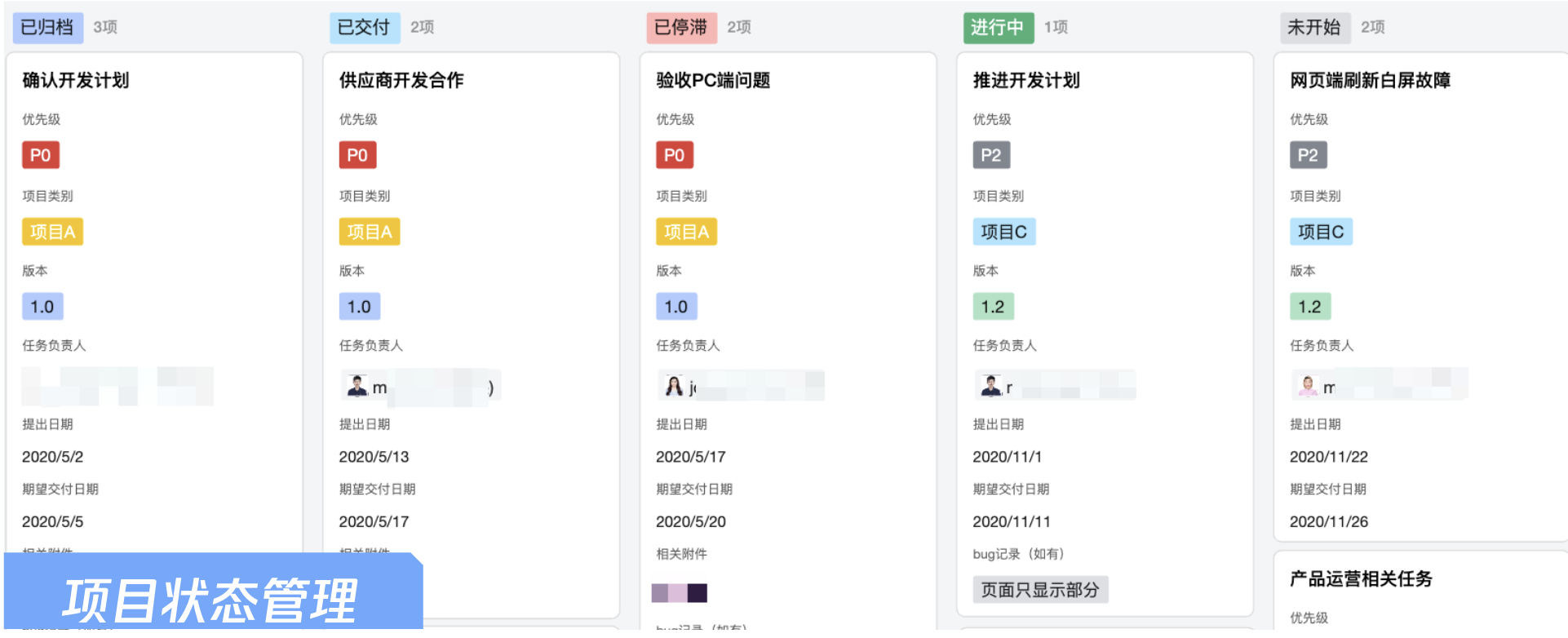
Kanban view is a brand-new rendering method that distinguishes intelligent spreadsheets from table view and Gantt view. It arranges information under each group vertically in a sliding and viewable manner, making it very suitable for categorization by different project stages, allowing you to see task execution under each project stage.
Each card in the Kanban can be freely arranged by collaborators. For example, drag and drop to adjust the order of different stages or set the information displayed in each card. As shown in the figure, if task-related attachments do not require priority display, they can be hidden. Hidden information can be viewed in full when clicking the card, allowing instant grasp of project status.

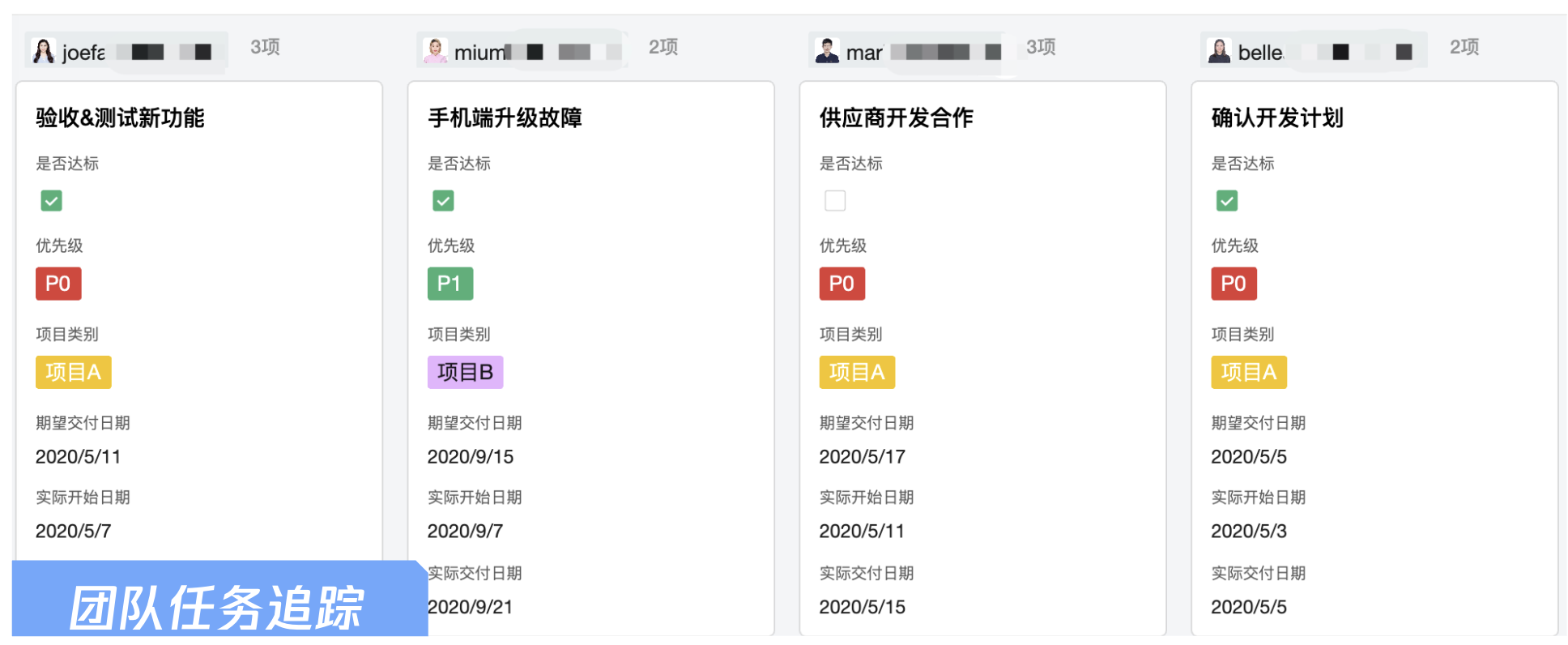
In addition to presenting the dashboard by "project stage", it can also be displayed by project leader. Each responsible person can focus on their own task completion status, while the overall project leader can clearly see the completion status of different personnel, making it easy for team task tracking.

Knowledge Management: Information Storage and Shared Space for Materials
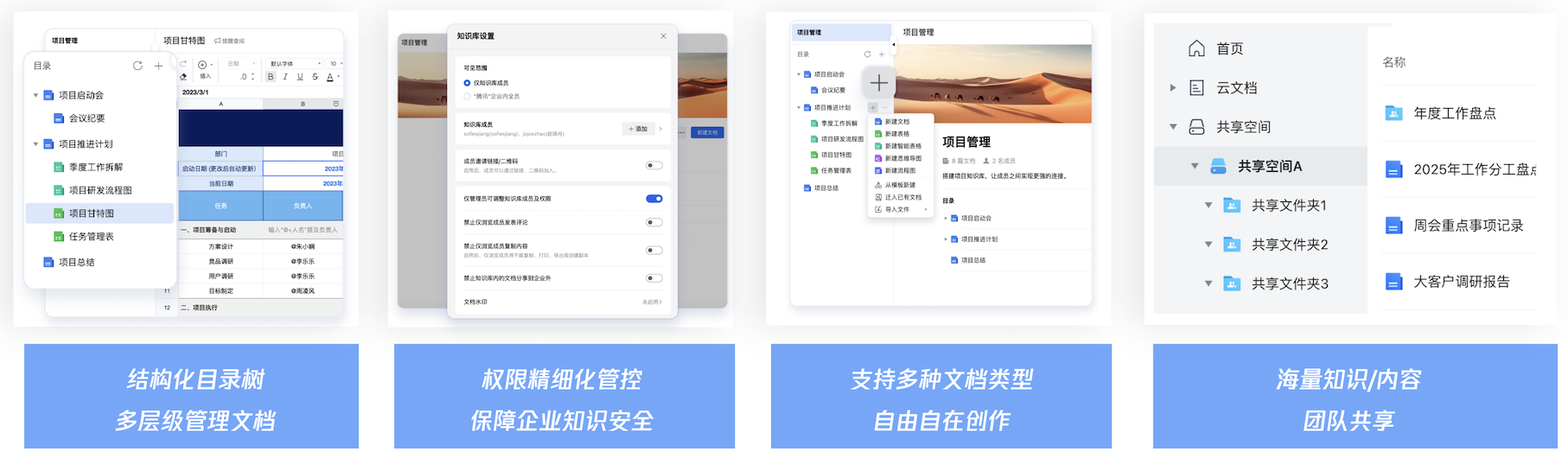
Enterprise knowledge management essentially involves systematically integrating, transmitting, applying, and innovating knowledge to convert this core intangible asset into actual competitiveness. In a complex and dynamic market environment, knowledge management holds multidimensional and in-depth value for business survival and development. Tencent Documents provides enterprises with a unified knowledge management portal—Shared Space—to effectively solve this problem. Shared Space supports the following features:
Various directory structures: Enterprises can create department spaces as needed, along with standard team shared spaces. Each space supports multi-level folders and subfolders, meeting business needs for diverse knowledge storage and management.
Fine-grained permission control: Each space can be configured with separate permissions at different tiers, ensuring identical spaces display different scopes for different roles. To facilitate management, you can also enable one-click confidentiality mode for the entire space, protecting important and confidential content to guarantee enterprise knowledge security.
Various document types: including but not limited to Tencent Documents' own online document formats, such as online documents, online spreadsheets, smart documents, smart tables. It also supports local file formats, including images, videos, PDFs, etc., comprehensively covering standard file formats in the market, enabling mass knowledge management and all-round sharing.

Visual Dashboard: Using Smart Table to Create Transparent Production and Optimize Production Quality
In addition to common project management scenarios, intelligent tables can also help businesses in different industries build their own exclusive lightweight business systems, addressing business problems with no code and low cost.
In the manufacturing industry, intelligent tables can flexibly transform into a business Production Management System, assigning workshop production tasks to individuals by line. Via intelligent kanban view, you can clearly see the overall progress of production, including the completion status at the latest time node.
During multi-user collaboration, document permissions management enables flexible control over document access for different roles, such as administrators, editable users, and view-only users. Collaboration records between members—including browsing history and edit logs—are fully traceable. You can restore to earlier versions at any time, ensuring important information is never lost.

Store/Workshop Inspection: Online Transformation of Table Inspection, Dashboard Data Access Anytime, Anywhere
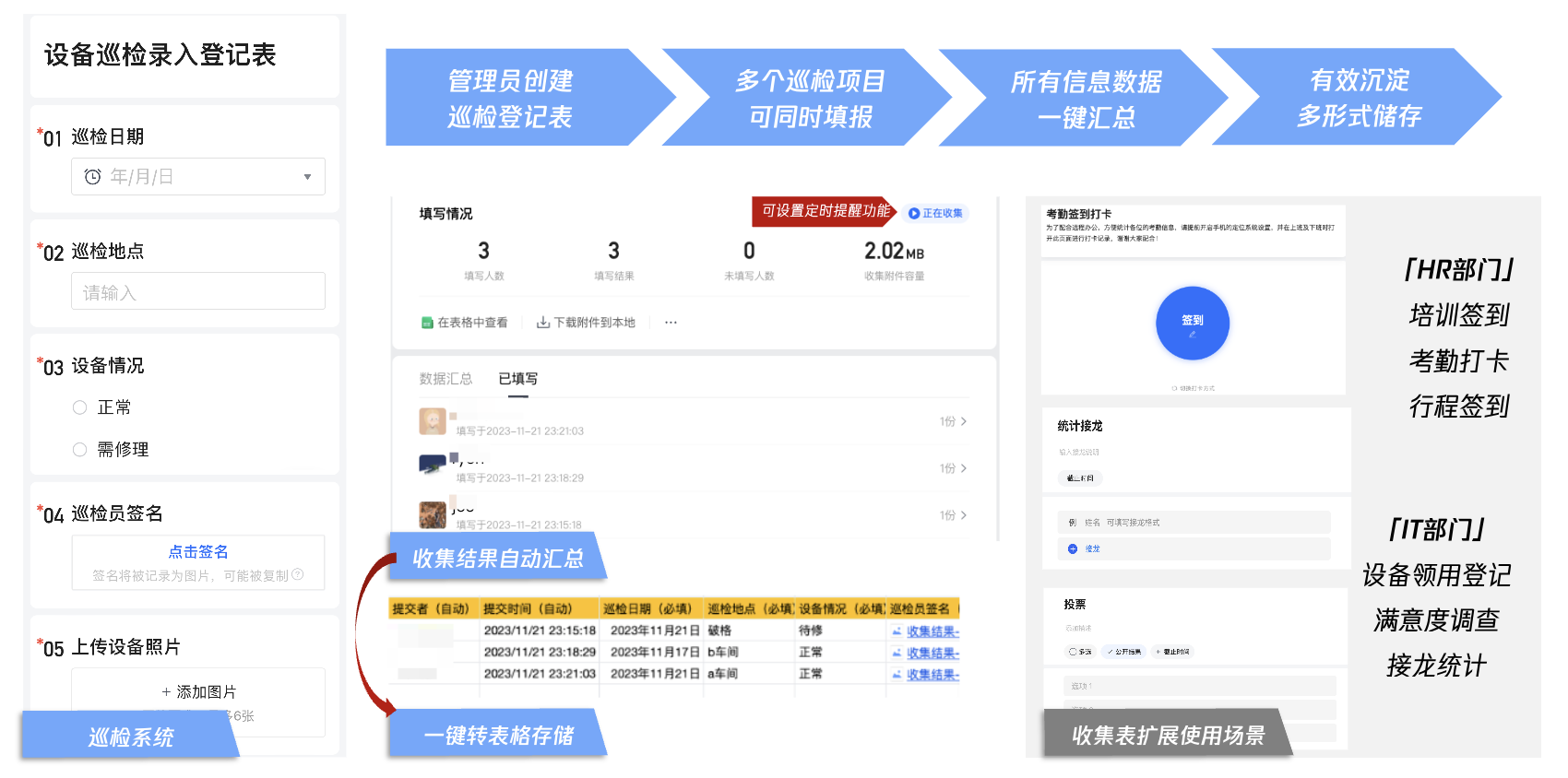
Tencent Docs collection form supports million-level information collection, with collected data automatically aggregated into online spreadsheets and smart tables, making data analysis easy.
In retail, manufacturing and other industries, store and workshop inspections require convenient mobile input. Collection forms can meet this need well, presenting as user-friendly questionnaires that allow inspectors to easily input data on mobile devices. The collected information is summarized in real-time in spreadsheets, eliminating the need for manual import/export by administrators. Visual charts can also be generated with one click, making it very convenient.
In addition to industry applications, collection forms are also common tools for administration, HR, and IT teams within businesses. For example, administration teams use them for employees to claim holiday gifts, HR teams organize training and events requiring sign-in, and IT teams conduct periodic satisfaction surveys. These tasks, which originally needed third-party tools, can now be resolved with one-click through collection forms. They also connect to the Enterprise Address Book, obtain employee information, and enable more convenient data analysis.

Inventory Management: One-Stop Inventory Inquiry with Smart Table, Information Within Reach
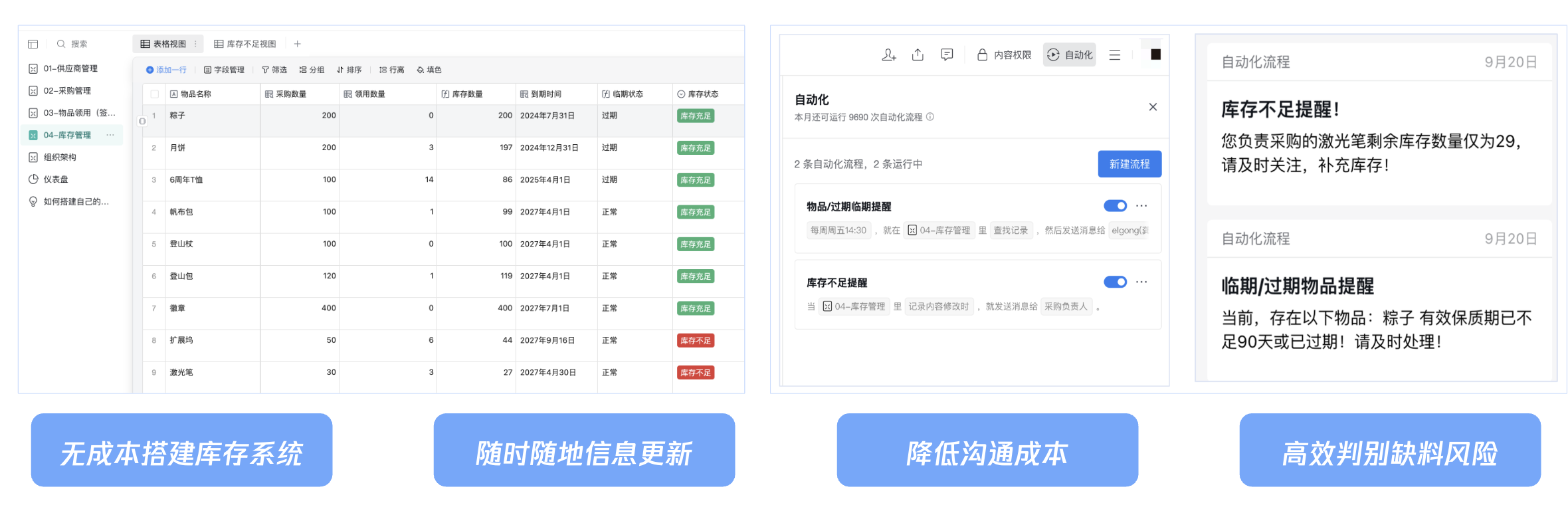
Build an inventory system at no cost: Use Tencent Docs smart tables to flexibly create an exclusive inventory management system for your business, managing supplier information, inventory details, and consumption status.
Anytime, anywhere information update: Information between different subtables can be automatically synced across tables through association and search reference, eliminating the need for repetitive manual updates.
Reduce communication costs: Automate various business notifications, such as item expiration, expiring soon reminders, and insufficient stock alerts, eliminating the need for manual messaging. Information reaches recipients promptly, improving communication efficiency.
Efficiently assess material shortage risks: For critical items in inventory management, if insufficient stock occurs, automated notifications are triggered immediately, making it easy for procurement staff to promptly follow up and complete replenishment.

New Product Promotion: Multi-Category Application Composite to Efficiently Promote Marketing Plan Implementation
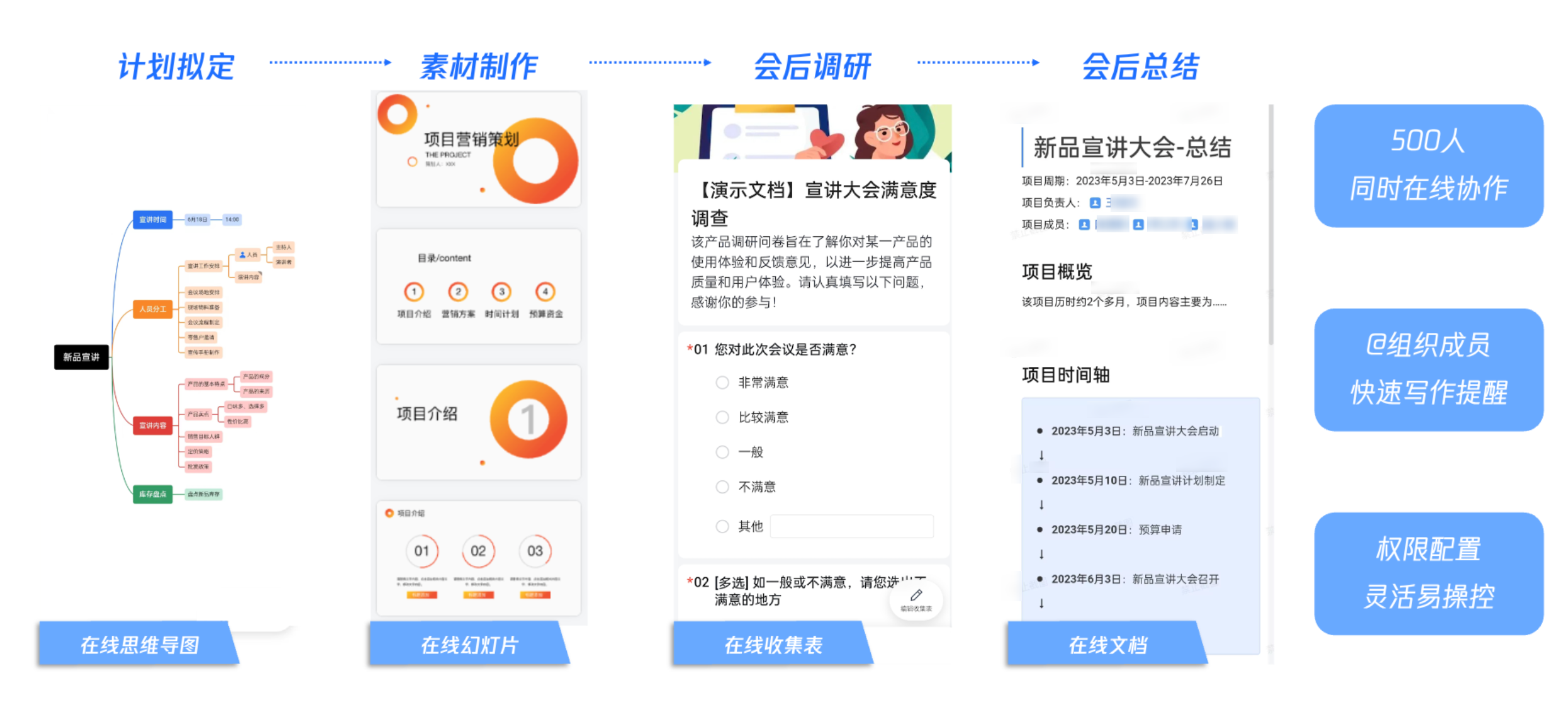
Plan drafting: Use Tencent Documents' online mind map to systematically organize planning ideas. Different colors and themes allow for intuitive sorting and presentation of division of roles in marketing activities.
Material creation: Use Tencent Documents' online slideshow to integrate marketing plans, materials from marketing activities, and presentation materials in an organized manner, and collaborate on editing by page.
Post-meeting research: The execution of any project activity relies on user feedback. Using collection forms allows for broad satisfaction rate data collection, enabling valid review and project experience accumulation.
Post-meeting summary: Use Tencent Documents' online document or smart document to summarize and accumulate post-meeting discussions and reviews, providing a reference for next time's activity planning and continuous improvement.