2. At the top of the Virtual Private Cloud page, select the region for the VPC and click Create.
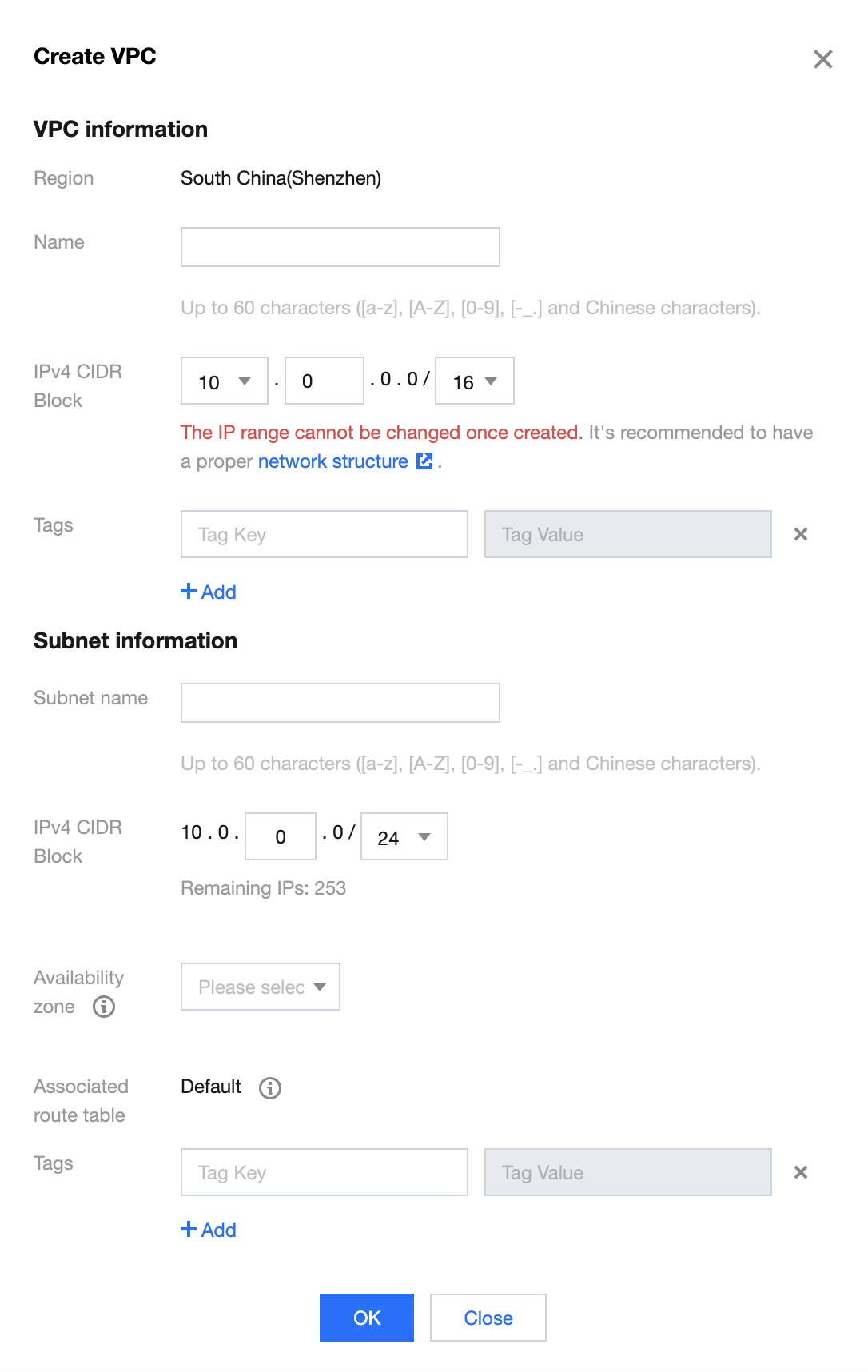
3. In the Create VPC pop-up window, enter the VPC information and initial subnet information.
Note
The CIDR blocks of the VPC and subnet cannot be modified after creation.
Tencent Cloud VPC supports CIDR blocks in any of the following IP ranges. If you require internal communication between different VPCs, ensure that the CIDR configurations of both VPCs do not overlap:
10.0.0.0 - 10.255.255.255 (subnet mask range must be between 12 and 28)
172.16.0.0 - 172.31.255.255 (mask range must be between 12 and 28)
192.168.0.0 - 192.168.255.255 (mask range must be between 16 and 28)
The subnet CIDR must be within or the same as the VPC CIDR.
For example, if the VPC CIDR block is 10.0.0.0/16, the subnet CIDR blocks within the VPC can be 10.0.0.0/16, 10.0.0.0/24, etc.
Availability Zone: Subnets have AZ-specific attributes. Please select the AZ for the initial subnet. A VPC can have subnets in different AZs, which communicate with each other over the private network by default.
Associated Route Table: A subnet must be associated with a route table for traffic forwarding control. The initial subnet is associated with a default route table, which is provided by the system and allows for network communication within the VPC.
Tags: You can add tags as needed to help manage resource permissions for sub-users and collaborators. This is an optional parameter and can be set as required.
4. After configuring the parameters, click Confirm to create the VPC. The successfully created VPC will be displayed in the list, as shown below. The new VPC includes an initial subnet and a default route table.
See Also
Once the VPC and initial subnet are created, you can deploy cloud resources within the VPC, such as Cloud Virtual Machines and Cloud Load Balancers. Click the icon in the red box below to directly access the Cloud Virtual Machine purchase page. For more information, see Quickly Build an IPv4 Virtual Private Cloud.
Related Content
In VPC, there is a default VPC, which means:
When no VPCs have been created in a region, while creating Cloud Virtual Machines, Cloud Load Balancers, or Databases, you can choose to have Tencent Cloud automatically create a default VPC and subnet for you, without the need to create them manually, as shown in the image below.
Upon successful instance creation, a default VPC and subnet will also be created. The default VPC and subnet have the same functionality as the ones you create manually and do not occupy your quota in a specific region. You can delete them if they are no longer needed. There can only be one default VPC per region and one default subnet per availability zone.