Overview

Last updated: 2024-01-12 14:40:59

A route table consists of multiple routing policies that control the outbound traffic direction of subnets in the VPC. Each subnet can only be associated with one route table, while each route table can be associated with multiple subnets. You can create multiple route tables for subnets with different traffic routes.

Types

There are two types of route tables: default and custom.
Default route table: When you create a VPC, the system automatically generates a default route table, which will be associated with subnets created later if no custom route table is selected. You cannot delete the default route table, but you can add, delete, and modify routing policies in it.
Custom route table: You can create or delete a custom route table in the VPC. The custom route table can be associated with all subnets to apply the same routing policy. Before deleting the custom route table, you need to first disassociate it from all the subnets.
Note
You can associate a route table when creating a subnet or change the associated route table after a subnet is created.

Routing policies

A route table controls traffic routes by using routing policies. A routing policy consists of the destination, next hop type, and next hop:
Destination: Specifies the destination IP range to which you want to forward the traffic. It should be an IP range. If you want to enter a single IP address, set the mask to 32 (for example, 172.16.1.1/32). The destination cannot be an IP range of the VPC where the route table resides, because the local route already allows private network interconnection in this VPC.
Note
If you have deployed Tencent Kubernetes Engine in your VPC, when you create a route table policy for a VPC subnet, the destination IP range cannot be within the VPC IP range or the container IP range.
If the container network and VPC routes overlap, traffic will be preferentially forwarded within the container network.
Next hop type: Indicates the egress of data packets for the VPC. The next hop type of VPC supports NAT gateway, peering connection, VPN gateway, direct connect gateway, CVM, and others.
Next hop: Specifies the next hop instance (identified by the next hop ID) to which the traffic is forwarded, such as a NAT gateway in the VPC.

Routing policy priority

When there are multiple routing policies in a route table, the following routing priority applies, from high to low:
Traffic within the VPC: Traffic within the VPC is matched first.
Exact match route (the longest prefix match): When there are multiple routes in the route table that can match the destination IP, the route with the longest (exact) mask is matched to determine the next hop.
Public IP: If no routing policy is matched, a CVM instance can access the internet through its public IP address. Example: When a subnet is associated with a NAT gateway and the CVM in the subnet has a public IP (or EIP), the CVM accesses the internet through the NAT gateway by default (because the priority of the exact match route is higher than that of the public IP). However, you can set a routing policy to allow the CVM to access the internet by using its public IP address. For details, see Adjusting the Priorities of NAT Gateways and EIPs.

ECMP

Equal-cost multipath (ECMP) routing means there are multiple equal-cost routes to a single destination. The traditional routing technology only uses one path to transfer packets to the same destination, while the remaining paths are in the standby or invalid status. When the used path fails, it takes time to switch to another path. By contrast, ECMP uses multiple equal-cost routes in the network environment to increase the transfer bandwidth, balance traffic over multiple routes, and achieve backup with redundant linkages.
ECMP with VPC routes of the same type is as detailed below:
Next Hop Type
Whether ECMP Is Formed with Routes of the Same Type
Maximum Number of Routes Supported by ECMP
NAT gateway
Yes
N/A
CVM public IP
No
N/A
CVM
Yes
Eight routes of the same type
Peering connection
No
N/A
Direct connect gateway
No
N/A
CCN
No
N/A
High availability virtual IP
Yes
Eight routes of the same type
VPN gateway
Yes
Eight routes of the same type
ECMP with VPC routes of different types is as detailed below:
NAT gateways and CVM instances can form the ECMP.
If there is already a self-learning CCN route, when a configured custom route to a direct connect gateway/peering connection is added, CCN and the direct connect gateway/peering connection can form the ECMP.
If there is already a custom route for the direct connect gateway/peering connection, and you want to form the ECMP with CCN, please contact our online customer service.

Scenarios

ECMP is often used to balance the traffic load over gateways with a limited bandwidth. Assume that you need 2,000 Mbps to interconnect your VPC-based and IDC-based businesses, but the current maximum VPN bandwidth is 1,000 Mbps. To achieve the goal, you can create two 1,000-Mbps VPN gateways and two VPN tunnels.

Primary/secondary routes

Primary and secondary routes refer to two or more paths to the same destination with only one active path. Assume there are two VPC routes to the IDC, that is, paths A and B. All packets are sent to the destination via path A, while path B is invalid or on standby. When path A suffers linkage failures, you can switch to path B to take over traffic from path A, thus ensuring business availability. In this case, paths A and B are called primary and secondary routes.
The next hop type determines the route priority. When adding a routing policy to the VPC route table, you can configure different types of gateways to act as primary and secondary routes to a single destination. Then, the VPC network probe can be used to check the linkage quality and accessibility. After configuring an alarm policy, you can promptly detect any linkage exception and quickly switch between primary and secondary routes to meet the high availability requirements.
Note
VPC does not have the route priority feature by default. This feature is currently in beta test. To try it out, please contact our online customer service.
The next hop type determines the route priority in the VPC route table. The default route priority sequence from high to low is CCN, direct connect gateway, VPN gateway, and others.
Currently, you cannot adjust the route priority in the console. If needed, please contaour online customer service.
The following table describes the primary/secondary support of different types of VPC routes:
Next Hop Type
Support for primary/secondary routes
NAT gateway
No
CVM public IP
No
CVM
Yes, with CCN, VPN gateway, direct connect gateway, or HAVIP
Peering connection (intra-region)
No
Peering Connection (Cross-region)
No
Direct connect gateway
Yes, with CCN, VPN gateway, HAVIP, or CVM
CCN
Yes, with VPN gateway, direct connect gateway, HAVIP, or CVM
High availability virtual IP
Yes, with CCN, VPN gateway, direct connect gateway, or CVM
VPN gateway
Yes, with CCN, direct connect gateway, HAVIP, or CVM

Scenarios

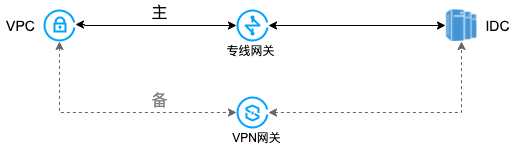
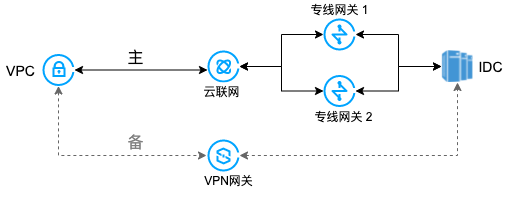
Primary and secondary routes are often used to smoothly forward traffic when a gateway linkage fails, for example:
VPC-based direct connect gateway (primary) and VPC-based VPN gateway (secondary) Scenario: Interconnect a Tencent Cloud VPC and an on-premises IDC through a VPC-based direct connect gateway. Meanwhile, create a VPN tunnel through a VPN gateway to act as the secondary communication linkage between the IDC and VPC.

Direct Connect Gateway (Primary) & VPC-based VPN Gateway (Secondary) Scenario Description: Users establish communication between the VPC in the cloud and their self-built IDC through a CCN-based direct connect gateway, while also creating a VPN backup channel via a VPN gateway to provide redundancy for the IDC and VPC communication link.