Tencent Cloud CDN supports downstream speed limit configuration for setting the maximum downstream throughput speed over one single URL on the node. The downstream speed limit configuration can control the peak bandwidth of CDN to a certain degree. It is frequently used in scenarios such as e-commerce promotions and new game version releases and updates.
Note
The downstream speed limit configuration takes effect globally for all users who access the domain name. After the downstream speed limit is configured, the user access experience and CDN acceleration effect may be affected. Therefore, configure the downstream speed limit with caution.
Configuration Guide
Viewing Configuration
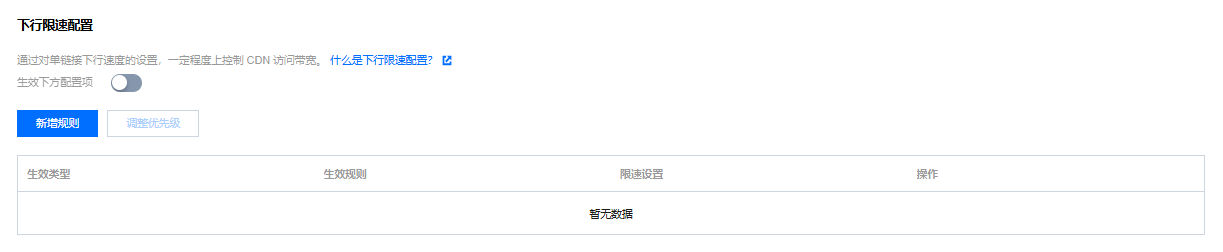
Log in to the CDN console, select Domain Management from the menu bar, click Management on the right side of the domain to enter the domain configuration page. In the second column Access Control, you can see the downstream speed limit configuration, which is in closed status by default:
Adding rules
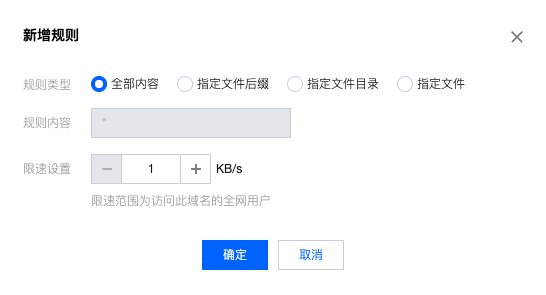
Click Add Speed Limit Rule to configure a rule:
Configuration limitations
Up to 10 downstream speed limit rules can be configured.
The speed limit unit is KB/s, which needs to be filled with a positive integer. The value range is 1 - 1000000.
Supported effect types: all content, file extension, file directory, and specified file. Regular matching is currently not supported.
Rules are executed from bottom to top. Rules at the bottom have higher priority.
Configuration Example
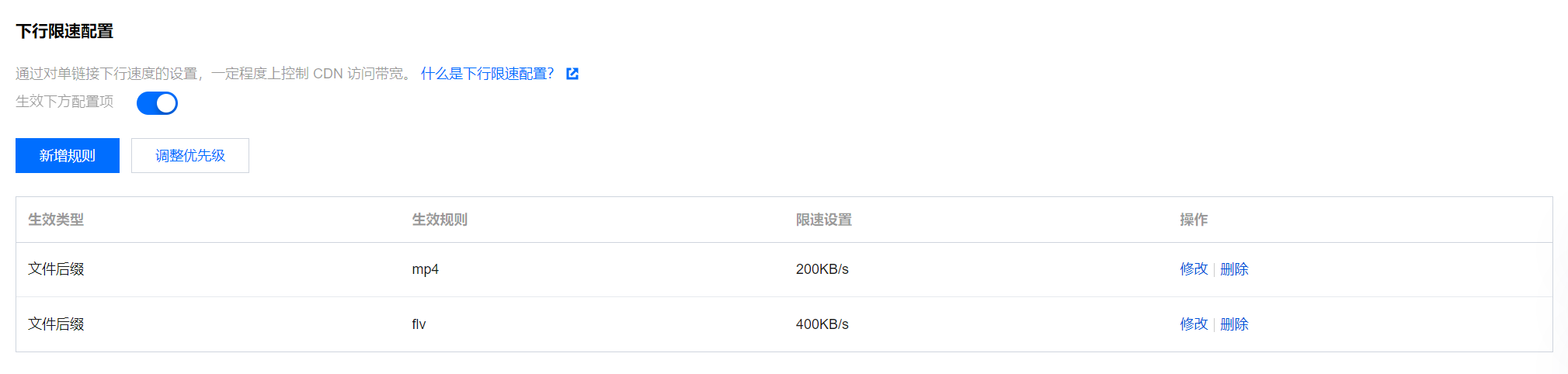
If the downstream speed limit configuration of the acceleration domain name cloud.tencent.com is as follows:
If a user accesses the resource http://cloud.tencent.com/test.mp4, the server will return the content at the configured downstream speed of 200 KB/s.
If a user accesses the resource http://cloud.tencent.com/test.flv, the server will return the content at the configured downstream speed of 400 KB/s.