Quota management is a feature that enables you to view and manage quotas in the Content Delivery Network (CDN) console. You can check the CDN-related quota limits and usage, and apply for temporary or permanent quota increases based on business needs. The following quota types can be requested on a temporary or permanent basis: URL purge quota, directory purge quota, URL prefetch quota, and CDN domain limit.
Applicable scenario
Temporary quota: When business activities or operational scenarios require a temporary increase in quota, you can apply for a temporary quota for the required time range through quota management. When the temporary quota expires, the current quota will revert to the permanent quota.
Permanent Quota: When the existing quota cannot meet your daily business needs, you can apply for a permanent quota for the corresponding feature through Quota Management. The approval process for a permanent quota takes longer, so for temporary business needs, it is recommended to apply for a temporary quota.
Operation Guide
Viewing quotas
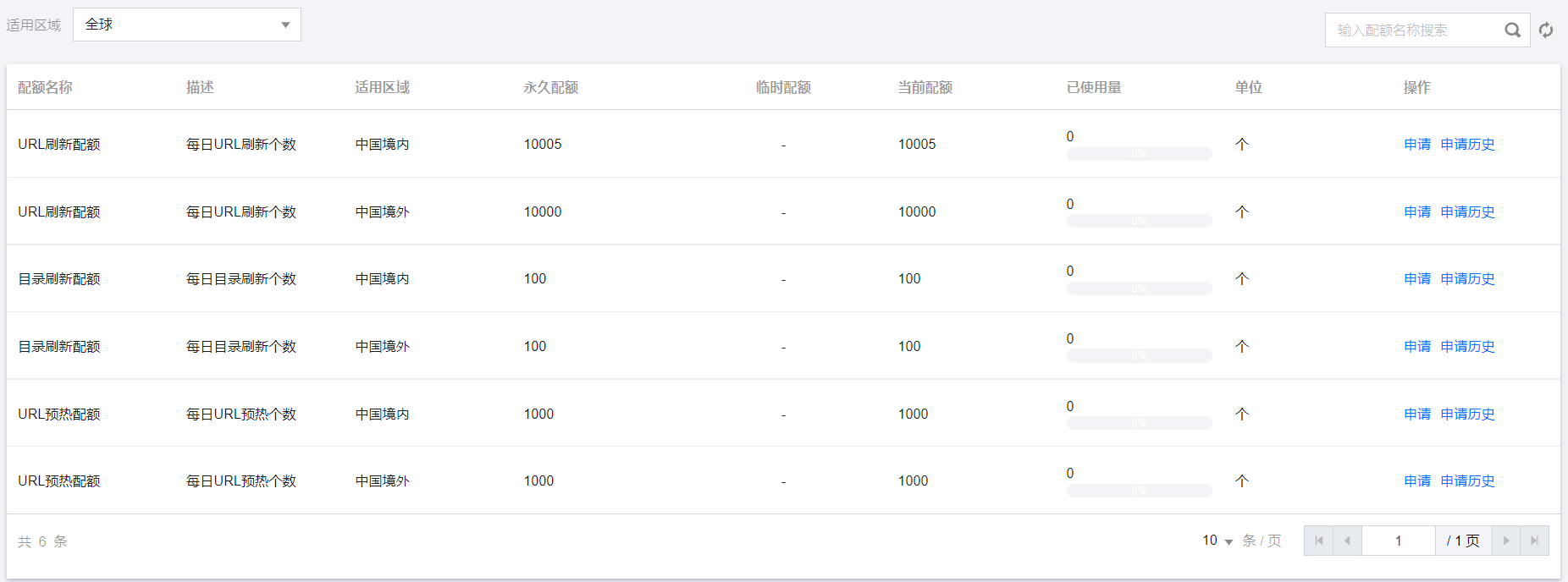
Log in to the CDN console, click on Quota Management > Quota Details in the left sidebar to enter the quota details page, where you can view the current quota status or apply for a quota.
Note:
The current quota represents the maximum limit of this quota. If there are multiple temporary quotas effective at the current time, the current quota is the maximum value among all temporary and permanently effective quotas. Note: This is highlighted content.
The temporary quota will take effect at 00:00 on the start date and end at 24:00 on the end date. After it expires, the quota will revert to the permanent quota.
URL purge quota, directory purge quota, and URL prefetch quota all take effect on a daily basis, and the used amount will be reset every day at 00:00.
Quotas for regions within and outside the Chinese mainland are independent of each other and need to be applied for separately.
The cdn domain limit is a permanently effective quota, not differentiated by region. Note: This is highlighted content.
Applying for quotas
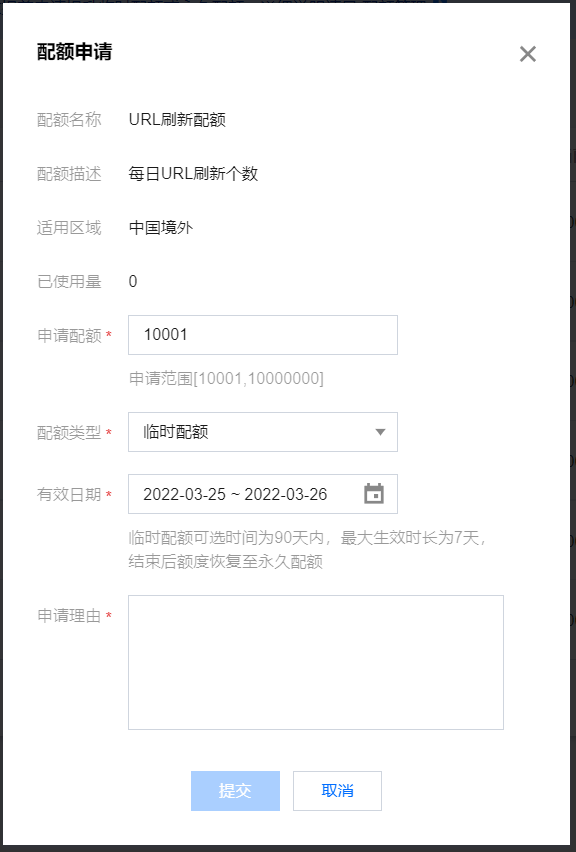
Click Apply to enter the selected quota application page, complete and submit the application form.
Note:
A temporary quota must be between the permanent quota +1 and 10000000.
For temporary quotas, the optional validity date can be selected within a range of 90 days, and the maximum effective duration is 7 days.
To increase the chances of your quota application being approved, please provide a reasonable quota value and a detailed reason for your application.
If you are currently applying for a quota as the CDN domain name upper limit quota, it is recommended that the current domain usage exceeds 70% and the number of domain name quotas applied for does not exceed twice the current quota; otherwise, it may be rejected.
Application History
Click Application History, or select Quota Management > Application History on the left sidebar to enter the application history page, where you can view the approval status of your quota application.
Note:
When the application result is approved, it means the quota application has been approved; if the approval has not passed, it is recommended to apply for temporary quota, or adjust the quota application and resubmit the application reasons.
When a temporary quota expires, it is no longer valid, and the quota type will turn permanent, or stay temporary if you still have other valid temporary quotas.