Upgrading Proxy

Last updated: 2024-11-01 16:24:18

Scenario

TencentDB for Redis® periodically releases minor versions of the proxy to enhance database features or fix known defects.
Proxy Version
Proxy Minor Version
Addition, Optimization, and Fixation
Proxy 5.0
5.6.3
Added getex, auth name pwd, and xautoclaim commands.
5.6.0
The cluster architecture supports the 'wait' command.
Supported SSL encryption to implement encrypted data transfer.
Optimized the performance of cluster nodes/slot command execution.
5.5.0
The cluster architecture supports the 'wait' command.
Supported the "Read Local Nodes Only" feature.
Supported the dbsize command in Cluster Edition instances to return the number of keys in all shards.
Supported displaying the client port information in slow logs.
Supported flushall/flushdb commands, which can be distributed to all primary shard nodes in the cluster architecture while retaining the specified nodeid parameter.
Supported monitoring metrics for large value request counts.
Supported the Scan command in Cluster Edition instances to traverse all shards.
Fixed the issue where executing the select command after a transaction might result in the return of ERR unknown command 'select' command.
Fixed the issue that using watch+ transaction in pipeline scenarios caused locked connections to be released in a delayed manner, resulting in commands being sent to the wrong node and triggering a Move error.
5.4.0
Optimized the statistical strategy for P99 monitoring indicators, including all Redis commands.
5.2.0
Supported the five-second granularity for monitoring data.
5.1.0
Supported keys command in Cluster Architecture instances.
Supported displaying the client address in slow logs.
Fixed the error "ERR MULTI calls cannot be nested."
5.0.0
Supported unlink and exists commands in Cluster Architecture instances.
Proxy 4.0
3.5.0
Supported the command analysis feature. You can view information such as QPS, P99 execution latency, average execution latency, and max execution latency of individual commands.
3.3.0
Supported the five-second granularity for system monitoring data collection.
3.2.0
Supported displaying the client address in slow logs.
Fixed the error "ERR MULTI calls cannot be nested."

Notes on Upgrade

The system automatically detects the proxy's minor version. If the Upgrade Proxy button is grayed out, the instance is already on the latest minor version.
As the version release time varies by region, the minor version release status is as displayed in the console.

Impact of Upgrade

The version upgrade process mainly consists of data sync and instance switch:
During data sync, the service will not be affected.
During switch, the instances will become read-only for less than 1 minute (to wait for the data sync completion), and a momentary disconnection (within seconds) will occur; therefore, your business should have an automatic reconnection mechanism.

Preparations for Upgrade

The instance to be upgraded is in Running status and is not executing any tasks.
We recommend that you perform upgrade in the maintenance time during off-peak hours.

Upgrade Directions

2. Above the Instance List on the right, select the region.
3. In the instance list, find the target instance.
4. Click the Instance ID to enter the Instance Details page.
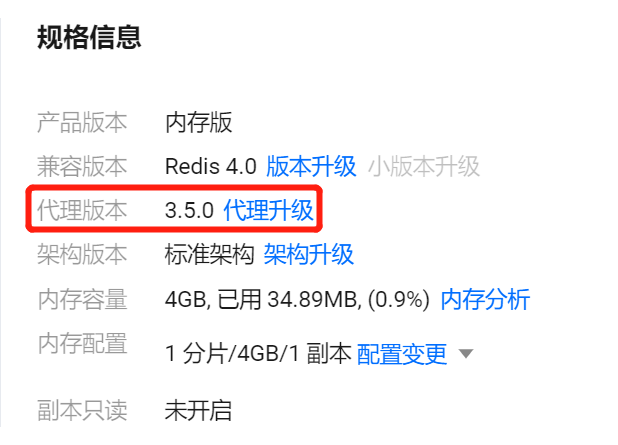
5. In the Specification Information section on the Instance Details page, click Upgrade Proxy after Proxy Version.

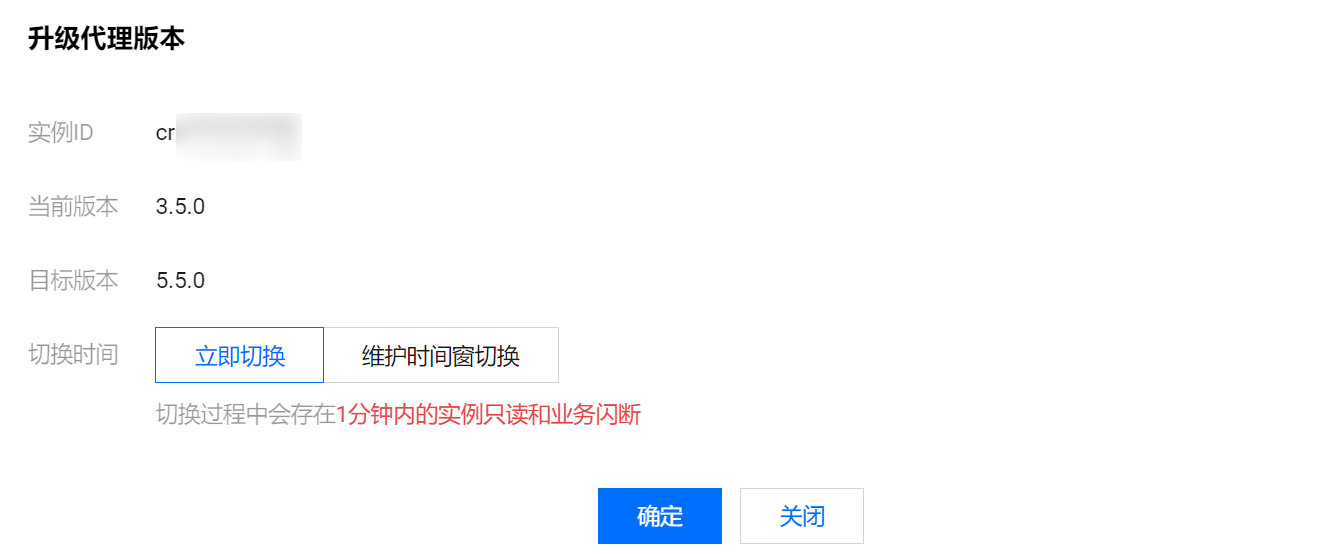
6. In the pop-up dialog, confirm the information of the instance to be upgraded based on the table below, configure the target upgrade version, and click OK.

Parameter name
Description
Unique instance ID
ID of the instance to be upgraded.
Current Version
Current minor version of the Proxy.
Target version
The target version after the proxy upgrade. Selecting a target version is not supported.
Switch Time
Switch Now: The switch will be performed when the data sync is almost completed (the data left to be synced is less than 10 MB).
Switch in Maintenance Time: The switch will be performed during the instance maintenance time. If the switch conditions cannot be met in the current maintenance time, the switch will be attempted in the next maintenance time. You can modify the Maintenance Window on the instance details page.
7. Return to the instance list. Once the instance status changes to Running, you can verify that the instance version has been upgraded in the instance list or instance details.

Related APIs

API Name
Feature
Upgrading Proxy Version