腾讯云
最新活动
大模型
产品
解决方案
定价
企业中心
云市场
开发者
客户支持
合作与生态
了解腾讯云
搜索
VPN 连接
文档中心
入门中心
API 中心
SDK 中心
文档活动
我的反馈
帮你快速理解、总结文档
立即下载
文档中心
>
VPN 连接
>
购买指南
>
手动续费
手动续费
最近更新时间:2024-12-04 10:03:52
微信扫一扫
QQ
新浪微博
复制链接
链接复制成功
我的收藏
包年包月 VPN 网关为预付费模式,为避免 VPN 网关欠费对您的业务造成影响,请您及时为 VPN 网关续费。
操作步骤
1.
登录
私有网络控制台
。
2.
在左侧目录中单击
VPN 连接
>
VPN 网关
,进入管理页。
3.
在
VPN 网关
页面,单击需要续费的 VPN 网关实例右侧操作列的
更多
>
续费
。
4.
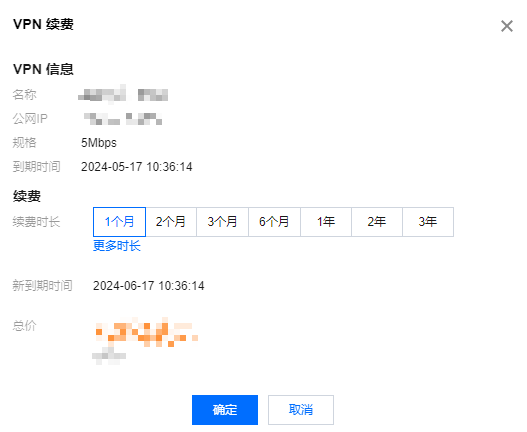
在弹出的续费页面,选择续费时间,确认无误后,单击
确定
。
5.
您也可以单击启动
自动续费
模式,如果账户余额充足,则会自动续费1个月。
上一篇: 自动续费
下一篇: 包年包月转为按量计费
文档“捉虫”活动
检视指定产品文档,发现和反馈有效问题,奖!
API专项"捉虫"
反馈API文档问题,代金券、周边好礼奖不停!
文档建议,你提了吗
快来使用腾讯云产品文档,提出有效建议,奖!
咨询