If NVIDIA series GPUs are used for 3D graphics rendering tasks (such as high-performance graphics processing and video encoding/decoding), the GRID Driver and License Server should be installed and configured. Only the GNV4v, GNV4, and GN7vw instance clusters offer public images with pre-installed GRID drivers, supporting DirectX and OpenGL graphics APIs. for user's experience, NVIDIA rendering GPU instances provide pre-installed GRID driver images, which can be selected when creating a GPU instance to complete the GRID driver deployment.
Operation Steps
1. On the Purchase Page, select the desired GPU Rendering Instance model and related configuration.
Note:
Only the GNV4v, GNV4, and GN7vw instance clusters provide public images with pre-installed GRID drivers. Both GNV4v and GN7vw are open in the allowlist. Contact Pre-sales Online Consultation to enable the instance purchase permissions.
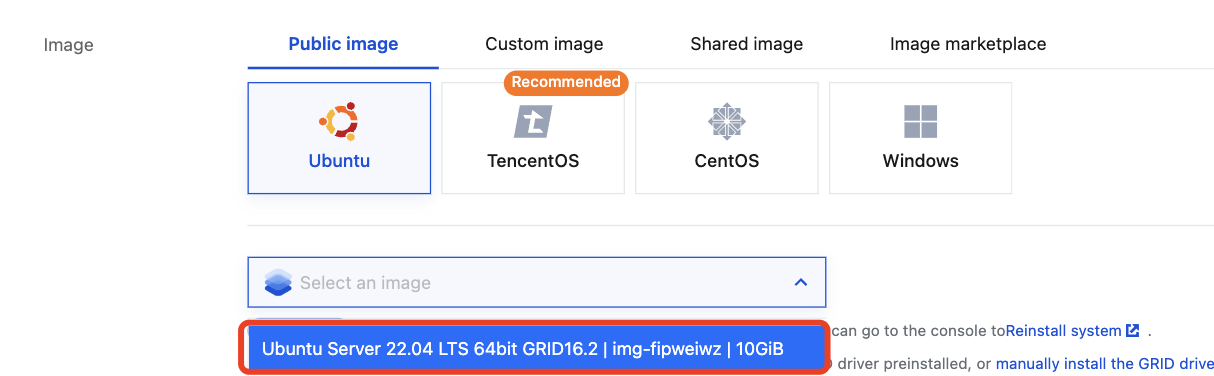
2. Select Public Image in the image, and click Selecting an image, as shown below:
3. In the pop-up Select Image dropdown list, use the search box to select the required image version based on your actual needs, as shown below:
This document uses Ubuntu Server 22.04 LTS 64-bit with GRID16.2 as an example. You can choose the appropriate image based on your actual needs and see Rendering Instance Supported Images for further guidance.
4. Follow the prompts in the interface to complete the instance configuration.