The content of this page has been automatically translated by AI. If you encounter any problems while reading, you can view the corresponding content in Chinese.
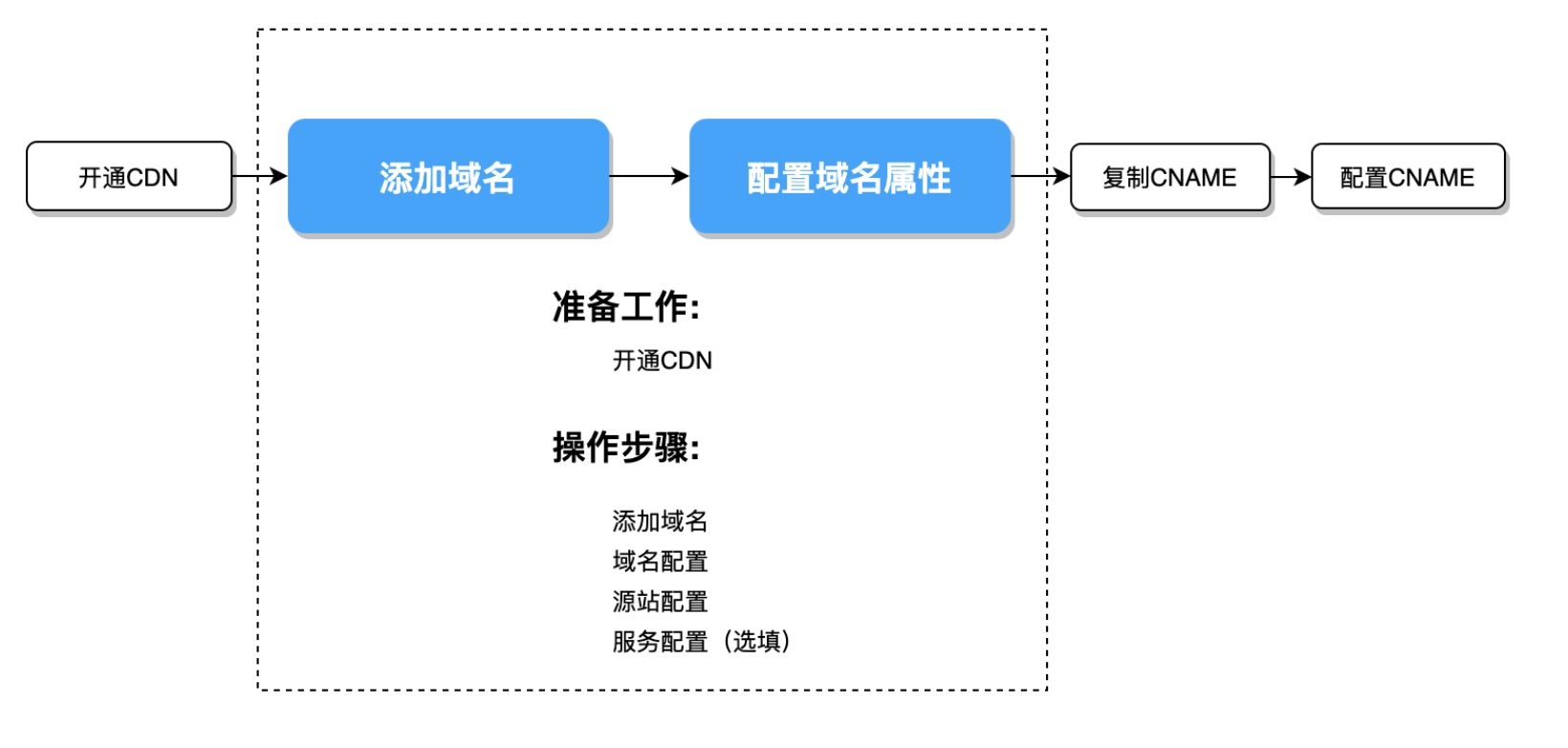
Before configuring CDN , you need to activate CDN service. If you have Activated CDN service, please proceed to the subsequent steps.
Confusing concepts:
Configuration Name
Configuration Instructions
Usage position
Acceleration Domain Name
Domain name connected to the CDN, the domain name that users actually access on the terminal
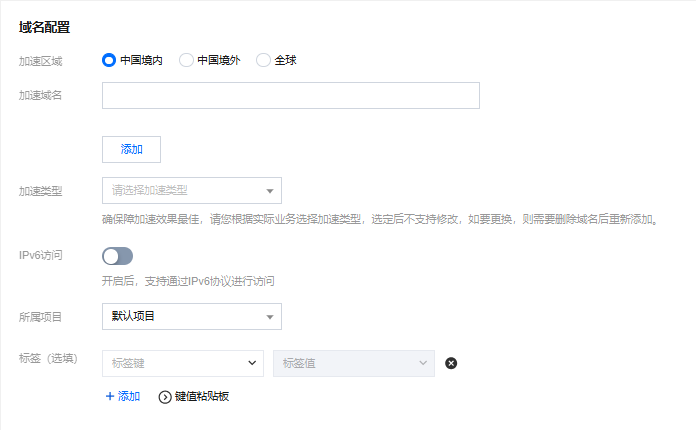
Add Domain - Domain Configuration
Origin server address/origin server domain name
The IP address (domain name) corresponding to the server origin server. If the CDN node does not cache the requested content, it will access this address (domain name) to fetch the requested content
Origin server: A server that provides services and can handle and respond to user requests. Users access it through the origin server address, which can be a domain name or an IP address
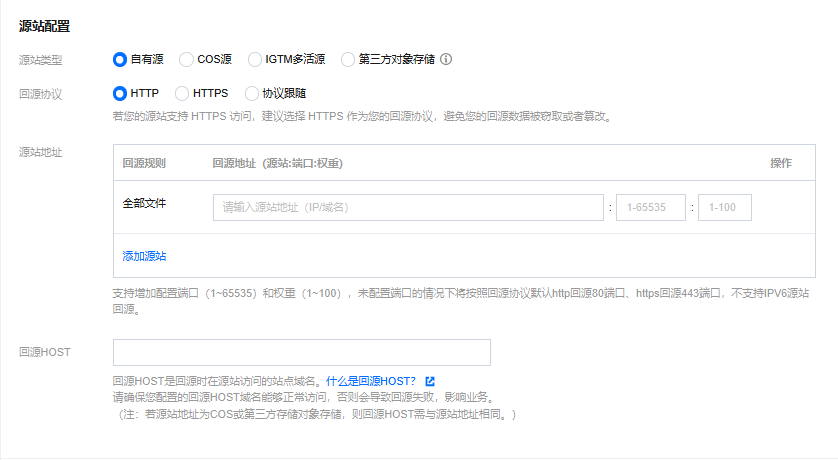
Add Domain - Origin Server Configuration
Host Header
The actual server content requested when the CDN node accesses the origin. It usually matches the acceleration domain name. You can fill it in based on the actual request content at the time of back-to-origin.
Add Domain - Origin Server Configuration
CNAME Domain Name
After your acceleration domain name is connected, the system will automatically assign a CNAME domain name with the suffix .cdn.dnsv1.com or .dsa.dnsv1.com. CNAME domain names cannot be directly used as access domain names.
After mapping your acceleration domain name to the CNAME domain name, Tencent Cloud will dynamically modify the IP address pointed to by the CNAME and update all your acceleration domains. You do not need to manually change each IP address that the acceleration domain name points to.
Configure CNAME
Acceleration domain name: Users access through cdntest.com, where cdntest.com is the acceleration domain name.
CNAME domain name: After the acceleration domain name is connected, the system will automatically assign a CNAME domain name suffixed with .cdn.dnsv1.com or .dsa.dnsv1.com, such as cdntest.com.cdn.dnsv1.com/cdntest.com.dsa.dnsv1.com.
Origin server address: When the CDN node does not cache the content requested by the user, the CDN node will request the content from 1.1.1.1, which is the origin server address.
Host header: When the CDN node requests 1.1.1.1, if you expect the actual request address to be "originhost.com", different from the end user request of "cdntest.com", configure the Host header as "originhost.com". In this case, the end user accessing through "cdntest.com" will fetch the content from "originhost.com". Typically, the acceleration domain name and Host header domain names are consistent, but you can adjust according to your business needs.
Operation step
Enter the CDN console, find Domain Management in the left navigation bar, click Add Domain.
After entering the Add Domain page, you need to configure the following three parts to complete the domain connection:
2. Fill in the acceleration domain
If the domain you are integrating falls under the following conditions, then domain ownership verification is necessary. For verification steps, please refer to Domain Ownership Verification.
First-time connection of the domain name.
This domain name has been connected by another user.
Connecting a wildcard domain name.
3. Select acceleration type
4. Other optional items (can be changed later in Domain Name Management)
Configuration description:
Configuration Item
Configuration Instructions
Acceleration Region
Within China: Access requests from global users will be scheduled to cache nodes within China for service. If your business is primarily based in China, please select acceleration within China.
Outside China: Access requests from global users will be scheduled to cache nodes outside China for service. If your business is primarily based overseas, please select acceleration outside China. For cross-border access, acceleration quality is not guaranteed.
Global: Access requests from global users will be preferentially scheduled to the nearest nodes for service. If your business is globally distributed, please select global acceleration. For cross-border backhaul, acceleration quality is not guaranteed.
Note:
Acceleration services within the Chinese mainland and outside the Chinese mainland are billed separately. Please refer to Billing Instructions.
Acceleration Domain Name
1. The length of the domain cannot exceed 81 characters.
2. Domestic domains have been filed with the Ministry of Industry and Information Technology.
3. A domain can be in the form of a subdomain such as a.test.com, a.b.test.com or a wildcard domain such as *.test.com, *.a.test.com.
4. When the access domain is a wildcard domain, or has already been accessed by another user, or when accessing a new domain for the first time, it’s necessary to perform domain ownership verification.
Note:
1. After connecting a wildcard domain, its subdomains or secondary wildcard domains cannot be connected to another account.
2. Simultaneous connections of *.test.com and *.a.test.com are not supported.
Domestic Chinese domain names must be filed in Chinese format first
Chinese domain names, such as "中文.域名", can be converted to "xn--fiq228c.xn--eqrt2g" using third-party tools before access
Domain names containing underscores, for example, "test_qq.tencent.cloud", can be added directly after whitelisting.
3. If the domain name is malicious or high-risk, it cannot be accessed. For detailed instructions, refer to Use Limitations.
Acceleration type
Tencent Cloud CDN optimizes acceleration performance for different business types. It is recommended to choose a business type closer to your own for better acceleration results.
CDN and ECDN are suitable for static and dynamic resource acceleration, respectively.
CDN:
Acceleration of small webpage file downloads: applicable to e-commerce, websites, UGC communities, and other business scenarios that mainly involve small static resources, such as webpage styles, images, and small files.
Acceleration of large file downloads: applicable to business scenarios where large files, such as game installation packages, application updates, and application program packages, are downloaded.
Audio and video on demand acceleration: applicable to audio and video on-demand scenarios that require acceleration, such as online on-demand audio and video streaming.
ECDN:
Dynamic and static content acceleration: applicable to business scenarios where dynamic and static data is integrated, such as various website homepages.
Dynamic content acceleration: applicable to scenarios such as account login, order transactions, API calls, and real-time queries.
Once selected, the acceleration type cannot be changed. To switch types, delete and re-add the domain.
IPv6 Access
The IPv6 access toggle is off by default. When enabled, it supports accessing CDN nodes over the IPv6 protocol.
Note:
Some platforms are being upgraded, IPv6 access is currently not supported. Please stay tuned for the official launch.
IPv6 access is available only within China.
For globally accelerated domains, if IPv6 access is enabled, it takes effect only within China.
Affiliated Project
A project is a set of shared resources for all Tencent Cloud products. You can manage project-related operations in Project Management.
Tag
Tag Key and Tag Value are mandatory options. If you haven't created a Tag, you can do so in Tag Management.
Origin Server Configuration
1. Select the origin server type
2. Select the origin-pull protocol
3. Enter the origin server address
Detailed Configuration Explanation:
Configuration Item
Configuration Instructions
Origin server type
Self-owned origin server:
An existing server with stable performance (i.e., origin server) scenario.
Using Tencent Cloud COS service, you can directly select the corresponding bucket.
Third-party COS:
Non-Tencent Cloud third-party COS. Currently supported third parties are: AWS S3 and Alibaba Cloud OSS.
Attention:
Some platforms do not support third-party COS for the time being, please wait for the full release.
Origin server address
We recommend that you configure your origin server in the same region as the acceleration region. For example, if the acceleration region resides in the Chinese mainland, configure your origin server in the Chinese mainland. If you configure the origin server in Hong Kong (China) or outside the Chinese mainland, cross-border access is required during origin-pull. In this case, the origin-pull effect may not be ensured.
If your acceleration domain name is configured for global acceleration, you can configure independent origin servers respectively for different regions in the origin server configuration module of the domain name. This way, origin-pull requests that are initiated in and outside the Chinese mainland are sent to different origin servers. This ensures the origin-pull effect.
Self-owned origin server:
1. Supports configuring multiple IPs as origin servers, and origin-pull will be performed in polling mode.
Reference Format:Origin server address:Port:Weight (Port is optional: Origin server address::Weight)
Note: HTTPS protocol currently only supports Port 443.
3. Support using domain names as origin server , please note that this domain cannot be the same as the CDN acceleration domain.
Note: If the origin server address is a CDN accelerated domain that has already been linked, it will cause a circular resolution, preventing normal back-to-origin.
COS origin server:
1. Select a COS bucket as the origin server.
2. Select the default domain name or static website type based on the bucket configuration and your actual business needs.
3. According to the read-write permissions of your bucket, if your bucket is private (private read and write), authorize the CDN and enable origin-pull authentication to allow private bucket access. If your bucket is public (including public read-write, public read private write), enabling private bucket access is unnecessary.
Third-party COS:
1. If resources are stored in a third-party COS, enter a valid bucket access address as the origin server. Currently, the following third-party services are supported: AWS S3 and Alibaba Cloud OSS.
Note:Cannot include http:// or http:// protocol header, my-bucket.oss-cn-beijing.aliyuncs.com or my-bucket.s3.ap-east-1.amazonaws.com.
2. If you use a private bucket of a third-party object storage service as the origin server, enter a valid key and enable origin-pull authentication to allow private bucket access.
Origin-pull Protocol
The origin-pull protocol refers to the application layer protocol used when Tencent CDN nodes request resources from your origin server. Choose based on the support of your origin server:
HTTP: HTTP/HTTPS access will use HTTP for origin-pull.
HTTPS: HTTP/HTTPS access will use HTTPS for origin-pull, preventing data theft or tampering and slightly consuming processor resources of your origin server (the origin server needs to support HTTPS access).
Follow Protocol: Use HTTP for HTTP access back-to-origin and HTTPS for HTTPS access back-to-origin. If you only need to transmit certain sensitive data via the HTTPS protocol and other services via the HTTP protocol, it is recommended to choose "Follow Protocol" ( origin server needs to support HTTPS access).
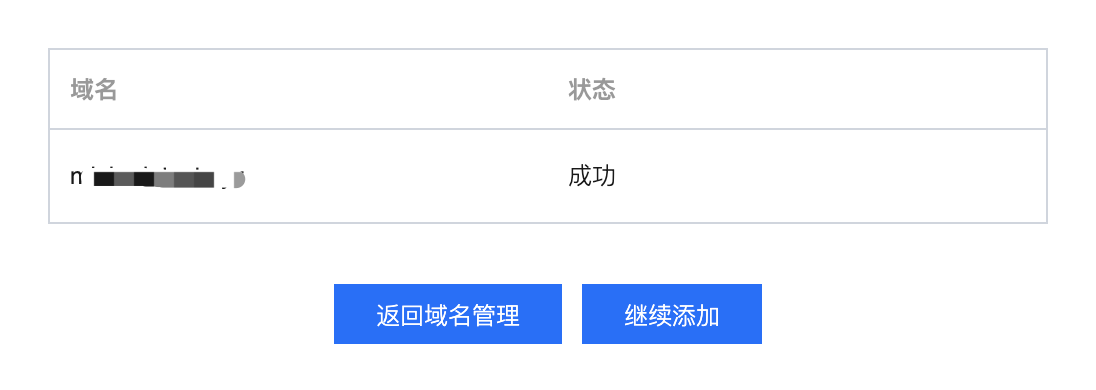
Access Completed
After completing the domain addition, please be patient and wait for the domain configuration to be distributed to the nodes across the network, which takes about 5 - 10 minutes.
Subsequent Work
After access is completed, Tencent Cloud CDN will assign a corresponding CNAME address. You need to complete the CNAME configuration for the CDN service to take effect. For details, see Configuring CNAME.