You can create an (identity provider) IdP via either Cloud Access Management Console or CAM API.
Creating a Role via Console
1. To create an OIDC IdP, you need to obtain a federation metadata document from the IdP. This document includes the publisher's name, client ID, IdP URL, and the public key to verify the signature received from the IdP.
Note
This document uses Azure Active Directory as an example of an IdP.
2. Log in to the Cloud Access Management Console and navigate to the Identity Providers > Role SSO page, then click on Create Provider.
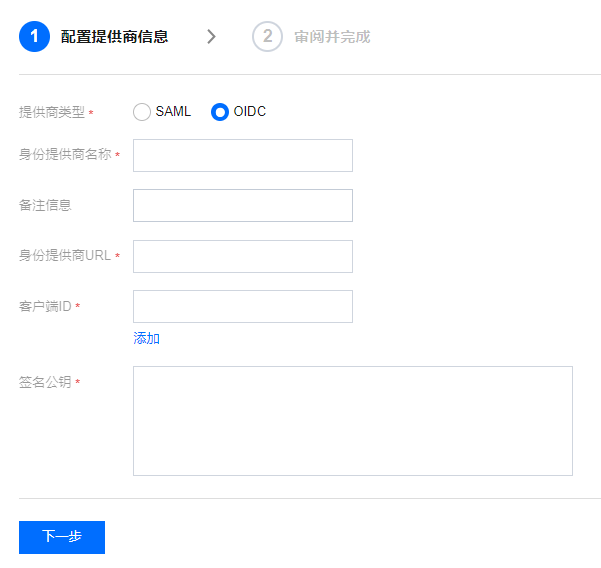
3. On the Create Identity Provider page, select the provider type as SAML, configure the provider information, and click Next.
IdP Name: Enter the name of the identity provider.
IdP URL: The identifier for the OpenID Connect identity provider. This corresponds to the "issuer" field value in the OpenID Connect metadata document provided by the identity provider.
Client ID: The client ID registered with the OpenID Connect IdP. This can be obtained from the Azure Active Directory > Enterprise Applications > OIDCSSO Application Overview page.
Public Key for Signature: This is the public key used to verify the signature of the IdP's ID Token. It corresponds to the content linked in the "jwks_uri" field in the OpenID Connect metadata document provided by the IdP (open the link in a browser to obtain the content). For the security of your account, it is recommended that you rotate the signature public key regularly.
4. Click 'Next' to review the information you've entered about the identity provider. Once you've confirmed that everything is correct, click on Complete to create the identity provider.
Creating a role using API
To create an IdP and upload the metadata document, please invoke the CreateOIDCConfig interface.