[Unity3d基础]使用GirdLayoutGroup组件制作表格

[Unity3d基础]使用GirdLayoutGroup组件制作表格

六月丶
发布于 2022-12-26 17:49:54
发布于 2022-12-26 17:49:54
步骤
1.给表格容器添加GridLayoutGroup组件
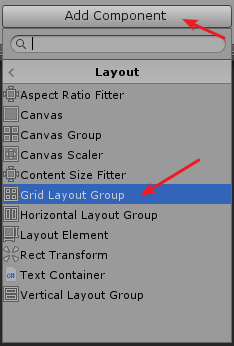
2.设置GridLayoutGroup组件
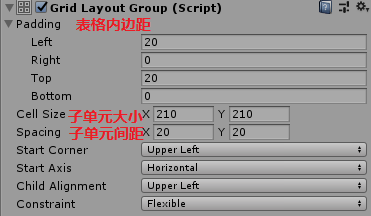
3.添加元素
这里有两种加法: 一种是在Hierarchy面板里直接重复crtl+d
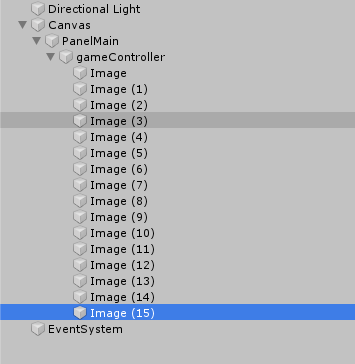
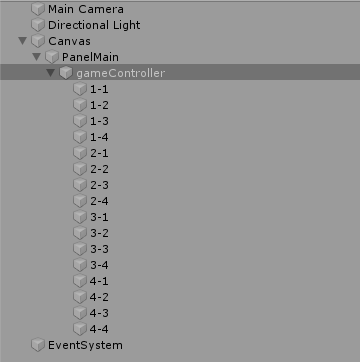
另一种是用脚本动态添加,如果是确定单元个数的就用第一种,如果是动态的就用第二种。两种添加方式都会自动排列子单元。 脚本代码(挂容器上):
using System.Collections;
using System.Collections.Generic;
using UnityEngine;
using UnityEngine.UI;

public class gameCTRLScript : MonoBehaviour
{
    // Start is called before the first frame update
    void Start()
    {
        createimgs(4,4);
    }

    // Update is called once per frame
    void Update()
    {

    }
    private void createimgs(int row,int col)
    {
        for (int i = 1; i <= row; i++)
            for (int j = 1; j <= col; j++)
                createimg(i+"-"+j);
    }
    private void createimg(string name)
    {
        GameObject go = new GameObject(name);
        go.AddComponent<Image>();  //记得using UnityEngine.UI
        go.transform.SetParent(this.transform,false);
    }
}
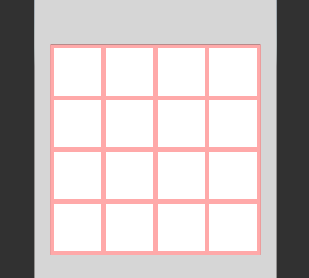
效果
本文参与 腾讯云自媒体同步曝光计划,分享自作者个人站点/博客。
原始发表:2020 年 01 月,如有侵权请联系 cloudcommunity@tencent.com 删除
目录
腾讯云开发者

Copyright © 2013 - 2026 Tencent Cloud. All Rights Reserved. 腾讯云 版权所有
深圳市腾讯计算机系统有限公司 ICP备案/许可证号:粤B2-20090059  粤公网安备44030502008569号
腾讯云计算(北京)有限责任公司 京ICP证150476号 | 京ICP备11018762号