FFmpeg API 基础

FFmpeg API 基础

Cellinlab
发布于 2023-05-17 20:44:36
发布于 2023-05-17 20:44:36
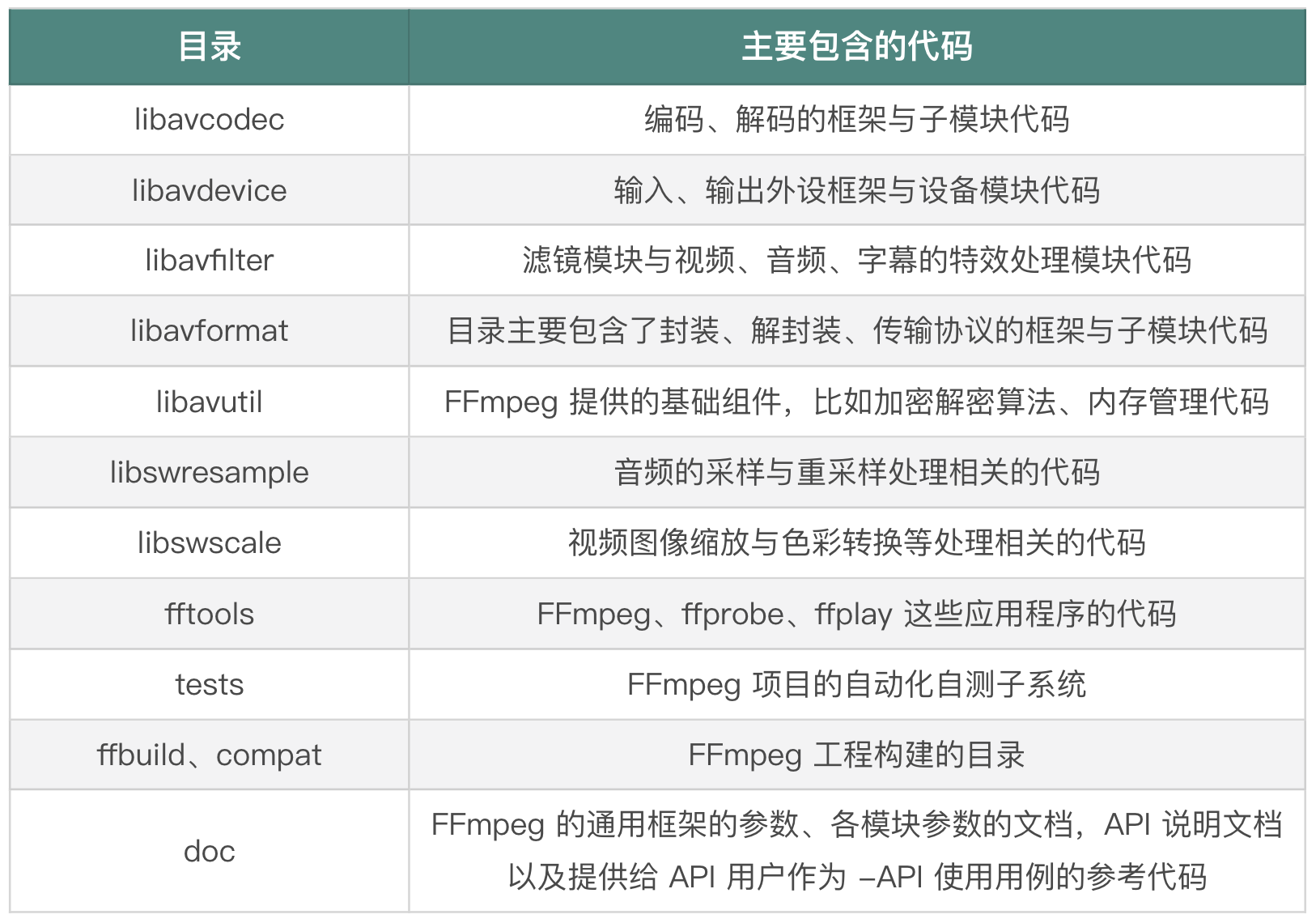
FFmpeg 代码 (opens new window)目录结构:
# AVFormat 模块
libavformat 主要是用来做封装格式处理的模块。
# 调试接口
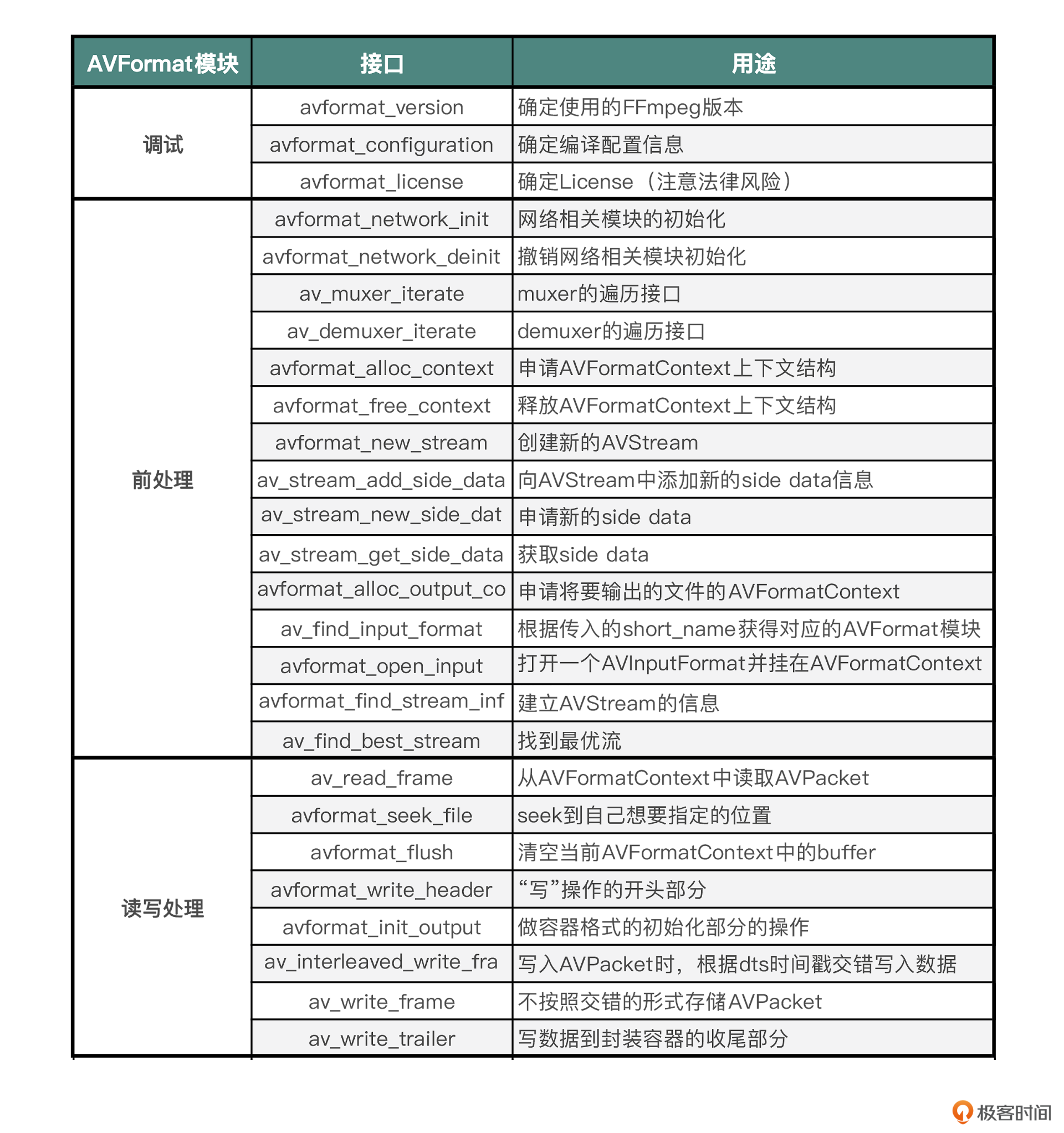
avformat_version:FFmpeg 版本信息avformat_configuration:FFmpeg 编译配置信息avformat_license:FFmpeg 许可证信息
许可法律风险
FFmpeg 本身是 LGPL 的,但是 FFmpeg 可以引入其他第三方库,比如 libfdkaac 是 nonfree 的,就有可能存在专利收费的法律风险。
# AVFormat 前处理
前处理部分,主要包含网络初始化、模块遍历、申请上下文空间、打开文件,还有分析音视频流等操作。
avformat_network_init和avformat_network_deinit:初始化网络模块 和 撤销网络模块初始化av_muxer_iterate和av_demuxer_iterate:muxer 和 demuxer 的遍历接口avformat_alloc_context和avformat_free_context:申请和释放 AVFormatContext 上下文avformat_new_stream:创建新的 AVStreamav_stream_add_side_data和av_stream_get_side_data:添加和获取 AVStream 的附加数据avformat_alloc_output_context2:申请用来输出文件的 AVFormatContext,可以通过avformat_free_context释放avformat_open_input和avformat_close_input:打开 AVInputFormat 并挂在 AVFormatContext 上,会调用avformat_alloc_contextav_find_input_format:根据传入的short_name查找 AVInputFormatav_find_best_stream:查找最佳的音视频流avformat_find_stream_info:分析音视频流信息
可以通过 probesize、analyzeduration 来设置读取的音视频数据的阈值,avformat_find_stream_info 里面也会遍历这个阈值,所以通过设置 probesize 和 analyzeduration 也可以节省一些时间。
# AVFormat 读写处理
av_read_frame:从 AVFormatContext 中读取 AVPacketavformat_seek_file:在 AVFormatContext 中查找 AVPacket,如拖动进度条avformat_flush:清空 AVFormatContext 中的缓存avformat_write_header:主要用在“写”操作的开头部分,通常指传输协议的开始,写封装格式头部avformat_init_output:用来做容器格式初始化部分的操作,如打开文件,或者有一些容器格式内部的信息需要初始化的时候av_interleaved_write_frame:支持在写入 AVPacket 的时候,根据 dts 时间戳交错写入数据av_write_frame:不按照交错的形式存储 AVPacket,不过在写入文件的时候是直接写入到磁盘,不会有 bufferav_write_trailer:写数据到封装容器的收尾部分
# AVIO
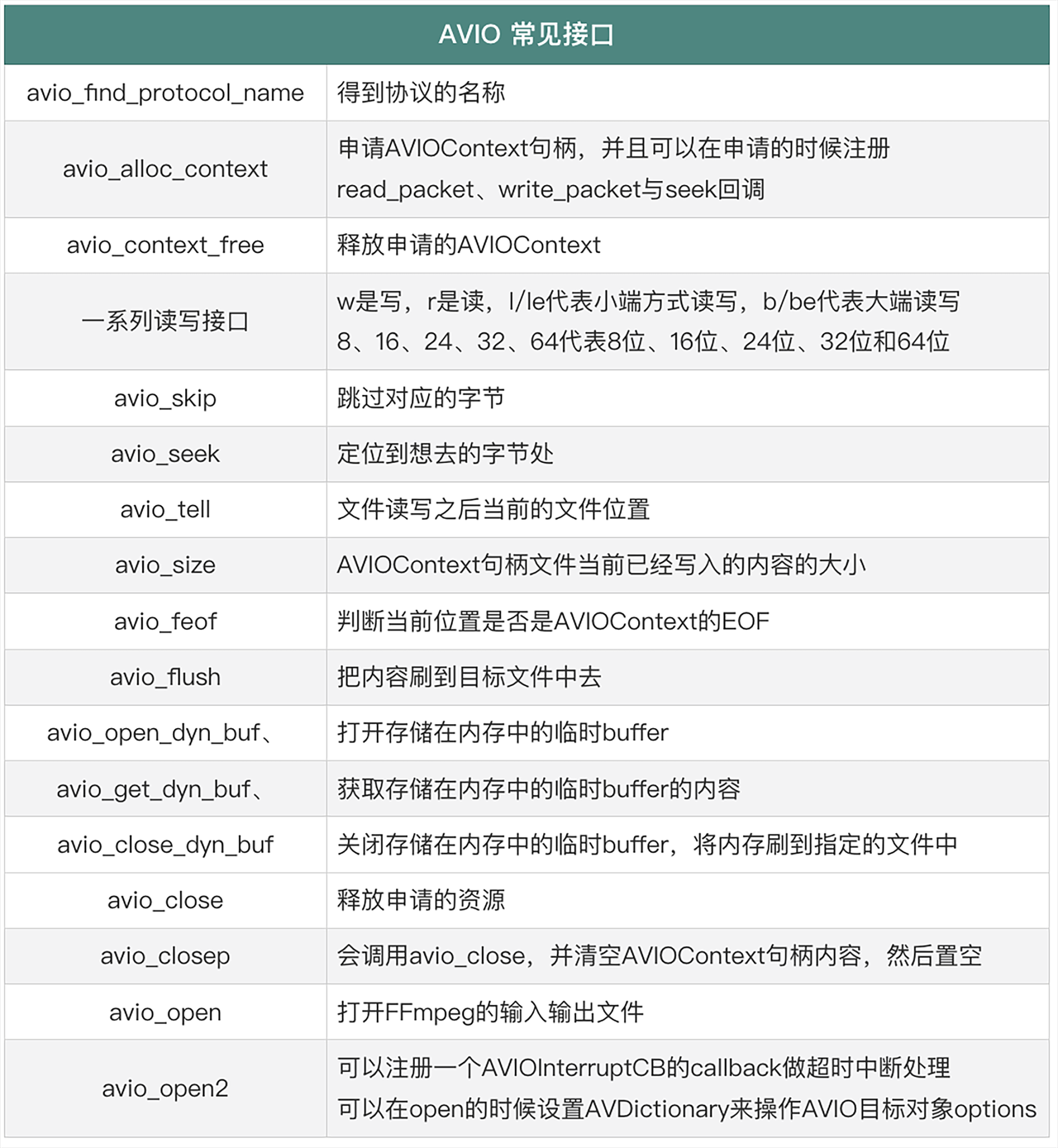
AVIO 接口,主要是为了方便读、写内容时做一些字节对齐与大小端定义的操作。
avio_find_protocol_name:获取字符串协议名avio_alloc_context:申请 AVIOContext 句柄,并且可以在申请的时候注册 read_packet、write_packet 与 seek 回调,然后可以将 AVIOContext 句柄挂载到 AVFormatContext 的 pb 上面avio_skip:跳过指定字节数avio_seek:跳转到指定位置avio_tell:文件读写之后当前的文件位置avio_size:获取当前写入内容的大小avio_feof:判断是否读到文件末尾avio_flush:将内容刷到目标文件avio_open_dyn_buf、avio_get_dyn_buf、avio_close_dyn_buf:写入文件需要先临时放在内存中,最后按照自己的计划将内容刷到文件中avio_close与avio_closep:释放申请的资源avio_open和avio_open2:打开 FFmpeg 的输入输出文件
# AVDictionary 与 AVOption
FFmpeg 提供的命令行支持很多参数,这些参数不单单是提供给命令行用户的,API 用户也可以使用。
可以通过 AVDictionary 或者 AVOption 来设置参数,这两个 API 系列主要用来设置操作目标的 format、codec、protocol 的参数,最终达到与命令行使用参数一样的效果。
# AVCodec 接口
- 编解码前置操作
- 获取编码器:
avcodec_find_encoder、avcodec_find_encoder_by_name- 确认是否是编码器:
av_codec_is_encoder
- 确认是否是编码器:
- 获取解码器:
avcodec_find_decoder、avcodec_find_decoder_by_name- 确认是否是解码器:
av_codec_is_decoder
- 确认是否是解码器:
- 通过
avcodec_alloc_context3申请 AVCodecContext 并建立关联- 使用完毕后,通过
avcodec_free_context释放
- 使用完毕后,通过
- 打开编码器:
avcodec_open2
- 获取编码器:
- 编码和解码操作接口
- 解码:
avcodec_send_packet、avcodec_receive_frame - 编码:
avcodec_send_frame、avcodec_receive_packet
- 解码:
- 关键参数
AVPacket- 申请
AVPacket:av_packet_alloc- 申请 buf 和 data:
av_new_packet
- 申请 buf 和 data:
- 释放
AVPacket:av_packet_free
- 申请
# Remuxing

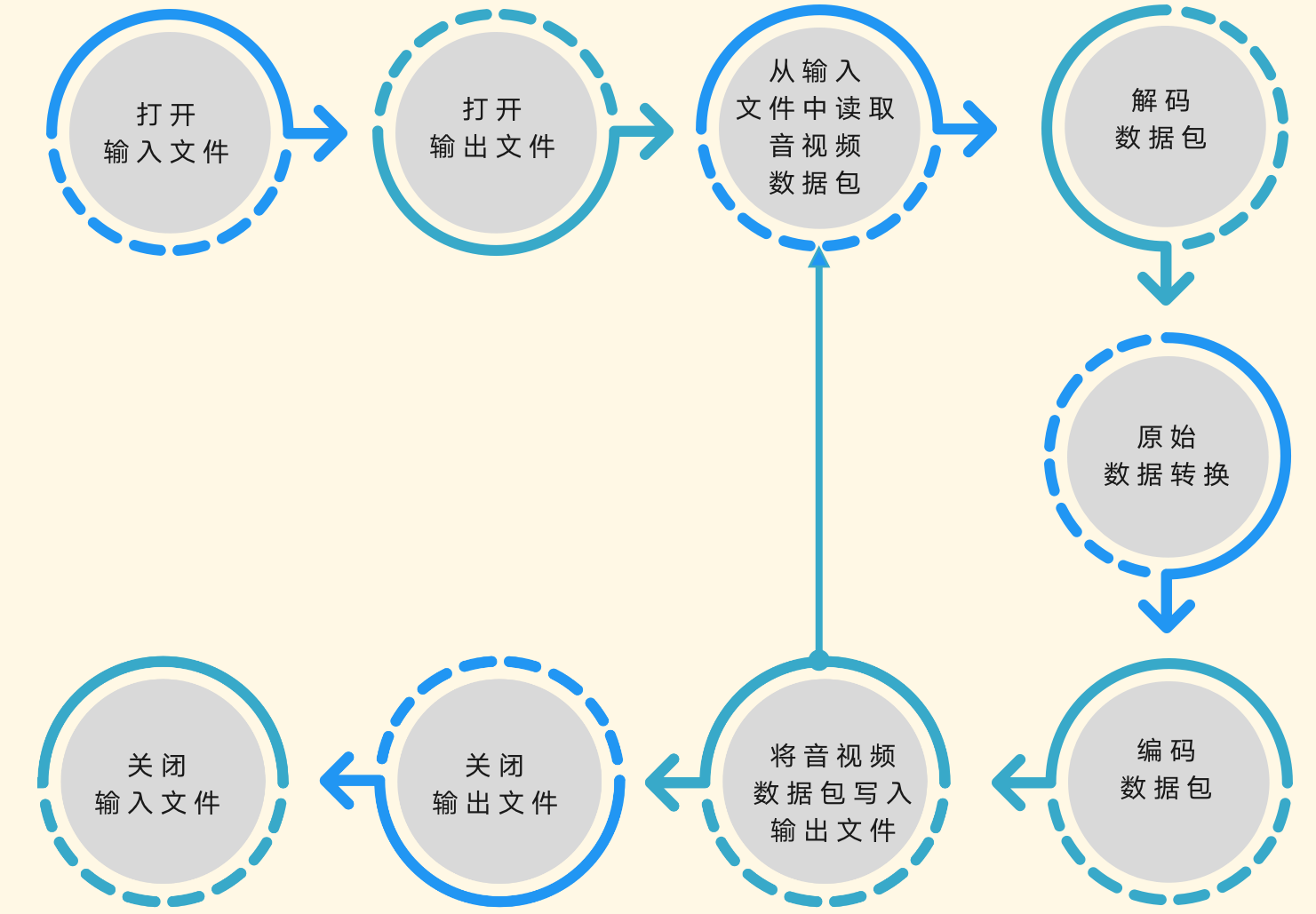
- 使用
avformat_open_input、avformat_find_stream_info来打开输入文件,并根据输入文件中的音视频流信息建立音视频流,也就是 AVStreams。 - 使用
avformat_alloc_output_context2、avformat_new_stream和avformat_write_header打开输出文件,并建立音视频流,输出文件会用到 AVOutputFormat,并建立封装格式操作的 AVFormatContext,作为操作上下文的结构体,并且会尝试写入输出文件的封装格式头部信息。 - 从输入文件中读取音视频数据包,将音视频数据包写入输出文件会使用
av_read_frame函数,从输入文件中读取 AVPacket 音视频数据包,还会使用av_interleaved_write_frame函数,将读取到的音视频数据包写入输出文件。 - 关闭输出文件和输入文件,使用
av_write_trailer函数,在关闭输出文件之前做写封装收尾工作。使用avformat_free_context函数关闭输出文件,并释放因操作输出文件封装格式申请的资源。最后使用 avformat_close_input 关闭输入文件并释放相关的资源。
日常操作时,做 remux 主要还是用于收录一些音视频内容的场景中,用得更多的还是编码或者转码的操作。因为音视频的编码数据格式比较多,需要统一转成相同的编码,即将输入的音视频内容转成统一规格输出的场景,比收录场景更常见。
# Transcoding
本文参与 腾讯云自媒体同步曝光计划,分享自作者个人站点/博客。
原始发表:2022/8/29,如有侵权请联系 cloudcommunity@tencent.com 删除
评论
登录后参与评论
推荐阅读
目录
腾讯云开发者

Copyright © 2013 - 2026 Tencent Cloud. All Rights Reserved. 腾讯云 版权所有
深圳市腾讯计算机系统有限公司 ICP备案/许可证号:粤B2-20090059  粤公网安备44030502008569号
腾讯云计算(北京)有限责任公司 京ICP证150476号 | 京ICP备11018762号