【在Linux世界中追寻伟大的One Piece】应用层协议HTTP



1 -> HTTP协议
虽然我们说,应用层协议是我们程序猿自己定的。但实际上,已经有大佬们定义了一些现成的,又非常好用的应用层协议,供我们直接参考使用。HTTP(超文本传输协议)就是其中之一。
在互联网世界中,HTTP(HyperText Transfer Protocol,超文本传输协议)是一个至关重要的协议。它定义了客户端(如浏览器)与服务器之间如何通信,以交换或传输超文本(如HTML文档)。
HTTP协议是客户端与服务器之间通信的基础。客户端通过HTTP协议向服务器发送请求,服务器收到请求后处理并返回响应。HTTP协议是一个无连接、无状态的协议,即每次请求都需要建立新的连接,且服务器不会保存客户端的状态信息。
2 -> 认识URL
平时我们俗称的"网址"其实就是说的URL。
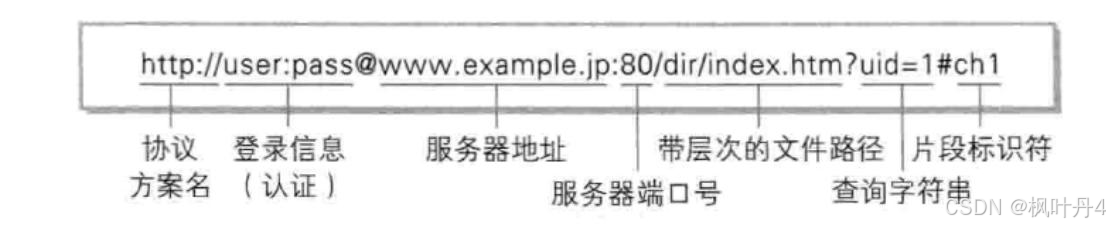
2.1 -> urlencode和urldecode
像 / ?:等这样的字符,已经被url当做特殊意义理解了。因此这些字符不能随意出现。比如,某个参数中需要带有这些特殊字符,就必须先对特殊字符进行转义。
转义的规则如下:
将需要转码的字符转为16进制,然后从右到左,取4位(不足4位直接处理),每2位做一位,前面加上%,编码成%XY格式。
例如:
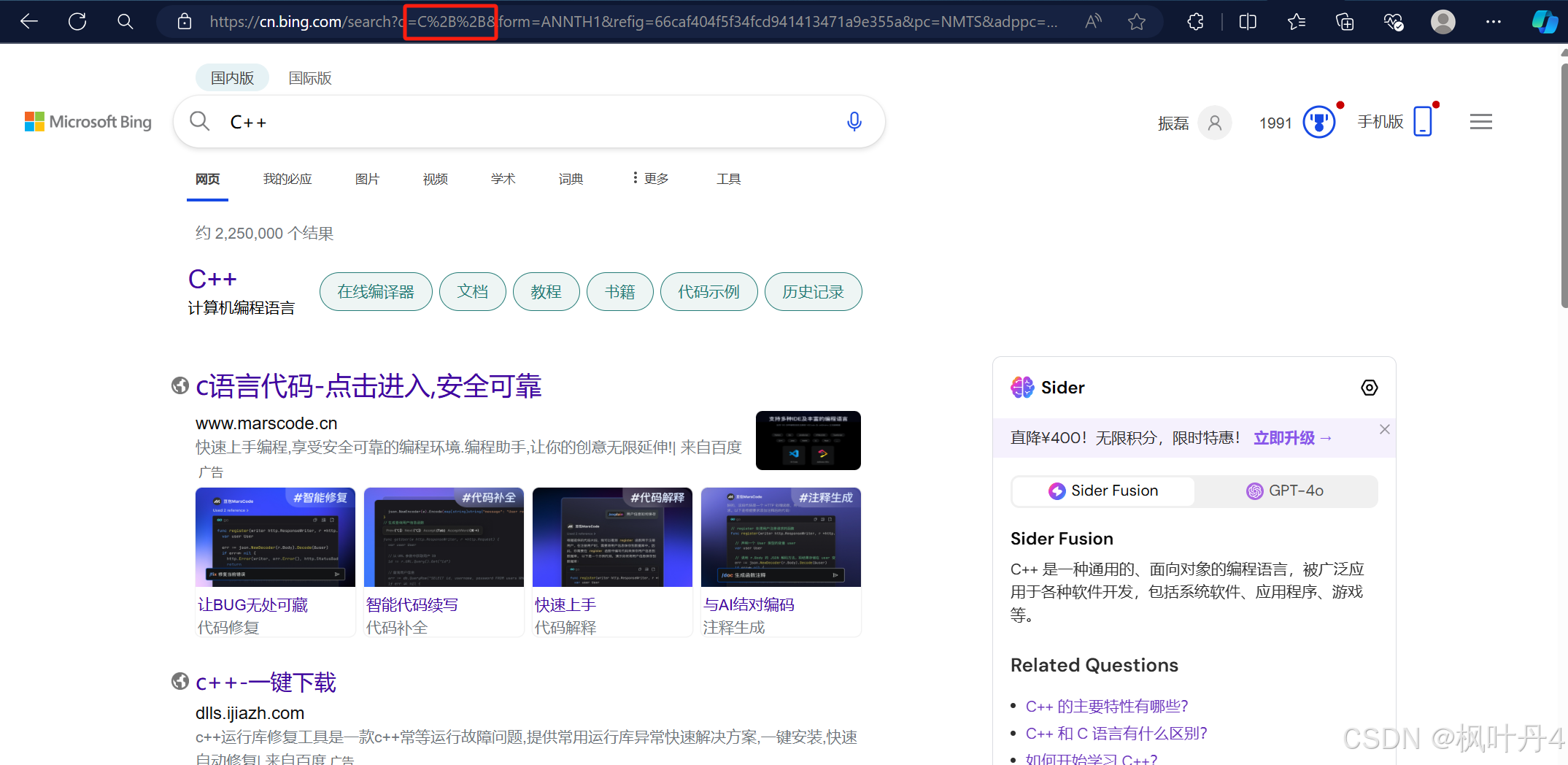
"+"被转义成了"%2B"。
urldecode就是urlencode的逆过程。
3 -> HTTP协议请求与响应格式
3.1 -> HTTP请求
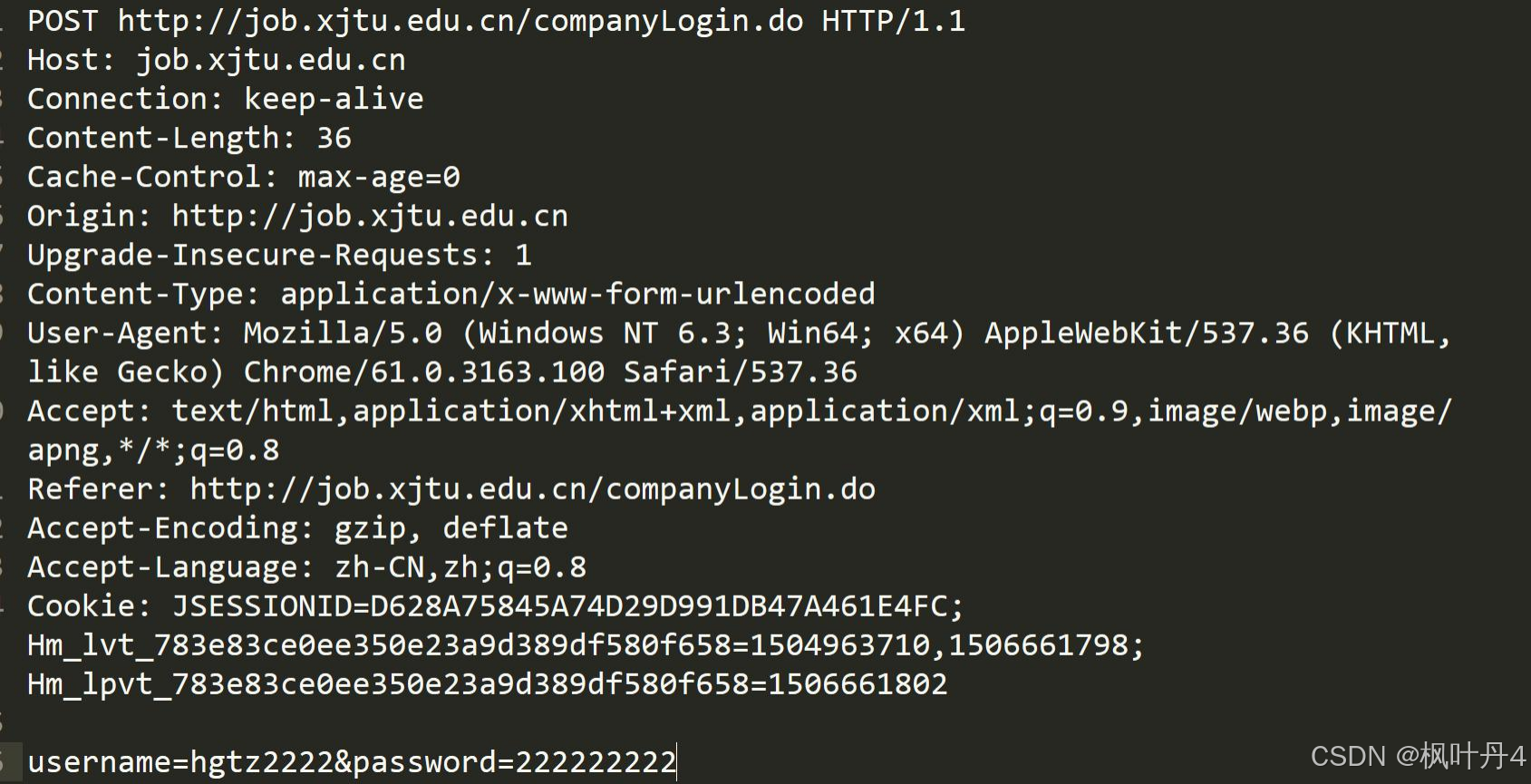
- 首行:[方法] + [url] + [版本]。
- Header:请求的属性,冒号分割的键值对;每组属性之间使用\r\n分隔;遇到空行表示Header部分结束。
- Body:空行后面的内容都是Body。Body允许为空字符串。如果Body存在,则在Header中会有一个Content-Length属性来标识Body的长度。
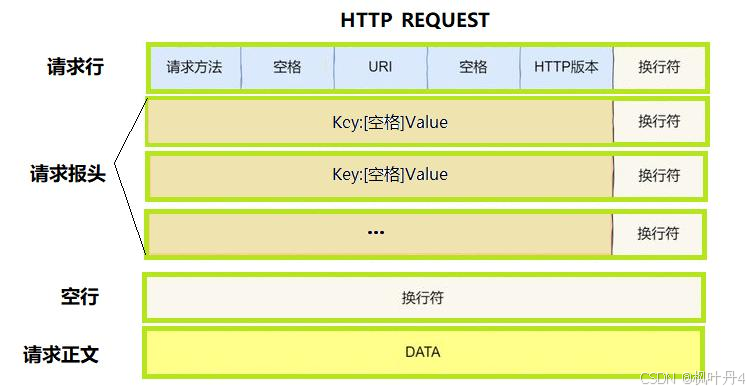
3.2 -> HTTP响应
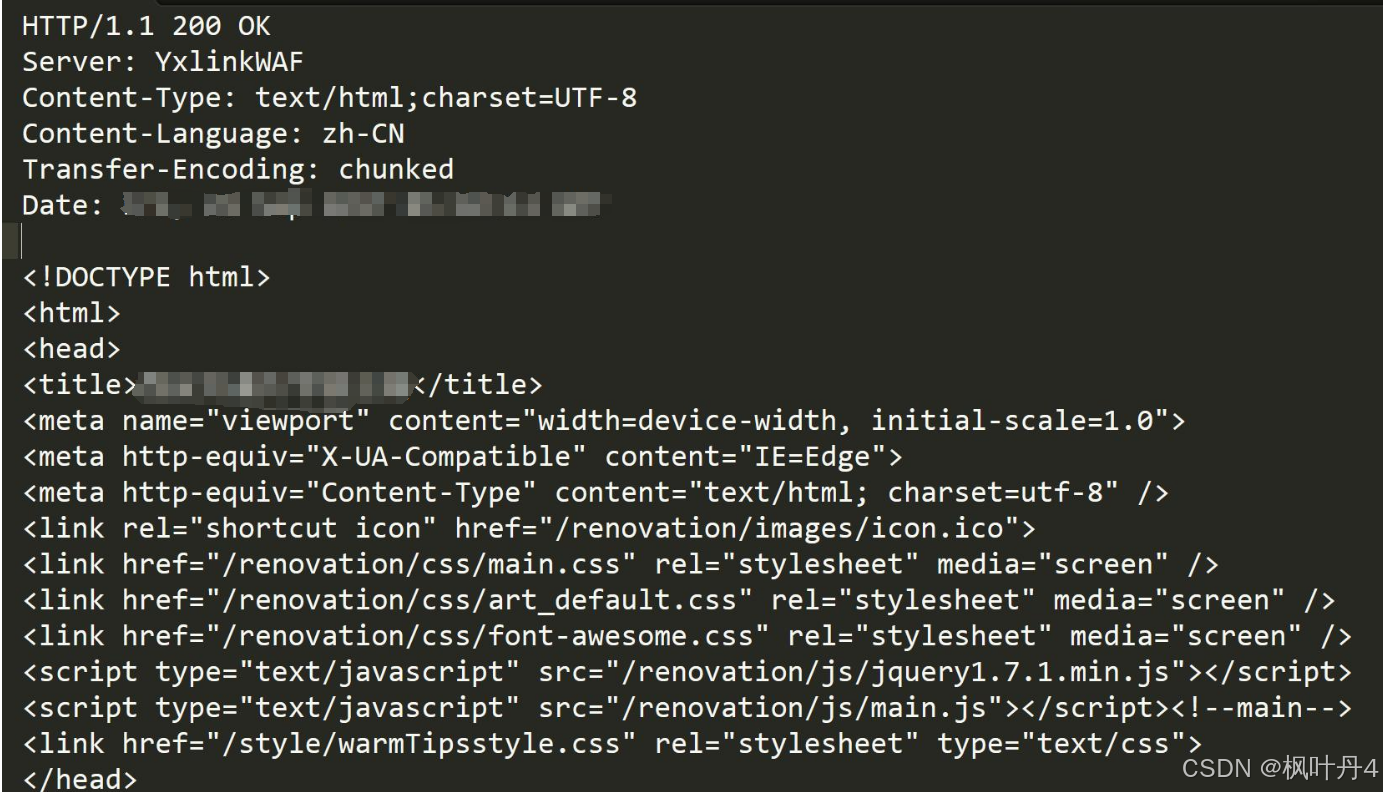
- 首行:[版本号] + [状态码] + [状态码解释]。
- Header:请求的属性,冒号分割的键值对;每组属性之间使用\r\n分隔;遇到空行表示Header部分结束。
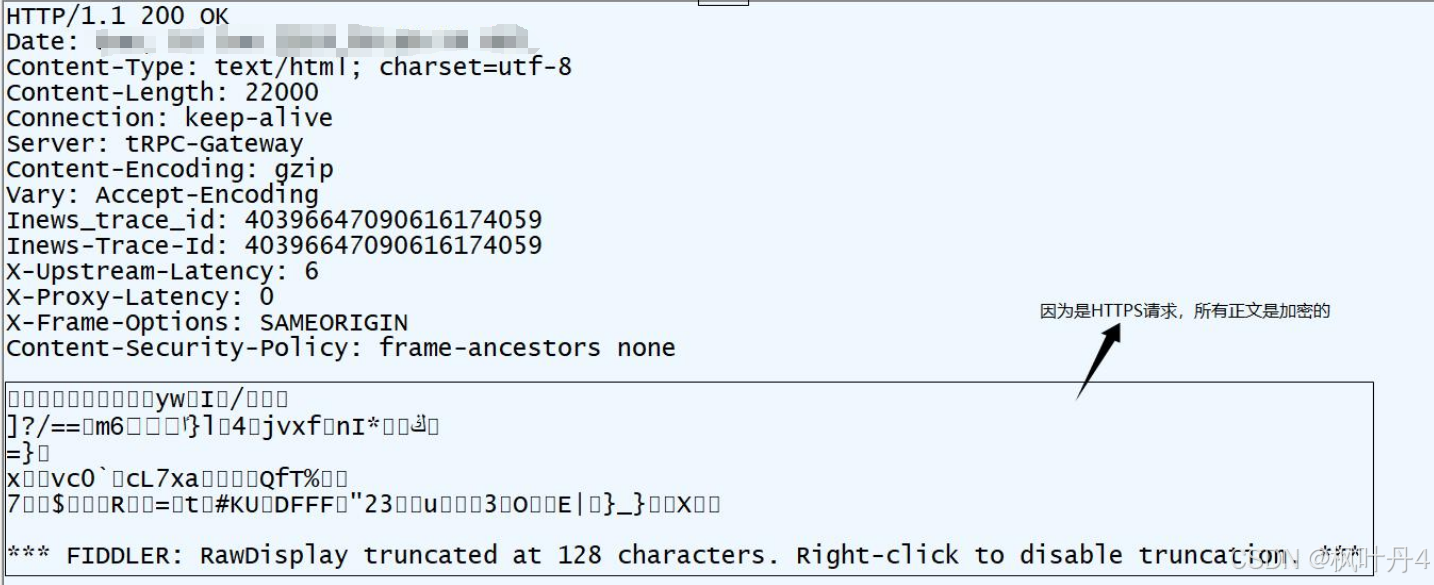
- Body:空行后面的内容都是Body。Body允许为空字符串。如果Body存在,则在Header中会有一个Content-Length属性来标识Body的长度;如果服务器返回了一个html页面,那么html页面内容就是在body中。
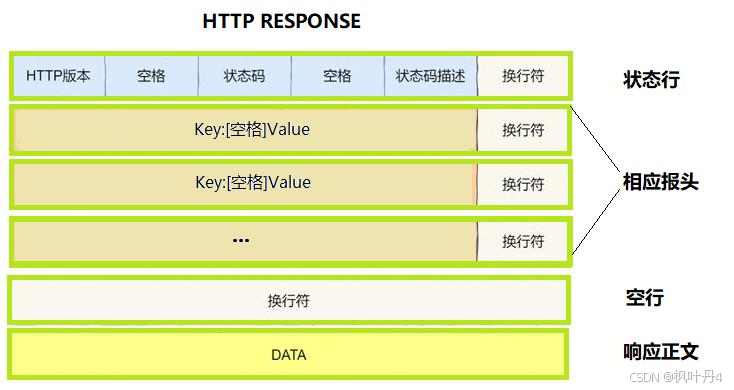
基本的应答格式
4 -> HTTP的方法
方法 | 说明 | 支持的HTTP协议版本 |
|---|---|---|
GET | 获取资源 | 1.0、1.1 |
POST | 传输实体主体 | 1.0、1.1 |
PUT | 传输文件 | 1.0、1.1 |
HEAD | 获得报文首部 | 1.0、1.1 |
DELETE | 删除文件 | 1.0、1.1 |
OPTIONS | 询问支持的方法 | 1.1 |
TRACE | 追踪路径 | 1.1 |
CONNECT | 要求用隧道协议连接代理 | 1.1 |
LINK | 建立和资源之间的联系 | 1.0 |
UNLINE | 断开连接关系 | 1.0 |
其中最常用的就是GET方法和POST方法。
4.1 -> HTTP常见方法
1. GET方法
- 用途:用于请求URL指定的资源。
- 示例:GET /index.html HTTP/1.1
- 特性:指定资源经服务器端解析后返回响应内容。
- form表单:https://www.runoob.com/html/html-forms.html
C++ 要通过历史写的http服务器,验证GET方法,这里需要了解一下FORM表单的问题。 这里就要引入web根目录,文件读取的基本操作了 std::string GetFileContentHelper(const std::string &path) { // 一份简单的读取二进制文件的代码 std::ifstream in(path, std::ios::binary); if (!in.is_open()) return ""; in.seekg(0, in.end); int filesize = in.tellg(); in.seekg(0, in.beg); std::string content; content.resize(filesize); in.read((char *)content.c_str(), filesize); // std::vector<char> content(filesize); // in.read(content.data(), filesize); in.close(); return content; }
2. POST方法
- 用途:用于传输实体的主体,通常用于提交表单数据。
- 示例:POST /submit.cgi HTTP/1.1
- 特性:可以发送大量的数据给服务器,并且数据包含在请求体中。
- form表单:https://www.runoob.com/html/html-forms.html
C++ 要通过历史写的http服务器,验证POST方法,这里需要了解一下FORM表单的问题。
3. PUT方法
- 用途:用于传输文件,将请求报文主体中的文件保存到请求URL指定的位置。
- 示例:PUT /example.html HTTP/1.1
- 特性:不太常用,但在某些情况下,如RESTful API中,用于更新资源。
4. HEAD方法
- 用途:与GET方法类似,但不返回报文主体部分,仅返回响应头。
- 示例:HEAD /index.html HTTP/1.1
- 特性:用于确认URL的有效性及资源更新的日期时间等。
C++ // curl -i 显示 $ curl -i www.baidu.com HTTP/1.1 200 OK Accept-Ranges: bytes Cache-Control: private, no-cache, no-store, proxy-revalidate, no transform Connection: keep-alive Content-Length: 2381 Content-Type: text/html Date: Sun, 16 Jun 2024 08:38:04 GMT Etag: "588604dc-94d" Last-Modified: Sun, 25 Aug 2024 13:27:56 GMT Pragma: no-cache Server: bfe/1.0.8.18 Set-Cookie: BDORZ=27315; max-age=86400; domain=.baidu.com; path=/ <!DOCTYPE html> ... // 使用 head 方法,只会返回响应头 $ curl --head www.baidu.com HTTP/1.1 200 OK Accept-Ranges: bytes Cache-Control: private, no-cache, no-store, proxy-revalidate, no transform Connection: keep-alive Content-Length: 277 Content-Type: text/html Date: Sun, 25 Aug 2024 17:43:38 GMT Etag: "575e1f71-115" Last-Modified: Mon, 13 Jun 2016 02:50:25 GMT Pragma: no-cache Server: bfe/1.0.8.18
5. DELETE方法
- 用途:用于删除文件,是PUT的相反方法。
- 示例:DELETE /example.html HTTP/1.1
- 特性:按请求URL删除指定的资源。
6. OPTIONS方法
- 用途:用于查询针对请求URL指定的资源支持的方法。
- 示例:OPTIONS * HTTP/1.1
- 特性:返回允许的方法,如GET、POST等。
不支持的效果
C++ // 搭建一个 nginx 用来测试 // sudo apt install nginx // sudo nginx -- 开启 // ps ajx | grep nginx -- 查看 // sudo nginx -s stop -- 停止服务 $ sudo nginx -s stop $ ps ajx | grep nginx 2944845 2945390 2945389 2944845 pts/1 2945389 S+ 1002 0:00 grep --color=auto nginx $ sudo nginx $ ps axj | grep nginx 1 2945393 2945393 2945393 ? -1 Ss 0 0:00 nginx: master process nginx 2945393 2945394 2945393 2945393 ? -1 S 33 0:00 nginx: worker process 2945393 2945395 2945393 2945393 ? -1 S 33 0:00 nginx: worker process 2944845 2945397 2945396 2944845 pts/1 2945396 S+ 1002 0:00 grep --color=auto nginx // -X(大 x) 指明方法 $ curl -X OPTIONS -i http://127.0.0.1/ HTTP/1.1 405 Not Allowed Server: nginx/1.18.0 (Ubuntu) Date: Sun, 25 Aug 2024 08:48:22 GMT Content-Type: text/html Content-Length: 166 Connection: keep-alive <html> <head><title>405 Not Allowed</title></head> <body> <center><h1>405 Not Allowed</h1></center> <hr><center>nginx/1.18.0 (Ubuntu)</center> </body> </html>
支持的效果
C++ HTTP/1.1 200 OK Allow: GET, HEAD, POST, OPTIONS Content-Type: text/plain Content-Length: 0 Server: nginx/1.18.0 (Ubuntu) Date: Sun, 25 Aug 2024 09:04:44 GMT Access-Control-Allow-Origin: * Access-Control-Allow-Methods: GET, POST, OPTIONS Access-Control-Allow-Headers: Content-Type, Authorization // 注意:这里没有响应体,因为 Content-Length 为 0
5 -> HTTP的状态码
类别 | 原因短语 | |
|---|---|---|
1XX | Informational(信息性状态码) | 接收的请求正在处理 |
2XX | Success(成功状态码) | 请求正常处理完毕 |
3XX | Redirection(重定向状态码) | 需要进行附加操作以完成请求 |
4XX | Client Error(客户端错误状态码) | 服务器无法处理请求 |
5XX | Server Error(服务器错误状态码) | 服务器处理请求出错 |
最常见的状态码,比如 200(OK),404(Not Found),403(Forbidden),302(Redirect,重定向),504(Bad Gateway)。
状态码 | 含义 | 应用样例 |
|---|---|---|
100 | Continue | 上传大文件时,服务器告诉客户端可以继续上传。 |
200 | OK | 访问网站首页,服务器返回网页内容。 |
201 | Created | 发布新文章,服务器返回文章创建成功的信息。 |
204 | No Content | 删除文章后,服务器返回“无内容”表示操作成功。 |
301 | Moved Permanently | 网站换域名后,自动跳转到新域名;搜索引擎更新网站链接时使用。 |
302 | Found或See Other | 用户登录成功后,重定向到用户首页 |
304 | Not Modified | 浏览器缓存机制,对未修改的资源返回304状态码。 |
400 | Bad Request | 填写表单时,格式不正确导致提交失败。 |
401 | Unauthorized | 访问需要登录的页面时,未登录或认证失败。 |
403 | Forbidden | 尝试访问有没有权限查看的页面 |
404 | Not Found | 访问不存在的网页链接 |
500 | Internal Server Error | 服务器崩溃或数据库错误导致页面无法加载 |
502 | Bad Gateway | 使用代理服务器时,代理服务器无法从上游服务器获取有效响应。 |
503 | Service Unavailable | 服务器维护或过载,暂时无法处理请求。 |
以下是仅包含重定向相关状态码的表格:
状态码 | 含义 | 是否临时重定向 | 应用样例 |
|---|---|---|---|
301 | Moved Permanently | 否(永久重定向) | 网站换域名后,自动跳转到新域名;搜索引擎更新网站链接时使用。 |
302 | Found或See Other | 是(临时重定向) | 用户登录成功后,重定向到用户首页。 |
307 | Temporary Redirect | 是(临时重定向) | 临时重定向资源到新的位置(较少使用)。 |
308 | Permanent Redirect | 否(永久重定向) | 永久重定向资源到新的位置(较少使用)。 |
关于重定向的验证,以301为代表:
HTTP状态码301(永久重定向)和302(临时重定向)都依赖Location选项。以下是关于两者依赖Location选项的详细说明:
HTTP状态码301(永久重定向):
- 当服务器返回HTTP 301状态码时,表示请求的资源已经被永久移动到新的位置。
- 在这种情况下,服务器会在响应中添加一个Location头部,用于指定资源的新位置。这个Location头部包含了新的URL地址,浏览器会自动重定向到该地址。
- 例如,在HTTP响应中,可能会看到类似于以下的头部信息。
C++ HTTP/1.1 301 Moved Permanently\r\n Location: https://www.new-url.com\r\n
HTTP状态码302(临时重定向):
- 当服务器返回HTTP 302状态码时,表示请求的资源临时被移动到新的位置。
- 同样地,服务器也会在响应中添加一个Location头部来指定资源的新位置。浏览器会暂时使用新的URL进行后续的请求,但不会缓存这个重定向。
- 例如,在HTTP响应中,可能会看到类似于以下的头部信息。
C++ HTTP/1.1 302 Found\r\n Location: https://www.new-url.com\r\n
总结:无论是HTTP 301还是HTTP 302重定向,都需要依赖Location选项来指定资源的新位置。这个Location选项是一个标准的HTTP响应头部,用于告诉浏览器应该将请求重定向到哪个新的URL地址。
6 -> HTTP常见Header
- Content-Type:数据类型(text/html等)。
- Content-Length:Body的长度。
- Host:客户端告知服务器,所请求的资源是在哪个主机的哪个端口上。
- User-Agent:声明用户的操作系统和浏览器版本信息。
- referer:当前页面是从哪个页面跳转过来的。
- Location:搭配3XX状态码使用,告诉客户端接下来要去哪里访问。
- Cookie:用于在客户端存储少量信息。通常用于实现会话(session)的功能。
关于connection报头
HTTP中的Connection 字段是HTTP报文头的一部分,它主要用于控制和管理客户端与服务器之间的连接状态。
核心作用
- 管理持久连接:Connection 字段还用于管理持久连接(也称为长连接)。持久连接允许客户端和服务器在请求/响应完成后不立即关闭 TCP 连接,以便在同一个连接上发送多个请求和接收多个响应。
持久连接(长连接)
- HTTP/1.1:在HTTP/1.1协议中,默认使用持久连接。当客户端和服务器都不明确指定关闭连接时,连接将保持打开状态,以便后续的请求和响应可以复用同一个连接。
- HTTP/1.0:在HTTP/1.0协议中,默认连接是非持久的。如果希望在HTTP/1.0上实现持久连接,需要在请求头中显式设置Connection: keep-alive。
语法格式
- Connection: keep-alive:表示希望保持连接以复用TCP连接。
- Connection: close:表示请求/响应完成后,应该关闭TCP连接。
附上一张关于HTTP常见header的表格:
字段名 | 含义 | 样例 |
|---|---|---|
Accept | 客户端可接受的响应内容类型 | Accept: text/html,application/xhtml+xml,app lication/xml;q=0.9,image/webp,image /apng,*/*;q=0.8 |
Accept-Encoding | 客户端支持的数据压缩格式 | Accept-Encoding: gzip, deflate, br |
Accept-Language | 客户端可接受的语言类型 | Accept-Language: zh-CN,zh;q=0.9,en;q=0.8 |
Host | 请求的主机名和端口号 | Host: www.example.com:8080 |
User-Agent | 客户端的软件环境信息 | User-Agent: Mozilla/5.0 (Windows NT 10.0; Win64; x64) AppleWebKit/537.36 (KHTML, like Gecko) Chrome/91.0.4472.124 Safari/537.36 |
Cookie | 客户端发送给服务器的HTTP cookie信息 | Cookie: session_id=abcdefg12345; user_id=123 |
Referer | 请求的来源URL | Referer: http://www.example.com/previous_pag e.html |
Content-Type | 实体主体的媒体类型 | Content-Type: application/x-wwwform-urlencoded (对于表单提交) 或 Content-Type: application/json (对于JSON数据) |
Content-Length | 实体主体的字节大小 | Content-Length: 150 |
Authorization | 认证信息,如用户名和密码 | Authorization: Basic QWxhZGRpbjpvcGVuIHNlc2FtZQ== (Base64编码后的用户名:密码) |
Cache-Control | 缓存控制指令 | 请求时:Cache-Control: no-cache 或 Cache-Control: max-age=3600;响应 时:Cache-Control: public, max-age=3600 |
Connection | 请求完后是关闭还是保持连接 | Connection: keep-alive 或 Connection: close |
Date | 请求或响应的日期和时间 | Date: Sun, 25 Aug 2024 19:11:00 GMT |
Location | 重定向的目标URL(与3XX状态码配合使用) | Location: http://www.example.com/new_location .html (与 302 状态码配合使用) |
Server | 服务器类型 | Server: Apache/2.4.41 (Unix) |
Last-Modified | 资源的最后修改时间 | Last-Modified: Sun, 25 Aug 2024 19:29:00 GMT |
ETag | 资源的唯一标识符,用于缓存 | ETag: "3f80f-1b6-5f4e2512a4100" |
EXpires | 响应过期的日期和时间 | Expires: Sun, 25 Aug 2024 19:28:00GMT |
7 -> 最简单的HTTP服务器
实现一个最简单的HTTP服务器,只在网页上输出"hello world";只要我们按照HTTP协议的要求构造数据,就很容易能做到。
#define _CRT_SECURE_NO_WARNINGS 1

#include <sys/socket.h>
#include <netinet/in.h>
#include <arpa/inet.h>
#include <unistd.h>
#include <stdio.h>
#include <string.h>
#include <stdlib.h>

void Usage()
{
	printf("usage: ./server [ip] [port]\n");
}

int main(int argc, char* argv[])
{
	if (argc != 3)
	{
		Usage();

		return 1;
	}

	int fd = socket(AF_INET, SOCK_STREAM, 0);
	if (fd < 0)
	{
		perror("socket");

		return 1;
	}

	struct sockaddr_in addr;
	addr.sin_family = AF_INET;
	addr.sin_addr.s_addr = inet_addr(argv[1]);
	addr.sin_port = htons(atoi(argv[2]));
	int ret = bind(fd, (struct sockaddr*)&addr, sizeof(addr));
	if (ret < 0)
	{
		perror("bind");

		return 1;
	}

	ret = listen(fd, 10);
	if (ret < 0)
	{
		perror("listen");

		return 1;
	}

	for (;;)
	{
		struct sockaddr_in client_addr;
		socklen_t len;
		int client_fd = accept(fd, (struct sockaddr*)&client_addr,
			&len);
		if (client_fd < 0)
		{
			perror("accept");

			continue;
		}

		char input_buf[1024 * 10] = { 0 }; // 用一个足够大的缓冲区直接把数据读完.
		size_t read_size = read(client_fd, input_buf,
				sizeof(input_buf) - 1);
		if (read_size < 0)
		{
			return 1;
		}

		printf("[Request] %s", input_buf);

		char buf[1024] = { 0 };
		const char* hello = "<h1>hello world</h1>";

		sprintf(buf, "HTTP/1.0 200 OK\nContent-Length:%lu\n\n%s",
		strlen(hello), hello);

		write(client_fd, buf, strlen(buf));
	}
	return 0;
}
注意:
此处使用9090端口号启动了HTTP服务器。虽然HTTP服务器一般使用80端口,但这只是一个通用的习惯。并不是说HTTP服务器就不能使用其他的端口号。使用chrome测试我们的服务器时,可以看到服务器打出的请求中还有一个GET/favicon.ico HTTP/1.1这样的请求。
8 -> HTTP历史及版本核心技术与时代背景
HTTP(Hypertext Transfer Protocol,超文本传输协议)作为互联网中浏览器和服务器间通信的基石,经历了从简单到复杂、从单一到多样的发展过程。以下将按照时间顺序,介绍HTTP的主要版本、核心技术及其对应的时代背景。
HTTP/0.9
核心技术:
- 仅支持GET请求方法。
- 仅支持纯文本传输,主要是HTML格式。
- 无请求和响应头信息。
时代背景:
- 1991年,HTTP/0.9版本作为HTTP协议的最初版本,用于传输基本的超文本HTML内容。
- 当时的互联网还处于起步阶段,网页内容相对简单,主要以文本为主。
HTTP/1.0
核心技术:
- 引入POST和HEAD请求方法。
- 请求和响应头信息,支持多种数据格式(MIME)。
- 支持缓存(cache)。
- 状态码(status code)、多字符集支持等。
时代背景:
- 1996年,随着互联网的快速发展,网页内容逐渐丰富,HTTP/1.0版本应运而生。
- 为了满足日益增长的网络应用需求,HTTP/1.0增加了更多的功能和灵活性。
- 然而,HTTP/1.0的工作方式是每次TCP连接只能发送一个请求,性能上存在一定局限。
HTTP/1.1
核心技术:
- 引入持久连接(persistent connection),支持管道化(pipelining)。
- 允许在单个TCP连接上进行多个请求和响应,提高了性能。
- 引入分块传输编码(chunked transfer encoding)。
- 支持Host头,允许在一个IP地址上部署多个Web站点。
时代背景:
- 1999年,随着网页加载的外部资源越来越多,HTTP/1.0的性能问题愈发突出。
- HTTP/1.1通过引入持久连接和管道化等技术,有效提高了数据传输效率。
- 同时,互联网应用开始呈现出多元化、复杂化的趋势,HTTP/1.1的出现满足了这些需求。
HTTP/2.0
核心技术:
- 多路复用(multiplexing),一个TCP连接允许多个HTTP请求。
- 二进制帧格式(binary framing),优化数据传输。
- 头部压缩(header compression),减少传输开销。
- 服务器推送(server push),提前发送资源到客户端。
时代背景:
- 2015年,随着移动互联网的兴起和云计算技术的发展,网络应用对性能的要求越来越高。
- HTTP/2.0通过多路复用、二进制帧格式等技术,显著提高了数据传输效率和网络性能。
- 同时,HTTP/2.0还支持加密传输(HTTPS),提高了数据传输的安全性。
HTTP/3.0
核心技术:
- 使用QUIC协议替代TCP协议,基于UDP构建的多路复用传输协议。
- 减少了TCP三次握手及TLS握手时间,提高了连接建立速度。
- 解决了TCP中的线头阻塞问题,提高了数据传输效率。
时代背景:
- 2022 年,随着5G、物联网等技术的快速发展,网络应用对实时性、可靠性的要求越来越高。
- HTTP/3.0通过使用QUIC协议,提高了连接建立速度和数据传输效率,满足了这些需求。
- 同时,HTTP/3.0还支持加密传输(HTTPS),保证了数据传输的安全性。
感谢各位大佬支持!!!
互三啦!!!
本文参与 腾讯云自媒体同步曝光计划,分享自作者个人站点/博客。
原始发表:2024-08-28,如有侵权请联系 cloudcommunity@tencent.com 删除
评论
登录后参与评论
推荐阅读
目录
腾讯云开发者

Copyright © 2013 - 2026 Tencent Cloud. All Rights Reserved. 腾讯云 版权所有
深圳市腾讯计算机系统有限公司 ICP备案/许可证号:粤B2-20090059  粤公网安备44030502008569号
腾讯云计算(北京)有限责任公司 京ICP证150476号 | 京ICP备11018762号