可拖拽列表实现
原创
可拖拽列表实现
原创
繁依Fanyi
发布于 2025-05-06 21:13:49
发布于 2025-05-06 21:13:49
需要做一个可复用的“网页可拖拽的列表排序”组件。从一开始,我就想:既要满足需求,高度封装;又得保证体验,视觉要足够现代精致。我决定用纯原生 JavaScript + CSS Variables + 少量 SVG 图标来实现,既轻量又易于集成,而流程与架构则用简洁的流程图来展现。
回想最初方案落地的那天,白板上写满了模块名:DragManager、ListRenderer、EventDispatcher、AnimationController……我一个劲儿地在模块间画箭头,也不止一次改写它们的职责边界。最终,我把核心流程抽象成三步——初始化、拖拽交互、状态提交,并用下面这张流程图来梳理它们的协作关系:
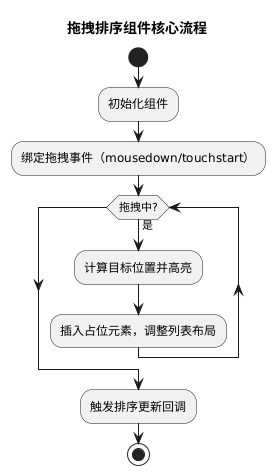
当时在代码里,我先构建了一个 SortableList 类,负责把目标容器(ul、div 都可)变成“可拖拽的”。构造函数里,我接收了四个参数:容器元素、项选择器、排序完成回调和可选动画时长。为了未来还能扩展排序动画或同列表间拖拽,我把一些核心方法都挂在原型上,而非闭包里,这样便于继承与二次封装。
class SortableList {
  constructor(container, itemSelector, onSortEnd, options = {}) {
    this.container = typeof container === 'string' ? document.querySelector(container) : container;
    this.itemSelector = itemSelector;
    this.onSortEnd = onSortEnd;
    this.options = Object.assign({ animationDuration: 200 }, options);
    this.draggingItem = null;
    this.placeholder = null;
    this._bindEvents();
  }
  _bindEvents() {
    this.container.addEventListener('mousedown', this._handleDragStart.bind(this));
    this.container.addEventListener('touchstart', this._handleDragStart.bind(this), { passive: false });
  }
  // … 省略后续方法
}
最开始写 _handleDragStart 的时候,我以为只要 clone 出一个拖拽元素,然后在 mousemove 时不断设置它的 top/left 就行,可是现实是,鼠标快移时总会卡顿,而且 DOM 重绘过于频繁。调试一整天后,我才意识到:最好把拖拽元素直接设置为 position: fixed; pointer-events: none; transform: translate3d(...),这样浏览器能走 GPU 加速,流畅度直接提高一个档次。
.dragging {
  position: fixed;
  z-index: 1000;
  pointer-events: none;
  will-change: transform;
}
在 JS 里对应地,我改用 element.style.transform = 'translate3d(' + x + 'px,' + y + 'px,0)' 来位移。配合 requestAnimationFrame 调度,每一帧只执行一次,避免了高频率的布局计算。
真正的难点出现在“实时插槽占位”上。简单的思路是:每次鼠标移动时遍历所有列表项,找出鼠标移入的那个元素,就在它前面或后面插入一个同等高度的占位节点。但这样虽然可行,却容易出现闪烁、占位节点跳动的问题。我回过头,翻查了很多开源实现,最终采用了以下逻辑优化:
- 在拖拽开始时,预先为所有列表项计算好它们的中点坐标,存入一个数组,减少每帧重新取 DOM 坐标的开销;
- 鼠标移动时,仅仅比较当前指针位置与这组中点数组,找到应插入位置的索引;
- 占位节点只需在索引变更时再插入或移动,避免重复操作;
- 为列表容器添加
transition: height Xms ease,平滑过渡占位带来的整体高度变化,让视觉更友好。
下面是计算中点并生成占位的核心片段:
_handleDragMove(evt) {
  evt.preventDefault();
  const clientY = evt.touches ? evt.touches[0].clientY : evt.clientY;
  if (!this.midPoints) this._calculateMidPoints();
  let insertIndex = this.midPoints.findIndex(point => clientY < point);
  if (insertIndex === -1) insertIndex = this.items.length;
  if (insertIndex !== this.currentIndex) {
    this.currentIndex = insertIndex;
    this._movePlaceholder(insertIndex);
  }
  this._moveDragging(evt);
}
_calculateMidPoints() {
  this.items = Array.from(this.container.querySelectorAll(this.itemSelector))
    .filter(item => item !== this.draggingItem);
  this.midPoints = this.items.map(item => {
    const rect = item.getBoundingClientRect();
    return rect.top + rect.height / 2;
  });
}
在 _movePlaceholder 方法里,我先判断占位节点是否已在文档中:如果没有,就创建一个高度和拖拽项一致的空 div;如果已存在,就直接 insertBefore 到目标索引前。最后别忘了更新 this.items,以便下一次计算正确。
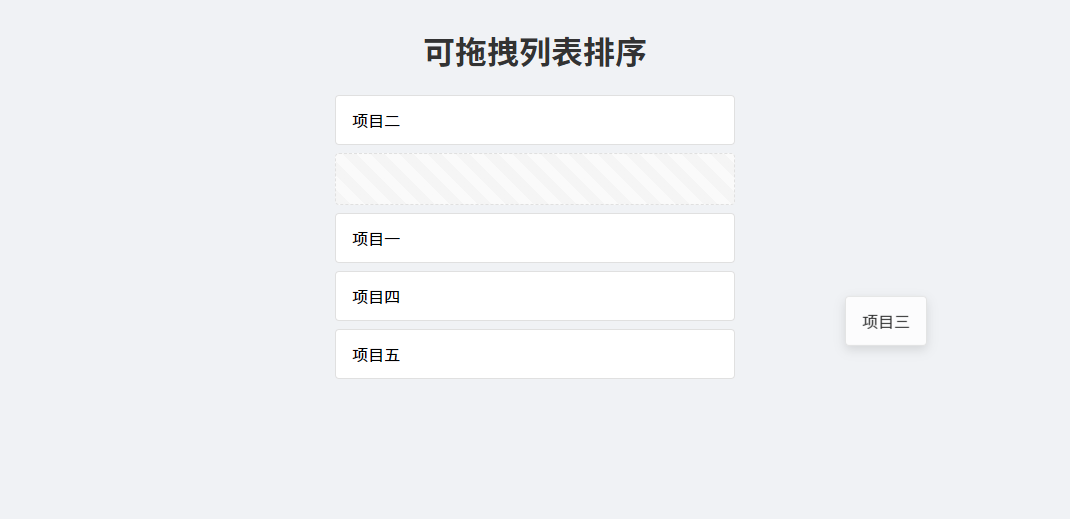
说到 UI,我特意花了几天时间打磨色彩和阴影。在交互层面,拖拽项半透明并带有轻微的阴影,以示“正在被抓取”;占位节点则用淡灰色边框和虚线背景,视觉上既不显眼,又能给用户清晰提示。整套样式我都通过 CSS Variables 管理,方便项目主题化:
:root {
  --item-bg: #ffffff;
  --item-border: #e0e0e0;
  --dragging-opacity: 0.8;
  --dragging-shadow: 0 4px 12px rgba(0,0,0,0.15);
  --placeholder-bg: repeating-linear-gradient(45deg, #f5f5f5, #f5f5f5 10px, #fafafa 10px, #fafafa 20px);
}
.sortable-item {
  background: var(--item-bg);
  border: 1px solid var(--item-border);
  padding: 12px 16px;
  border-radius: 4px;
  margin-bottom: 8px;
  transition: box-shadow 0.2s;
}
.dragging {
  opacity: var(--dragging-opacity);
  box-shadow: var(--dragging-shadow);
}
.placeholder {
  background: var(--placeholder-bg);
  border: 1px dashed var(--item-border);
  border-radius: 4px;
}
接下来,我还给组件加了一个小优化:当拖拽到容器边缘时,自动滚动容器视图。通过监听 dragMove 里指针和容器 getBoundingClientRect() 的距离,调用 container.scrollBy,平滑地把尚未可见的部分挤进视野,大大提升了长列表场景下的体验。
_handleAutoScroll(clientY) {
  const { top, bottom } = this.container.getBoundingClientRect();
  const threshold = 40;
  if (clientY - top < threshold) {
    this.container.scrollBy({ top: -10, behavior: 'smooth' });
  } else if (bottom - clientY < threshold) {
    this.container.scrollBy({ top: 10, behavior: 'smooth' });
  }
}最终,当用户松开鼠标或手指时,mouseup/touchend 触发 _handleDragEnd。我先把拖拽元素插回正常流并移除内联样式,然后移除占位,最后调用用户传入的 onSortEnd 回调,把新的索引顺序作为参数。这样,业务方拿到新的排序后,就能立刻发 API 或本地更新视图了。
原创声明:本文系作者授权腾讯云开发者社区发表,未经许可,不得转载。
如有侵权,请联系 cloudcommunity@tencent.com 删除。
腾讯云开发者

Copyright © 2013 - 2026 Tencent Cloud. All Rights Reserved. 腾讯云 版权所有
深圳市腾讯计算机系统有限公司 ICP备案/许可证号:粤B2-20090059  粤公网安备44030502008569号
腾讯云计算(北京)有限责任公司 京ICP证150476号 | 京ICP备11018762号