用CodeBuddy打造儿童拼图游戏:AI如何让创意编程更简单
原创
用CodeBuddy打造儿童拼图游戏:AI如何让创意编程更简单
原创
小Q圈圈
修改于 2025-05-28 22:47:31
修改于 2025-05-28 22:47:31
我正在参加CodeBuddy「首席试玩官」内容创作大赛,本文所使用的 CodeBuddy 免费下载链接:腾讯云代码助手 CodeBuddy - AI 时代的智能编程伙伴
前言
六一儿童节快到啦!
是不是还在为送孩子什么礼物发愁?与其买一堆玩具,不如陪TA一起动手做个“会动的小游戏”吧!
不过,如果你和我一样不是程序员,可能会想:“编程听起来好复杂,我能行吗?”
别担心!今年有个新工具——腾讯云CodeBuddy,它就像个超级聪明的“AI小助手”,能帮你把奇思妙想变成现实。
比如,输入一句“我想做个拼图游戏,让小朋友拖动小动物拼图”,CodeBuddy就能自动生成代码,几分钟就能做出一个完整的小游戏!
这篇文章就来教你怎么用CodeBuddy,零基础也能为孩子打造一个专属的Web拼图游戏。
六一节那天,孩子一定会惊喜地喊:“爸爸/妈妈,这是我一起做的游戏!” 😄
项目目标:为1-3岁儿童设计的Web拼图游戏
核心需求:
- 交互性:拖拽拼图块完成图案(如动物、卡通人物)。
- 适配性:支持手机和电脑端操作。
- 趣味性:添加音效、动画和积分反馈。
- 安全性:避免广告、弹窗等干扰。
开发工具:CodeBuddy
开始提问:
帮我创建一个新文件夹,我想创建一个新功能,我当前的需求是,我会在一个文件夹里面放入很多图片(例如动物),然后呢,我希望实现的效果是,在线拼图,将动物拆成2块到5块的程度,带底,我的目标用户是3岁内小孩子,请考虑页面的整体设计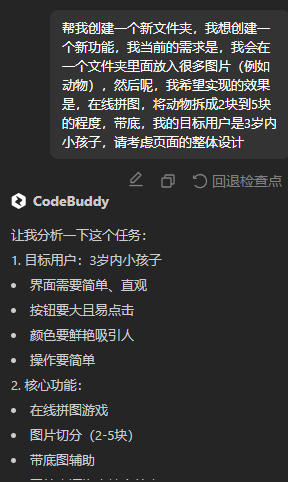
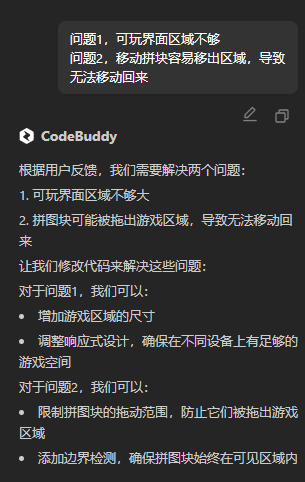
优化调整
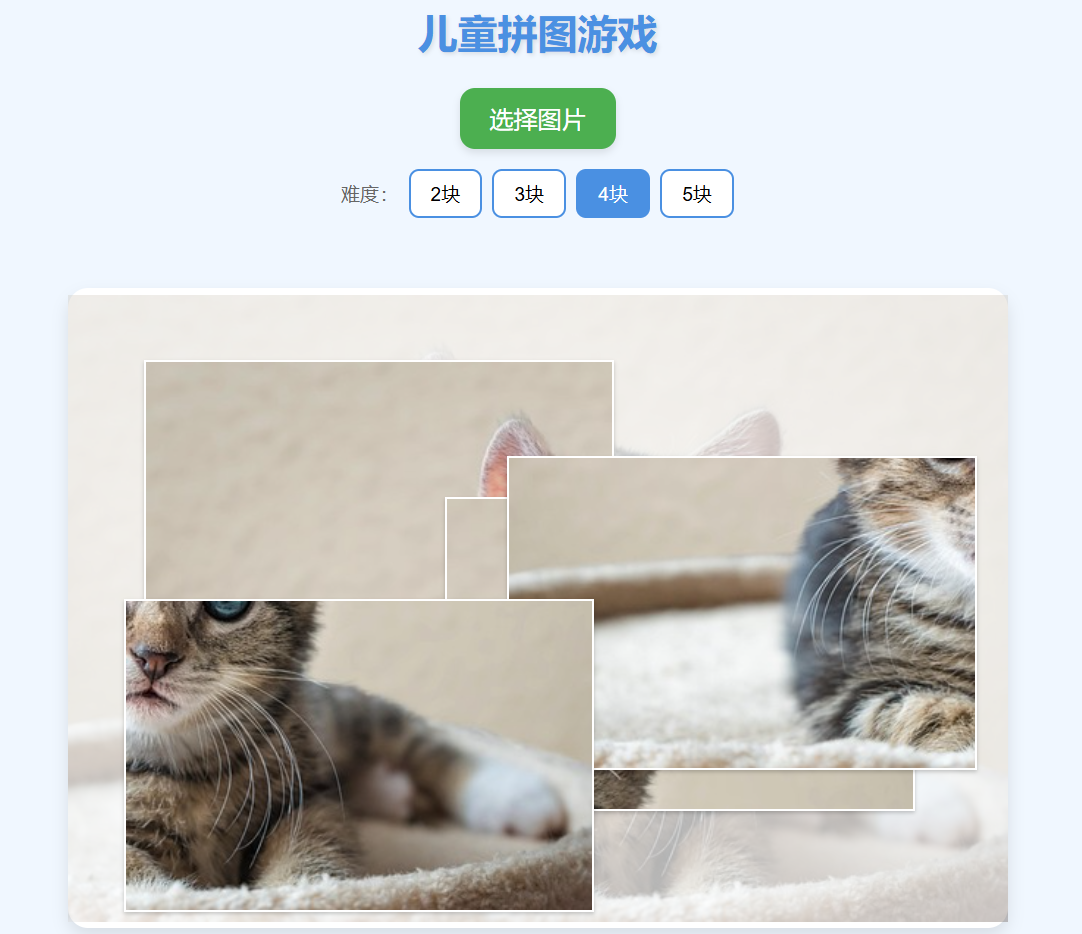
效果展示
完整代码
index.html
<!DOCTYPE html>
<html lang="zh-CN">
<head>
    <meta charset="UTF-8">
    <meta name="viewport" content="width=device-width, initial-scale=1.0">
    <title>儿童拼图游戏</title>
    <link rel="stylesheet" href="css/style.css">
</head>
<body>
    <div class="container">
        <header>
            <h1>儿童拼图游戏</h1>
        </header>

        <div class="game-controls">
            <button id="select-image" class="big-button">选择图片</button>
            <div class="difficulty">
                <span>难度:</span>
                <button class="level-button active" data-pieces="2">2块</button>
                <button class="level-button" data-pieces="3">3块</button>
                <button class="level-button" data-pieces="4">4块</button>
                <button class="level-button" data-pieces="5">5块</button>
            </div>
        </div>

        <div class="game-area">
            <div class="puzzle-container">
                <div class="puzzle-background"></div>
                <div id="puzzle-pieces"></div>
            </div>
        </div>

        <div class="message-box">
            <p id="message">选择一张图片开始游戏!</p>
        </div>

        <input type="file" id="image-input" accept="image/*" style="display: none;">
    </div>

    <script src="js/puzzle.js"></script>
</body>
</html>
style.css
/* 基础样式 */
* {
    margin: 0;
    padding: 0;
    box-sizing: border-box;
}

body {
    font-family: 'Arial Rounded MT Bold', 'Arial', sans-serif;
    background-color: #f0f7ff;
    min-height: 100vh;
    display: flex;
    justify-content: center;
}

.container {
    width: 100%;
    max-width: 1600px;
    padding: 10px;
    display: flex;
    flex-direction: column;
    min-height: 100vh;
}

/* 标题样式 */
header {
    text-align: center;
    margin-bottom: 30px;
}

h1 {
    color: #4a90e2;
    font-size: 2.5em;
    text-shadow: 2px 2px 4px rgba(0, 0, 0, 0.1);
}

/* 游戏控制区域 */
.game-controls {
    display: flex;
    flex-direction: column;
    align-items: center;
    gap: 20px;
    margin-bottom: 30px;
}

.big-button {
    background-color: #4CAF50;
    color: white;
    border: none;
    border-radius: 15px;
    padding: 15px 30px;
    font-size: 1.5em;
    cursor: pointer;
    transition: transform 0.2s, background-color 0.2s;
    box-shadow: 0 4px 8px rgba(0, 0, 0, 0.1);
}

.big-button:hover {
    background-color: #45a049;
    transform: scale(1.05);
}

.big-button:active {
    transform: scale(0.95);
}

/* 难度选择按钮 */
.difficulty {
    display: flex;
    gap: 10px;
    align-items: center;
}

.difficulty span {
    font-size: 1.2em;
    color: #666;
}

.level-button {
    background-color: #fff;
    border: 2px solid #4a90e2;
    border-radius: 10px;
    padding: 10px 20px;
    font-size: 1.2em;
    cursor: pointer;
    transition: all 0.2s;
}

.level-button:hover {
    background-color: #e3f2fd;
}

.level-button.active {
    background-color: #4a90e2;
    color: white;
}

/* 游戏区域 */
.game-area {
    display: flex;
    justify-content: center;
    margin: 20px 0;
    flex-grow: 1;
}

.puzzle-container {
    position: relative;
    width: 900px;
    height: 600px;
    background-color: #fff;
    border-radius: 20px;
    box-shadow: 0 8px 16px rgba(0, 0, 0, 0.1);
    overflow: visible;
    margin: 20px auto;
    padding: 20px;
    box-sizing: content-box; /* 确保padding不会影响整体尺寸 */
}

/* 添加媒体查询以确保在较小屏幕上也能正常显示 */
@media (max-width: 1000px) {
    .puzzle-container {
        width: 80vw;
        height: 60vw;
        padding: 10px;
    }
}

.puzzle-background {
    position: absolute;
    top: 0;
    left: 0;
    width: 100%;
    height: 100%;
    opacity: 0.3;
    background-size: contain;
    background-position: center;
    background-repeat: no-repeat;
}

#puzzle-pieces {
    position: absolute;
    top: 0;
    left: 0;
    width: 100%;
    height: 100%;
}

.puzzle-piece {
    position: absolute;
    cursor: move;
    transition: transform 0.2s, box-shadow 0.2s;
    border: 2px solid white;
    box-shadow: 0 2px 4px rgba(0, 0, 0, 0.2);
    touch-action: none;
    user-select: none;
    -webkit-user-select: none;
    -webkit-touch-callout: none;
    z-index: 1;
}

.puzzle-piece:hover {
    transform: scale(1.02);
    box-shadow: 0 4px 8px rgba(0, 0, 0, 0.3);
    z-index: 2;
}

.puzzle-piece:active {
    transform: scale(1.05);
    box-shadow: 0 6px 12px rgba(0, 0, 0, 0.4);
    z-index: 3;
}

@media (hover: none) {
    .puzzle-piece:hover {
        transform: none;
        box-shadow: 0 2px 4px rgba(0, 0, 0, 0.2);
    }
}

.puzzle-piece.correct {
    border-color: #4CAF50;
    animation: correct-piece 0.5s ease-out;
}

@keyframes correct-piece {
    0% { transform: scale(1); }
    50% { transform: scale(1.1); }
    100% { transform: scale(1); }
}

/* 消息框 */
.message-box {
    text-align: center;
    margin-top: 20px;
}

#message {
    font-size: 1.2em;
    color: #666;
    padding: 10px;
    border-radius: 10px;
    background-color: #fff;
    display: inline-block;
}

/* 响应式设计 */
@media (max-width: 768px) {
    .puzzle-container {
        width: 100%;
        height: 300px;
    }

    .difficulty {
        flex-wrap: wrap;
        justify-content: center;
    }

    h1 {
        font-size: 2em;
    }

    .big-button {
        font-size: 1.2em;
        padding: 12px 24px;
    }

    .level-button {
        font-size: 1em;
        padding: 8px 16px;
    }
}
puzzle.js
document.addEventListener('DOMContentLoaded', function() {
    // 游戏变量
    let selectedImage = null;
    let pieces = [];
    let numPieces = 2; // 默认拼图块数
    let isGameActive = false;
    let correctPieces = 0;

    // DOM元素
    const selectImageBtn = document.getElementById('select-image');
    const imageInput = document.getElementById('image-input');
    const puzzlePiecesContainer = document.getElementById('puzzle-pieces');
    const puzzleBackground = document.querySelector('.puzzle-background');
    const messageElement = document.getElementById('message');
    const levelButtons = document.querySelectorAll('.level-button');

    // 事件监听器
    selectImageBtn.addEventListener('click', () => {
        imageInput.click();
    });

    imageInput.addEventListener('change', handleImageSelect);

    levelButtons.forEach(button => {
        button.addEventListener('click', () => {
            // 更新活动按钮样式
            levelButtons.forEach(btn => btn.classList.remove('active'));
            button.classList.add('active');

            // 更新拼图块数
            numPieces = parseInt(button.getAttribute('data-pieces'));

            // 如果已经选择了图片,重新开始游戏
            if (selectedImage) {
                startGame();
            }
        });
    });

    // 处理图片选择
    function handleImageSelect(e) {
        const file = e.target.files[0];
        if (!file) return;

        // 检查是否为图片文件
        if (!file.type.match('image.*')) {
            showMessage('请选择图片文件!');
            return;
        }

        const reader = new FileReader();
        reader.onload = function(event) {
            selectedImage = event.target.result;
            startGame();
        };
        reader.readAsDataURL(file);
    }

    // 开始游戏
    function startGame() {
        // 清空之前的拼图
        puzzlePiecesContainer.innerHTML = '';
        pieces = [];
        correctPieces = 0;
        isGameActive = true;

        // 设置背景图(底图)
        puzzleBackground.style.backgroundImage = `url(${selectedImage})`;

        // 创建图片元素以获取尺寸
        const img = new Image();
        img.onload = function() {
            createPuzzlePieces(this.width, this.height);
        };
        img.src = selectedImage;

        showMessage('开始拼图!将拼图块拖到正确的位置');
    }

    // 创建拼图块
    function createPuzzlePieces(imgWidth, imgHeight) {
        const containerWidth = puzzlePiecesContainer.offsetWidth;
        const containerHeight = puzzlePiecesContainer.offsetHeight;

        // 计算图片缩放比例以适应容器
        const scale = Math.min(
            containerWidth / imgWidth,
            containerHeight / imgHeight
        );

        const scaledWidth = imgWidth * scale;
        const scaledHeight = imgHeight * scale;

        // 计算拼图块的行列数
        let rows, cols;
        if (numPieces <= 2) {
            rows = 1;
            cols = 2;
        } else if (numPieces <= 4) {
            rows = 2;
            cols = 2;
        } else {
            rows = 2;
            cols = 3;
            // 如果是5块,我们只创建5块而不是6块
        }

        // 计算每个拼图块的尺寸
        const pieceWidth = scaledWidth / cols;
        const pieceHeight = scaledHeight / rows;

        // 计算拼图在容器中的居中位置
        const offsetX = (containerWidth - scaledWidth) / 2;
        const offsetY = (containerHeight - scaledHeight) / 2;

        // 创建拼图块
        let pieceCount = 0;
        for (let row = 0; row < rows; row++) {
            for (let col = 0; col < cols; col++) {
                // 如果是5块拼图,跳过最后一块
                if (numPieces === 5 && row === 1 && col === 2) continue;

                // 创建拼图块
                const piece = document.createElement('div');
                piece.className = 'puzzle-piece';
                piece.style.width = `${pieceWidth}px`;
                piece.style.height = `${pieceHeight}px`;

                // 设置拼图块的背景图片
                piece.style.backgroundImage = `url(${selectedImage})`;
                piece.style.backgroundSize = `${scaledWidth}px ${scaledHeight}px`;
                piece.style.backgroundPosition = `-${col * pieceWidth}px -${row * pieceHeight}px`;

                // 存储拼图块的正确位置
                const correctX = offsetX + col * pieceWidth;
                const correctY = offsetY + row * pieceHeight;

                piece.dataset.correctX = correctX;
                piece.dataset.correctY = correctY;

                // 随机放置拼图块,但确保不会太靠近边缘
                const margin = 50; // 边缘安全距离
                const randomX = margin + Math.random() * (containerWidth - pieceWidth - margin * 2);
                const randomY = margin + Math.random() * (containerHeight - pieceHeight - margin * 2);

                piece.style.left = `${randomX}px`;
                piece.style.top = `${randomY}px`;

                // 添加拖拽功能
                makeDraggable(piece);

                // 添加到容器
                puzzlePiecesContainer.appendChild(piece);
                pieces.push(piece);
                pieceCount++;
            }
        }
    }

    // 使元素可拖拽
    function makeDraggable(element) {
        let pos1 = 0, pos2 = 0, pos3 = 0, pos4 = 0;

        element.onmousedown = dragMouseDown;
        element.ontouchstart = dragTouchStart;

        function dragMouseDown(e) {
            e.preventDefault();
            // 获取鼠标位置
            pos3 = e.clientX;
            pos4 = e.clientY;

            // 将拼图块移到最上层并添加拖动效果
            element.style.zIndex = '100';
            element.style.transform = 'scale(1.05)';
            element.style.opacity = '0.9';

            // 添加移动和释放事件监听器
            document.onmousemove = elementDrag;
            document.onmouseup = closeDragElement;
        }

        function dragTouchStart(e) {
            e.preventDefault();
            // 获取触摸位置
            pos3 = e.touches[0].clientX;
            pos4 = e.touches[0].clientY;

            // 将拼图块移到最上层
            element.style.zIndex = '10';

            // 添加移动和释放事件监听器
            document.ontouchmove = elementTouchDrag;
            document.ontouchend = closeTouchDragElement;
        }

        function elementDrag(e) {
            e.preventDefault();
            // 计算新位置
            pos1 = pos3 - e.clientX;
            pos2 = pos4 - e.clientY;
            pos3 = e.clientX;
            pos4 = e.clientY;

            // 计算新位置
            let newTop = element.offsetTop - pos2;
            let newLeft = element.offsetLeft - pos1;

            // 获取容器边界
            const container = puzzlePiecesContainer;
            const containerRect = container.getBoundingClientRect();
            const pieceRect = element.getBoundingClientRect();

            // 计算边界限制
            const minX = 0;
            const maxX = containerRect.width - pieceRect.width;
            const minY = 0;
            const maxY = containerRect.height - pieceRect.height;

            // 应用边界限制
            newLeft = Math.max(minX, Math.min(maxX, newLeft));
            newTop = Math.max(minY, Math.min(maxY, newTop));

            // 设置元素的新位置
            element.style.top = newTop + "px";
            element.style.left = newLeft + "px";
        }

        function elementTouchDrag(e) {
            e.preventDefault();
            // 计算新位置
            pos1 = pos3 - e.touches[0].clientX;
            pos2 = pos4 - e.touches[0].clientY;
            pos3 = e.touches[0].clientX;
            pos4 = e.touches[0].clientY;

            // 计算新位置
            let newTop = element.offsetTop - pos2;
            let newLeft = element.offsetLeft - pos1;

            // 获取容器边界
            const container = puzzlePiecesContainer;
            const containerRect = container.getBoundingClientRect();
            const pieceRect = element.getBoundingClientRect();

            // 计算边界限制
            const minX = 0;
            const maxX = containerRect.width - pieceRect.width;
            const minY = 0;
            const maxY = containerRect.height - pieceRect.height;

            // 应用边界限制
            newLeft = Math.max(minX, Math.min(maxX, newLeft));
            newTop = Math.max(minY, Math.min(maxY, newTop));

            // 设置元素的新位置
            element.style.top = newTop + "px";
            element.style.left = newLeft + "px";
        }

        function closeDragElement() {
            // 停止移动
            document.onmouseup = null;
            document.onmousemove = null;

            // 检查是否放置在正确位置
            checkPosition(element);

            // 恢复正常状态并添加过渡效果
            element.style.transform = 'scale(1)';
            element.style.opacity = '1';
            setTimeout(() => {
                element.style.zIndex = '1';
            }, 300);
        }

        function closeTouchDragElement() {
            // 停止移动
            document.ontouchend = null;
            document.ontouchmove = null;

            // 检查是否放置在正确位置
            checkPosition(element);

            // 恢复z-index
            setTimeout(() => {
                element.style.zIndex = '1';
            }, 200);
        }
    }

    // 检查拼图块是否放置在正确位置
    function checkPosition(piece) {
        const correctX = parseFloat(piece.dataset.correctX);
        const correctY = parseFloat(piece.dataset.correctY);

        const currentX = piece.offsetLeft;
        const currentY = piece.offsetTop;

        // 允许一定的误差范围
        const tolerance = 20;

        if (
            Math.abs(currentX - correctX) < tolerance &&
            Math.abs(currentY - correctY) < tolerance
        ) {
            // 放置在正确位置
            piece.style.left = `${correctX}px`;
            piece.style.top = `${correctY}px`;
            piece.classList.add('correct');

            // 禁用拖拽
            piece.onmousedown = null;
            piece.ontouchstart = null;

            // 更新正确的拼图块计数
            correctPieces++;

            // 检查是否完成拼图
            if (correctPieces === pieces.length) {
                setTimeout(puzzleCompleted, 500);
            }
        }
    }

    // 拼图完成
    function puzzleCompleted() {
        isGameActive = false;
        showMessage('太棒了!你完成了拼图!👏');

        // 添加庆祝动画
        const container = document.querySelector('.puzzle-container');
        container.classList.add('completed');

        // 添加简单的庆祝效果
        setTimeout(() => {
            // 可以在这里添加更多庆祝效果,如播放声音等
            showMessage('点击"选择图片"开始新的拼图!');
        }, 2000);
    }

    // 显示消息
    function showMessage(text) {
        messageElement.textContent = text;

        // 添加简单的动画效果
        messageElement.style.animation = 'none';
        setTimeout(() => {
            messageElement.style.animation = 'pulse 0.5s';
        }, 10);
    }

    // 添加消息动画
    const style = document.createElement('style');
    style.textContent = `
        @keyframes pulse {
            0% { transform: scale(1); }
            50% { transform: scale(1.1); }
            100% { transform: scale(1); }
        }

        @keyframes celebrate {
            0% { box-shadow: 0 0 0 0 rgba(76, 175, 80, 0.5); }
            70% { box-shadow: 0 0 0 20px rgba(76, 175, 80, 0); }
            100% { box-shadow: 0 0 0 0 rgba(76, 175, 80, 0); }
        }

        .puzzle-container.completed {
            animation: celebrate 1s ease-out;
        }
    `;
    document.head.appendChild(style);

    // 初始消息
    showMessage('选择一张图片开始游戏!');
});
结尾
其实啊,编程并不是什么高深的“黑科技”,它也可以很有趣、很温暖。其实还可以存在很多优化的空间,比如现在的方块都是方块,可以调整成方块,增加闯关模式等提升整个游戏的趣味性!
就像这个拼图小游戏,不只是写代码那么简单,更是你和孩子一起完成的一次小冒险。
有了 CodeBuddy 这样的 AI 编程助手,哪怕你是“编程小白”,也能轻松做出属于你们的小游戏。
今年六一节,不妨试试看:不是给孩子买一个礼物,而是陪他一起“造”一个。
等游戏跑起来的那一刻,你会发现——
孩子眼里的光,才是最好的节日礼物。🎁✨
原创声明:本文系作者授权腾讯云开发者社区发表,未经许可,不得转载。
如有侵权,请联系 cloudcommunity@tencent.com 删除。
原创声明:本文系作者授权腾讯云开发者社区发表,未经许可,不得转载。
如有侵权,请联系 cloudcommunity@tencent.com 删除。
评论
登录后参与评论
推荐阅读
目录
腾讯云开发者

Copyright © 2013 - 2026 Tencent Cloud. All Rights Reserved. 腾讯云 版权所有
深圳市腾讯计算机系统有限公司 ICP备案/许可证号:粤B2-20090059  粤公网安备44030502008569号
腾讯云计算(北京)有限责任公司 京ICP证150476号 | 京ICP备11018762号